
Manual / Environment and Units
Environment and Units
Air is half the trajectory. Wrist Dope reads it for you (pressure, temperature, altitude, humidity), and every one of those four fields can be taken off the sensors and typed in by hand instead. What matters most is the third thing this page does: it tells you, out loud, when a number on screen is not a reading.
AUTO
Sensors and Apple Weather. Part of Wrist Dope Pro.
MANUAL
Type it yourself. Free, on every tier.
The triangle
Nothing measured this field. Tap it to find out why.
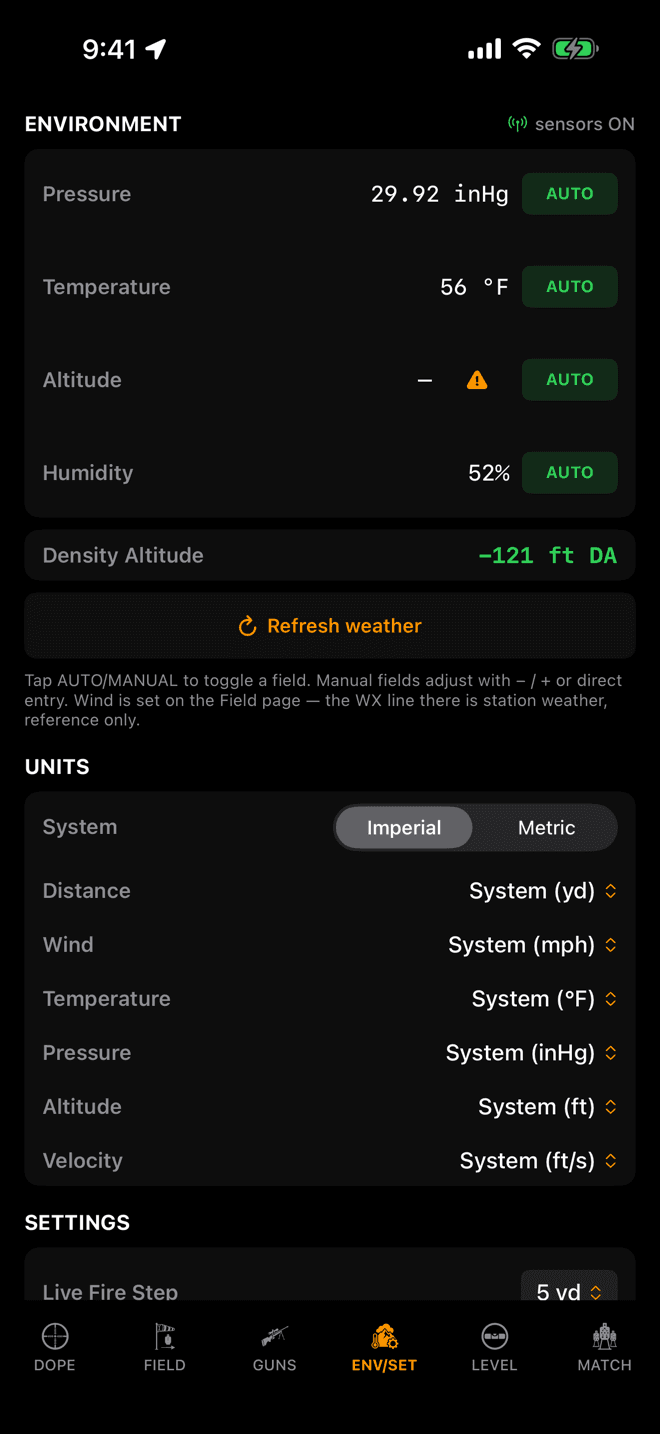
Every row states its value and its mode. Altitude here has an orange triangle and a dash. Nothing has measured it yet.
Step 1
Four fields, four sources
On iPhone this is the ENV/SET page. On Apple Watch it is the Environment page, two swipes right of Live Fire. Four fields drive the air your bullet flies through:
- Pressure: the barometer, as station pressure. Not the sea-level number an aviation report gives you.
- Temperature: Apple Weather. No wrist-worn device measures air temperature honestly; it measures you.
- Altitude: the watch barometer, or GPS on iPhone.
- Humidity: Apple Weather.
The sensors ON chip at the top right says the feed is running. While the page is open the numbers stream live and unsmoothed so you can watch them move and see the data is real.
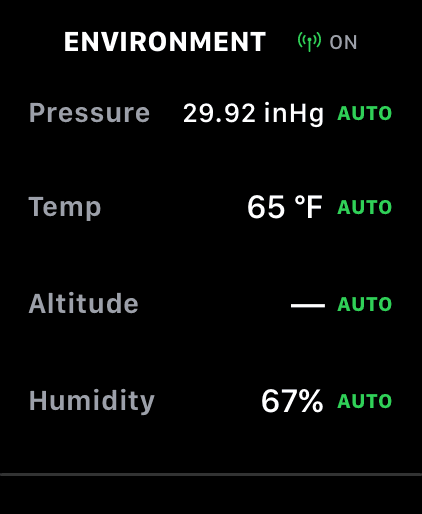
On the watch, tap a field to flip it between AUTO and MAN, then turn the crown to set the value.
Step 2
AUTO reads it, MANUAL is yours
Each field carries its own switch, so you can leave three on the sensors and type the fourth.
- iPhone: tap the
AUTOchip to make the rowMANUAL. A−/+pair and a number field appear under it; type straight into the field if you have a Kestrel reading to copy. - Apple Watch: tap the field to flip it, then turn the Digital Crown to set the value. No keyboard, by design.
Refresh weather forces an immediate pull rather than waiting for the next poll. Use it when you have walked out of the trees and back into signal.
Typing conditions in by hand is free for everyone. Letting the app read them for you (the sensors, Apple Weather and the refresh button) is part of Wrist Dope Pro. Accuracy is never the thing behind the upgrade: the engine is the same engine either way.
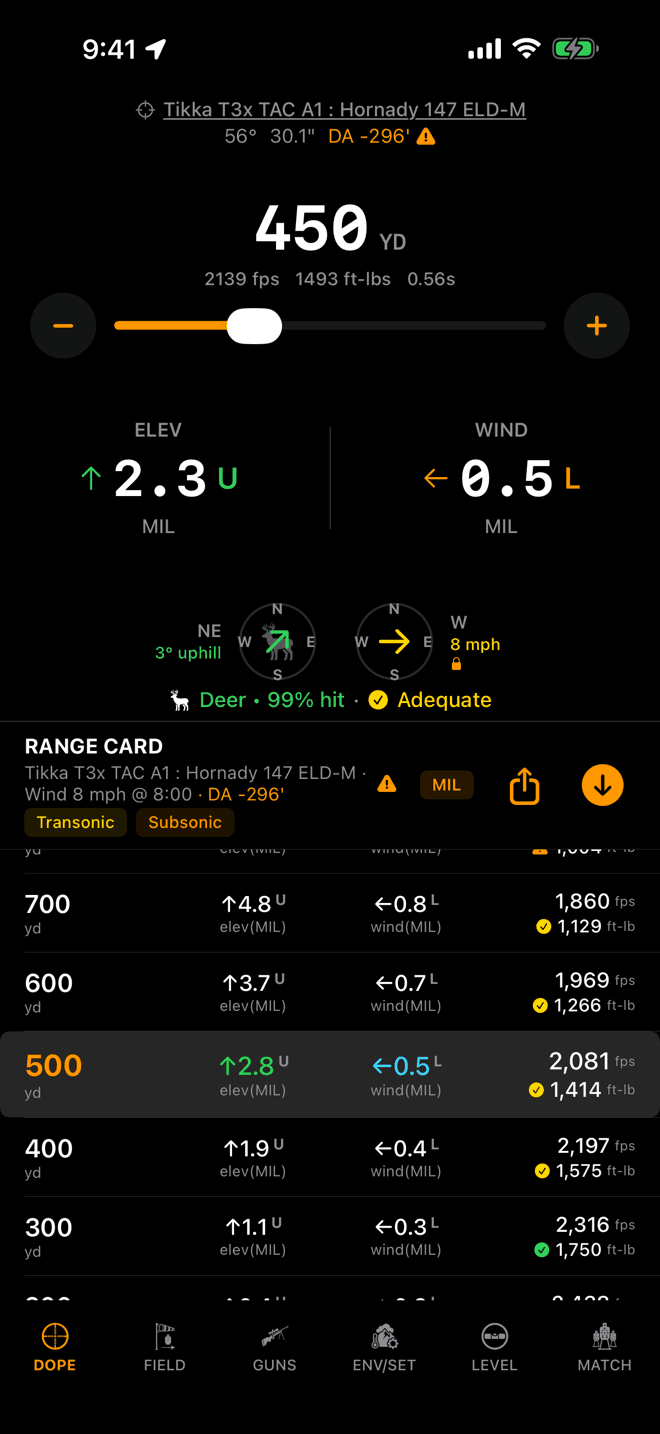
The same triangle rides the Live Fire and range-card headers, beside the density altitude the solution used.
Step 3
The orange triangle means “not a reading”
A field on AUTO that nothing has actually measured does not quietly show you a plausible number. It shows the stand-in and marks it:
- Altitude gets a dash. Zero feet is a claim about where you are standing; a dash is the absence of one.
- Temperature, pressure and humidity fall back to the ICAO standard atmosphere (59 °F, 29.92 inHg, 50%), and your solution is honestly computed against those until the real ones arrive.
Tap the triangle and the sheet tells you which source is missing and why. If Location was never asked for, its button asks for real. If you denied it, the button opens this app's page in Settings, because from there iOS will never show the prompt again. Either sheet also offers to drop that one row into MANUAL with the value already filled in, ready for you to correct.
Leave the row on AUTO while you wait. The real conditions take over on their own the moment there is a fix and a signal.
Density altitude sits under the four fields. The UNITS block is directly below it.
Step 4
Density altitude, and your units
Density altitude is the one number that folds pressure, temperature and humidity into a single reading of how thick the air is. It is derived from true air density, not from your elevation, so it changes on a hot afternoon at a range that has not moved.
The readout here is the live one. The DA printed in the Live Fire and range-card headers is the density altitude your current solution was actually computed with, so the two can differ slightly while the air settles. The header is the one that matches your holds.
Units start with one switch: Imperial or Metric. Everything follows it: yards or metres, mph or m/s, °F or °C, inHg or hPa, feet or metres, ft/s or m/s. Under it, each unit can be overridden on its own, so metres and mph together is a perfectly ordinary setting.
MIL and MOA are not here. Scope units belong to the rifle, not to you, and live on the gun in the Guns tab. Your unit settings sync between iPhone and Apple Watch.
Why wind isn't on this page
Pressure, temperature, altitude and humidity are facts a device can measure. Wind is a judgement you make by looking at grass, mirage and flags between you and the target, and it is different at 400 yards than it is at your feet. So it lives on the Field page, where you commit it deliberately, and never in a list of sensor readings.
The station wind Apple Weather reports does appear beside your wind call, clearly labelled, as a sanity check. It never feeds a solution.
Conditions look wrong?
- Altitude is a dash, or the temperature reads 59 °F. Nothing has measured them. Tap the orange triangle on the row. It names the missing source and offers the fix. Location access being off is the usual answer.
- The pressure disagrees with the airport. Aviation reports quote sea-level-corrected pressure. Wrist Dope wants station pressure, the real weight of air where you are standing. At elevation those two numbers are supposed to differ, by a lot.
- Temperature matches your body, not the range. A wrist device sits in your sleeve. Wrist Dope takes temperature from Apple Weather for exactly this reason, but a station some miles off is still a station some miles off. If you carry a Kestrel, put that row on MANUAL and type its reading.
- A field won't go back to AUTO. Switching a row into AUTO turns the sensor feed on, and that is the Pro side of the line. Manual entry stays available on every tier.
- Nothing updates. Pressure and altitude move almost continuously; temperature and humidity arrive on the weather poll, roughly every few minutes. Tap
Refresh weatherrather than waiting.
Going deeper: How Wrist Dope reads the air explains what the app does with these four numbers, and Skip the weather log covers how much of it is worth chasing.
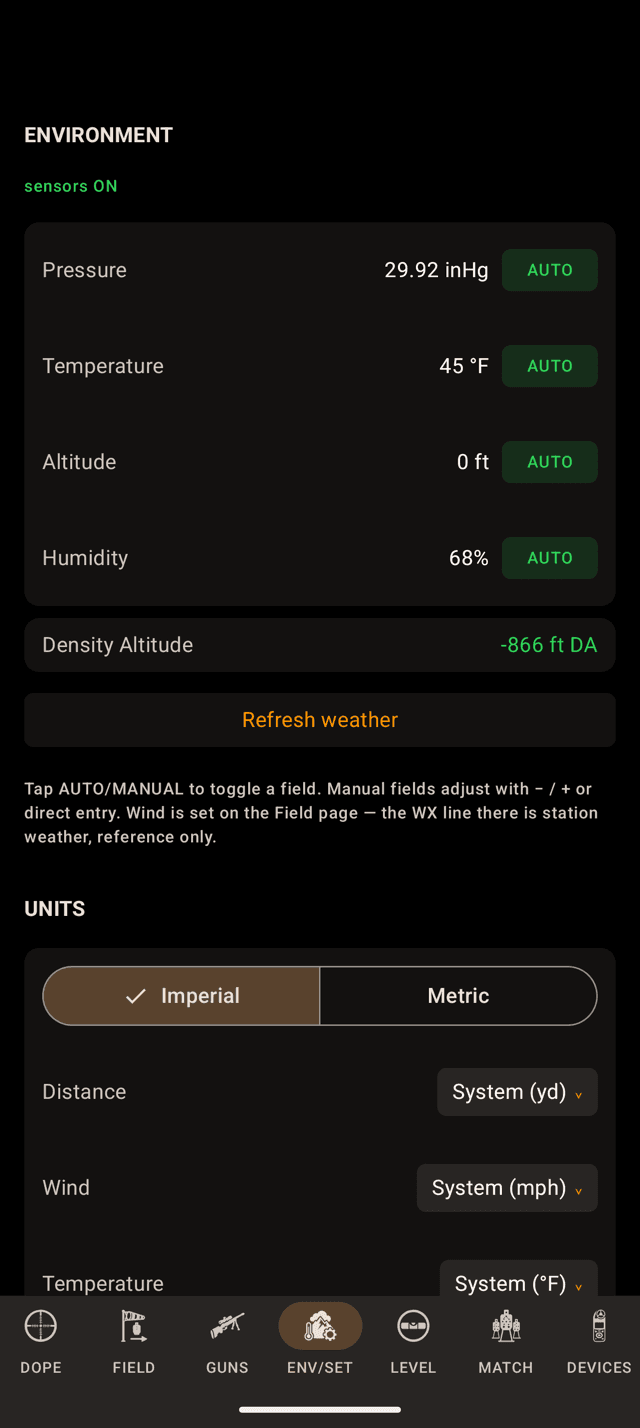
ENV/SET on the phone. Every row states its value and where it came from.
Step 1
Four fields, four sources
On the phone this is the ENVIRONMENT section at the top of ENV/SET. On the watch it is the ENV page in the swipe loop. Four fields drive the air your bullet flies through:
- Pressure comes from the device's barometer, as station pressure, when it has one. Plenty of Android phones do not. Then it comes from the weather, corrected to your altitude.
- Temperature comes from Apple Weather. A device on your wrist or in your pocket measures you, not the air.
- Altitude comes from GPS. Until there is a fix, it is an estimate from the weather grid, marked
EST. - Humidity comes from Apple Weather.
Weather refreshes every three minutes. Your position is rounded to a grid about five kilometres wide before it leaves the device, so a precise location is never sent.
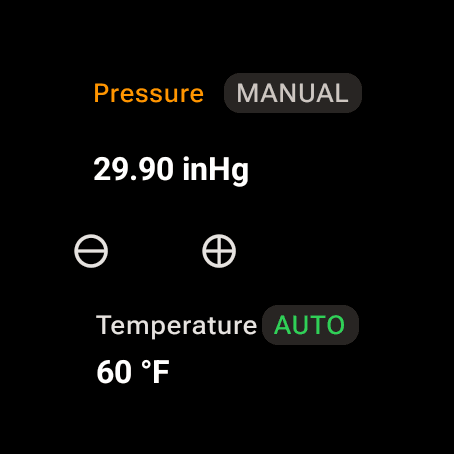
On the watch, tap the row name to flip it. A MANUAL row gets minus and plus.
Step 2
AUTO reads it, MANUAL is yours
Each field has its own switch, so you can leave three on the sensors and type the fourth.
- Phone: tap the
AUTOchip to make the rowMANUAL. A minus and plus pair and a number box appear; type straight into the box if you have a Kestrel reading to copy. - Watch: tap the row's name to flip it. A MANUAL row gets minus and plus, and tapping the number opens a keypad. The bezel or crown scrolls the page; it does not change a value here.
Refresh weather on the phone, or Refresh on the watch, pulls the weather now instead of waiting for the next poll.
Typing conditions in is free for everyone. Letting the app read them (the sensors, Apple Weather and the refresh) is part of the one-time Pro upgrade. The engine is the same engine either way.
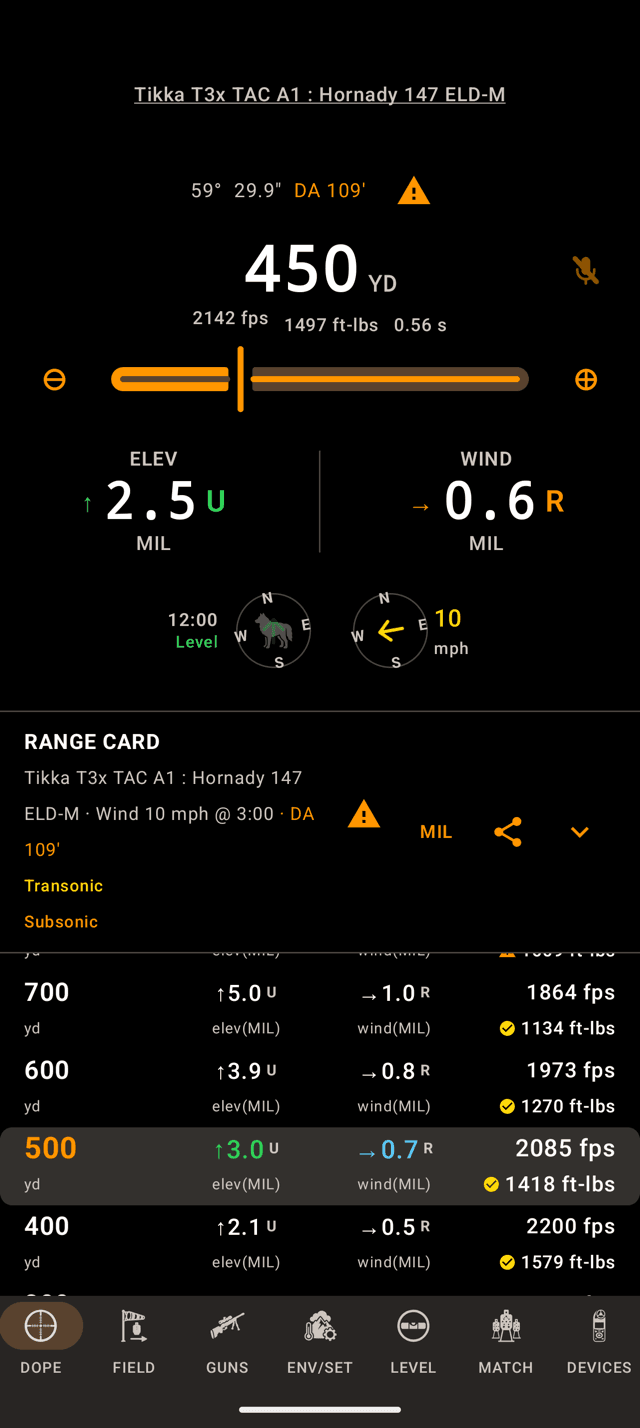
The triangle rides the Live Fire and range card headers, beside the density altitude the solution used.
Step 3
The orange triangle means “not a reading”
When a field on AUTO has nothing behind it, the app does not show you a plausible number and move on. The solution is computed against the ICAO standard (59 °F, 29.92 inHg, 50%) and the headers say so with a triangle.
Tap it and a sheet lists every stand-in in that solution, with Open Env page to go and fix them.
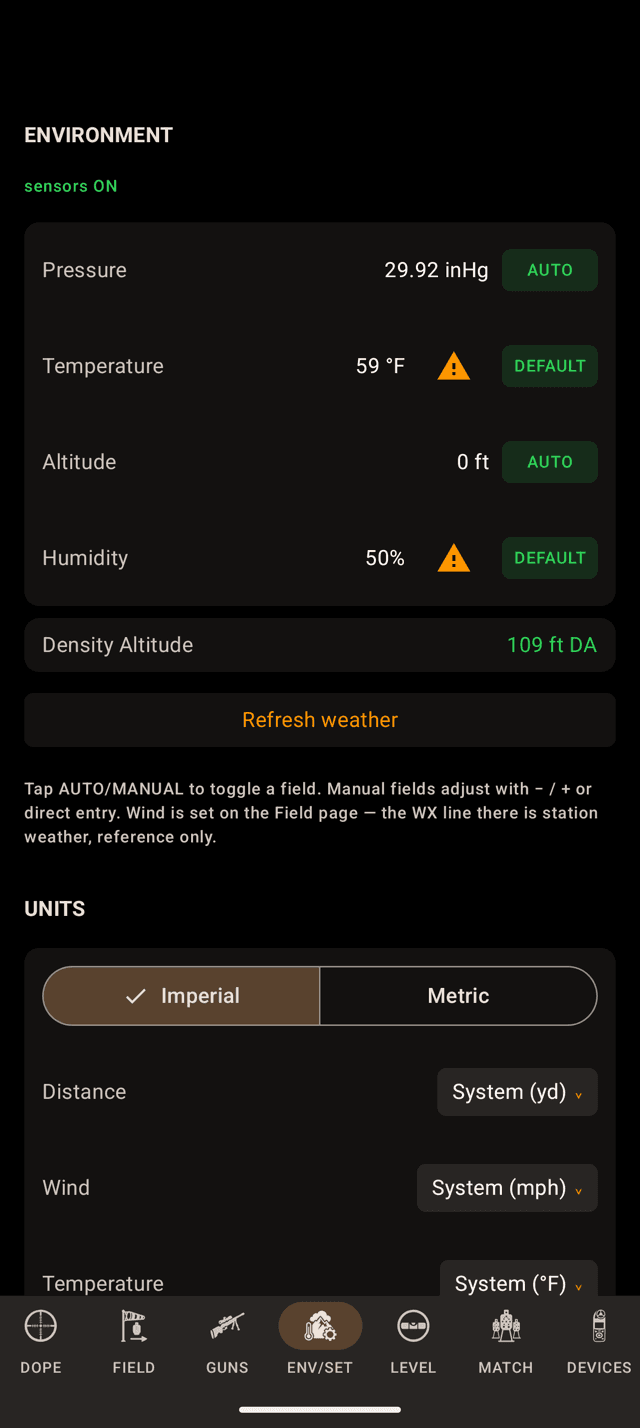
No weather yet: temperature and humidity are the standard, and they say so.
Step 4
DEFAULT and EST, row by row
On the ENV page each row names its own source:
AUTOis a sensor or the weather.MANUALis yours.DEFAULTwith a triangle is the ICAO stand-in. Nothing has measured that field yet.ESTis an altitude estimated from the weather grid until GPS gets a fix. It is about where you are, so it is worth solving with, but nothing measured it.- An altitude nobody has measured or estimated shows a dash.
Tap a row's triangle and the sheet says what is missing and why. It offers Allow Location if Location was never asked for, or Open App settings if you said no, and a button to enter that one value by hand.
Leave the row on AUTO while you wait. The real conditions take over on their own the moment there is a fix and a signal.
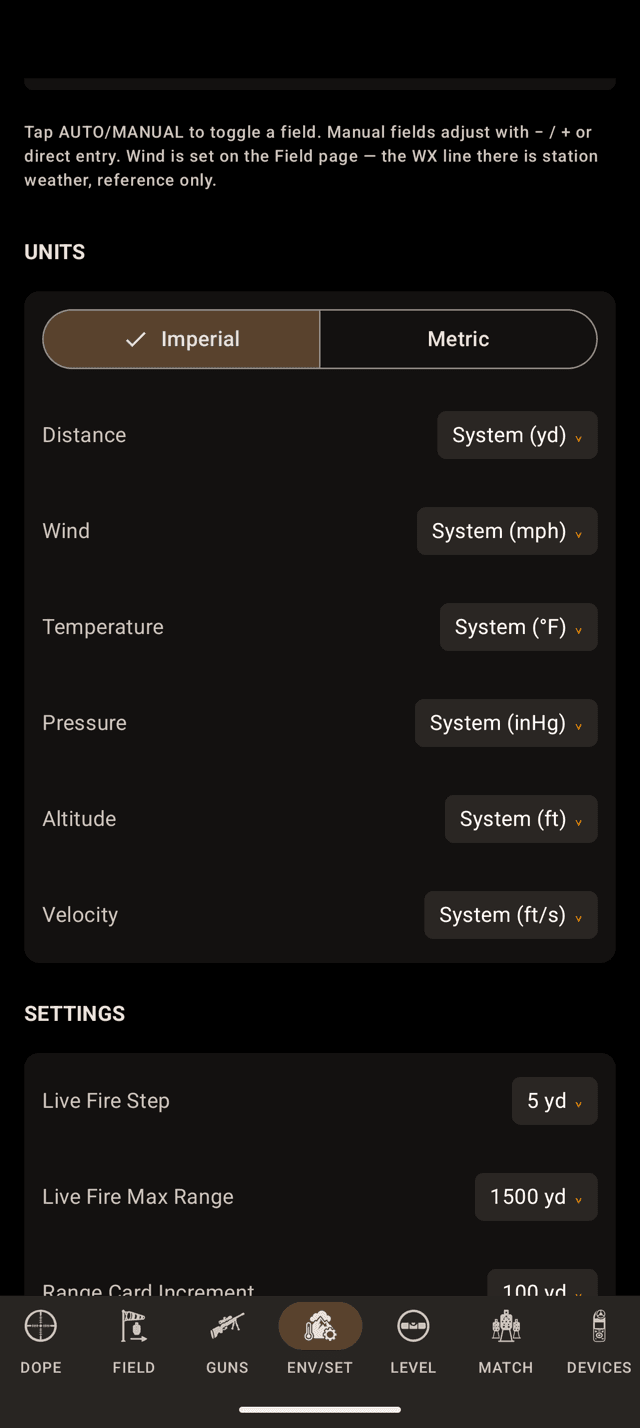
UNITS sits under the environment fields on ENV/SET.
Step 5
Your units
Units start with one switch: Imperial or Metric. Under it, distance, wind, temperature, pressure, altitude and velocity can each be set on their own, so metres and mph together is an ordinary setting. On the watch it is the System row under Units in Settings.
MIL and MOA are not here. Scope units belong to the rifle, and live on the gun in GUNS.
What syncs between phone and watch: the units, the AUTO or MANUAL choice for each field, and the values you type. What does not: the AUTO readings themselves. Each device reads its own sensors and pulls its own weather.
Why wind isn't on this page
Pressure, temperature, altitude and humidity are facts a device can measure. Wind is a judgement you make by looking at grass, mirage and flags between you and the target, and it is different at 400 yards than it is at your feet. So it lives on the Field page, where you commit it deliberately, and never in a list of sensor readings.
The station wind Apple Weather reports does appear beside your wind call, clearly labelled, as a sanity check. It never feeds a solution.
Conditions look wrong?
- Temperature reads 59 °F and humidity 50%, marked DEFAULT. No weather has arrived yet: no signal, or Location is off. Tap the triangle for which one, then
Refresh weatheronce you are back in signal, or put the row on MANUAL. - Altitude reads EST. GPS has no fix yet, so the altitude is the weather grid's estimate. Step outside for a minute, or enter your altitude by hand.
- The pressure disagrees with the airport. Aviation reports quote sea-level pressure. Wrist Dope wants station pressure, the real weight of air where you are standing. At elevation those two numbers are supposed to differ, by a lot.
- Pressure only moves every few minutes. The phone has no barometer, so pressure follows the weather, which refreshes every three minutes. Tap
Refresh weatherto pull it now. - A field won't go back to AUTO. Switching a row into AUTO turns the sensor feed on, and that is part of the one-time Pro upgrade. Manual entry stays free on every tier.
- The watch and the phone show different AUTO numbers. Each device reads its own sensors and pulls its own weather. The AUTO or MANUAL choice and the values you type sync; the AUTO readings do not.
Going deeper: How Wrist Dope reads the air explains what the app does with these four numbers, and Skip the weather log covers how much of it is worth chasing.
Still stuck? support@wristdope.com