
Manual / Field Trueing
Field Trueing
Box numbers describe a test barrel. Yours is a different barrel, a different lot, and a different day. Field Trueing corrects the solver to what your rifle actually did: velocity first, then BC, each one measured where it can be measured cleanly. It runs on the phone, and the watch solves on the result.
A confirmed zero
The whole thing solves backwards from your zero, so the wizard makes you check it first.
A measured range
A rangefinder reading or a known-distance target. Not a guess, and not a map estimate.
Pro required
Field Trueing is part of Wrist Dope Pro. A free 7-day trial starts from the unlock card.
You do not need a chronograph, and you do not have to do it all in one trip. Velocity alone is worth the outing; BC can wait until you have a target far enough away.
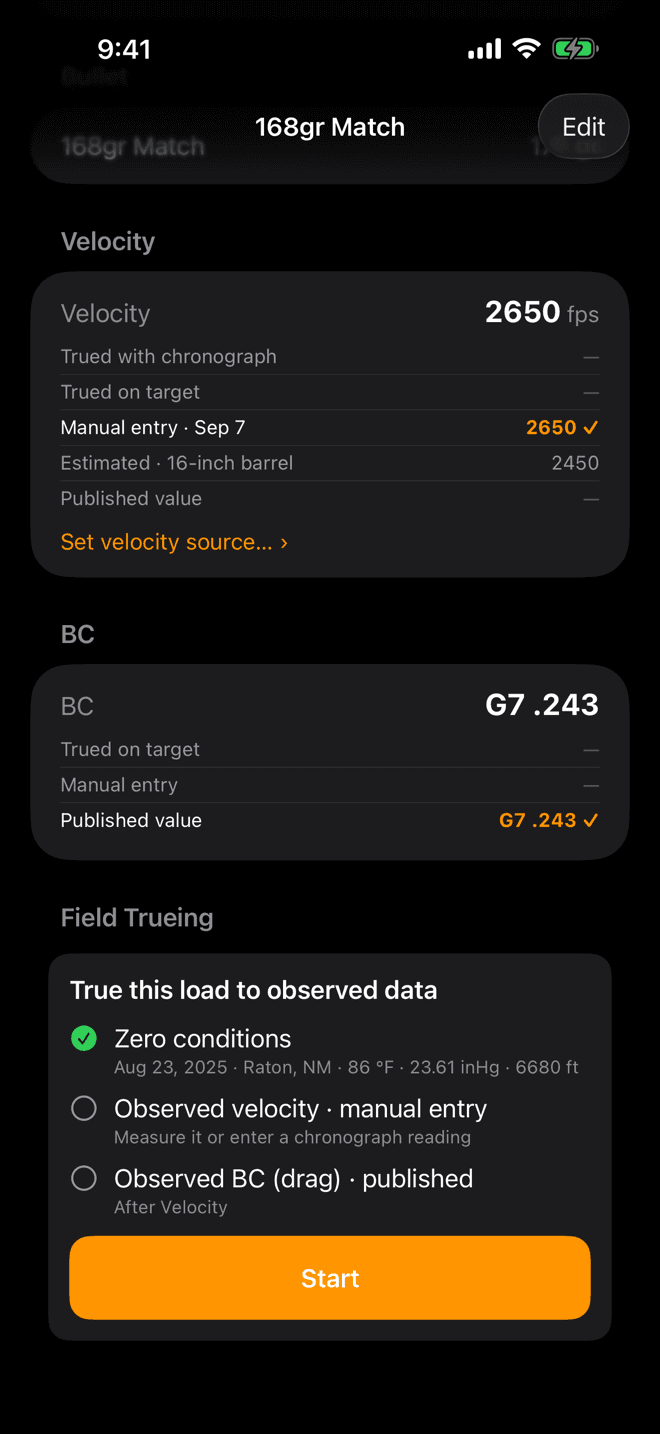
The load page. Field Trueing sits below Velocity and BC, with a line per stage and Start at the bottom.
Start here
Find the Field Trueing card
Open Guns, pick the rifle, then pick the load you want to true. Scroll to Field Trueing and tap Start.
The card's three lines are the whole job, in order: zero conditions, observed velocity, observed BC. A circle means that stage is still on the published numbers. A green check means you measured it.
Field Trueing is part of Wrist Dope Pro. Without it, Start opens the unlock card instead of the wizard, and a free 7-day trial starts from there.
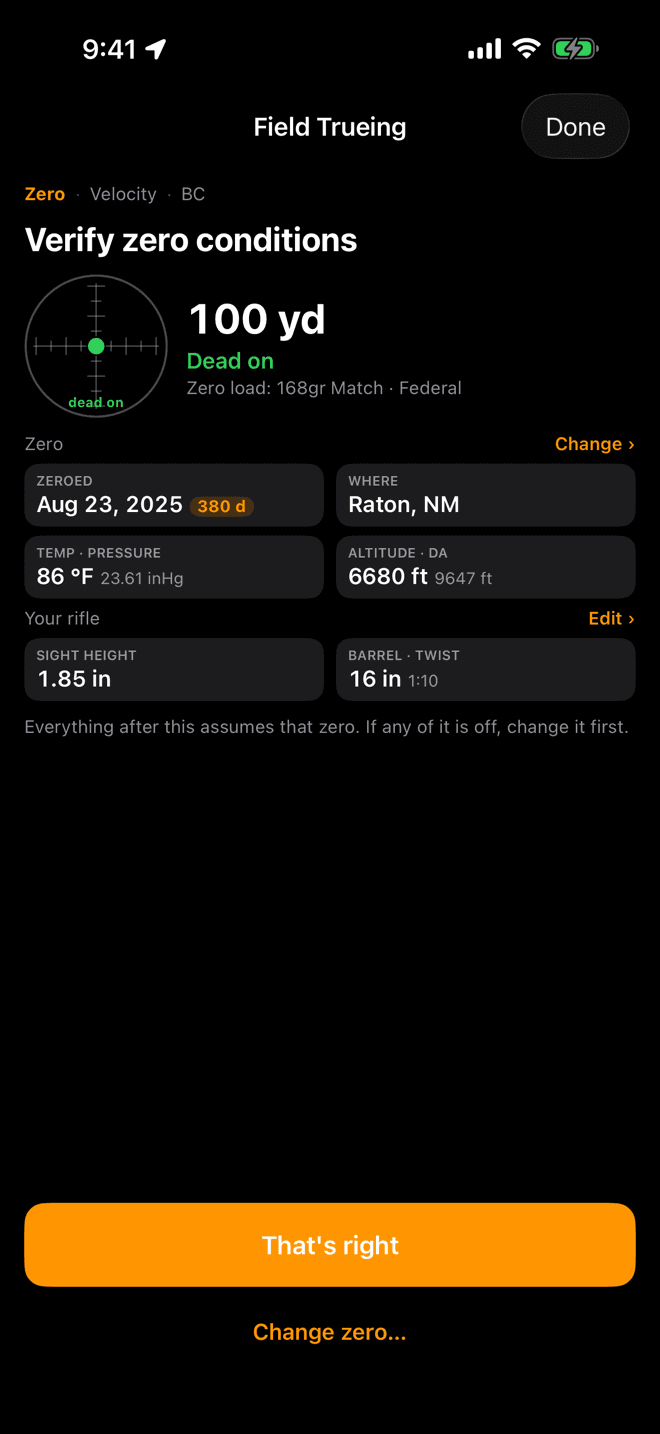
Everything after this assumes that zero. The chip beside the date turns orange when the zero is getting old.
Step 1
Verify zero conditions
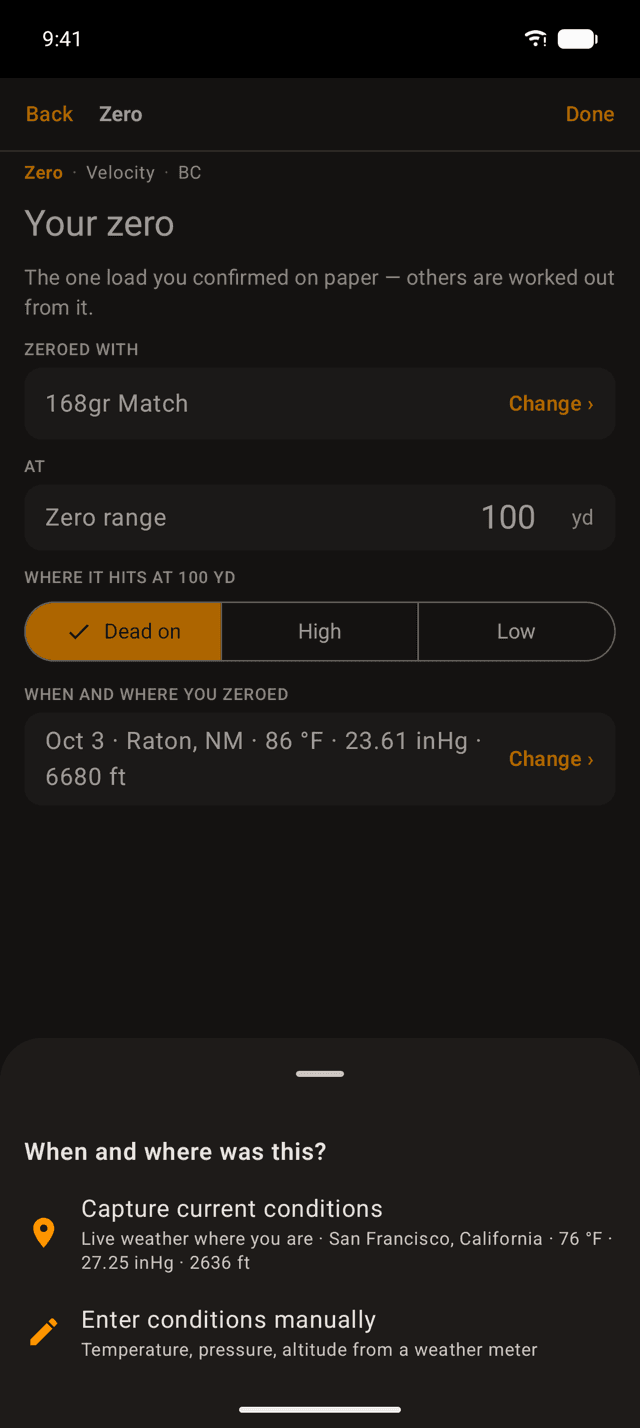
The first screen is read-only and you cannot skip it. It shows the load you zeroed with, the zero range, where that load hits, and the weather the day you zeroed.
Read it like a checklist. Trueing solves backwards from your zero, so a wrong zero here becomes a wrong velocity later:
- All of it correct? Tap
That's right. - Anything off? Tap
Change zero…first. - Sight height or barrel wrong?
Edit ›opens the rifle.
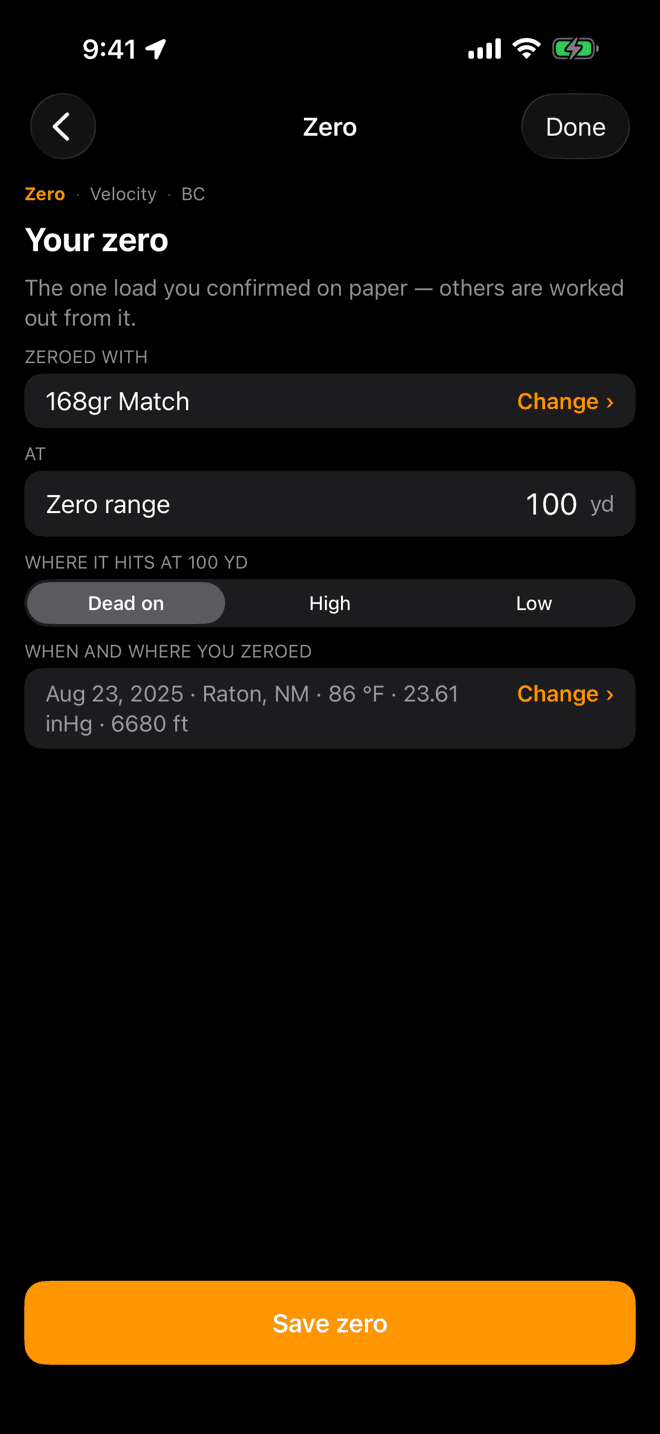
One load per rifle carries the zero. Every other load on that rifle is worked out from it.
If the zero is wrong
Set the zero properly
Wrist Dope keeps one zero per rifle, on one reference load: the one you actually confirmed on paper. Set four things:
- Zeroed with: the load you shot to zero the scope.
- Zero range: the distance you zeroed at.
- Where it hits: dead on, or high or low by a measured amount.
- When and where: the date, place, and air the day you zeroed.
Tap Save zero and the wizard drops you back on the confirm screen with the new numbers.
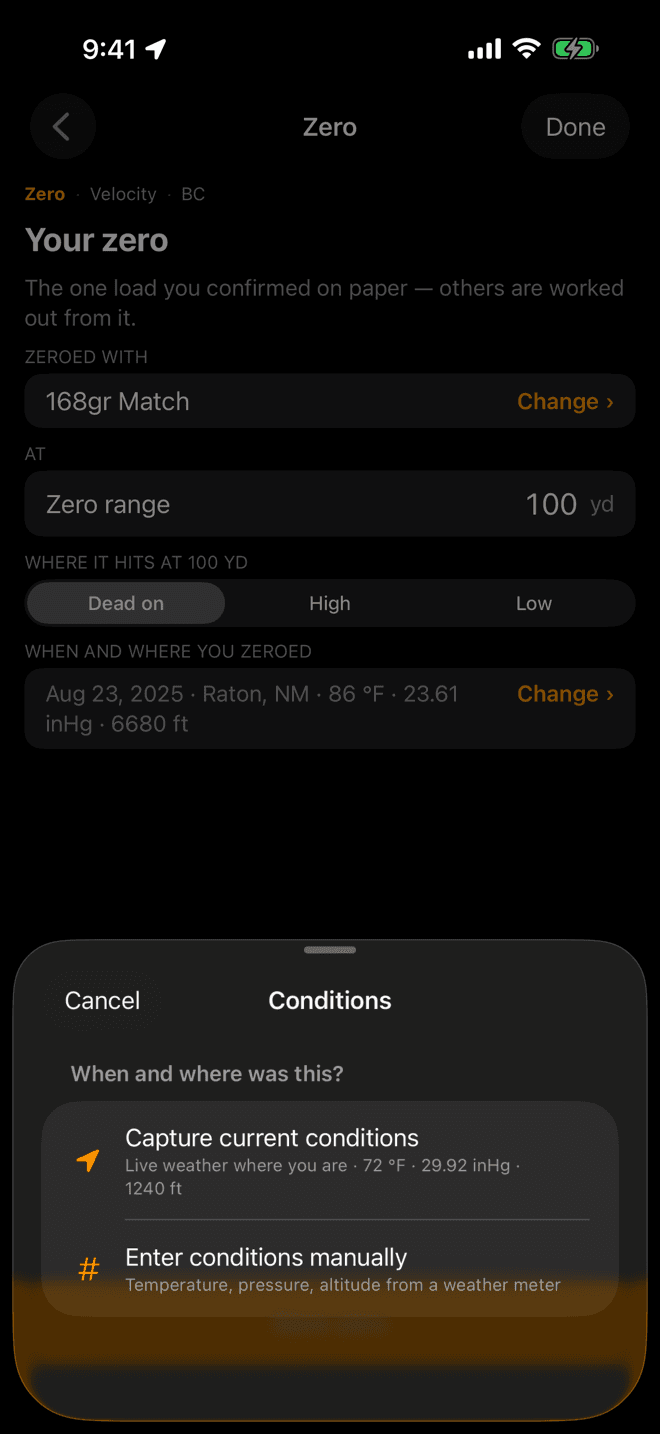
The same sheet appears wherever the app needs to know what the air was doing.
Conditions
Record the air, not just the date
Temperature, pressure, and altitude change where a bullet lands, so the app records them with your zero and with every measurement you make. Tap Change › on the conditions row and pick one:
- Capture current conditions: live weather where you are, right now.
- Enter conditions manually: temperature, station pressure, altitude, and optionally humidity, from your weather meter or the range's station.
Shot the group yesterday, or somewhere else? Every entry screen has a Shot somewhere else or earlier? link that opens this same sheet.
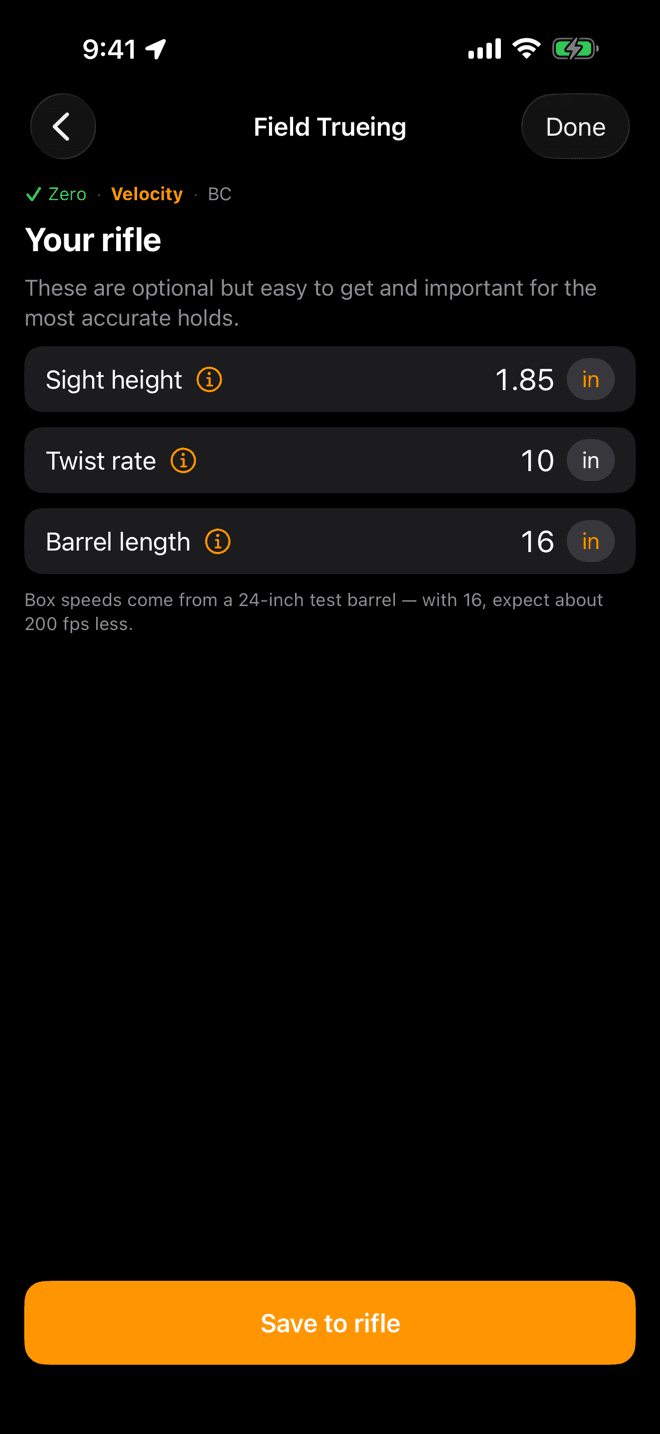
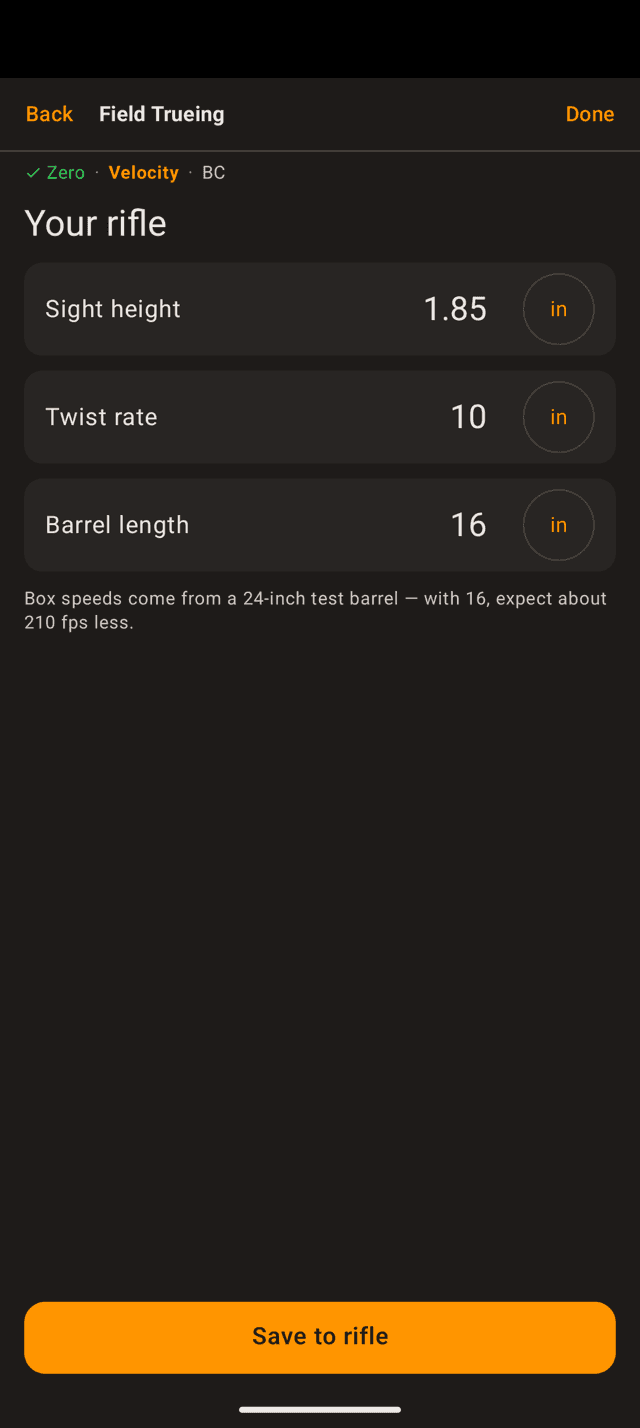
Asked once per rifle. Barrel length is what turns a box number into a number for your gun.
Step 2
Your rifle
Three fields: sight height, twist rate, barrel length. The note under them updates live as you type the barrel length, because that is the field doing the work.
Published velocities come off a long test barrel. Tell the app your barrel and it does two things: it estimates what your rifle should actually run, and it sets the sanity bands that later flag a result as unusual or refuse it outright.
Tap Save to rifle. You can go on without a barrel length, but the app then has nothing to compare your result against.
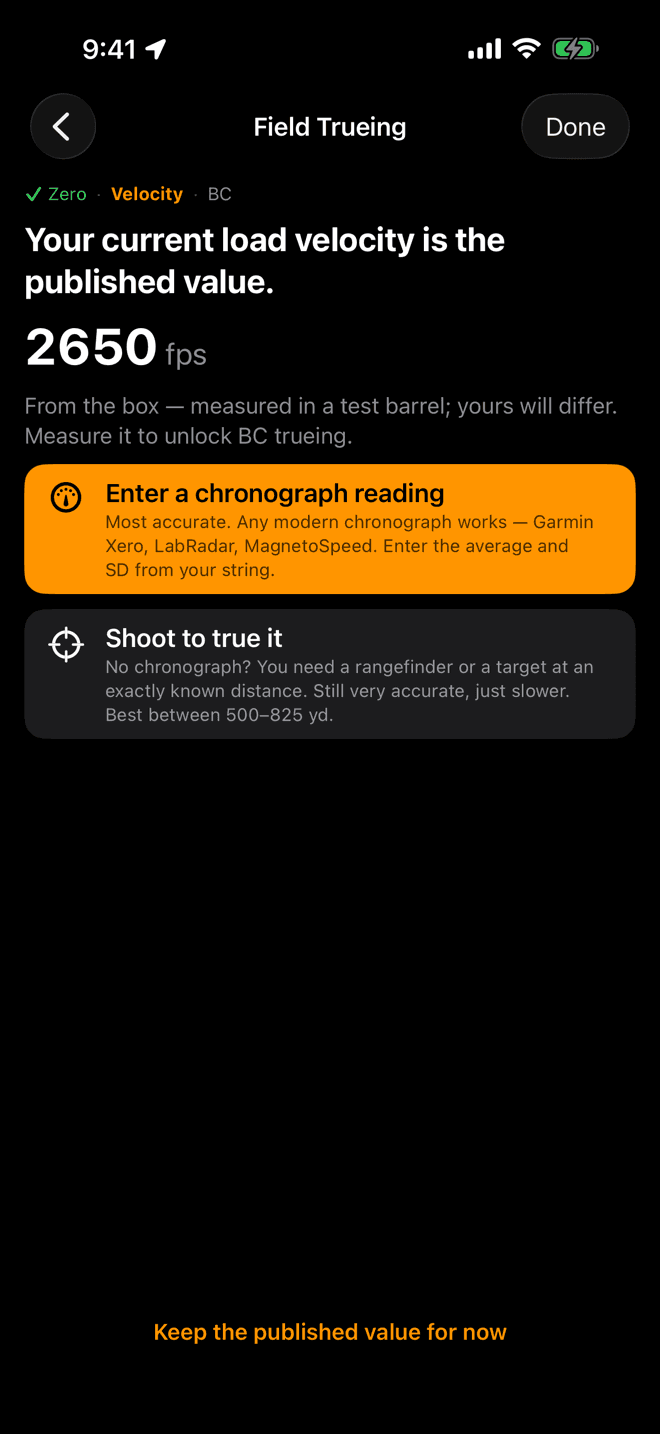
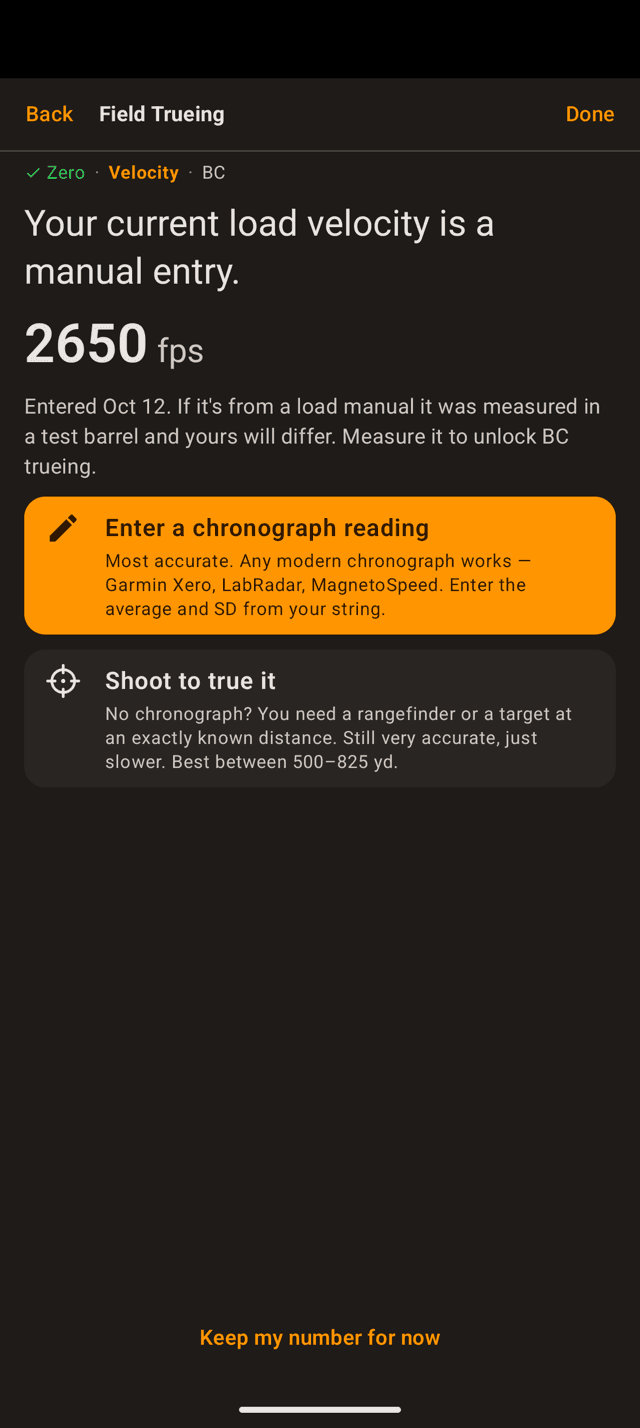
The number in use sits at the top, with where it came from underneath. Tap a card to go.
Step 3
Velocity: two ways
Velocity comes first, always. It is the single biggest lever on your holds, and BC cannot be read cleanly until speed is nailed down.
- Enter a chronograph reading: most accurate, and the fastest if you own one.
- Shoot to true it: no chronograph needed. You need a rangefinder and a target at distance.
The ghost button at the bottom keeps the number you have for now and moves on. BC stays locked until velocity is measured one of the two ways above.
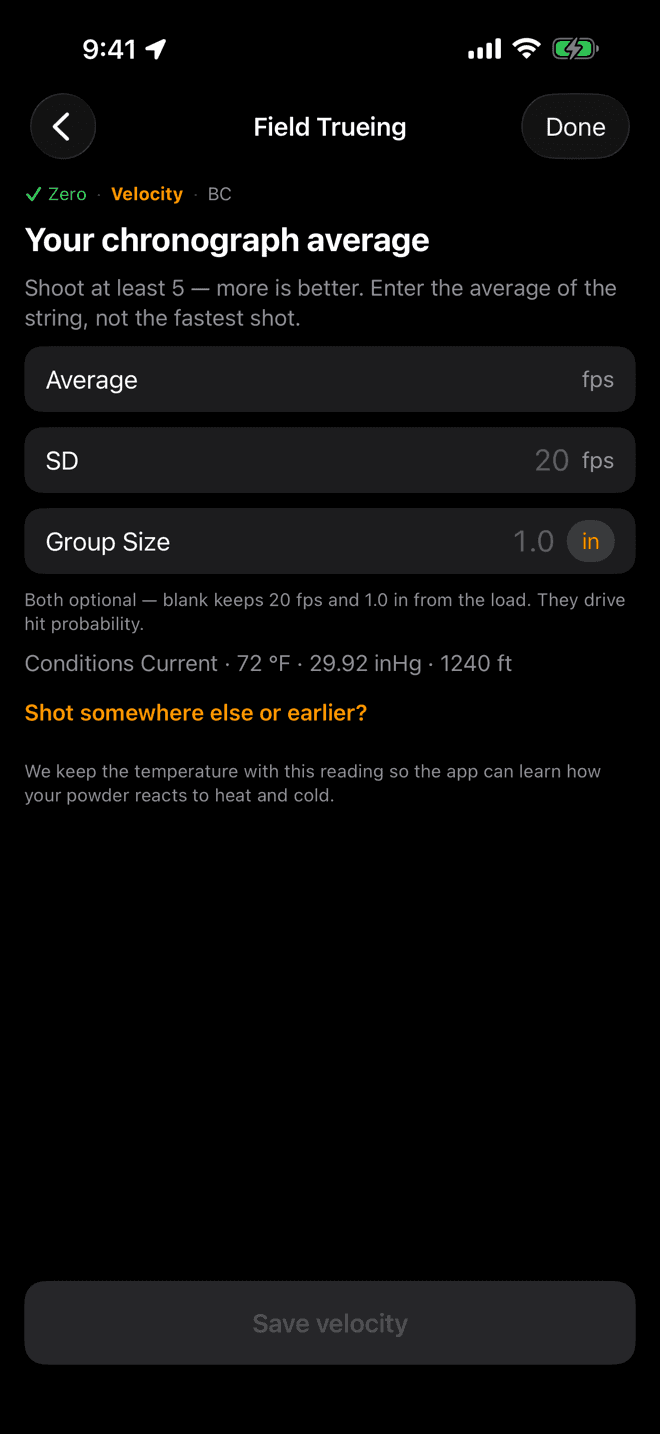
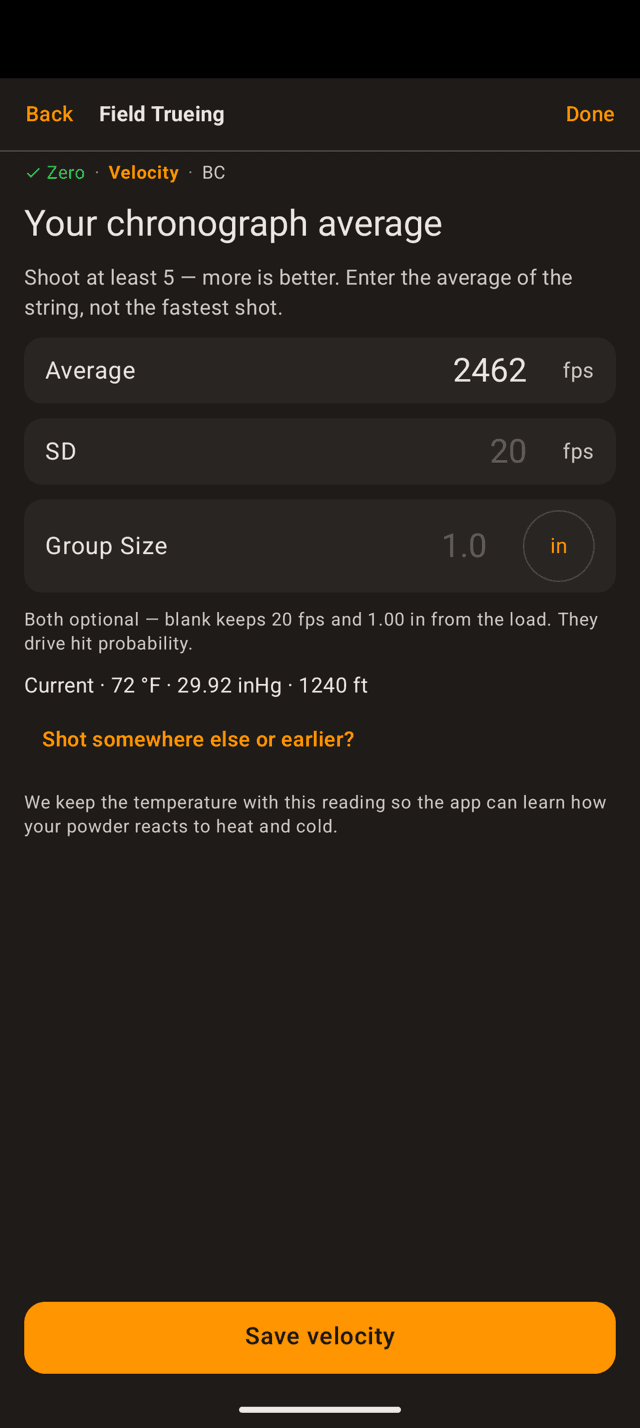
Average, not the fastest shot. SD and group size are optional and feed hit probability.
Velocity · with a chronograph
Enter the string average
Shoot at least five rounds over the chronograph, more if you have the ammo, and enter the average of the string. Any modern chronograph works.
- Average: required.
- SD and Group Size: optional. Left blank, the load keeps the values it already has. Both drive hit probability.
The temperature is stored alongside the reading so the app can learn how your powder behaves in heat and cold. Tap Save velocity and BC unlocks.
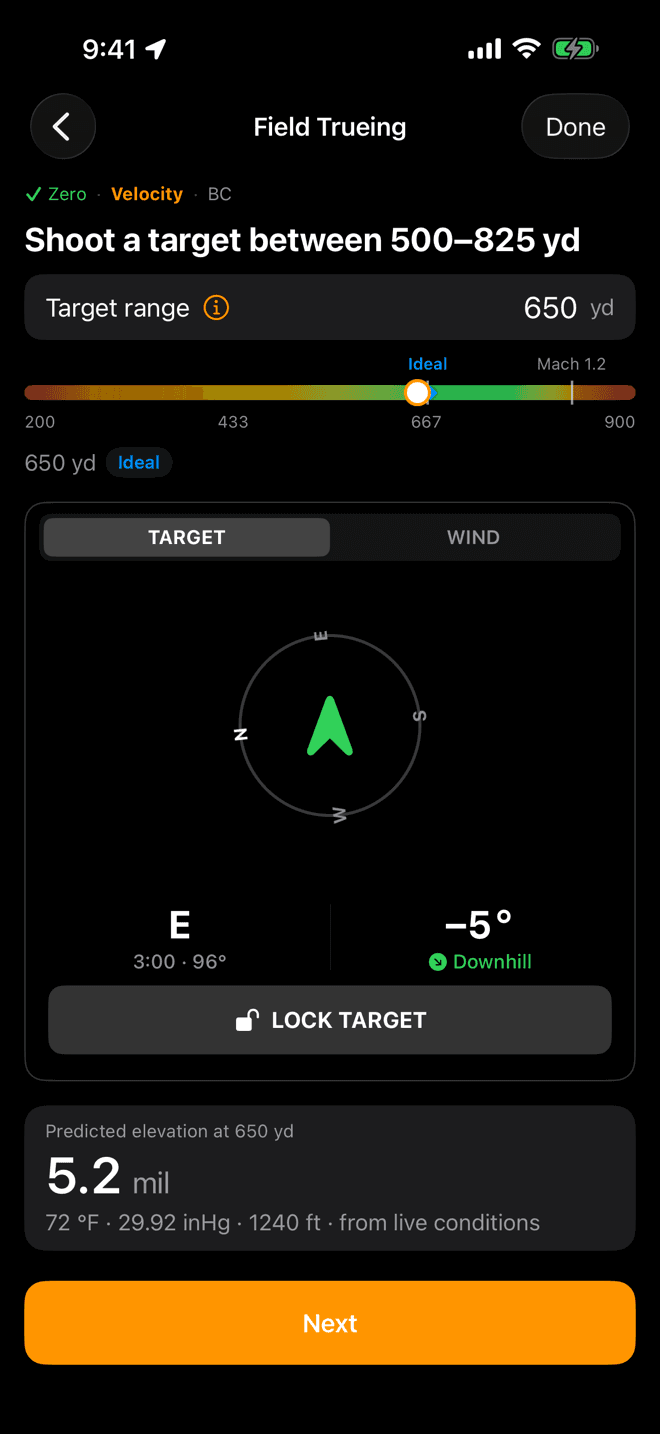
The band is computed for this load. Green is where a miss is mostly about speed.
Velocity · by shooting
Pick a target inside the green band
The app works out the window where a group tells it the most about muzzle velocity, and puts your target range on a band. Green is the sweet spot; the marker is the ideal distance.
The range has to be measured, not estimated. A rangefinder reading or a known-distance target, or the answer is garbage. Tap the i beside the field for why the band sits where it does.
Set the target direction and the wind in the panes below, then read the predicted elevation at the bottom. That is what you will dial. Tap Next.
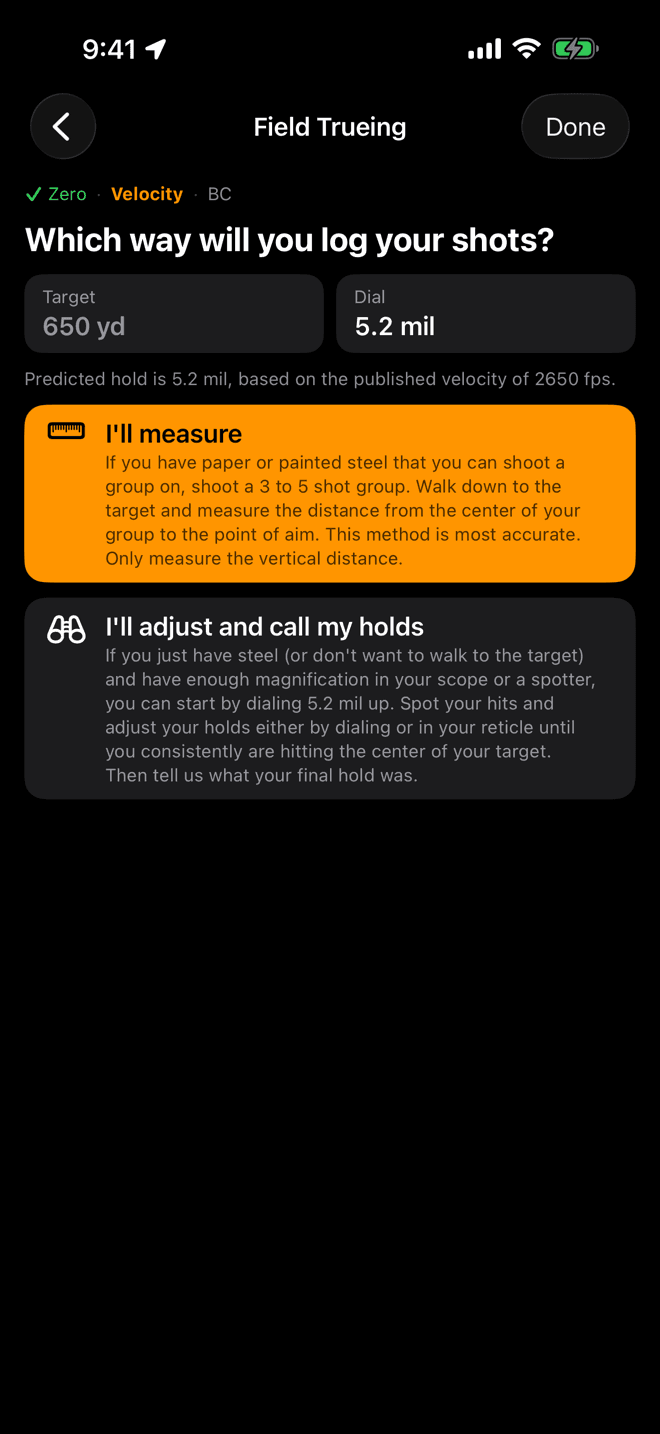
Paper or painted steel gets you the accurate method. Steel and a spotter gets you the other one.
Velocity · by shooting
Say how you will read your hits
Same group either way. The difference is what you can read off the target when you are done.
- I'll measure: you can walk to the target and measure the group. More accurate.
- I'll adjust and call my holds: you cannot get to the target, so you correct until impacts are centred and report the hold that did it.
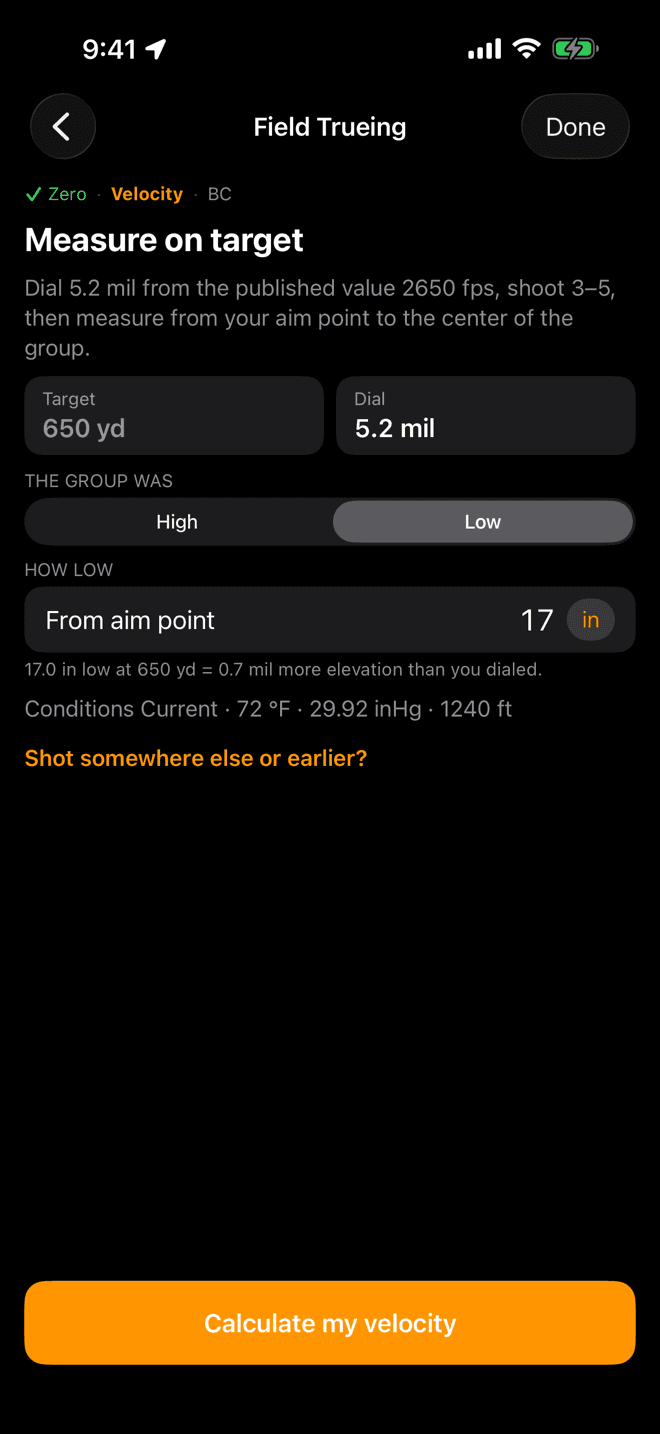
Vertical distance only. The line under the field converts what you typed into hold.
Velocity · I'll measure
Measure from aim point to group centre
Dial the elevation the app predicted, shoot a three-to-five shot group, then walk down and measure.
- Measure the vertical distance from your point of aim to the centre of the group. Ignore horizontal spread.
- Set the segment to
HighorLow, then type the distance. - The unit chip on the field switches between inches and your scope units, so enter whichever you measured.
Tap Calculate my velocity.
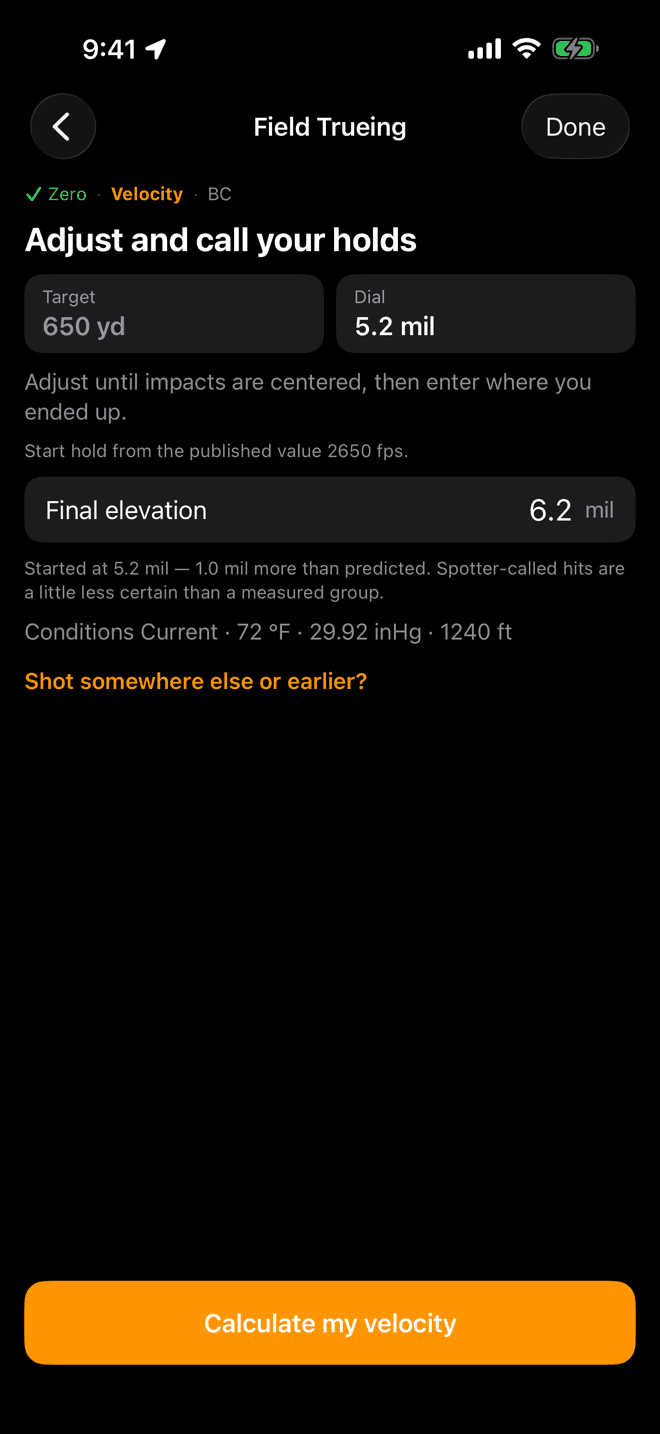
Enter where you ended up, not the correction. The app compares it to what it predicted.
Velocity · I'll adjust and call
Or report the hold that centred it
Start at the predicted hold. Adjust, dialled or held in the reticle, until impacts are centred on the target, then enter the elevation you finished on.
The app says so plainly on the screen: a spotter-called hit is a little less certain than a group you measured. Use this when you cannot get downrange, not by default.
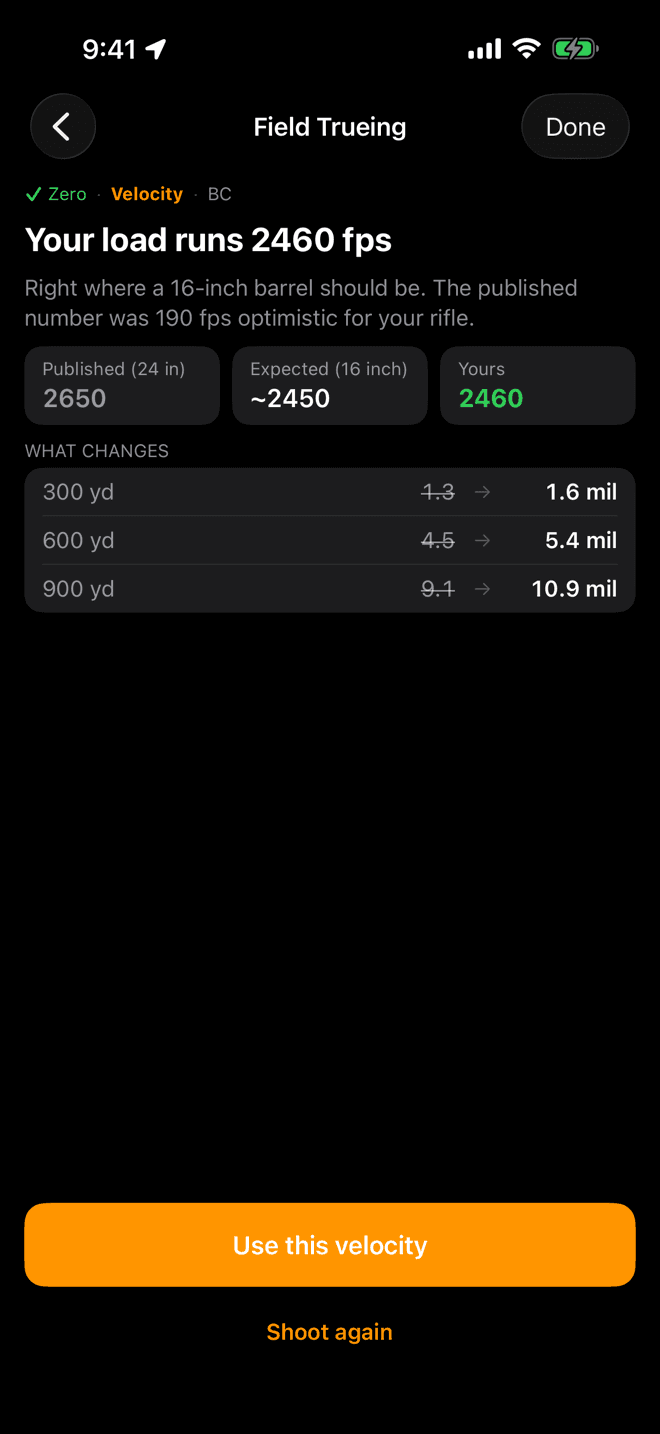
Published, what a barrel your length should give, and yours. Then the holds that change.
Velocity · the answer
What your rifle actually runs
The result names the number, says how it compares to what the app expected, and shows what it does to your holds at three ranges.
Happy with it? Use this velocity saves it and moves on to BC. Something felt off about that group, like bad wind or a called flier? Shoot again takes you back to the entry screen.
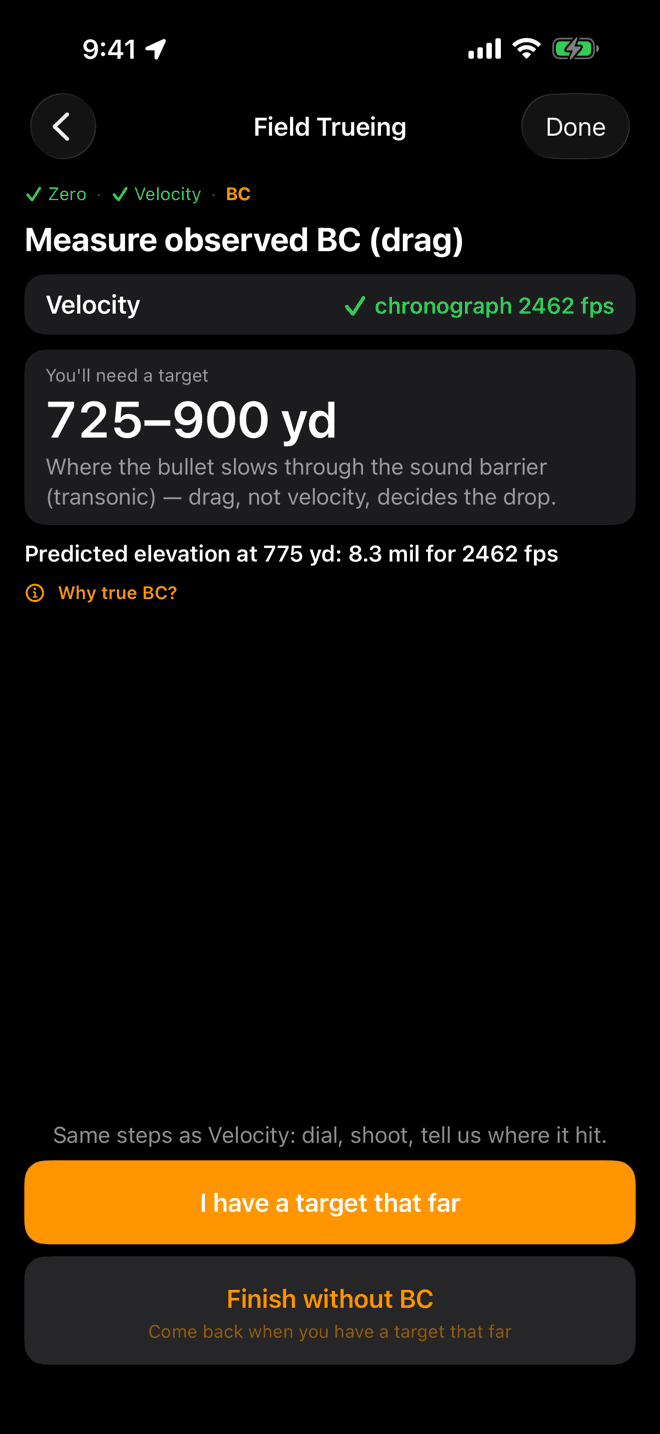
BC only unlocks behind a measured velocity. The range it asks for is farther than the velocity band.
Step 4
True BC, once velocity is measured
BC describes how well your bullet holds speed. Published BCs come off a test barrel and a different lot, and the difference only shows up far out, which is exactly where you feel it.
This stage stays locked until velocity has been chronographed or trued on target. Speed gets measured where speed dominates, so drag can be read where drag dominates.
No target that far today? Finish without BC keeps your trued velocity and closes out. Come back to it any time.
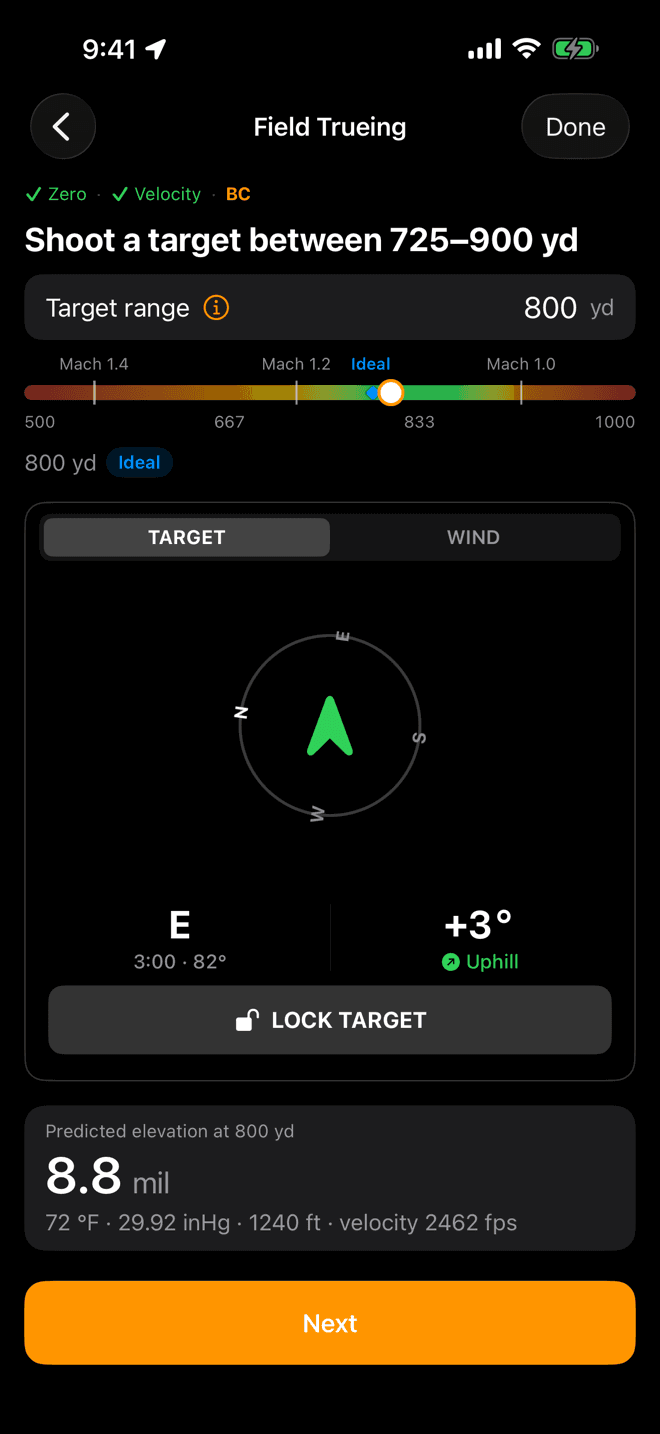
The Mach ticks show where the bullet slows through the sound barrier. Green sits around it.
BC · the target
Farther, into the transonic band
The BC band sits where the bullet is slowing through the sound barrier and drag, not speed, decides the drop. The app computes it from your load and today's air, so read the number on your screen rather than reusing one from a friend's rifle.
Type a range that is too close and Next stays disabled. That is deliberate. Closer in, speed and drag are tangled together and a miss cannot tell the app which one it was looking at.
From here the steps repeat: pick the method, dial, shoot, tell the app where it hit.
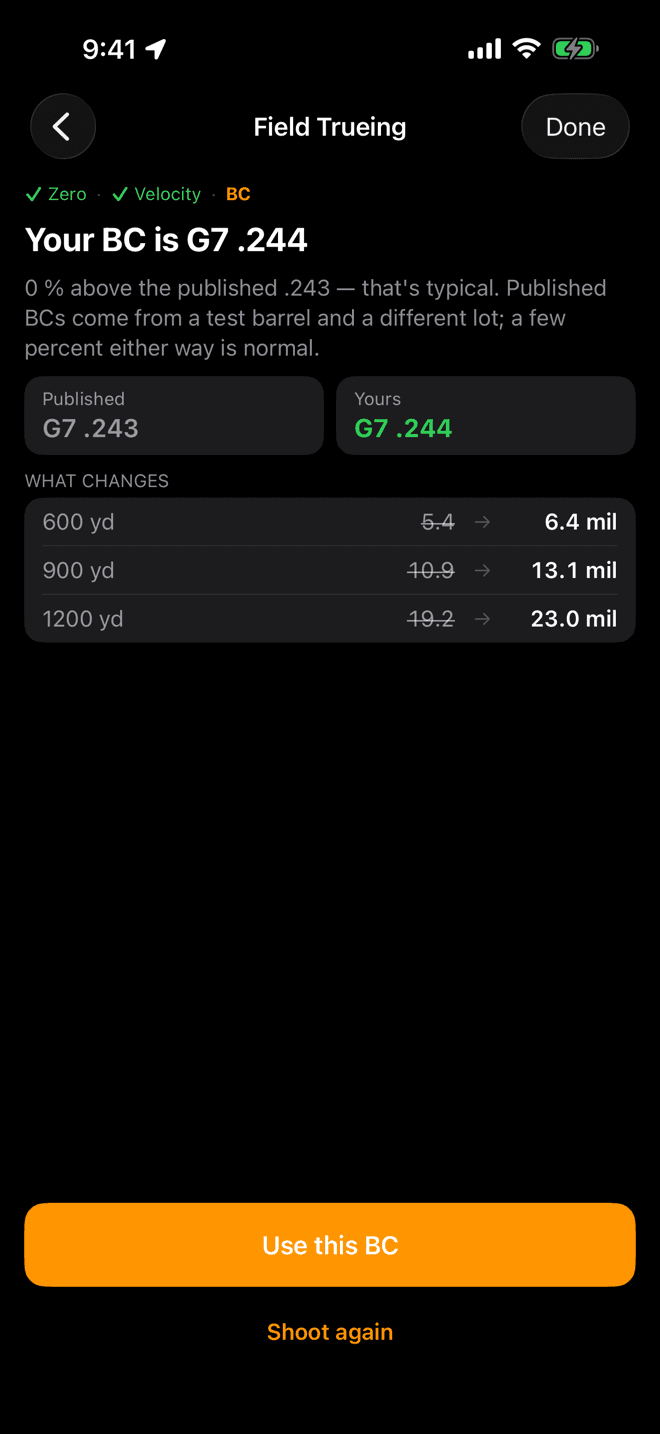
A few percent either way is normal. The table shows what moves.
BC · the answer
Your BC, against the published one
Same shape as the velocity result: your number, how it sits against published, and the holds it changes. Note the ranges in the table are farther out. That is where BC earns its keep.
Use this BC saves it and finishes the run.
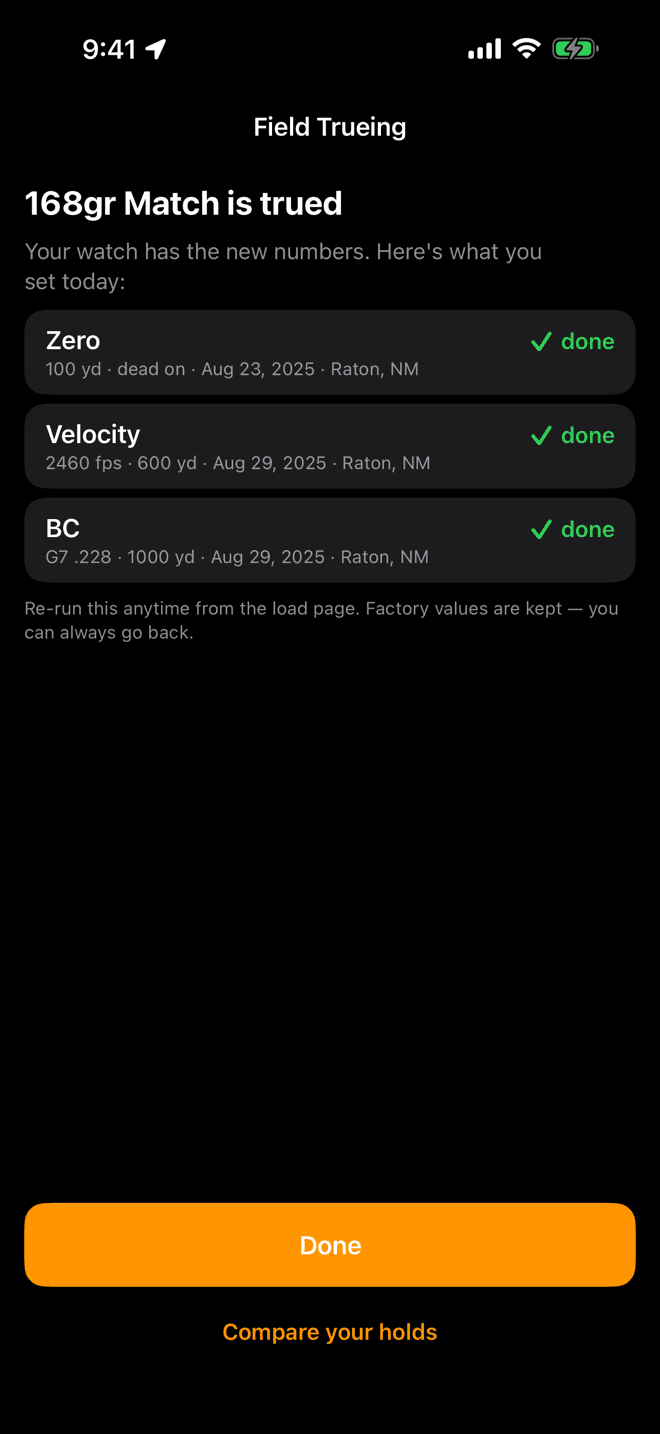
Each row carries its provenance: the value, the range, the date, and the place.
Step 5
Done, and what it changed
The summary lists what you set today and where each number came from. Tap Done and you are back on the load.
Nothing is thrown away. The published values stay on the load, and you can put them back whenever you like.
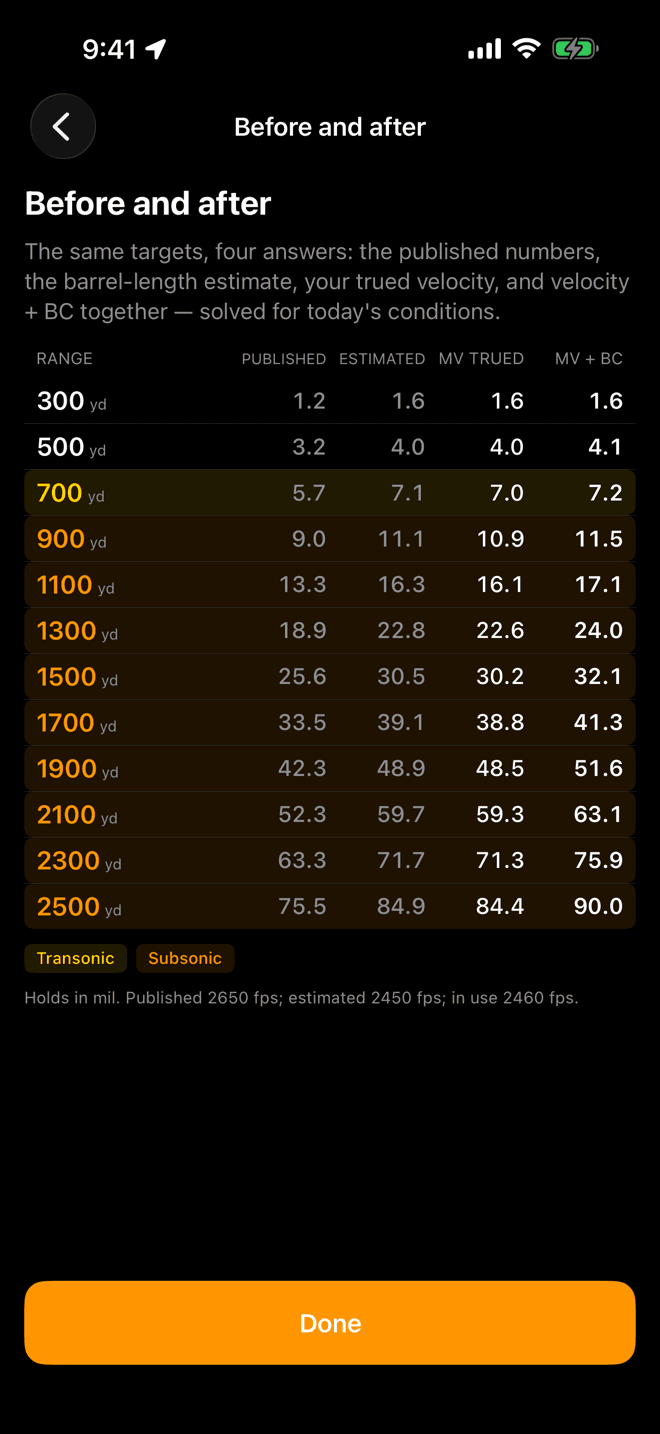
The same targets, solved four ways under today's conditions. Shading marks transonic and subsonic.
Before and after
See the holds side by side
Compare your holds on the summary opens the whole picture: the published numbers, the barrel-length estimate, your trued velocity, and velocity plus BC together.
Read down a row and you can see where trueing mattered. Close in the columns agree. Past transonic they separate by mils.
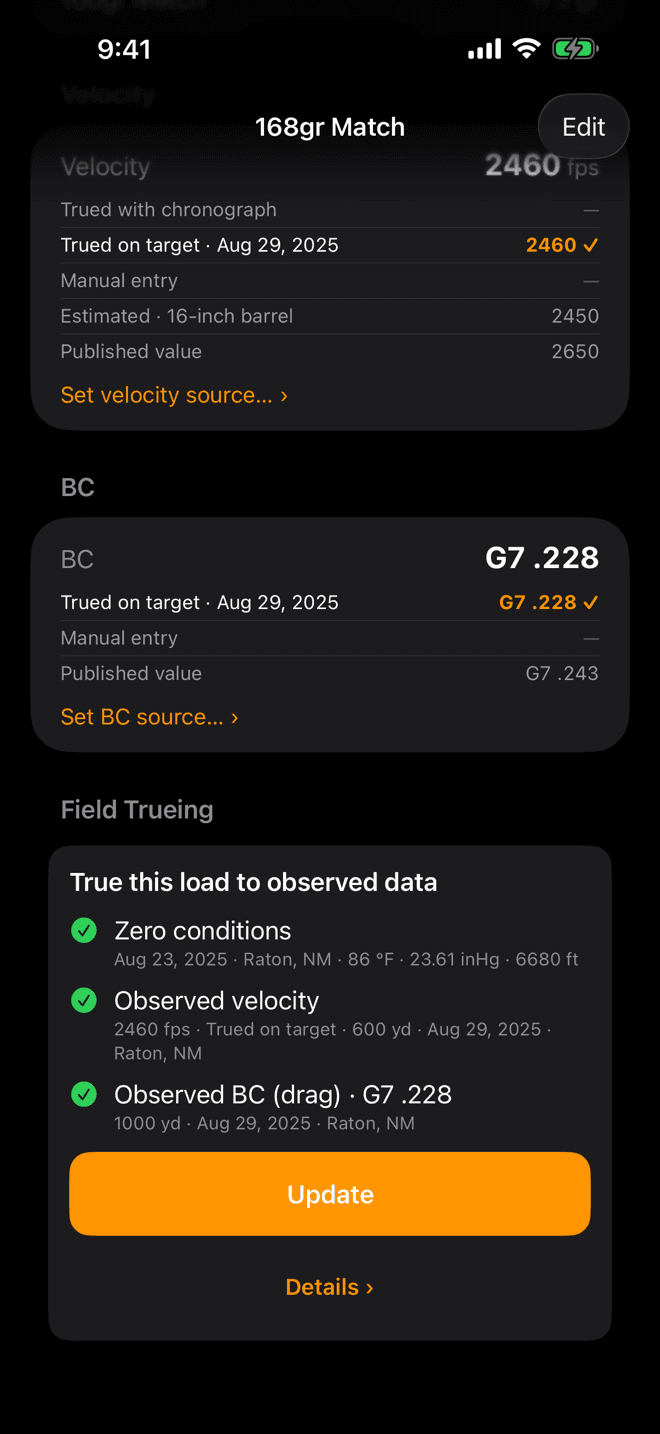
The ladders show every value the load has and which one is in use.
After
Where the numbers show up
Back on the load page, the Velocity and BC sections each show a ladder of everything that value could be (chronograph, trued on target, manual, estimated, published) with a check on the one in use.
From here on, the Range Card, Live Fire, and the watch all solve on the trued numbers. The load list on the watch marks the load TRUED.
The Field Trueing card now reads Update instead of Start, and a Details › button appears with the full history.
When the app pushes back
Most groups come back with a plain answer. Two other verdicts exist, and both are the app telling you something useful rather than refusing to work.
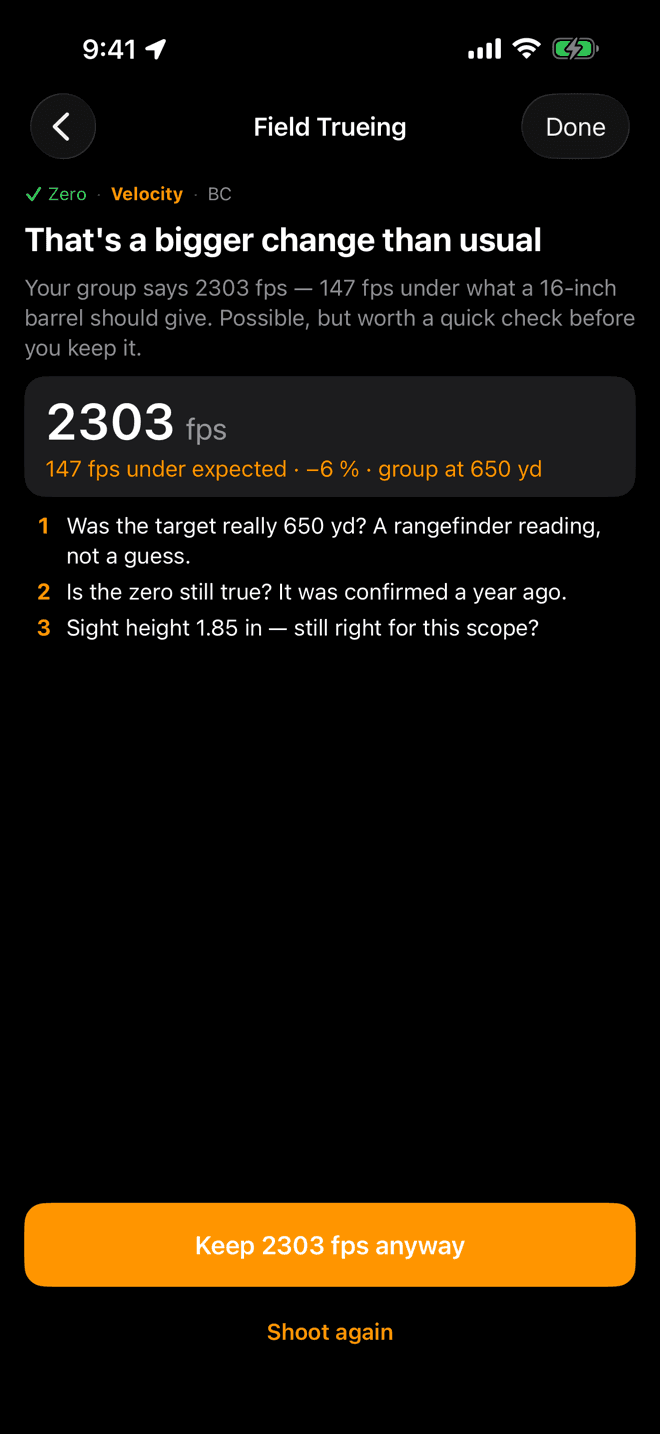
“A bigger change than usual”
The answer is possible, but far enough from expected to be worth a second look. Work the checklist on the screen (the range, how old the zero is, the sight height), then either keep the number anyway or shoot the group again.
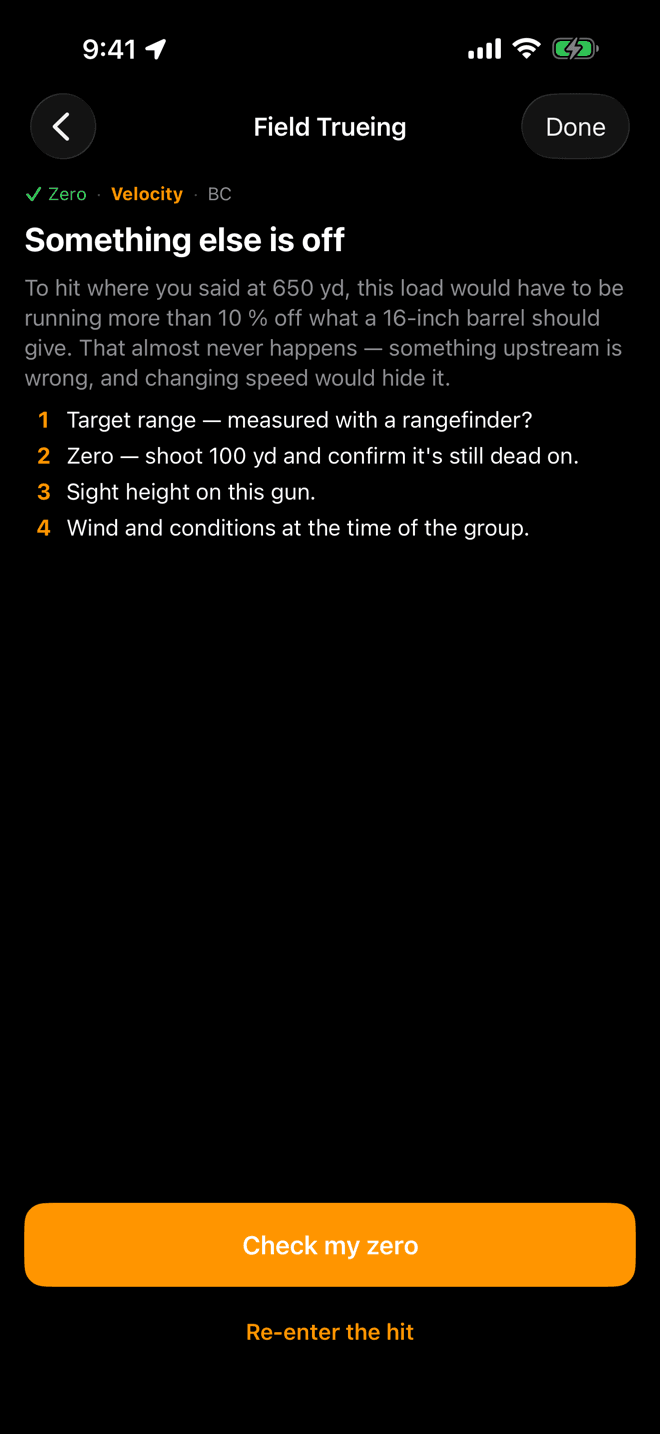
“Something else is off”
The app will not save this one. To put your group where you said, the load would have to be so far off that something upstream must be wrong, and changing velocity would only hide it. Fix the cause first, usually the range or the zero.
Changing your mind
Nothing you measure overwrites anything. The load keeps every value it has ever had, and you pick which one is in use.
- Go back to the box number. On the load page, tap
Set velocity source… ›under the velocity ladder and choose the published value, an earlier trued value, or your own number. BC has the sameSet BC source… ›once it has been trued. - Measure again.
Updateon the Field Trueing card re-runs the wizard. Earlier measurements move into the history rather than disappearing. - See the history.
Details ›opens the full record (every measurement, its range, date, and conditions) with the one in use marked. You can restore an old one from there. - It travels with the load. Trued values and their history are part of the load, so they sync to the watch and come along in your profile backups and exports.
Stuck somewhere?
- Start opens an unlock card, not the wizard. Field Trueing is a Pro feature. The card is where the free trial starts.
- “That's right” will not let you continue. The zero has to be saved through the wizard at least once. Tap
Change zero…, check the fields, and tapSave zeroeven if nothing changed. - The BC stage is locked. It needs a measured velocity: a chronograph reading or a group trued on target. An estimate from barrel length does not unlock it.
- Next is greyed out on the BC target screen. Your range is closer than the app can read drag at. That refusal is on purpose; you need a farther target.
- The trued holds do not match your impacts. Check the zero first, then the range you trued at. A zero that has drifted moves every trued number with it.
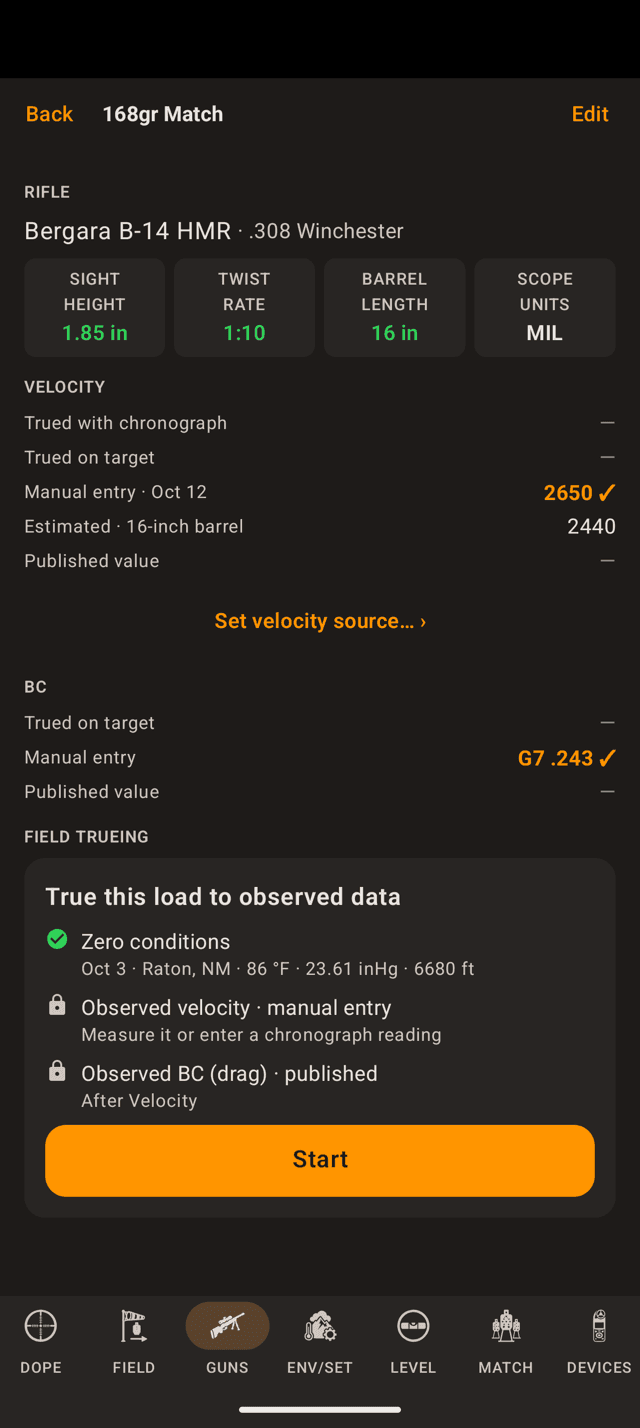
The load page. Field Trueing sits below Velocity and BC, with a line per stage and Start at the bottom.
Start here
Find the Field Trueing card
Open Guns, pick the rifle, then pick the load you want to true. Scroll to Field Trueing and tap Start.
The card's three lines are the whole job, in order: zero conditions, observed velocity, observed BC. A padlock means that stage is still on the published or typed numbers. A green check means you measured it.
Field Trueing is part of Wrist Dope Pro. Without it, Start opens the unlock card instead of the wizard, and a free 7-day trial starts from there.
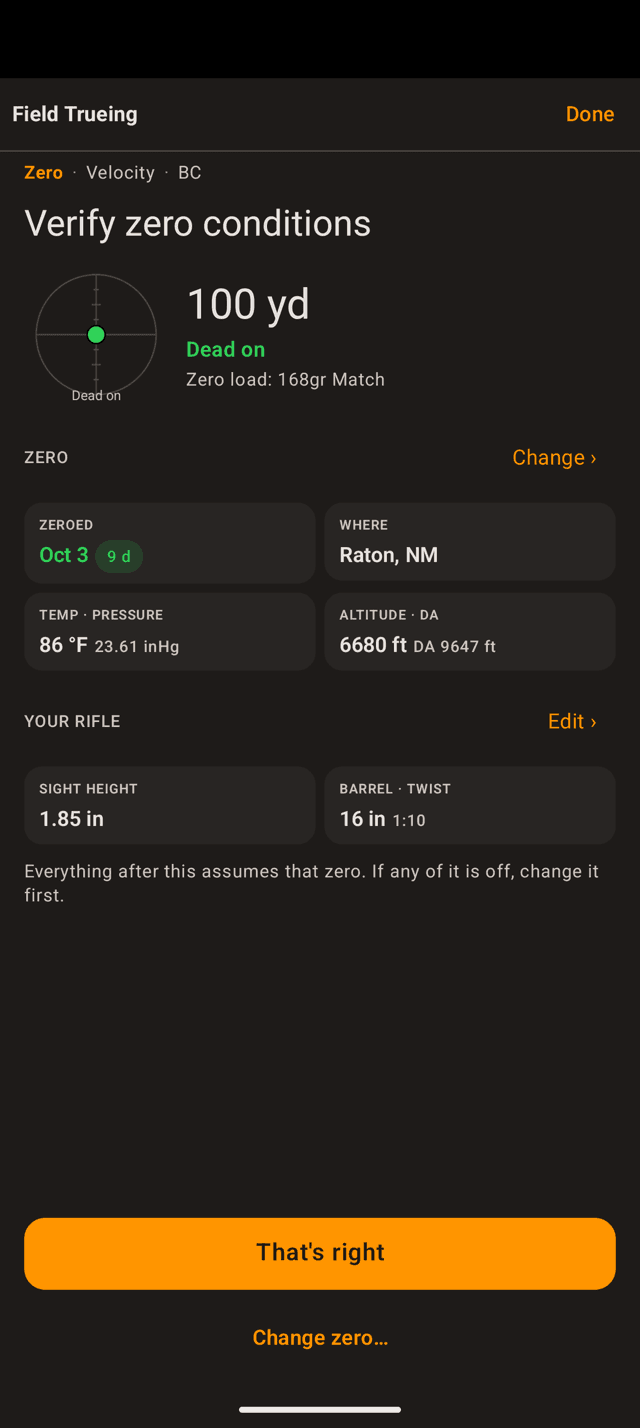
Everything after this assumes that zero. The chip beside the date turns orange when the zero is getting old.
Step 1
Verify zero conditions
The first screen is read-only and you cannot skip it. It shows the load you zeroed with, the zero range, where that load hits, and the weather the day you zeroed.
Read it like a checklist. Trueing solves backwards from your zero, so a wrong zero here becomes a wrong velocity later:
- All of it correct? Tap
That's right. - Anything off? Tap
Change zero…first. - Sight height or barrel wrong?
Edit ›opens the rifle.
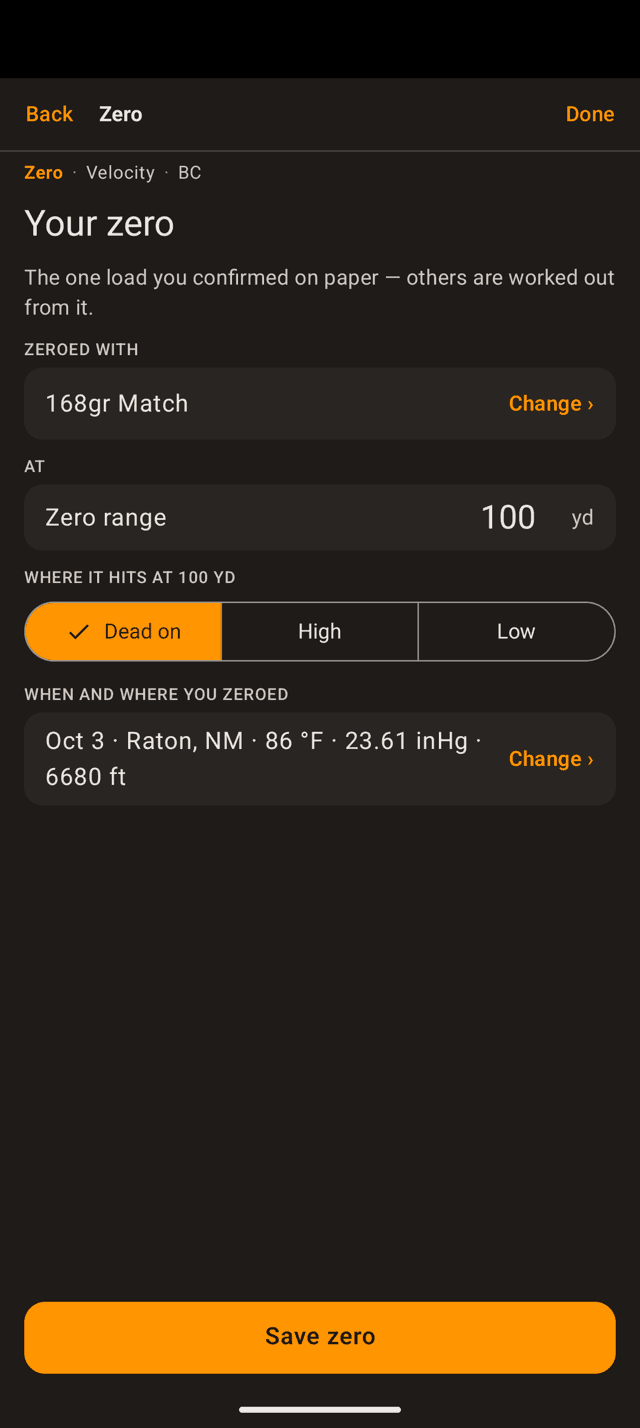
One load per rifle carries the zero. Every other load on that rifle is worked out from it.
If the zero is wrong
Set the zero properly
Wrist Dope keeps one zero per rifle, on one reference load: the one you actually confirmed on paper. Set four things:
- Zeroed with: the load you shot to zero the scope.
- Zero range: the distance you zeroed at.
- Where it hits: dead on, or high or low by a measured amount.
- When and where: the date, place, and air the day you zeroed.
Tap Save zero and the wizard drops you back on the confirm screen with the new numbers.
The same sheet appears wherever the app needs to know what the air was doing.
Conditions
Record the air, not just the date
Temperature, pressure, and altitude change where a bullet lands, so the app records them with your zero and with every measurement you make. Tap Change › on the conditions row and pick one:
- Capture current conditions: live weather where you are, right now.
- Enter conditions manually: temperature, station pressure, altitude, and optionally humidity, from your weather meter or the range's station.
Shot the group yesterday, or somewhere else? Every entry screen has a Shot somewhere else or earlier? link that opens this same sheet.
Asked once per rifle. Barrel length is what turns a box number into a number for your gun.
Step 2
Your rifle
Three fields: sight height, twist rate, barrel length. The note under them updates live as you type the barrel length, because that is the field doing the work.
Published velocities come off a long test barrel. Tell the app your barrel and it does two things: it estimates what your rifle should actually run, and it sets the sanity bands that later flag a result as unusual or refuse it outright.
Tap Save to rifle. You can go on without a barrel length, but the app then has nothing to compare your result against.
The number in use sits at the top, with where it came from underneath. Tap a card to go.
Step 3
Velocity: two ways
Velocity comes first, always. It is the single biggest lever on your holds, and BC cannot be read cleanly until speed is nailed down.
- Enter a chronograph reading: most accurate, and the fastest if you own one.
- Shoot to true it: no chronograph needed. You need a rangefinder and a target at distance.
The ghost button at the bottom keeps the number you have for now and moves on. BC stays locked until velocity is measured one of the two ways above.
Average, not the fastest shot. SD and group size are optional and feed hit probability.
Velocity · with a chronograph
Enter the string average
Shoot at least five rounds over the chronograph, more if you have the ammo, and enter the average of the string. Any modern chronograph works.
- Average: required.
- SD and Group Size: optional. Left blank, the load keeps the values it already has. Both drive hit probability.
The temperature is stored alongside the reading so the app can learn how your powder behaves in heat and cold. Tap Save velocity and BC unlocks.
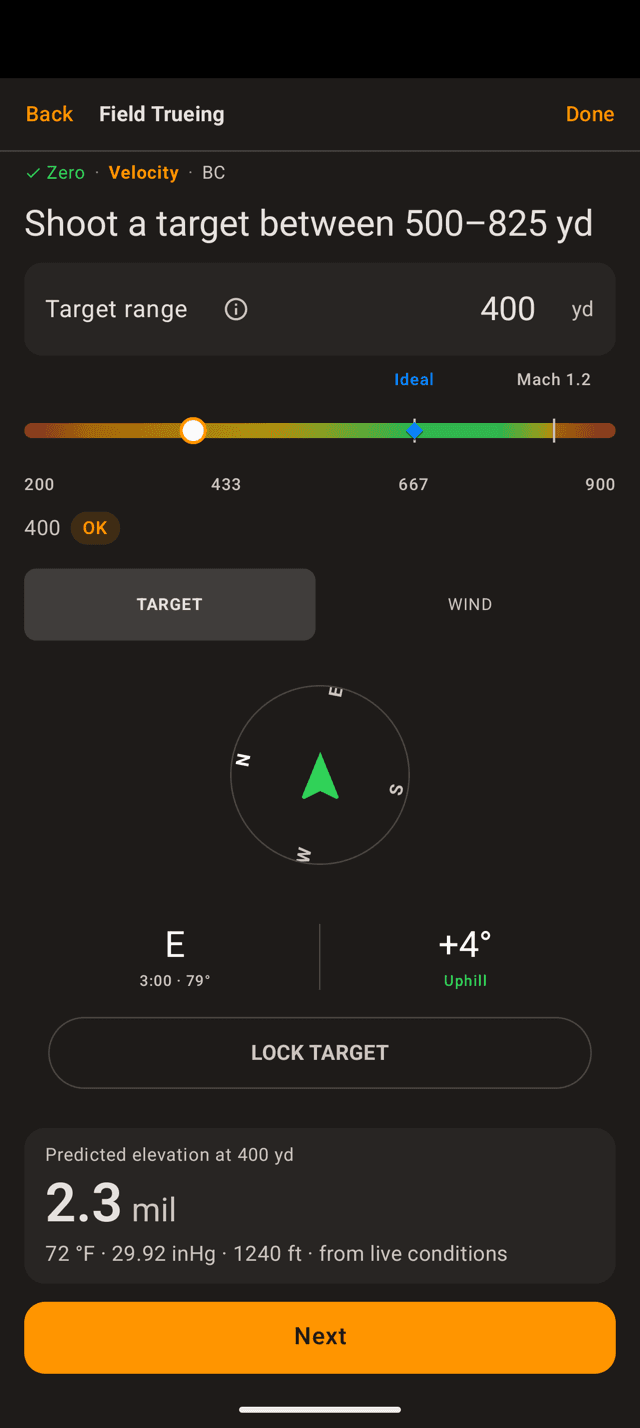
The band is computed for this load. Green is where a miss is mostly about speed.
Velocity · by shooting
Pick a target inside the green band
The app works out the window where a group tells it the most about muzzle velocity, and puts your target range on a band. Green is the sweet spot; the marker is the ideal distance.
The range has to be measured, not estimated. A rangefinder reading or a known-distance target, or the answer is garbage. Tap the i beside the field for why the band sits where it does.
Set the target direction and the wind in the panes below, then read the predicted elevation at the bottom. That is what you will dial. Tap Next.
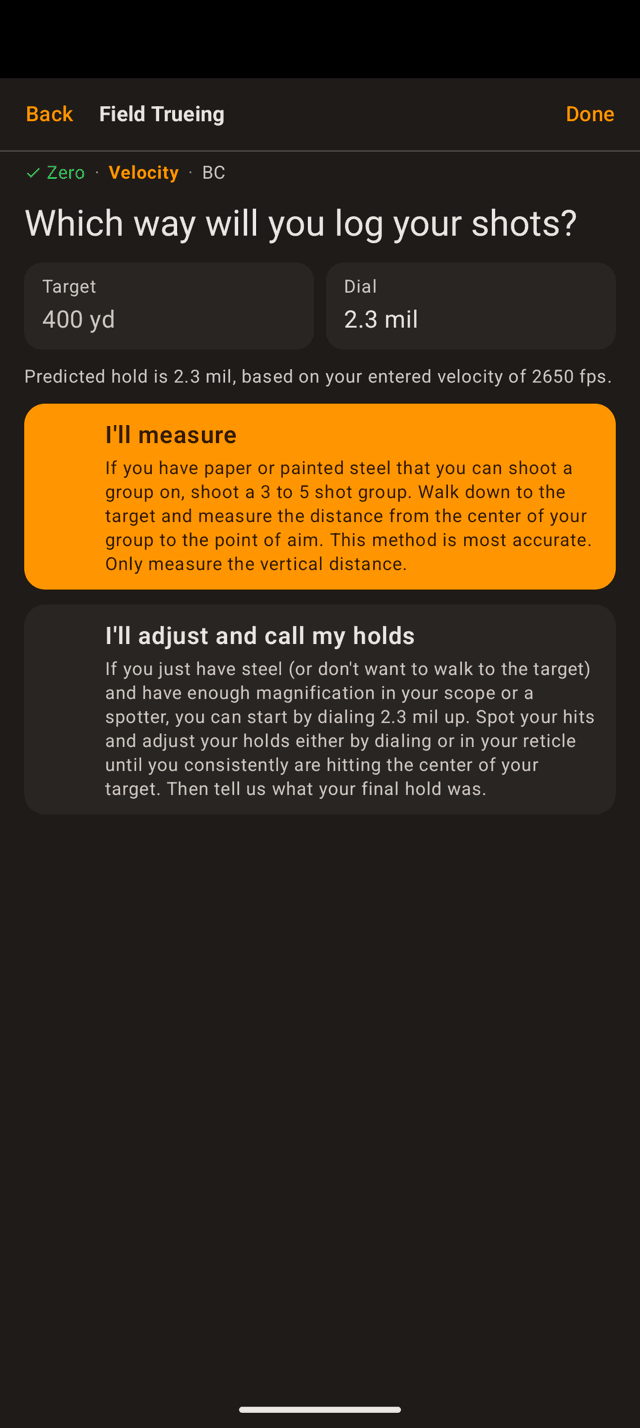
Paper or painted steel gets you the accurate method. Steel and a spotter gets you the other one.
Velocity · by shooting
Say how you will read your hits
Same group either way. The difference is what you can read off the target when you are done.
- I'll measure: you can walk to the target and measure the group. More accurate.
- I'll adjust and call my holds: you cannot get to the target, so you correct until impacts are centred and report the hold that did it.
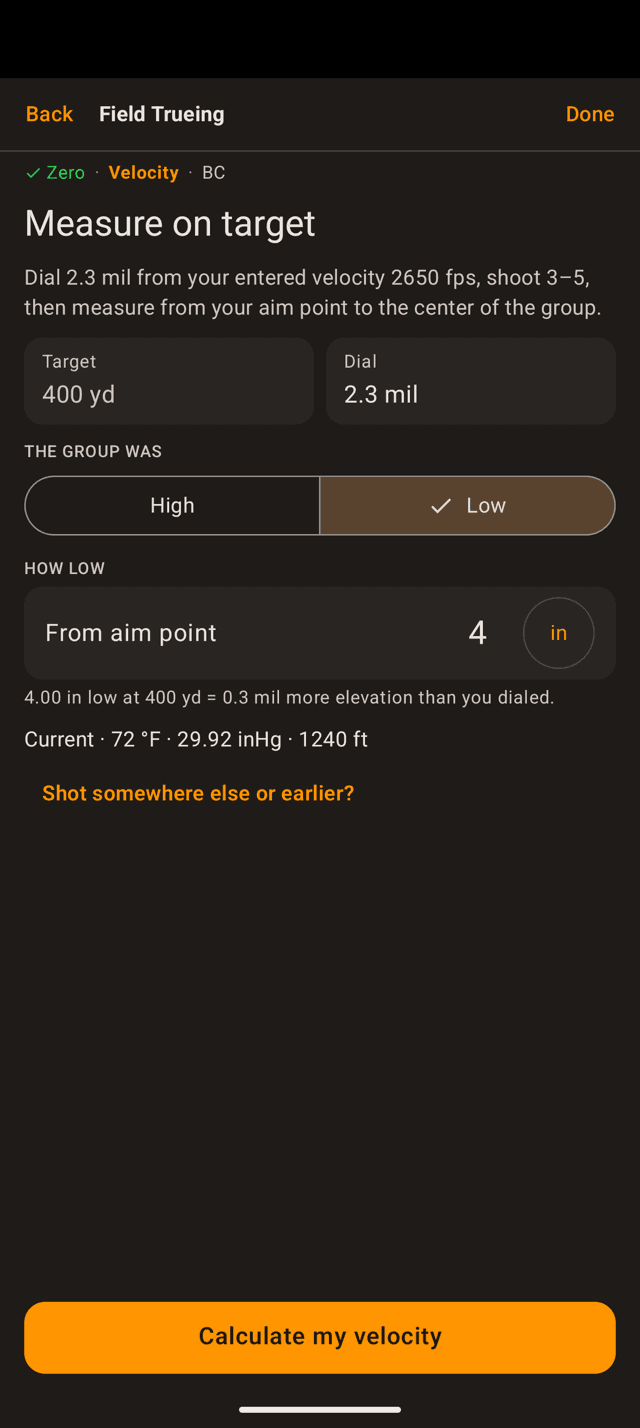
Vertical distance only. The line under the field converts what you typed into hold.
Velocity · I'll measure
Measure from aim point to group centre
Dial the elevation the app predicted, shoot a three-to-five shot group, then walk down and measure.
- Measure the vertical distance from your point of aim to the centre of the group. Ignore horizontal spread.
- Set the segment to
HighorLow, then type the distance. - The unit chip on the field switches between inches and your scope units, so enter whichever you measured.
Tap Calculate my velocity.
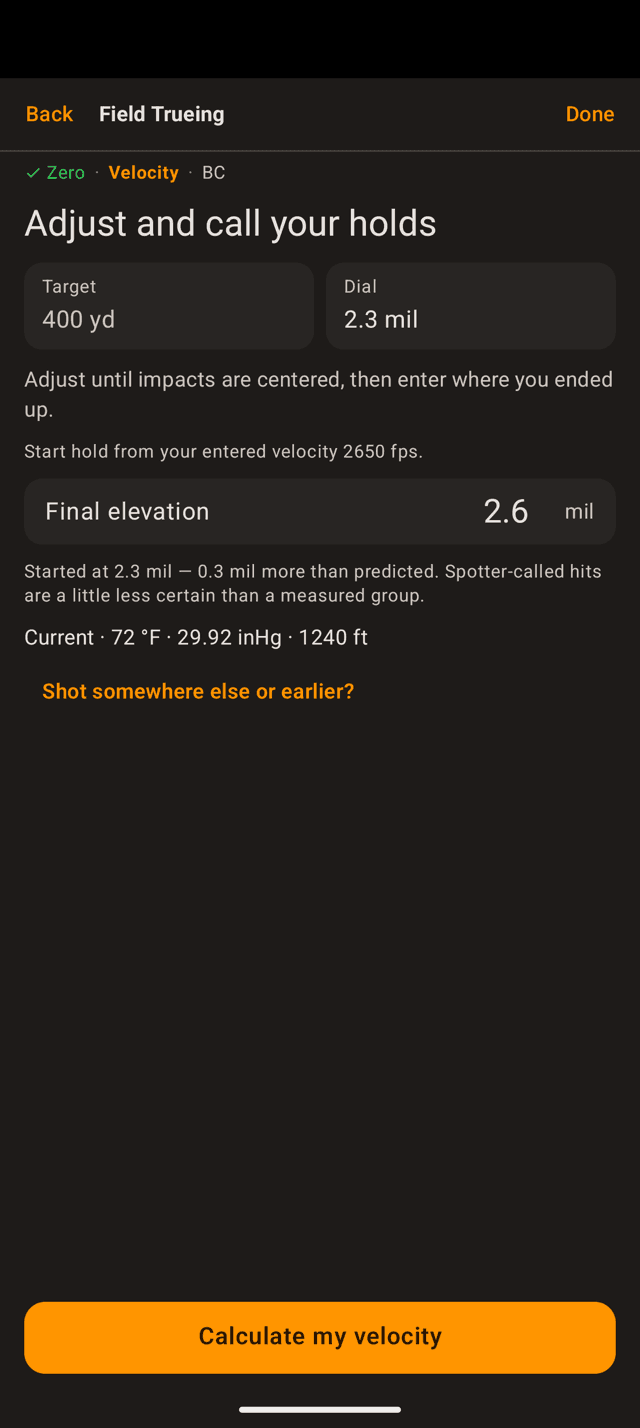
Enter where you ended up, not the correction. The app compares it to what it predicted.
Velocity · I'll adjust and call
Or report the hold that centred it
Start at the predicted hold. Adjust, dialled or held in the reticle, until impacts are centred on the target, then enter the elevation you finished on.
The app says so plainly on the screen: a spotter-called hit is a little less certain than a group you measured. Use this when you cannot get downrange, not by default.
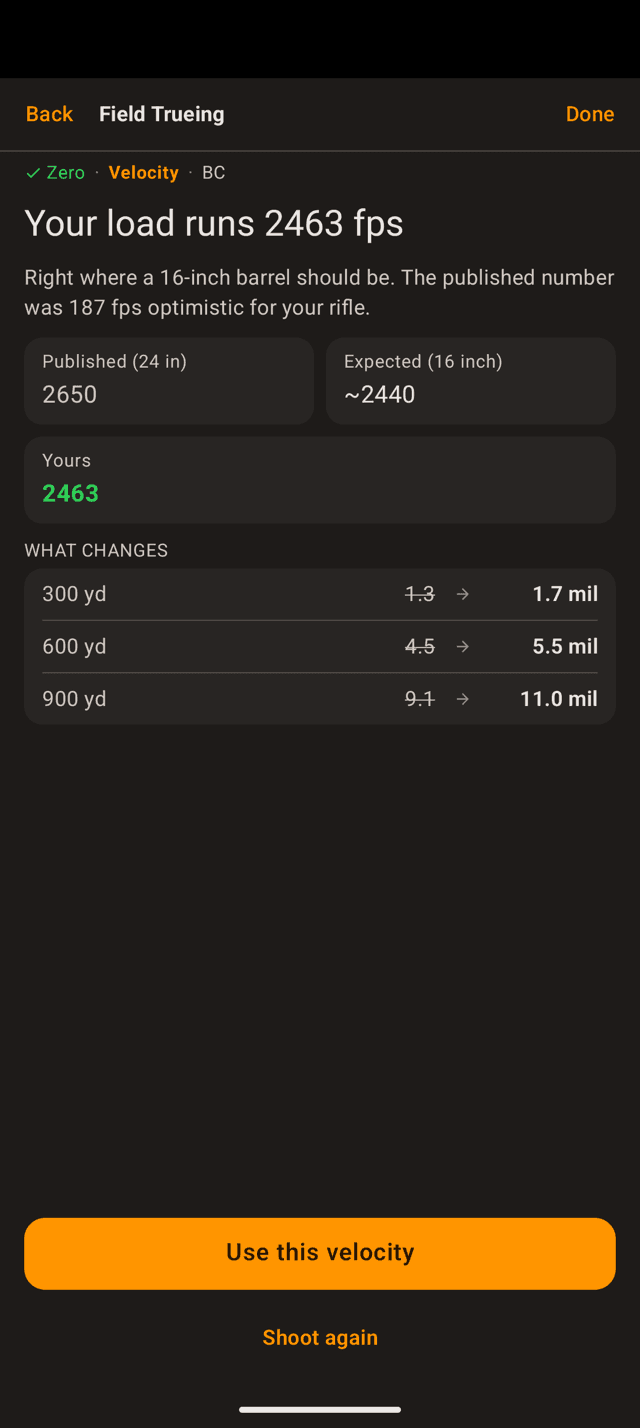
Published, what a barrel your length should give, and yours. Then the holds that change.
Velocity · the answer
What your rifle actually runs
The result names the number, says how it compares to what the app expected, and shows what it does to your holds at three ranges.
Happy with it? Use this velocity saves it and moves on to BC. Something felt off about that group, like bad wind or a called flier? Shoot again takes you back to the entry screen.
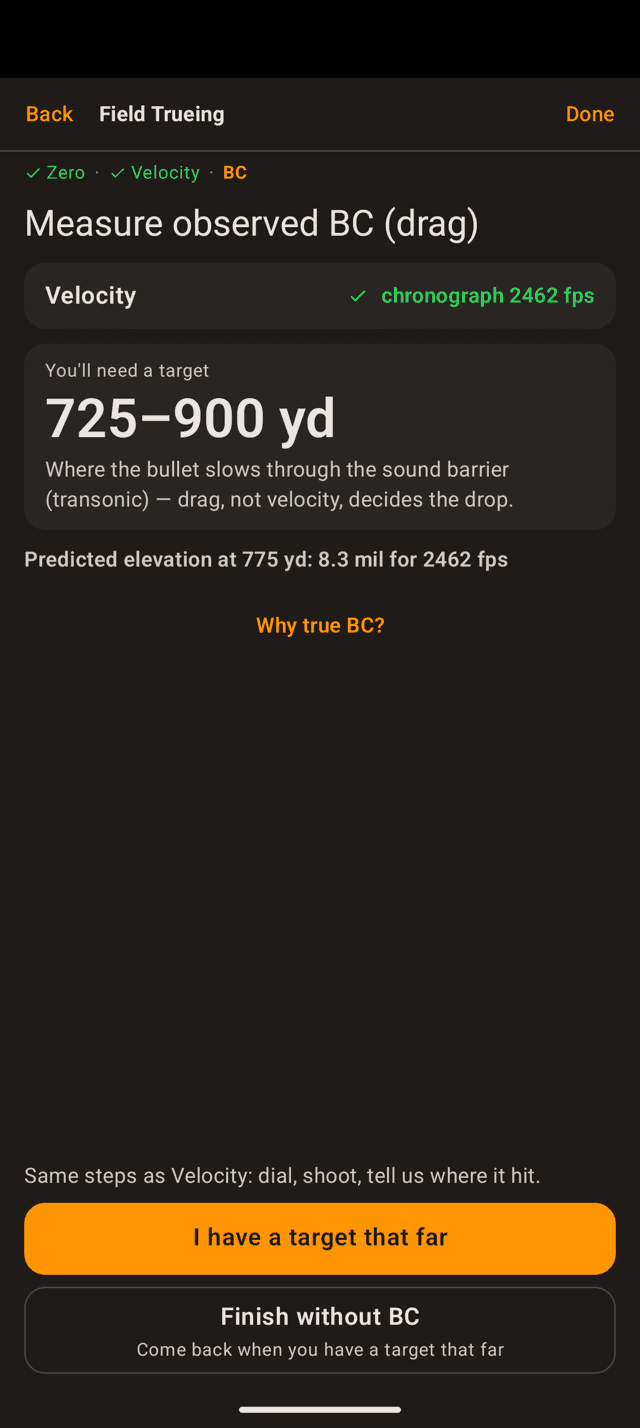
BC only unlocks behind a measured velocity. The range it asks for is farther than the velocity band.
Step 4
True BC, once velocity is measured
BC describes how well your bullet holds speed. Published BCs come off a test barrel and a different lot, and the difference only shows up far out, which is exactly where you feel it.
This stage stays locked until velocity has been chronographed or trued on target. Speed gets measured where speed dominates, so drag can be read where drag dominates.
No target that far today? Finish without BC keeps your trued velocity and closes out. Come back to it any time.
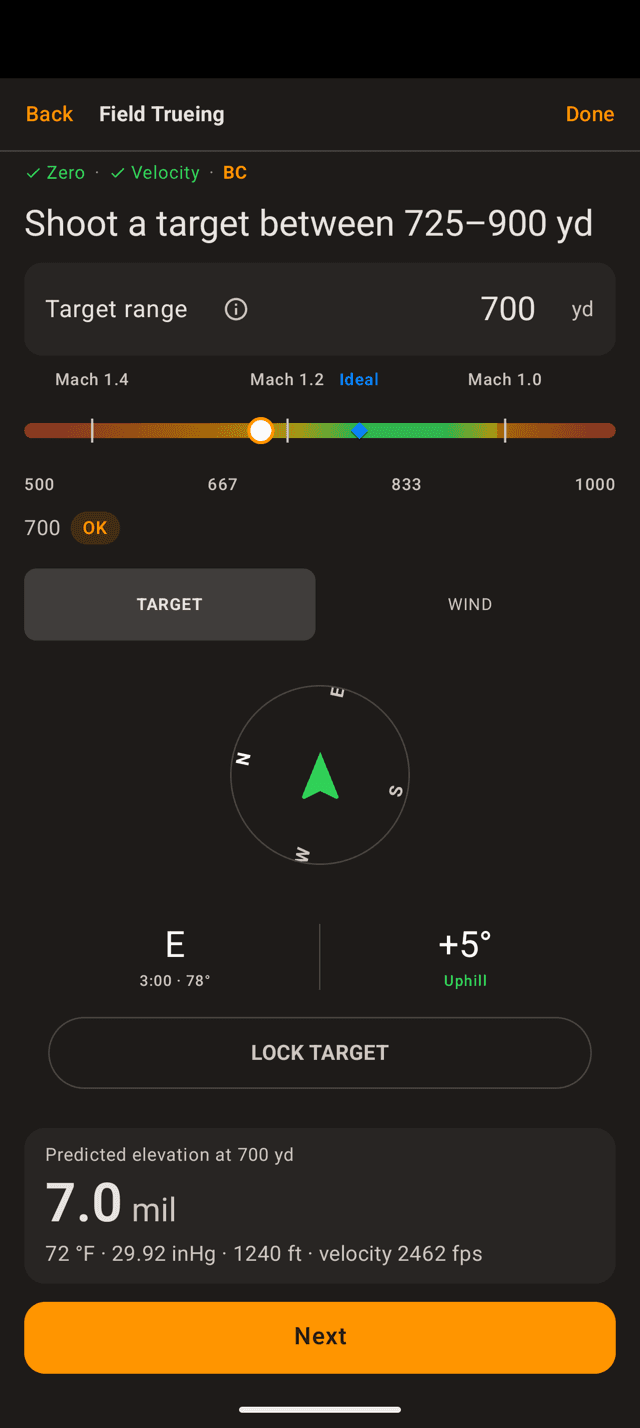
The Mach ticks show where the bullet slows through the sound barrier. Green sits around it.
BC · the target
Farther, into the transonic band
The BC band sits where the bullet is slowing through the sound barrier and drag, not speed, decides the drop. The app computes it from your load and today's air, so read the number on your screen rather than reusing one from a friend's rifle.
Type a range that is too close and Next stays disabled. That is deliberate. Closer in, speed and drag are tangled together and a miss cannot tell the app which one it was looking at.
From here the steps repeat: pick the method, dial, shoot, tell the app where it hit.
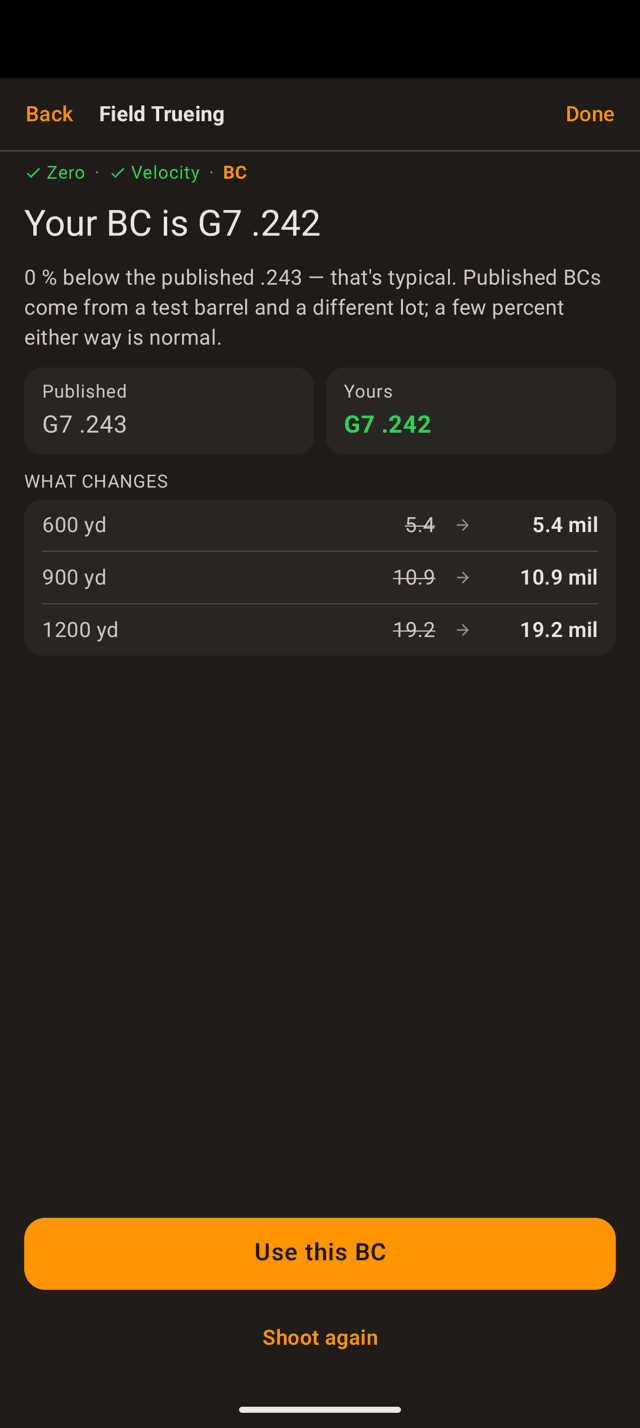
A few percent either way is normal. The table shows what moves.
BC · the answer
Your BC, against the published one
Same shape as the velocity result: your number, how it sits against published, and the holds it changes. Note the ranges in the table are farther out. That is where BC earns its keep.
Use this BC saves it and finishes the run.
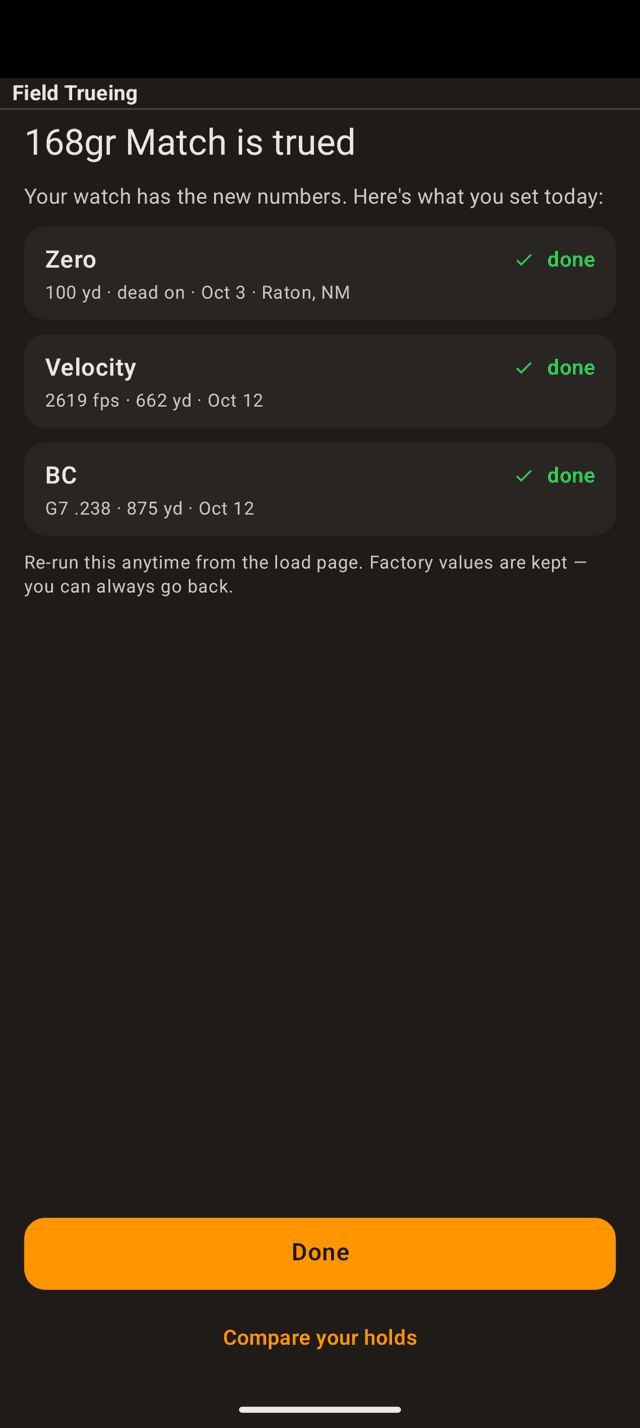
Each row carries its provenance: the value, the range, the date, and the place.
Step 5
Done, and what it changed
The summary lists what you set today and where each number came from. Tap Done and you are back on the load.
Nothing is thrown away. The published values stay on the load, and you can put them back whenever you like.
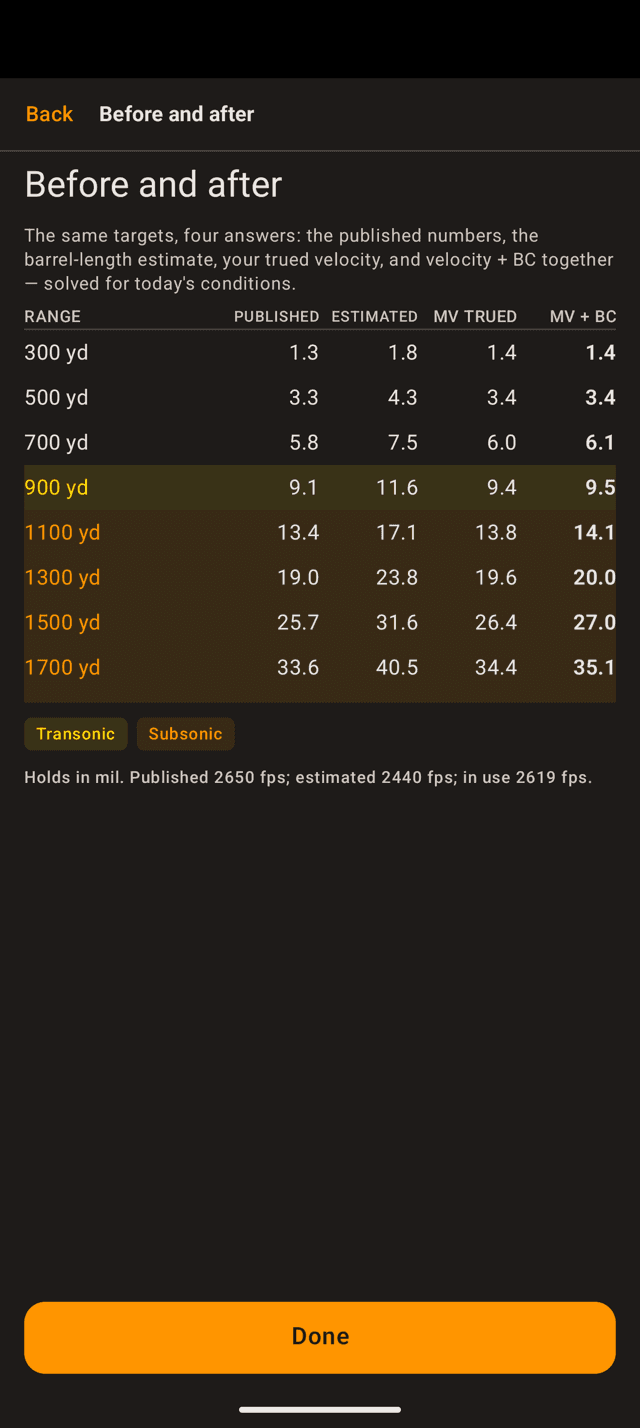
The same targets, solved four ways under today's conditions. Shading marks transonic and subsonic.
Before and after
See the holds side by side
Compare your holds on the summary opens the whole picture: the published numbers, the barrel-length estimate, your trued velocity, and velocity plus BC together.
Read down a row and you can see where trueing mattered. Close in the columns agree. Past transonic they separate by mils.
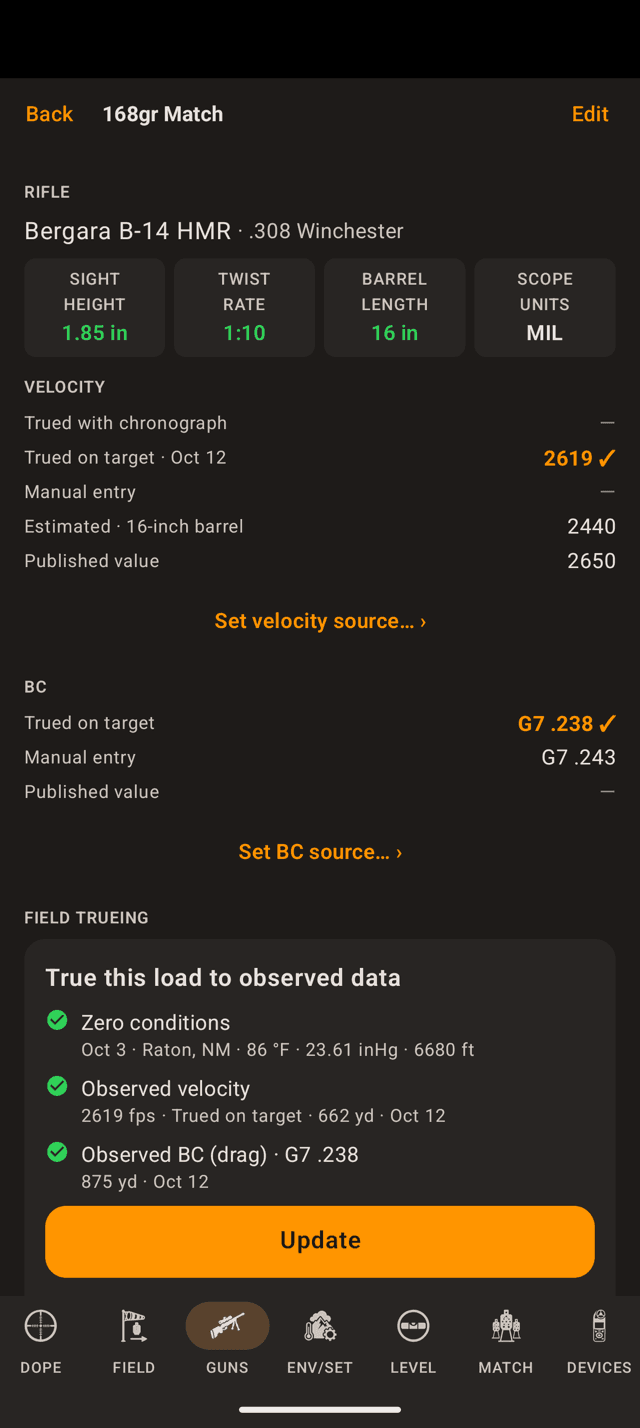
The ladders show every value the load has and which one is in use.
After
Where the numbers show up
Back on the load page, the Velocity and BC sections each show a ladder of everything that value could be (chronograph, trued on target, manual, estimated, published) with a check on the one in use.
From here on, the Range Card, Live Fire, and the watch all solve on the trued numbers. The load list on the watch marks the load TRUED.
The Field Trueing card now reads Update instead of Start, and a Details › button appears with the full history.
When the app pushes back
Most groups come back with a plain answer. Two other verdicts exist, and both are the app telling you something useful rather than refusing to work.
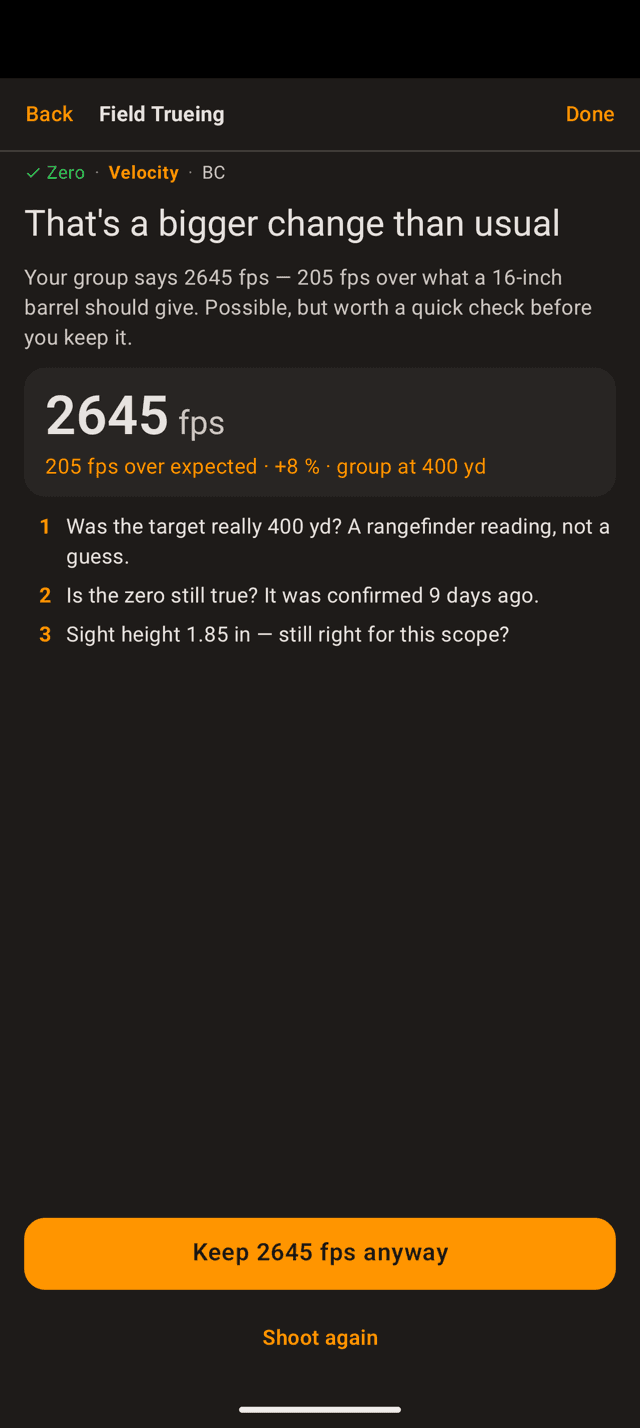
“A bigger change than usual”
The answer is possible, but far enough from expected to be worth a second look. Work the checklist on the screen (the range, how old the zero is, the sight height), then either keep the number anyway or shoot the group again.
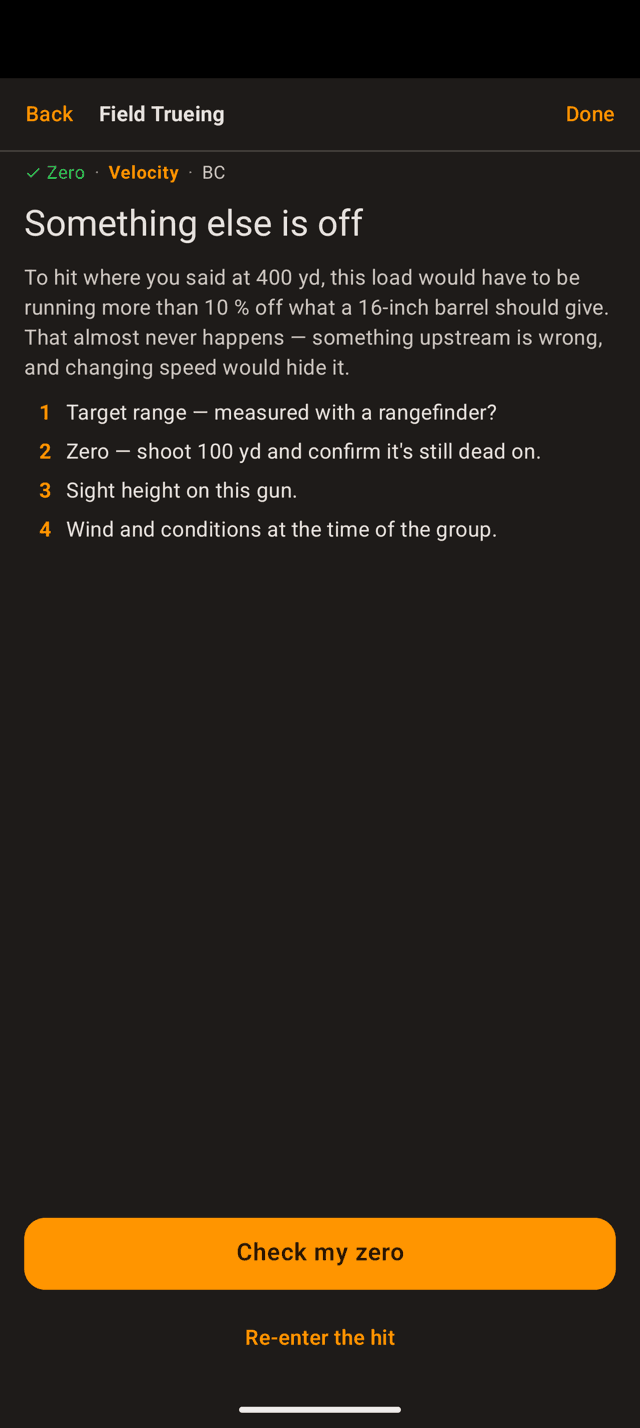
“Something else is off”
The app will not save this one. To put your group where you said, the load would have to be so far off that something upstream must be wrong, and changing velocity would only hide it. Fix the cause first, usually the range or the zero.
Changing your mind
Nothing you measure overwrites anything. The load keeps every value it has ever had, and you pick which one is in use.
- Go back to the box number. On the load page, tap
Set velocity source… ›under the velocity ladder and choose the published value, an earlier trued value, or your own number. BC has the sameSet BC source… ›once it has been trued. - Measure again.
Updateon the Field Trueing card re-runs the wizard. Earlier measurements move into the history rather than disappearing. - See the history.
Details ›opens the full record (every measurement, its range, date, and conditions) with the one in use marked. You can restore an old one from there. - It travels with the load. Trued values and their history are part of the load, so they sync to the watch and come along in your profile backups and exports.
Stuck somewhere?
- Start opens an unlock card, not the wizard. Field Trueing is a Pro feature. The card is where the free trial starts.
- “That's right” will not let you continue. The zero has to be saved through the wizard at least once. Tap
Change zero…, check the fields, and tapSave zeroeven if nothing changed. - The BC stage is locked. It needs a measured velocity: a chronograph reading or a group trued on target. An estimate from barrel length does not unlock it.
- Next is greyed out on the BC target screen. Your range is closer than the app can read drag at. That refusal is on purpose; you need a farther target.
- The trued holds do not match your impacts. Check the zero first, then the range you trued at. A zero that has drifted moves every trued number with it.
- There is no trueing on the watch. That is by design. The wizard runs on the phone, and the watch shows a trued velocity or BC locked, with
Change on phoneunder it.
One more thing: trueing corrects the solver, it does not replace confirming your dope. Verify your data and shoot safely, responsibly, and within the law.
Still stuck? support@wristdope.com