
Manual / Index Cards and Card Export
Index Cards and Card Export
The range card's share sheet prints more than the full page. It makes a 3 × 5 index card for a forearm data sleeve, a wind rose and an MPBR card, in the hold unit you pick, and prints them four to a sheet.
Pro
Export and print are part of the one-time Pro upgrade.
Phone only
iPhone and Android phones. The watch has no export.
What you see
The preview is the exact card you share or print.
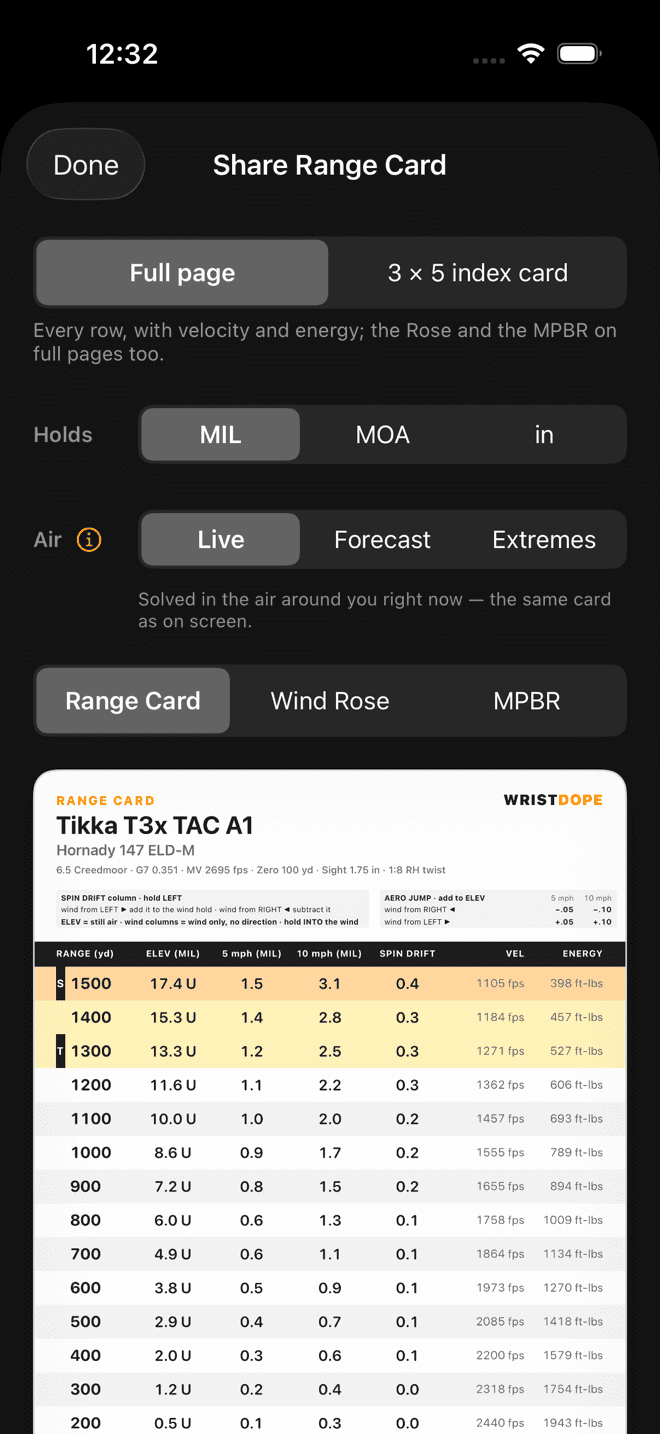
Format, Holds and Air at the top, then the three tabs and the preview.
Step 1
Open the share sheet
Tap the share icon in the RANGE CARD header on the DOPE page. The sheet opens at once and solves the card inside it; until the first card lands the preview reads Solving…. From the top down:
- Format:
Full page, every row with velocity and energy, or3 × 5 index card, holds only, sized for a forearm data sleeve. Your pick is remembered. - Holds:
MIL,MOAorin(cmon a metric card). It starts on the unit your card is in every time you open the sheet, and applies to every card on it. - Air:
Livesolves the card in the air around you, the same card as on screen.ForecastandExtremessolve it for another place and date. - The tabs:
Range Card,Wind RoseandMPBR, each with its own preview and options under it.
Tap the preview to open it full screen, where you can pinch to zoom and drag around the card.
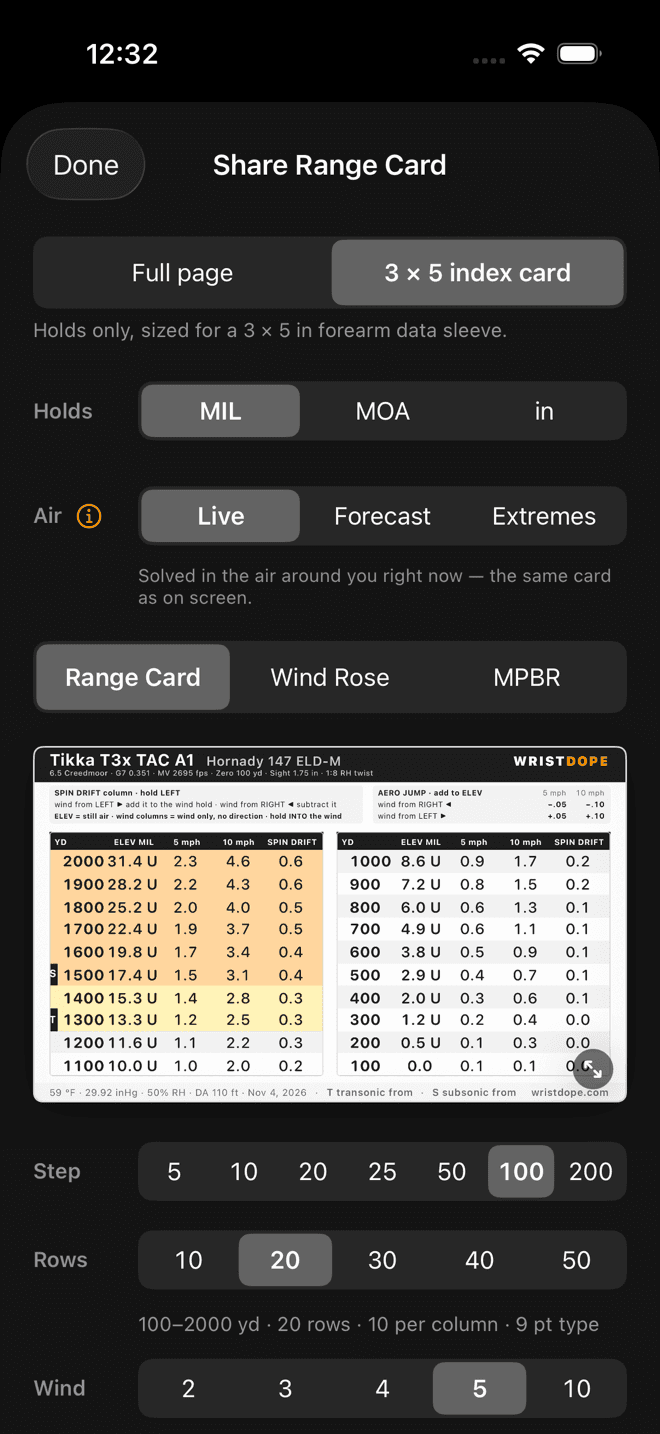
Step 100, 20 rows: 100 to 2000 yards on one card, two columns of ten.
Step 2
Pick the 3 × 5 index card
The index card prints range, elevation and the wind columns in two columns on one 5 × 3 in card. It solves its own range rather than copying the on-screen card:
- Step: the distance between rows. The card starts at the step, so a 100 step runs 100, 200, 300.
- Rows: how many rows. Step times rows is the last range, and the line under them says what you chose: the span, the rows per column and the type size.
- Wind and Bands: the wind columns are the interval times one, two, three and on up to the number of bands. A 5 interval with 2 bands prints 5 and 10 mph columns. These are the same two settings as
Export Wind IntervalandExport Wind Bandson the ENV/SET page.
More rows mean smaller type and fewer mean bigger, so an airgunner's card in fives and a long-range card in hundreds both fit. Step and rows are remembered. Metric shooters get metres and round wind steps in their own unit.
Step 3
Add a wind rose or an MPBR card
Two more tabs make one more card each, for the same rifle in the same air, in either format:
- Wind Rose: the complete hold at eight clock directions and a ring for each range, elevation over wind with their letters, spin drift and jump already inside. It draws your lowest and highest wind band side by side, and an arrow on each spoke shows the way the wind blows.
Stepspaces the rings;Autoplaces them at the card's own ranges. - MPBR: your current zero, the zero that reaches farthest with what to dial, and a red dot on top of the scope, side by side on the target with every impact to the reach.
Targetpicks from the target list,Red dotadds or drops the third column, and theHeightrow sets how far the dot sits above the scope.
In the Full page format both print as full portrait pages. A tab that cannot make its card for this rifle says why in place of the preview.
Reading the printed card
The printed card is built to be read in the field without the app. Both formats print it the same way:
- ELEV is still air. The elevation column carries no wind at all, so it is the same whichever way the wind blows.
- Wind columns are wind only, with no direction letter. Read the hold under the wind speed and hold into the wind.
- SPIN DRIFT gets its own column. The box at top left says which way it pushes for your twist, and whether to add it to the wind hold or take it off for a wind from either side.
- AERO JUMP sits in the box at top right: what to add to ELEV for each wind band, from the right and from the left, with its sign.
- A T tab marks the first transonic row and an S tab the first subsonic row; the shading carries on below them.
The header line names the cartridge, the BC and muzzle velocity (with “trued” when they are), the zero, the sight height and the twist. The footer carries the air the card was solved in, and on a live card the date. A rifle with no twist rate gets no spin drift column and zero for jump.
Card not coming out right?
- Tapping share opens the upgrade sheet. Export and print are part of the one-time Pro upgrade. The card on screen stays free.
- The type on the index card is tiny. Too many rows for one card. Pick a bigger step or fewer rows; the line under them shows the type size as you change them.
- The printed card came out the wrong size. Print at 100 %, with no scaling to fit the page. AirPrint can shrink a page to the paper if you let it.
- The elevation column doesn't match the screen. The screen solves your wind call, aerodynamic jump included. The card prints still air and puts jump in its own box. Add the jump for your wind and the two agree.
- The Wind Rose or MPBR tab shows no card. It needs something this rifle lacks, like a wind band or a sight height, and the line in place of the preview says which.
Related: Range Card and Dope Card covers the on-screen card the export starts from. Guns and Loads covers the twist, sight height and BC the card prints.
Step 1
Open the share sheet
Tap the share icon in the RANGE CARD header on the DOPE page. The sheet opens at once and solves the card inside it; until the first card lands the preview reads Solving…. From the top down:
- Format:
Full page, every row with velocity and energy, or3 × 5 index card, holds only, sized for a forearm data sleeve. Your pick is remembered. - Holds:
MIL,MOAorin(cmon a metric card). It starts on the unit your card is in every time you open the sheet, and applies to every card on it. - Air:
Livesolves the card in the air around you, the same card as on screen.ForecastandExtremessolve it for another place and date. - The tabs:
Range Card,Wind RoseandMPBR, each with its own preview and options under it.
Tap the preview to open it full screen, where you can pinch to zoom and drag around the card.
Step 2
Pick the 3 × 5 index card
The index card prints range, elevation and the wind columns in two columns on one 5 × 3 in card. It solves its own range rather than copying the on-screen card:
- Step: the distance between rows. The card starts at the step, so a 100 step runs 100, 200, 300.
- Rows: how many rows. Step times rows is the last range, and the line under them says what you chose: the span, the rows per column and the type size.
- Wind and Bands: the wind columns are the interval times one, two, three and on up to the number of bands. A 5 interval with 2 bands prints 5 and 10 mph columns. These are the same two settings as
Export Wind IntervalandExport Wind Bandson the ENV/SET page.
More rows mean smaller type and fewer mean bigger, so an airgunner's card in fives and a long-range card in hundreds both fit. Step and rows are remembered. Metric shooters get metres and round wind steps in their own unit.
Step 3
Add a wind rose or an MPBR card
Two more tabs make one more card each, for the same rifle in the same air, in either format:
- Wind Rose: the complete hold at eight clock directions and a ring for each range, elevation over wind with their letters, spin drift and jump already inside. It draws your lowest and highest wind band side by side, and an arrow on each spoke shows the way the wind blows.
Stepspaces the rings;Autoplaces them at the card's own ranges. - MPBR: your current zero, the zero that reaches farthest with what to dial, and a red dot on top of the scope, side by side on the target with every impact to the reach.
Targetpicks from the target list,Red dotadds or drops the third column, and theHeightrow sets how far the dot sits above the scope.
In the Full page format both print as full portrait pages. A tab that cannot make its card for this rifle says why in place of the preview.
Reading the printed card
The printed card is built to be read in the field without the app. Both formats print it the same way:
- ELEV is still air. The elevation column carries no wind at all, so it is the same whichever way the wind blows.
- Wind columns are wind only, with no direction letter. Read the hold under the wind speed and hold into the wind.
- SPIN DRIFT gets its own column. The box at top left says which way it pushes for your twist, and whether to add it to the wind hold or take it off for a wind from either side.
- AERO JUMP sits in the box at top right: what to add to ELEV for each wind band, from the right and from the left, with its sign.
- A T tab marks the first transonic row and an S tab the first subsonic row; the shading carries on below them.
The header line names the cartridge, the BC and muzzle velocity (with “trued” when they are), the zero, the sight height and the twist. The footer carries the air the card was solved in, and on a live card the date. A rifle with no twist rate gets no spin drift column and zero for jump.
Card not coming out right?
- Tapping share opens the upgrade sheet. Export and print are part of the one-time Pro upgrade. The card on screen stays free.
- The type on the index card is tiny. Too many rows for one card. Pick a bigger step or fewer rows; the line under them shows the type size as you change them.
- The printed card came out the wrong size. Print at 100 %, with no scaling to fit the page. Some print services scale to fit by default; turn it off.
- The elevation column doesn't match the screen. The screen solves your wind call, aerodynamic jump included. The card prints still air and puts jump in its own box. Add the jump for your wind and the two agree.
- The Wind Rose or MPBR tab shows no card. It needs something this rifle lacks, like a wind band or a sight height, and the line in place of the preview says which.
Related: Range Card and Dope Card covers the on-screen card the export starts from. Guns and Loads covers the twist, sight height and BC the card prints.
Still stuck? support@wristdope.com