
Manual / Range Card and Dope Card
Range Card and Dope Card
The range card is the whole table at once: every distance you might shoot, with the hold for each, re-solved for the air you are standing in. It lives on your wrist and on your phone, and when you want it on paper it prints as a self-documenting dope card for the armboard.
Live, not stored
Every row re-solves when the conditions move.
Trim it
Min, max and step, so the card is only ranges you shoot.
Print is Pro
The table on screen is free; the export is part of Pro.
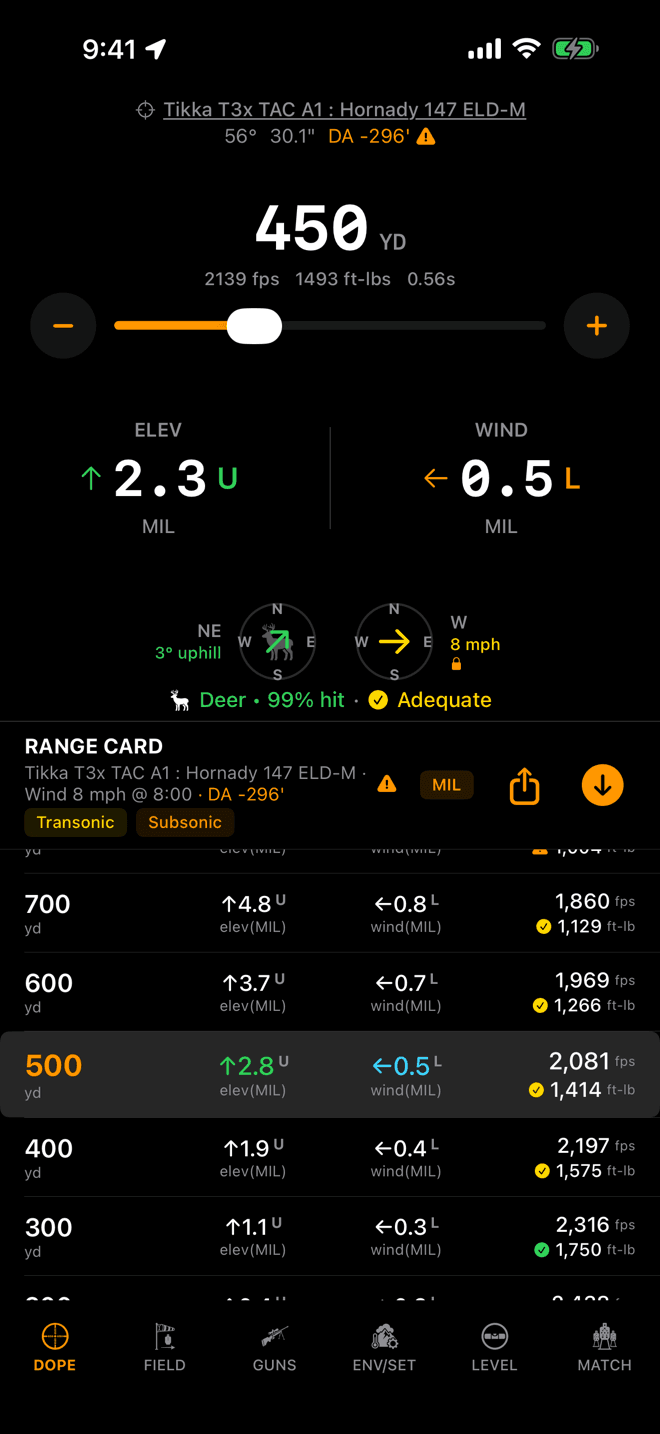
On iPhone the range card shares the DOPE page with Live Fire. The highlighted row is the range you have dialled.
Step 1
Read the live card
Every row is a distance with the two numbers you need at it: an elevation hold and a wind hold, in your scope's unit, with a letter for the direction to hold. Velocity and energy ride along on the right.
Nothing on the card is stored. Every row is solved against your active load, your locked wind call and the air you are standing in right now, and it re-solves when any of those move. The header prints the wind and the density altitude it used, so you can always see what the numbers were computed against.
- Tap a row and Live Fire dials to that range. On Apple Watch that also jumps you to the Live Fire page.
- The arrow button flips the sort between near-to-far and far-to-near.
- The
MILchip in the iPhone header flips both hold columns between your scope's dial unit and the linear spread at the target: inches in yards, centimetres in metres. It always wears the unit the columns are in right now. The watch card has no room for it and stays in the scope's unit.
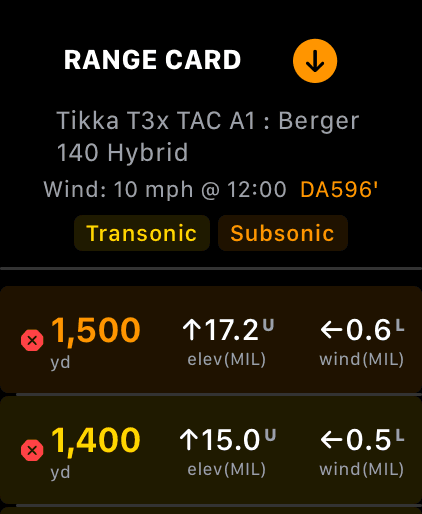
The watch card. The crown scrolls it and centres the selected row; the header carries the same legend.
Step 2
Make the span match your rifle
Out of the box the card runs from 0 to 1,500 yards in 100-yard steps. For most rifles that is a lot of rows you will never shoot. Three settings fix it, on the iPhone's ENV/SET page or in the watch's Settings: Range Card Min Range, Range Card Max Range and Range Card Increment.
An airgun wants 10 to 100 in fives. A 6.5 Creedmoor wants 100 to 1,200 in fifties. Shorter cards are faster cards, on a screen and on paper.
Leave the minimum at 0 and the first row becomes the muzzle: the load's real muzzle velocity and energy, and in the elevation column the optic-over-bore offset your shot starts with, printed as the angle it subtends at your zero range. Wind shows a dash, because at zero distance there is nothing to drift.
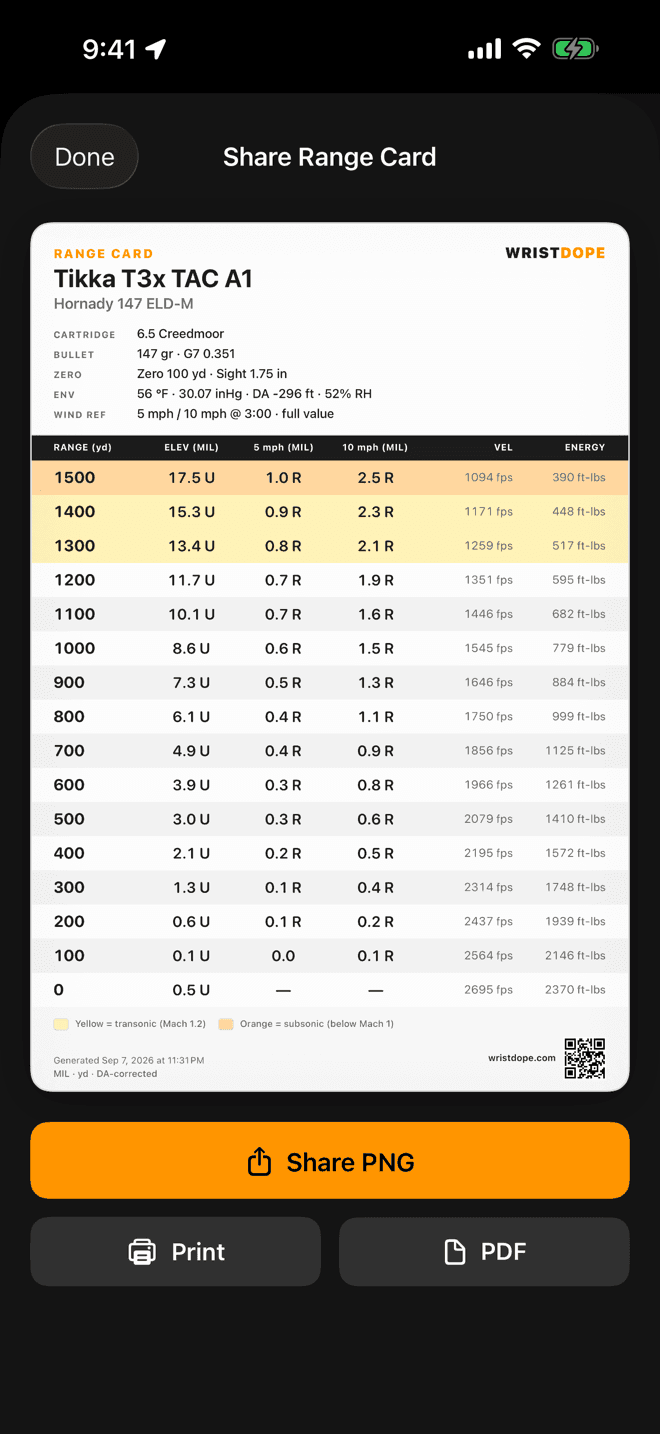
The share sheet renders the card light-themed for paper, with Share PNG, Print and PDF underneath.
Step 3
Print it for the armboard
Tap the share icon in the RANGE CARD header on iPhone. The card that appears is not a screenshot of the dark table. It is a purpose-built printable one, and it documents itself:
- Rifle, load, cartridge, bullet weight and BC.
- Zero range and sight height.
- The temperature, pressure, humidity and density altitude it was solved in, with the date and time.
- Your units, spelled out, so a card in a pocket is never ambiguous.
Then Share PNG for Messages and group chats, PDF for email and Files, or Print straight to an AirPrint printer. The QR code in the footer points at wristdope.com, so a card you hand a squadmate is also the way they get the app.
The table on screen is free on every tier. Exporting and printing it is part of Wrist Dope Pro.
The two wind columns on the printed card
The live card holds one wind: yours, the one you locked. A printed card cannot. The wind will have changed by the time you unfold it. So the export replaces your call with two fixed reference columns, and you interpolate in the field the way you always have.
- Both are a full-value 3 o'clock crosswind, straight across your line of fire, the worst case. A wind at 1 or 2 o'clock is a fraction of the printed number.
- They default to 5 and 10 mph. Change them with
Export Wind — LowandExport Wind — Highon the ENV/SET page. - Each column is solved on its own. Wind holds do not scale linearly, so doubling the 5 mph column is not the 10 mph answer.
Elevation is unaffected: a pure crosswind changes neither drop nor velocity, so one elevation column serves both.
Yellow rows and orange rows
A bullet slowing through the sound barrier gets shoved around in ways no drag model predicts well. The card shades those rows rather than pretending the holds are as good as the ones above them:
- Yellow: transonic. The bullet is below Mach 1.2 and entering the messy part. Treat these holds as a starting point, not a promise.
- Orange: subsonic. Below the speed of sound. Where a shading legend appears in the header, this is what it is telling you.
The threshold moves with air temperature, because the speed of sound does. Colder air, closer shading.
Card not doing what you expect?
- The share icon is greyed out. There are no rows to export. Activate a load in the Guns tab first. The card generates once a load is active.
- Tapping share opens the upgrade card. Export and print are part of Wrist Dope Pro. The table itself, and scrolling and sorting it, stay free.
- The printed holds don't match the screen. They are not supposed to. The screen solves your locked wind call; the print solves two fixed reference crosswinds. Elevation should match.
- A warning triangle beside the DA in the header. At least one condition behind those rows is a stand-in rather than a reading, so the card was solved on the standard atmosphere. Tap it, or see Environment and Units.
- Holds changed and you didn't touch the card. That is the point. A new wind call, a change in the air, a different load, or an edit to the active one all re-solve every row.
Related: Target and Wind covers the wind call the live card solves. How wind affects your bullet explains why the columns don't scale.
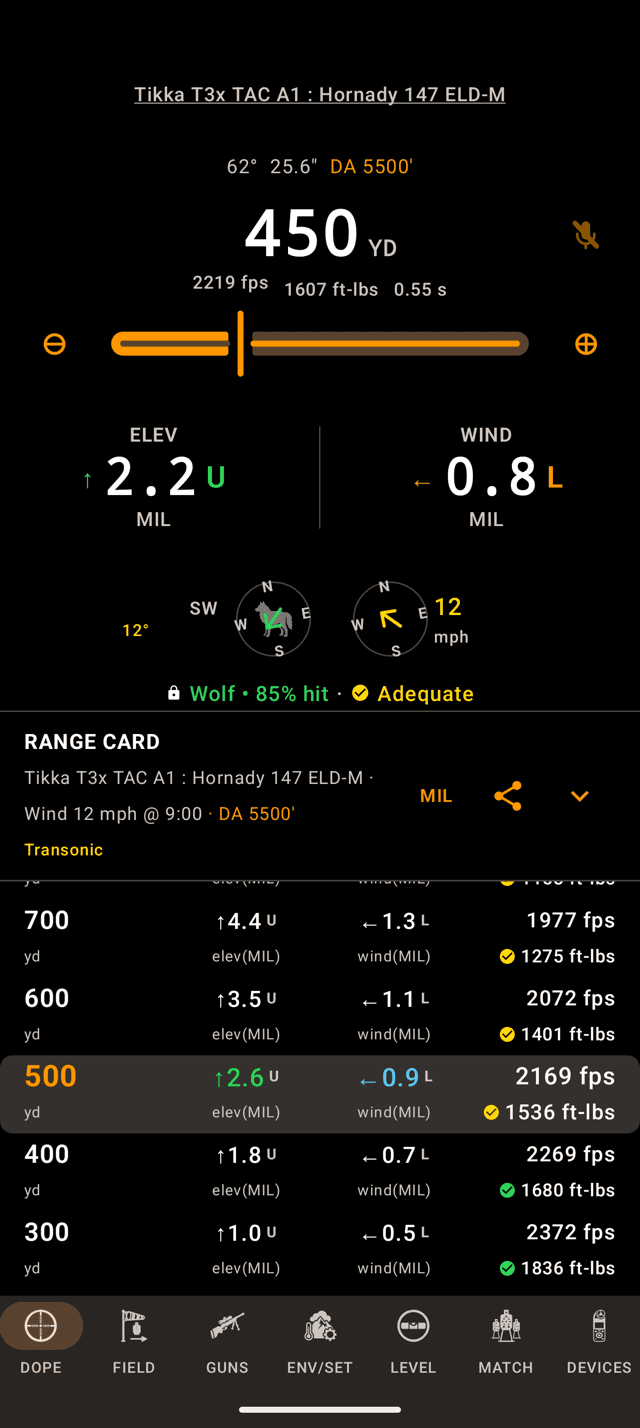
The range card shares the DOPE page with Live Fire. The highlighted row is the one nearest the range you dialled.
Step 1
Read the live card
Every row is a distance with the two holds you need at it, elevation and wind, in your scope's unit, with a letter for the direction to hold. Velocity and energy ride along on the right.
Nothing on the card is stored. Every row is solved against your active load, your locked wind call and the air you are standing in right now, and it re-solves when any of those move. The header prints the wind and the density altitude it used, so you can always see what the numbers were computed against.
- Tap a row. It lights up and Live Fire dials to that range, right above it on the same page.
- The arrow flips the sort between far-to-near and near-to-far. Far-to-near is where it starts.
- The
MILchip flips both hold columns between your scope's unit and the spread at the target: inches in yards, centimetres in metres. It always shows the unit the columns are in right now.
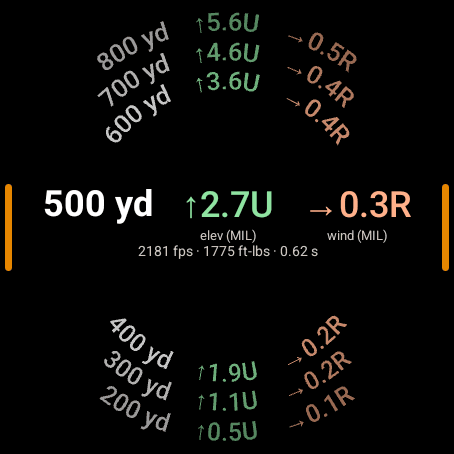
On the watch the rows curve around the edge. The bezel or crown moves the band.
Step 2
The card on your wrist
The watch draws the card around the edge of the screen. The row in the band across the middle is the selected one: its holds big, and its velocity, energy and time of flight under them. Turn the bezel or crown, or drag, to walk through the rows.
- Tap the band. Live Fire dials to that range and the watch jumps to it.
- Press and hold the band. The sort flips. There is no arrow button on the watch.
- Transonic and subsonic rows take the yellow and orange from the shading below. The watch card has no header or legend, and no inches chip; it stays in the scope's unit.
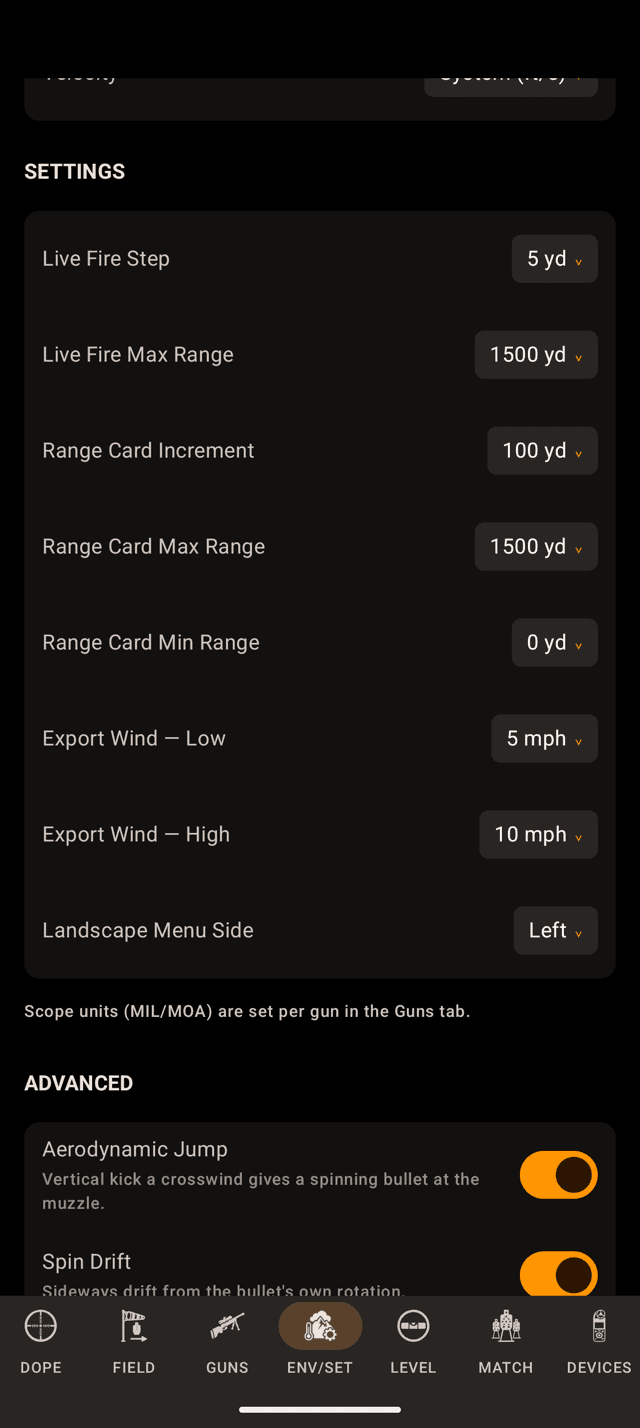
ENV/SET on the phone. The watch has the same three under Range Card in its Settings.
Step 3
Make the span match your rifle
Out of the box the card runs from 0 to 1,500 yards in 100-yard steps. For most rifles that is a lot of rows you will never shoot. Three settings fix it: Range Card Min Range, Range Card Max Range and Range Card Increment in the SETTINGS section of ENV/SET. On the watch they are Min Range, Max Range and Increment under Range Card in Settings. Change them on either one and the other follows.
An airgun wants 10 to 100 in fives. A 6.5 Creedmoor wants 100 to 1,200 in fifties. Shorter cards are faster cards, on a screen and on paper.
Leave the minimum at 0 and the first row becomes the muzzle: the load's real muzzle velocity and energy, and in the elevation column the optic-over-bore offset your shot starts with, printed as the angle it subtends at your zero range. Wind shows a dash, because at zero distance there is nothing to drift.
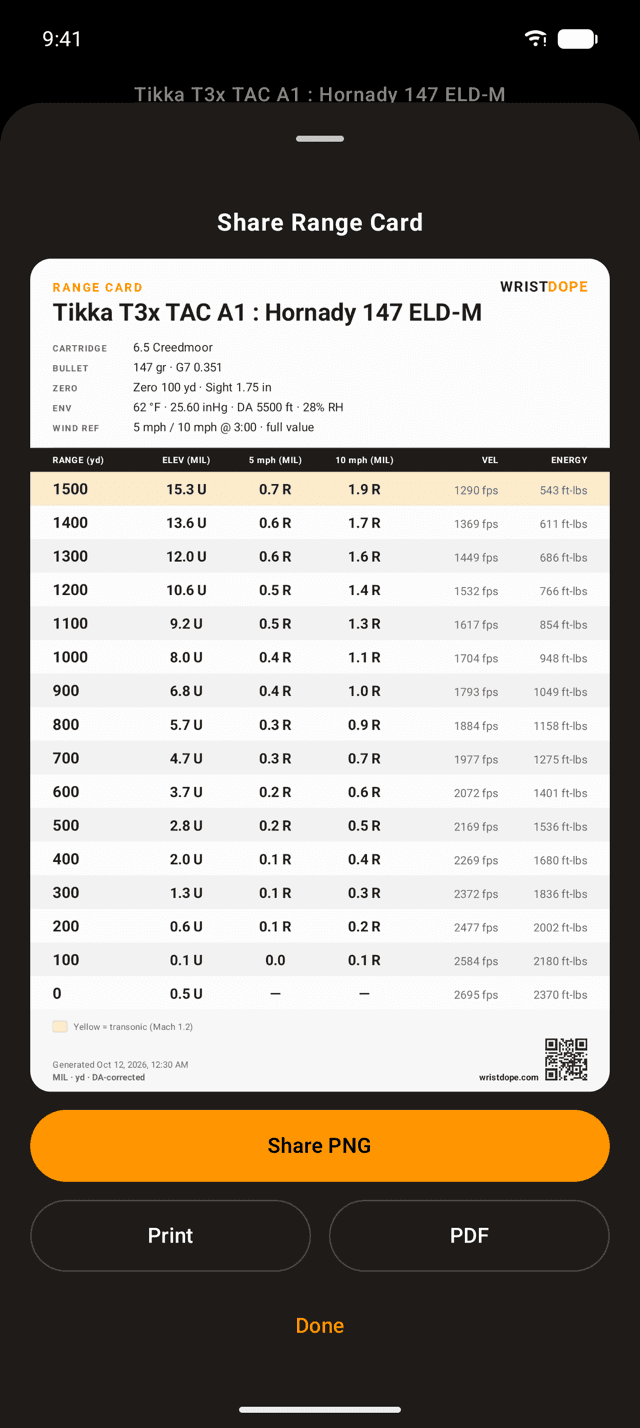
The share sheet draws the card light for paper, with Share PNG, Print and PDF under it.
Step 4
Print it for the armboard
Tap the share icon in the RANGE CARD header. It opens a card drawn light for paper rather than a copy of the dark table, and the card documents itself:
- Rifle, load, cartridge, bullet weight and BC.
- Zero range and sight height.
- The temperature, pressure, humidity and density altitude it was solved in, with the date and time.
- Your units, spelled out, so a card in a pocket is never ambiguous.
Share PNG and PDF hand the file to Android's share sheet, so it goes wherever your phone sends things, a group chat or an email. Print opens Android's print dialog, for any printer your phone has a print service for. The QR code in the footer points at wristdope.com, so a card you hand a squadmate is also the way they get the app.
The table on screen is free on every tier. Exporting and printing it is part of the one-time Pro upgrade. The watch has no export.
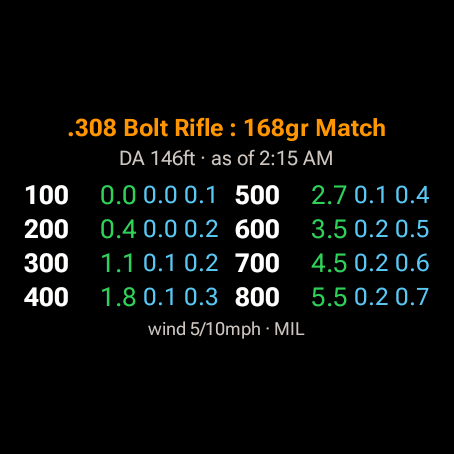
The Range Card tile, one swipe from the watch face.
Step 5
The card as a tile
Wear OS gets something the Apple Watch app does not have: a Range Card tile. Swipe from the watch face to your tiles and the active load's card is there, eight ranges with an elevation hold and two wind holds each, without opening the app.
It takes its rows, spacing and wind speeds from Widgets in the watch's Settings, not from the in-app card, so the tile can step by 100 while the app steps by 25. Watch Face Complications covers those settings and how to add the tile. It is part of the one-time Pro upgrade.
The two wind columns on the printed card
The live card holds one wind: yours, the one you locked. A printed card cannot. The wind will have changed by the time you unfold it. So the export replaces your call with two fixed reference columns, and you interpolate in the field the way you always have.
- Both are a full-value 3 o'clock crosswind, straight across your line of fire, the worst case. A wind at 1 or 2 o'clock is a fraction of the printed number.
- They default to 5 and 10 mph. Change them with
Export Wind — LowandExport Wind — Highon the ENV/SET page. - Each column is solved on its own. Wind holds do not scale linearly, so doubling the 5 mph column is not the 10 mph answer.
Elevation is unaffected: a pure crosswind changes neither drop nor velocity, so one elevation column serves both.
Yellow rows and orange rows
A bullet slowing through the sound barrier gets shoved around in ways no drag model predicts well. The card shades those rows rather than pretending the holds are as good as the ones above them:
- Yellow: transonic. The bullet is below Mach 1.2 and entering the messy part. Treat these holds as a starting point, not a promise.
- Orange: subsonic. Below the speed of sound. Where a shading legend appears in the header, this is what it is telling you.
The threshold moves with air temperature, because the speed of sound does. Colder air, closer shading.
Card not doing what you expect?
- The share icon is grey. There are no rows to export. Make a load active on GUNS first; the card fills in once a load is active.
- Tapping share opens the upgrade sheet. Export and print are part of the one-time Pro upgrade. The table itself, and scrolling and sorting it, stay free.
- Print finds no printer. Android prints through print services. Add or turn one on in your phone's settings, then try
Printagain.PDFworks without one. - The printed holds don't match the screen. They are not supposed to. The screen solves your locked wind call; the print solves two fixed reference crosswinds. Elevation should match.
- A warning triangle beside the DA in the header. At least one condition behind those rows is a stand-in rather than a reading, so the card was solved on the standard atmosphere. Tap it, or see Environment and Units.
- The watch card did not change after you trimmed it on the phone. The span and the sort travel over the connection between phone and watch. Open Wrist Dope on the watch with the phone nearby and give it a moment.
- Holds changed and you didn't touch the card. That is the point. A new wind call, a change in the air, a different load, or an edit to the active one all re-solve every row.
Related: Target and Wind covers the wind call the live card solves. How wind affects your bullet explains why the columns don't scale.
Still stuck? support@wristdope.com