
Manual / Guns and Loads
Guns and Loads
A solver is only as honest as what you feed it. This is every field in the rifle and load editor: what the number is, where to get it, and exactly what it changes in your firing solution. Fill in the four rifle chips and one load properly and the rest of the app has what it needs.
Rifle first
Sight height, zero range, twist rate, barrel length. Set once, good for every load.
Then the ammo
Bullet weight, muzzle velocity, BC and its model. Scan the box to skip the typing.
Both devices
Create and edit on the phone or on the watch alone. It syncs either way.
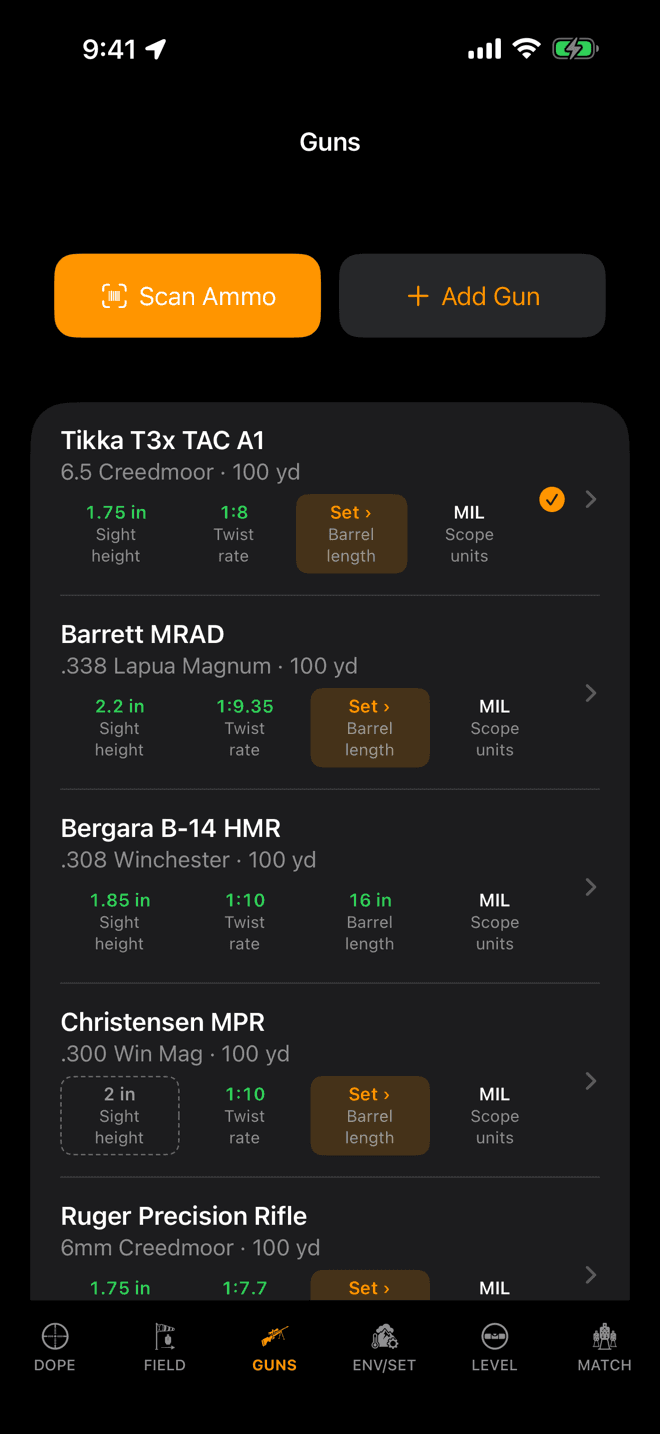
The GUNS page. Green chips are set, an orange “Set ›” chip is missing, a dashed chip is still the default.
Start here
A rifle, and the loads you shoot through it
Wrist Dope splits your profile in two. The rifle holds everything that stays put when you change ammunition: the optic's height over the bore, where it's zeroed, the barrel. Each load under it holds the bullet: weight, velocity, drag.
Every rifle row carries four chips. They are a checklist, not decoration:
- Green: you set this value.
- Orange “Set ›”: nothing stored. Tap it to open the editor on that field.
- Dashed outline: sight height is still exactly 2 in, the value the solver falls back to. Worth confirming against your actual rings.
Free covers three rifle-and-load combinations. Past that, extra loads are kept and shown locked rather than deleted, and the one-time Pro upgrade unlocks them all.
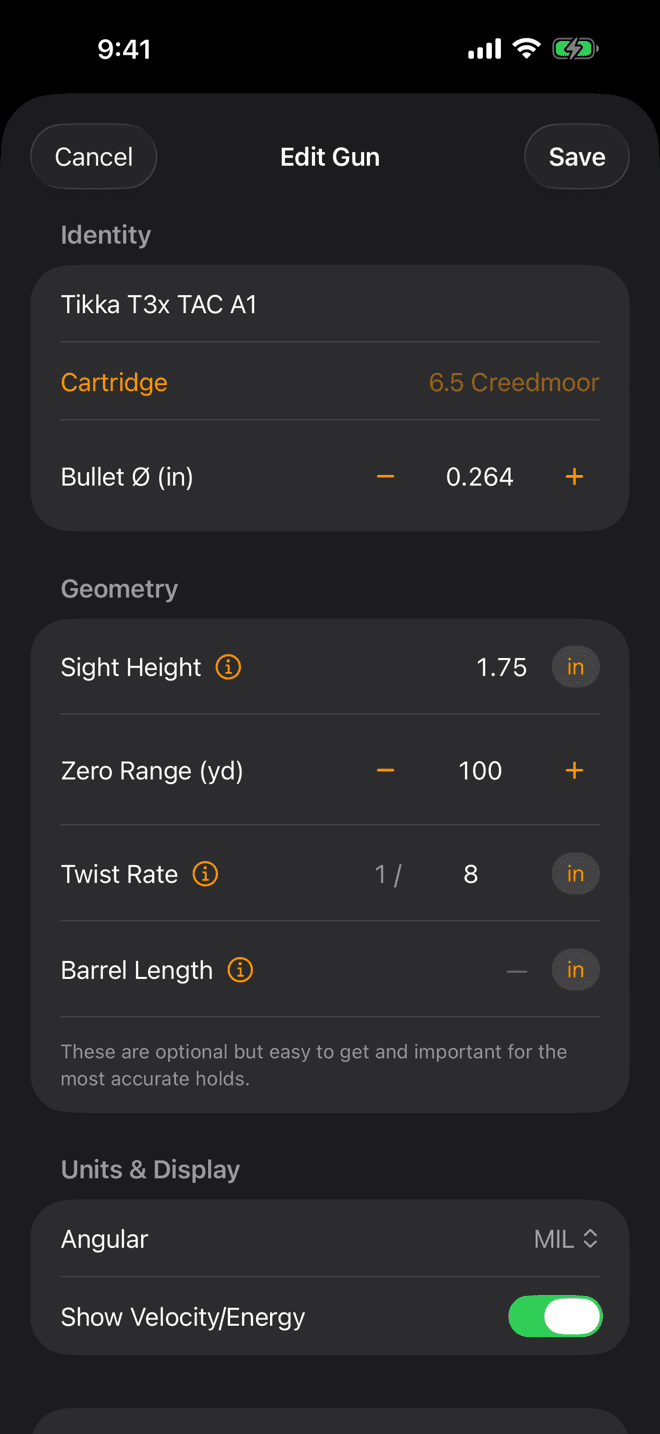
Edit Gun. The ⓘ next to sight height, twist rate and barrel length explains how to measure each one.
The rifle
Every field, and what it moves
Add Gun on the GUNS page, or tap a rifle and then Edit Gun.
Name
Where to get it: Whatever you call it out loud.
Cartridge
Where to get it: Stamped on the barrel; it’s also on the ammo box.
Bullet Ø
Where to get it: Filled in by the cartridge. Override it only for a wildcat or an odd bore.
Sight Height
Where to get it: Bore centreline to scope centreline, straight up. Typically 1.5 to 2.0 in on a bolt gun, about 2.6 in on an AR with a flat-top mount.
Zero Range
Where to get it: The distance you actually sighted in at.
Twist Rate
Where to get it: Stamped on the barrel near the chamber or muzzle. 1:8, 1-8 and 1/8 all mean the same thing.
Barrel Length
Where to get it: Bolt face to muzzle crown, action closed and the rifle unloaded. Don't count a brake or a suppressor.
Angular
Where to get it: However your scope turret is marked.
Show Velocity/Energy
Where to get it: Your call.
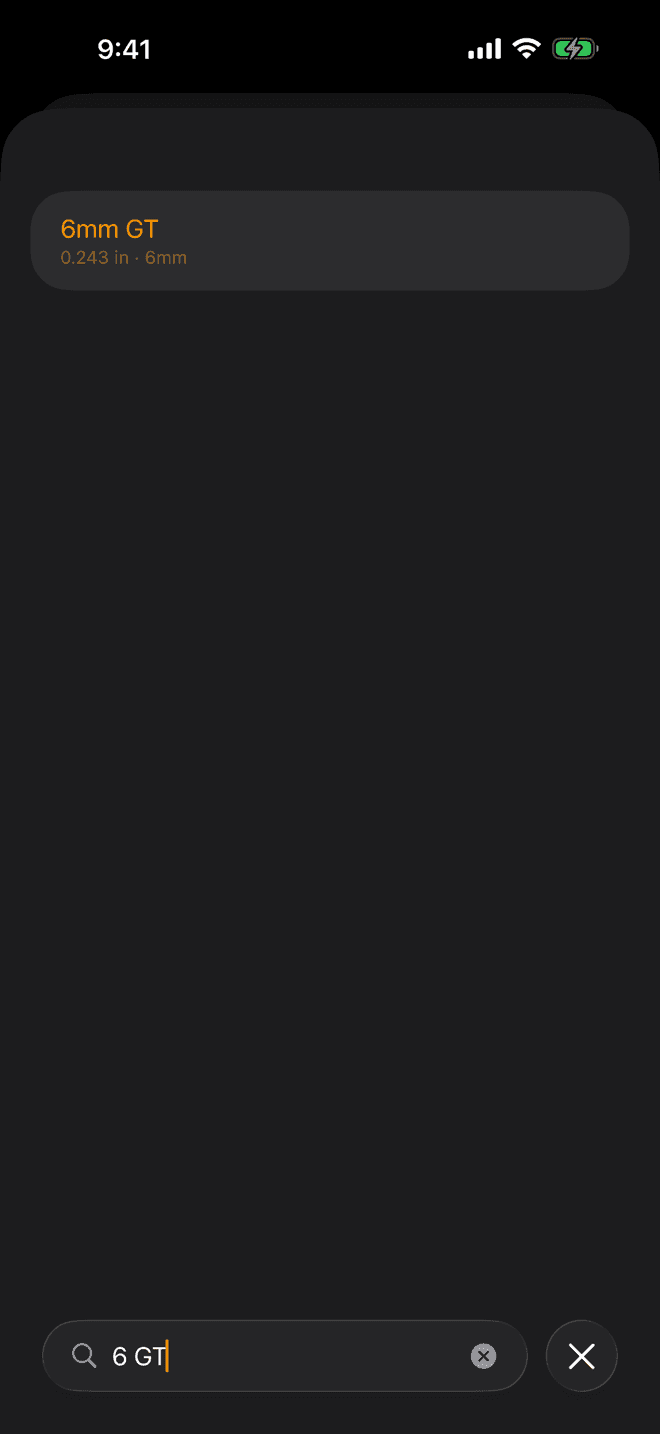
Type it the way you say it. 6 GT finds 6mm GT.
The cartridge
Find it in the cartridge library
The Cartridge row opens the cartridge library: centrefire, magnums, wildcats, big bores, military, rimfire, pistol and airgun calibers. On iPhone the sheet opens on a short list of common cartridges, with a Search cartridges field at the bottom. Everything else, airguns and wildcats included, is a search away rather than a scroll.
Type it the way you would say it. The search ignores spaces, punctuation and “mm”, so 6 GT finds 6mm GT, 6XC finds 6mm XC and 7-08 finds 7mm-08 Remington. A cartridge's other common names count as well.
Results are ranked, not listed by bore. An exact match comes first, then names that start with what you typed, then whole-word matches, then hits in the middle of a word. Within each of those, the common cartridges come first.
5.56×45mm NATO and .223 Wylde are entries of their own, and both match .223 Remington factory ammunition.
On the watch the Cartridge row lists the whole library, with a Search field. If yours really isn't there, Not Listed? then Select by Caliber sets the bore from a list of common calibers.
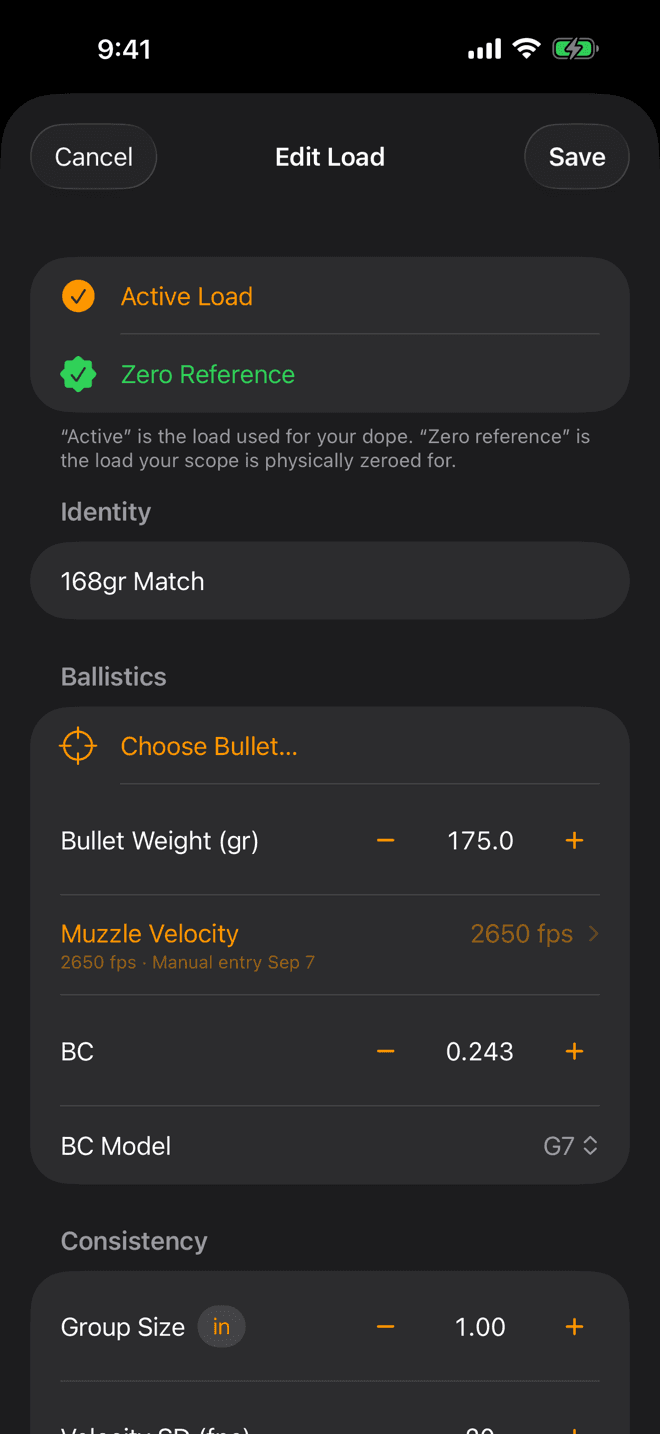
Edit Load. Bullet weight, muzzle velocity, BC and BC model are the four numbers the trajectory is built from.
The load
Bullet, velocity, drag
Add Load from a rifle's page. On a new load, Start From offers published factory ammunition in that cartridge, and Choose Bullet… offers component bullets at that bore. Either one fills the ballistics in for you.
Name
Where to get it: Whatever’s on the box, or your load book.
Bullet Weight
Where to get it: On the box, in grains.
Muzzle Velocity
Where to get it: Chronograph it if you can. Otherwise the box number, adjusted for your barrel.
BC and BC Model
Where to get it: Published by the bullet maker. Match the model to the number you copied.
Group Size
Where to get it: The extreme spread of a 5-shot group, measured at this rifle’s zero range.
Velocity SD
Where to get it: Your chronograph’s standard deviation over a string.
Factory Load and Manufacturer
Where to get it: The box. Off means a handload.
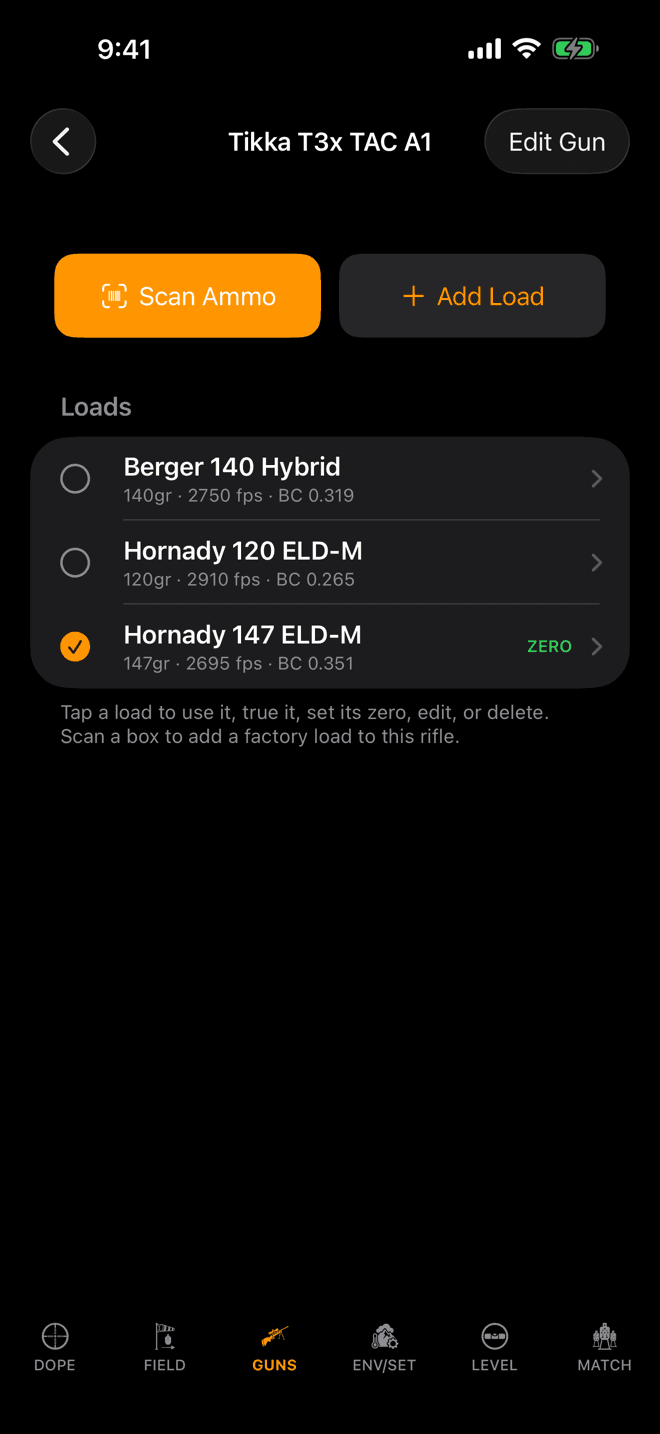
Tap a rifle to see its loads. The orange check is the active load; the green ZERO badge is the zero reference.
Zero
Active load, and the one your scope is zeroed for
Two different marks live on a load, and mixing them up is the most common way to get good numbers from bad dope:
- Active: the load your dope is being solved for right now. One across the whole app.
- Zero Reference: the load your scope is physically zeroed with. One per rifle.
Every other load on that rifle takes its zero from the reference, so you don't re-zero to swap ammunition. If a second load prints high or low of the reference at the zero distance, record that distance as its zero offset and the app converts it to an angular correction on every hold. On iPhone the offset lives on the load’s Field Trueing card; on the watch it’s a row in the load editor.
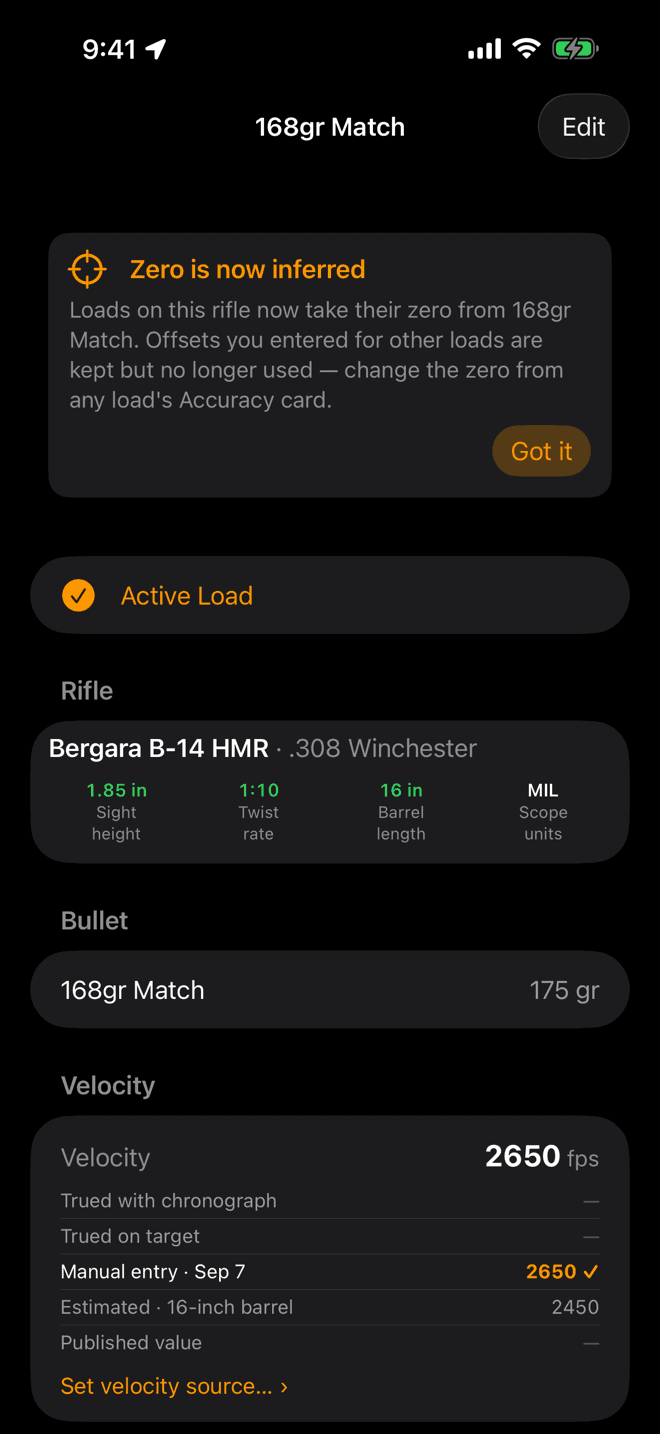
The load page. The ladder lists every velocity the app knows for this load and ticks the one in use.
Provenance
Where the velocity came from
Tap a load and the velocity section answers “where did this number come from?” on its own. Five rungs, highest wins:
- Trued with chronograph: you measured it over a chronograph.
- Trued on target: the app solved it back out of real impacts at distance.
- Manual entry: you typed it.
- Estimated: the published number adjusted for your barrel length. Marked with an asterisk everywhere it appears.
- Published value: straight off the box, from someone else's test barrel.
Nothing here is silent. An estimate never passes itself off as a measurement, and the rungs you aren't using keep their numbers so you can see what you gained. Measuring a velocity properly is its own job. The Field Trueing card at the bottom of the load page walks you through it, and the BC gets the same treatment once the velocity is trustworthy.
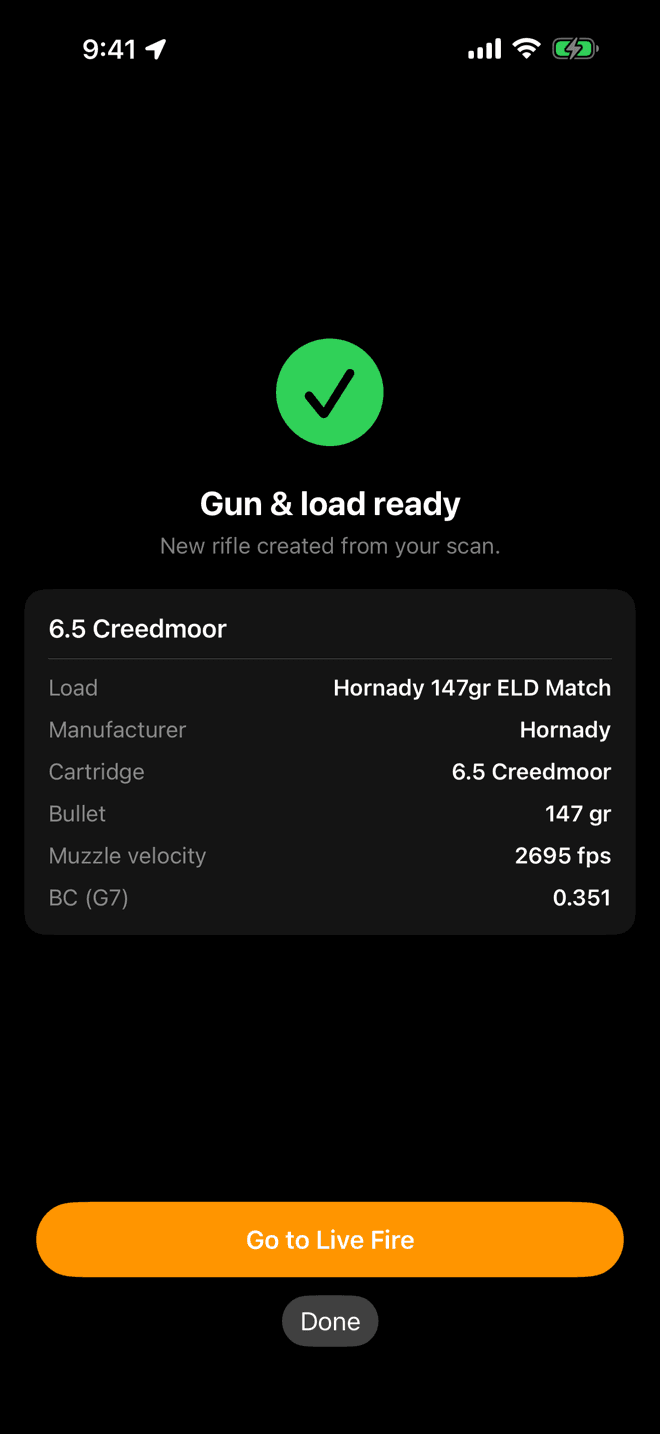
Scan Ammo reads the UPC and builds the rifle and the load, published ballistics already filled in.
Shortcut
Scan the box instead
Scan Ammo sits at the top of the GUNS page and on each rifle's page. Point it at the barcode on a box of factory ammunition and it fills in cartridge, bullet weight, published muzzle velocity and BC, and tags the load with its maker.
- From the GUNS page it can create the rifle too, then hand you straight to Live Fire.
- From inside a rifle it adds the load there. Scanning the same box again recognises it rather than duplicating it.
- The catalog is bundled in the app, covering thousands of factory loads from the major manufacturers. Anything it doesn't know says
Not in the catalog yet, and you enter it by hand.
A scanned load still carries a published velocity from someone else's test barrel. Give the rifle a barrel length, or true it, before you trust it at distance.
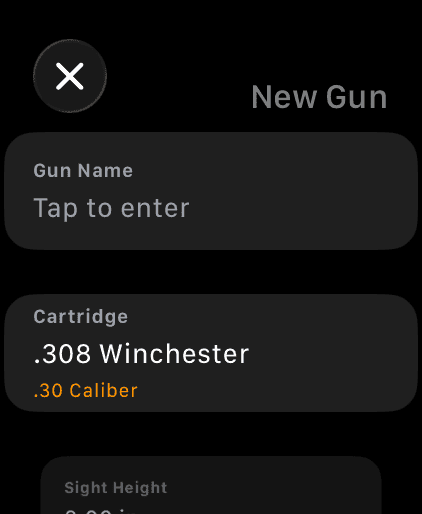
The watch GUNS page creates and edits rifles and loads on its own. The crown drives every number.
On the wrist
Build a rifle without your phone
Swipe to the GUNS page on the watch and you can add a rifle, add a load, edit either, and switch which load is active, with no phone in the equation. Each number opens a crown input: turn for coarse steps, tap the buttons for fine ones.
Two things are deliberately phone-side. Barrel length is set on iPhone. And a velocity that came from a chronograph or from trueing shows as locked with its source underneath and Change on iPhone below it, so a stray turn of the crown can't throw away a measurement you paid for in range time.
Everything you enter on either device syncs to the other.
Duplicating, deleting, backing up
- Duplicate a rifle: press and hold its row on the GUNS page. You get a copy with all of its loads, which is the fast way to log the same rifle with a different optic.
- Delete: deleting a rifle deletes every load under it, on your phone and your watch. The app asks first, and it can't be undone.
- Back it up:
Export Gunsat the bottom of the GUNS page writes one file with every rifle and load, andImport Gunsreads it back. The same file imports into the Android app, so it doubles as the way to move between platforms. Export before a phone swap.
Numbers don't look right?
- The BC model doesn't match the BC. A G1 number sitting in a load set to G7 is the biggest silent error on this page. It looks like a typo's worth of difference on screen and it is feet of miss at distance. Check the bullet maker's page and match the pair.
- The velocity is still the box number. Open the load and read the ladder. If it says
Published value, that speed came from a test barrel that isn't yours. Add a barrel length for an estimate, or true it. - Zero range is wrong. It shifts every hold by the same amount, which reads as “the app is off by a constant”. Confirm it matches where you actually sighted in.
- Sight height is still the default. A dashed chip on the GUNS page means 2 in: the fallback, not a measurement. Tall rings and an AR mount are both well off it.
- Wind holds ignore spin drift. No twist rate means no spin drift and no aerodynamic jump. The chip reads
Set ›until you fill it in. - A load you can see won't solve. Free keeps three rifle-and-load combinations usable. Extras stay on the device, shown locked, and the one-time Pro upgrade opens them back up.
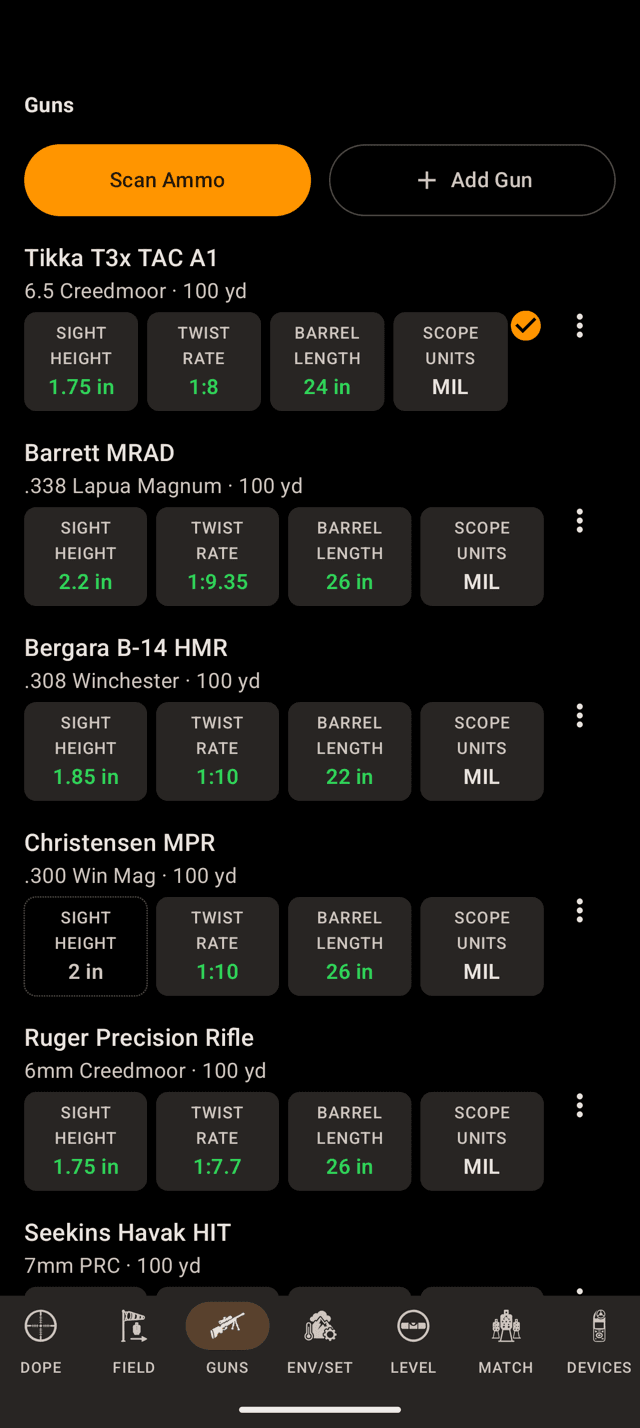
The GUNS page. Green chips are set, a dashed chip is still the default, and the orange check marks the rifle with the active load.
Start here
A rifle, and the loads you shoot through it
Wrist Dope splits your profile in two. The rifle holds everything that stays put when you change ammunition: the optic's height over the bore, where it's zeroed, the barrel. Each load under it holds the bullet: weight, velocity, drag.
Every rifle row carries four chips. They are a checklist, not decoration:
- Green: you set this value.
- Orange “Set ›”: nothing stored. Tap it to open the rifle editor.
- Dashed outline: sight height is still exactly 2 in, the value the solver falls back to. Worth confirming against your actual rings.
Free covers three rifle-and-load combinations. Past that, extra loads are kept and shown locked rather than deleted, and the one-time Pro upgrade unlocks them all.
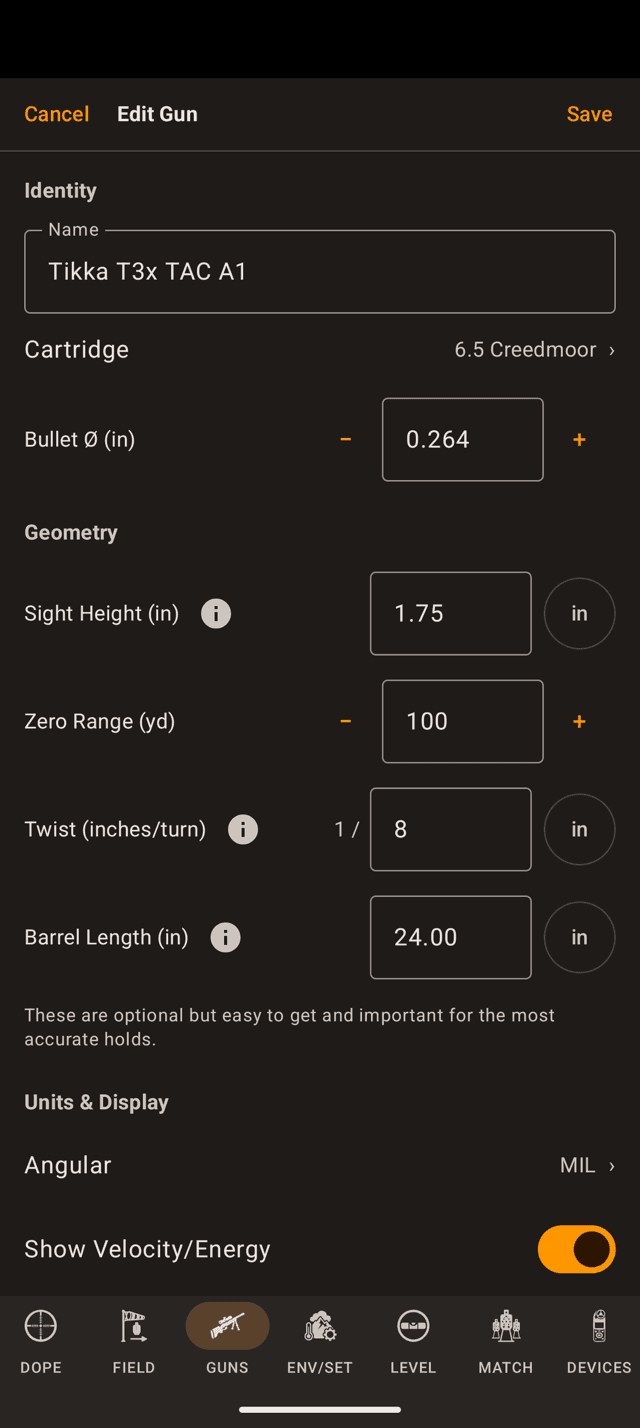
Edit Gun. The ⓘ next to sight height, twist and barrel length explains how to measure each one.
The rifle
Every field, and what it moves
Add Gun on the GUNS page, or open a rifle and tap Edit Gun. Sight height, twist and barrel length each carry a unit chip: tap it to enter that one number in centimetres or millimetres instead of inches.
Name
Where to get it: Whatever you call it out loud.
Cartridge
Where to get it: Stamped on the barrel; it’s also on the ammo box.
Bullet Ø
Where to get it: Filled in by the cartridge. Override it only for a wildcat or an odd bore.
Sight Height
Where to get it: Bore centreline to scope centreline, straight up. Typically 1.5 to 2.0 in on a bolt gun, about 2.6 in on an AR with a flat-top mount.
Zero Range
Where to get it: The distance you actually sighted in at.
Twist Rate
Where to get it: Stamped on the barrel near the chamber or muzzle. 1:8, 1-8 and 1/8 all mean the same thing.
Barrel Length
Where to get it: Bolt face to muzzle crown, action closed and the rifle unloaded. Don't count a brake or a suppressor.
Angular
Where to get it: However your scope turret is marked.
Show Velocity/Energy
Where to get it: Your call.
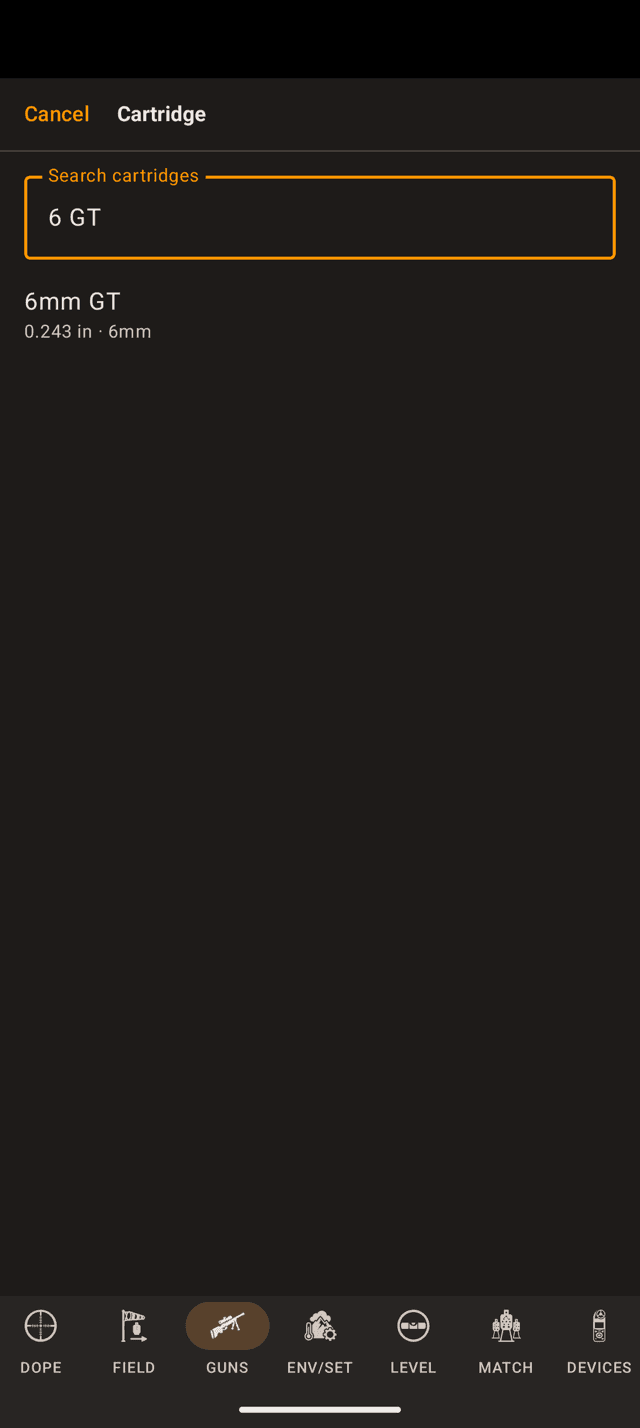
Type it the way you say it. 6 GT finds 6mm GT.
The cartridge
Find it in the cartridge library
The Cartridge row opens the cartridge library: centrefire, magnums, wildcats, big bores, military, rimfire, pistol and airgun calibers. On the phone the picker opens on a short list of common cartridges under a Search cartridges field. Everything else, airguns and wildcats included, is a search away rather than a scroll.
Type it the way you would say it. The search ignores spaces, punctuation and “mm”, so 6 GT finds 6mm GT, 6XC finds 6mm XC and 7-08 finds 7mm-08 Remington. A cartridge's other common names count as well.
Results are ranked, not listed by bore. An exact match comes first, then names that start with what you typed, then whole-word matches, then hits in the middle of a word. Within each of those, the common cartridges come first.
5.56×45mm NATO and .223 Wylde are entries of their own, and both match .223 Remington factory ammunition.
On the watch the Cartridge row lists the whole library, grouped by family in bore order, with a Search row at the top that takes the Wear OS keyboard or your voice. If yours really isn't there, Not Listed? then Select by Caliber sets the bore from a list of common calibers.
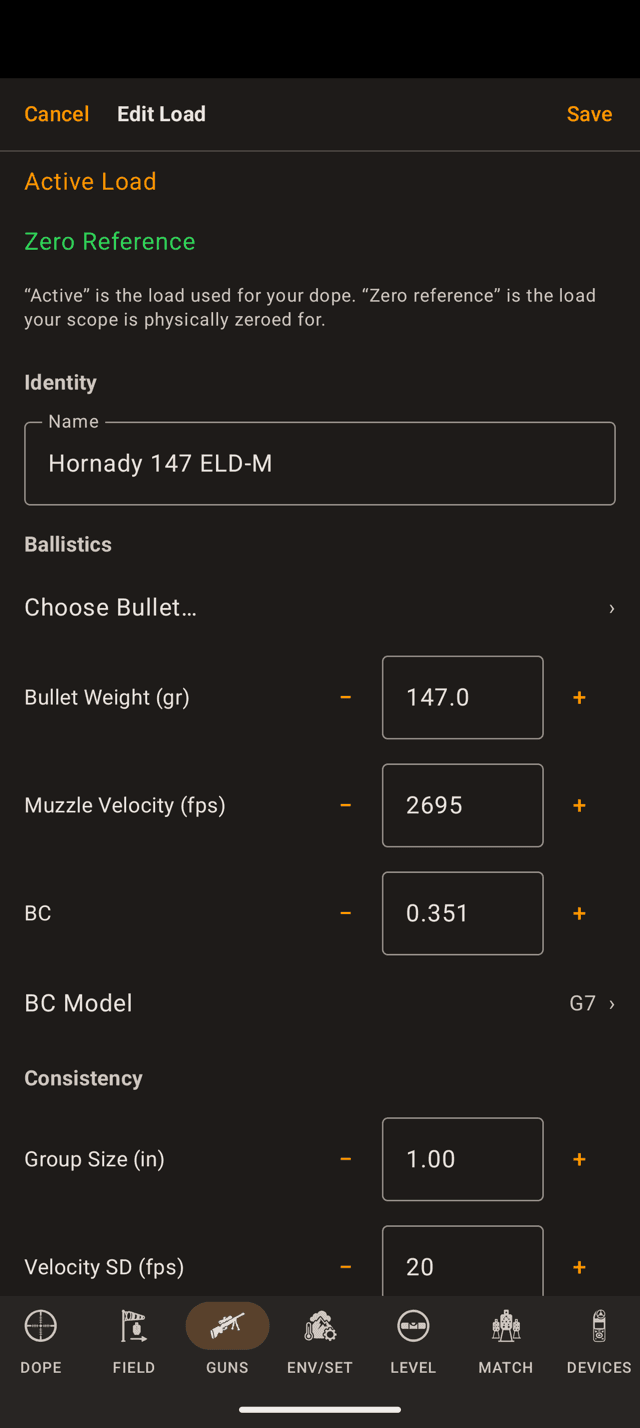
Edit Load. Bullet weight, muzzle velocity, BC and BC model are the four numbers the trajectory is built from.
The load
Bullet, velocity, drag
Add Load from a rifle's page. On a new load, Start From offers published factory ammunition in that cartridge, and Choose Bullet… offers component bullets at that bore. Either one fills the ballistics in for you.
Name
Where to get it: Whatever’s on the box, or your load book.
Bullet Weight
Where to get it: On the box, in grains.
Muzzle Velocity
Where to get it: Chronograph it if you can. Otherwise the box number, adjusted for your barrel.
Set velocity source…BC and BC Model
Where to get it: Published by the bullet maker. Match the model to the number you copied.
Group Size
Where to get it: The extreme spread of a 5-shot group, measured at this rifle’s zero range.
Velocity SD
Where to get it: Your chronograph’s standard deviation over a string.
Factory Load and Manufacturer
Where to get it: The box. Off means a handload.
FACTORY badge on it in the list, and lets you record the maker. Scanned loads arrive with both already filled in.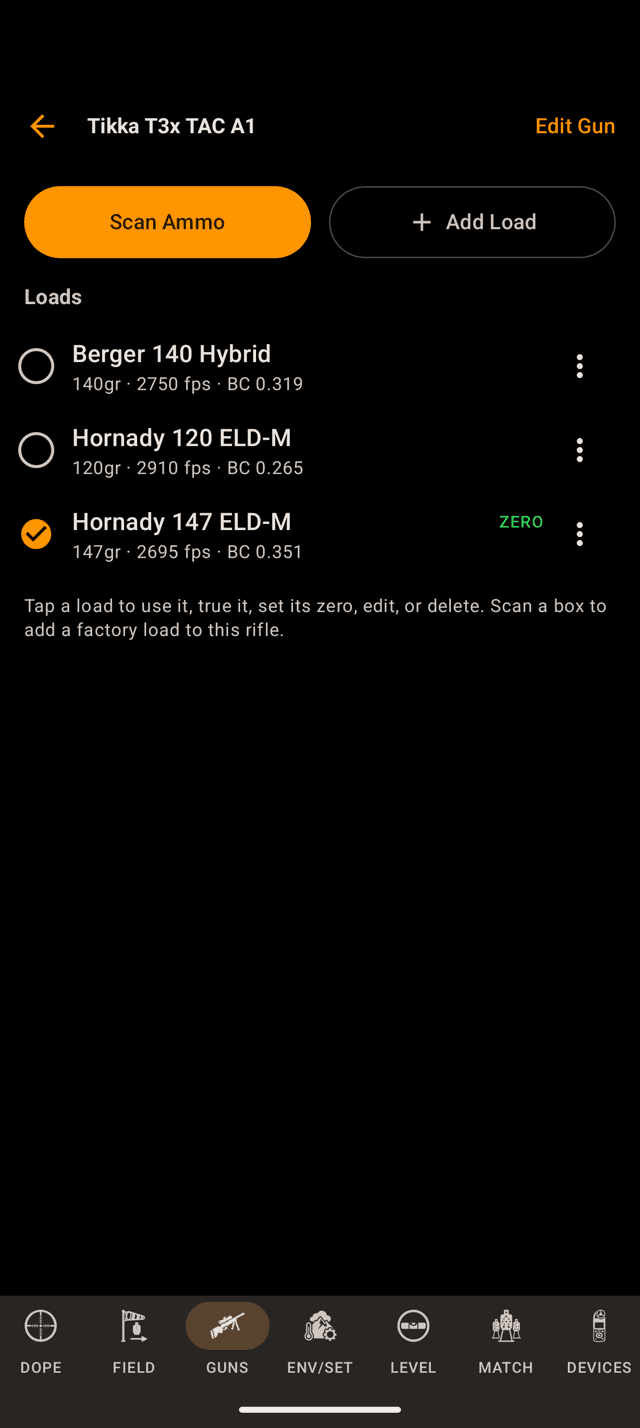
Open a rifle to see its loads. The orange check is the active load; the green ZERO badge is the zero reference.
Zero
Active load, and the one your scope is zeroed for
Two different marks live on a load, and mixing them up is the most common way to get good numbers from bad dope:
- Active: the load your dope is being solved for right now. One across the whole app.
- Zero Reference: the load your scope is physically zeroed with. One per rifle.
Every other load on that rifle takes its zero from the reference, so you don't re-zero to swap ammunition. If a second load prints high or low of the reference at the zero distance, record that distance as its zero offset and the app converts it to an angular correction on every hold. On the watch it is the Zero Offset row in the load editor.
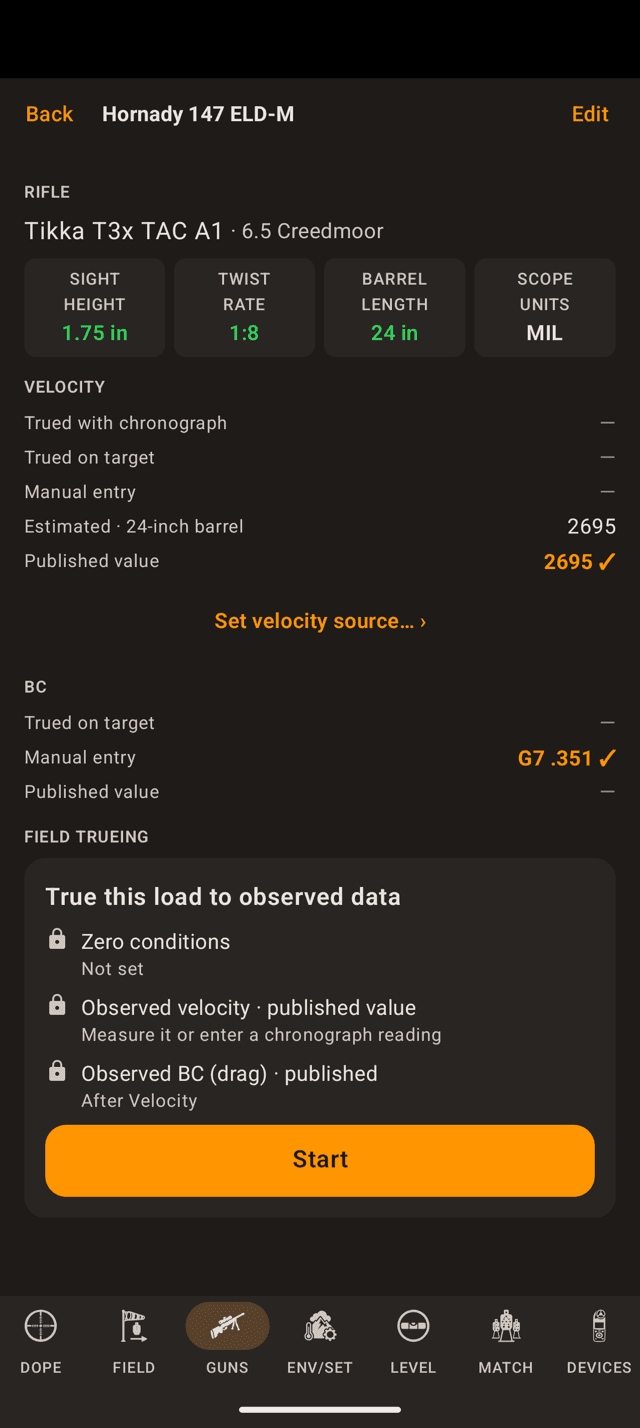
The load page. The ladder lists every velocity the app knows for this load and ticks the one in use.
Provenance
Where the velocity came from
Tap a load and the velocity section answers “where did this number come from?” on its own. Five rungs, highest wins:
- Trued with chronograph: you measured it over a chronograph.
- Trued on target: the app solved it back out of real impacts at distance.
- Manual entry: you typed it.
- Estimated: the published number adjusted for your barrel length. Marked with an asterisk everywhere it appears.
- Published value: straight off the box, from someone else's test barrel.
Set velocity source… under the ladder is where you choose which rung the load uses.
Nothing here is silent. An estimate never passes itself off as a measurement, and the rungs you aren't using keep their numbers so you can see what you gained. Measuring a velocity properly is its own job. The Field Trueing card at the bottom of the load page walks you through it, and the BC gets the same treatment once the velocity is trustworthy.
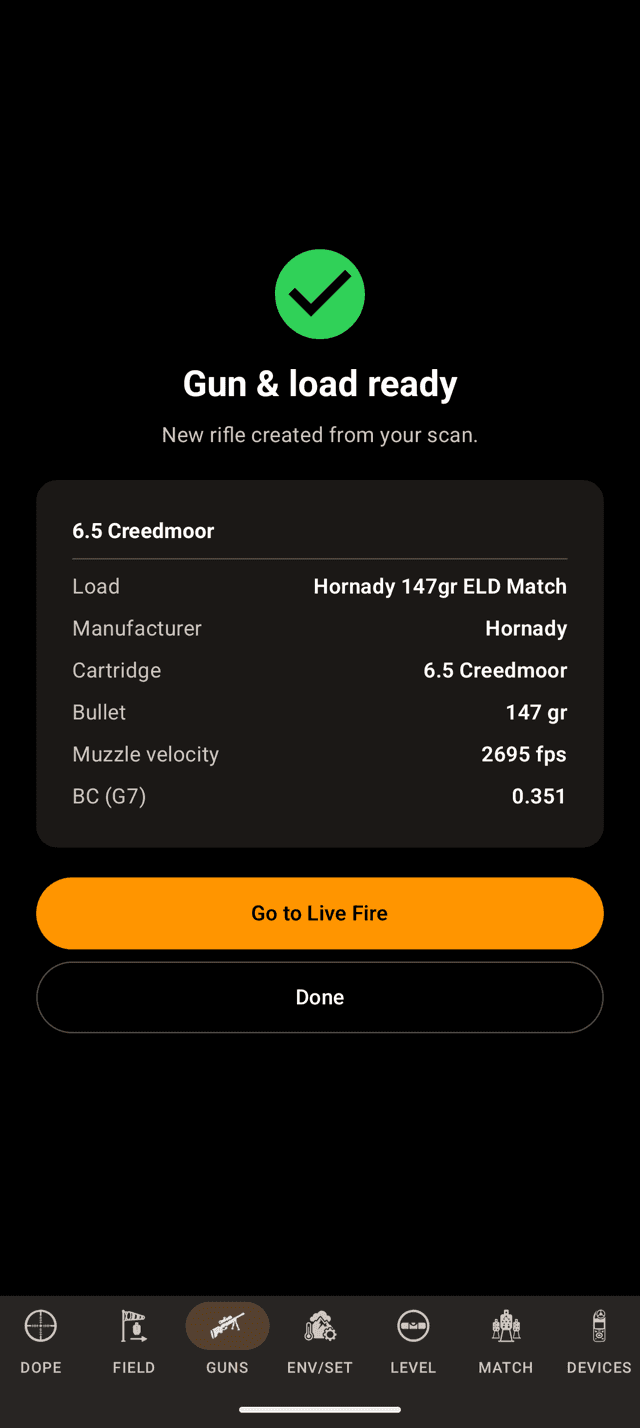
Scan Ammo reads the UPC and builds the rifle and the load, published ballistics already filled in.
Shortcut
Scan the box instead
Scan Ammo sits at the top of the GUNS page and on each rifle's page. Point the camera at the barcode on a box of factory ammunition and it fills in cartridge, bullet weight, published muzzle velocity and BC, and tags the load with its maker.
- From the GUNS page it can create the rifle too, then hand you straight to Live Fire.
- From inside a rifle it adds the load there. Scanning the same box again recognises it rather than duplicating it.
- The catalog is bundled in the app, covering thousands of factory loads from the major manufacturers. Anything it doesn't know says
Not in the catalog yet, and you enter it by hand. - Scanning is part of Pro, and it is on the phone only.
A scanned load still carries a published velocity from someone else's test barrel. Give the rifle a barrel length, or true it, before you trust it at distance.
Scan Ammo has the whole flow.
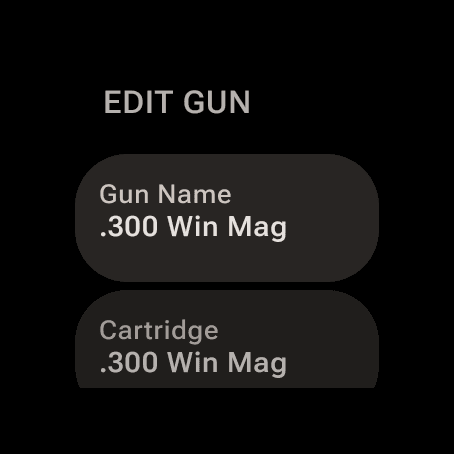
The watch GUNS page creates and edits rifles and loads on its own.
On the wrist
Build a rifle without your phone
Swipe to the GUNS page on the watch and you can add a rifle, add a load, edit either, and switch which load is active, with no phone in the equation. Each number opens a stepper: turn the bezel or crown for coarse steps, or open the keypad when you want an exact value.
Deleting a rifle on the watch asks first, and the question counts the loads that go with it.
Everything you enter on either device syncs to the other.
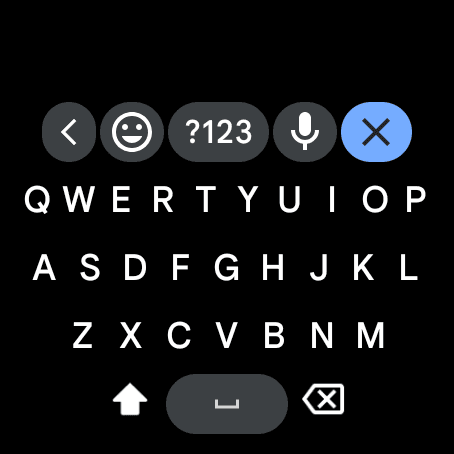
Enter text hands you the Wear OS keyboard, or the microphone.
On the wrist
Type a name on the watch
Gun names and load names are typed on the watch itself. Tap the name row, then Enter text, and Wear OS offers its keyboard. The microphone key takes the name by voice instead.
The cartridge search on the watch uses the same keyboard.
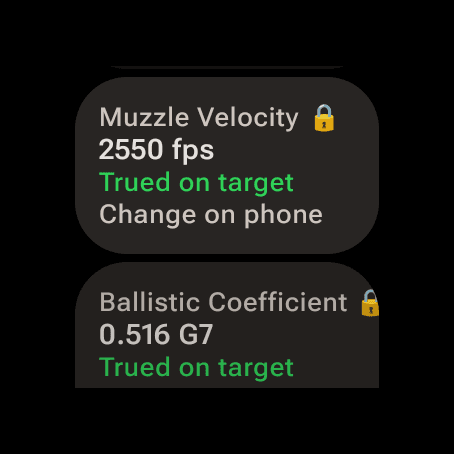
A trued velocity and BC show locked on the watch, with their source under them.
On the wrist
Measured numbers stay put
Two things are deliberately phone-side. Barrel length is set on the phone. And a velocity or BC that came from a chronograph or from trueing shows locked with its source underneath and Change on phone below it, so a stray turn of the bezel can't throw away a measurement you paid for in range time.
Duplicating, deleting, backing up
- Duplicate a rifle: tap the
⋮on its row on the GUNS page, thenDuplicate Rifle. You get a copy with all of its loads, which is the fast way to log the same rifle with a different optic. The copy's loads count toward the free tier's three combinations. - Delete: deleting a rifle deletes every load under it, on your phone and your watch. The app asks first, and it can't be undone.
- Back it up:
Export Gunsat the bottom of the GUNS page writes one file with every rifle and load, andImport Gunsreads it back. It is the same file the iPhone app writes, so it doubles as the way to move between platforms. Importing is part of Pro. Export before a phone swap.
Numbers don't look right?
- The BC model doesn't match the BC. A G1 number sitting in a load set to G7 is the biggest silent error on this page. It looks like a typo's worth of difference on screen and it is feet of miss at distance. Check the bullet maker's page and match the pair.
- The velocity is still the box number. Open the load and read the ladder. If it says
Published value, that speed came from a test barrel that isn't yours. Add a barrel length for an estimate, or true it. - Zero range is wrong. It shifts every hold by the same amount, which reads as “the app is off by a constant”. Confirm it matches where you actually sighted in.
- Sight height is still the default. A dashed chip on the GUNS page means 2 in: the fallback, not a measurement. Tall rings and an AR mount are both well off it.
- Wind holds ignore spin drift. No twist rate means no spin drift and no aerodynamic jump. The chip reads
Set ›until you fill it in. - A load you can see won't solve. Free keeps three rifle-and-load combinations usable. Extras stay on the device, shown locked, and the one-time Pro upgrade opens them back up.
- Your cartridge isn't in the list. The phone only lists the common ones until you type. Search for it, and try it without spaces or “mm”. On the watch,
Not Listed?thenSelect by Calibersets the bore by hand. - The watch shows an old gun list. Rifles and loads sync over the watch connection. Check that the watch is connected to the phone and open Wrist Dope on it once.
One honest caveat: good inputs make a good prediction, not a guarantee. Verify your data on paper at distance before you need it, and shoot safely, responsibly and within the law.
Still stuck? support@wristdope.com