
Manual / Target and Wind
Target and Wind
Wrist Dope measures the air for you. It cannot measure the two calls that are yours: where the target is, and what the wind is doing between you and it. Both are point-and-lock: aim the device, then commit. Until you commit, nothing you touch moves your holds.
1 · Point
Aim at the target, or face into the wind.
2 · Lock
Locking is the commit. Editing on its own changes nothing.
Free
Target and wind on the phone are on the free tier.
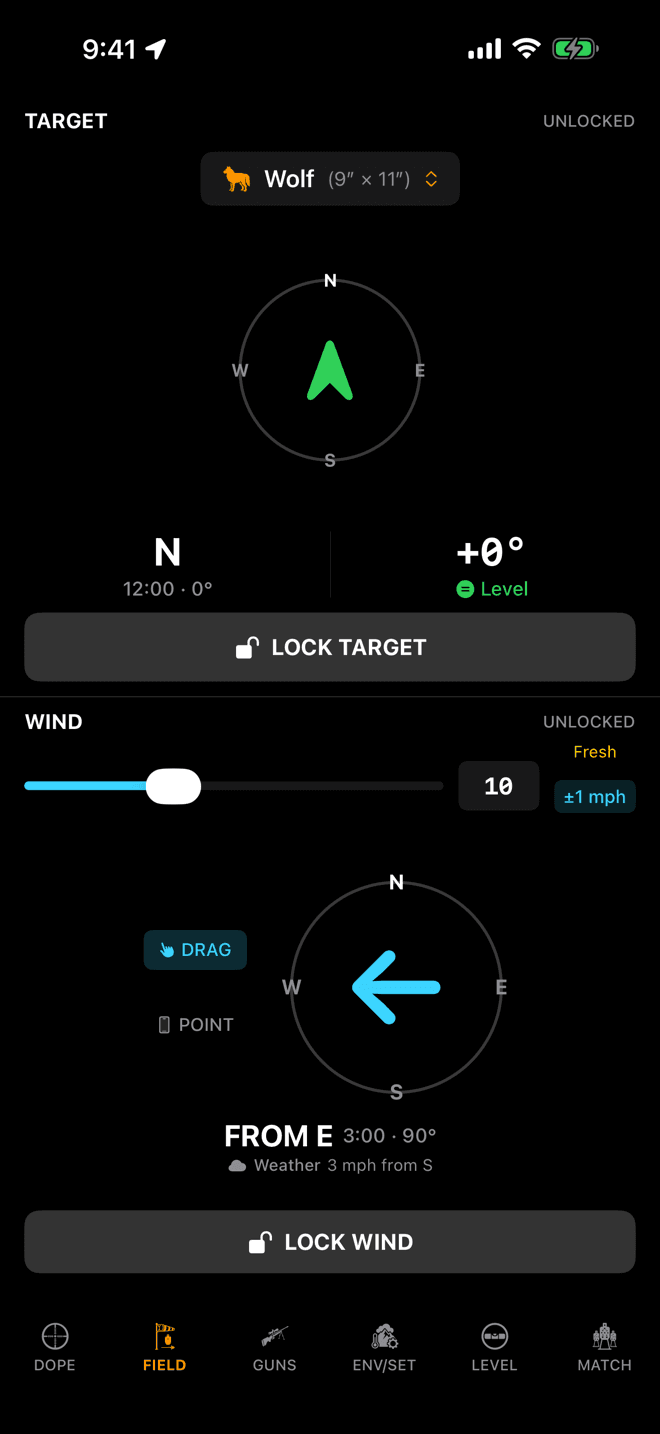
The FIELD page: TARGET on top, WIND below. Grey chrome and a green arrow mean nothing is locked yet.
Step 1
Choose the target size
On iPhone, target and wind share the FIELD page. On Apple Watch they are two pages, one either side of Live Fire. Both work the same way.
Tap the pill at the top of the TARGET pane and pick what you are shooting. The presets are grouped into varmints, game, steel, competition and tactical, and each carries the vital-zone or plate size it is named for: Deer is 10″ × 12″, and 10″ Steel is the plate. Pick the preset closest to what you are shooting. The size is only used to turn a hold into a hit percentage, so the nearest vital-zone or plate size is enough.
The size never changes your holds. It is what turns a hold into a hit percentage and, on game, into the ethical-shot rating beside it. Your choice is remembered between sessions.
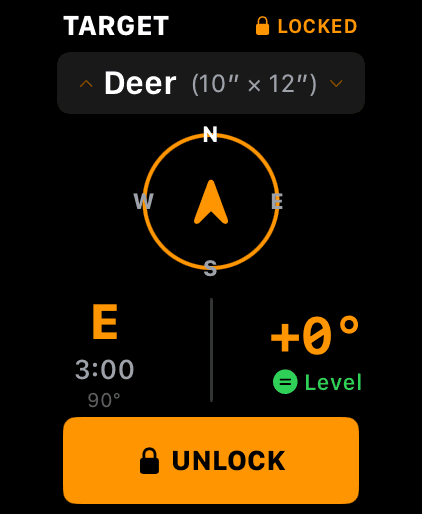
Locked: the header reads LOCKED, the chrome turns orange, and the button becomes UNLOCK.
Step 2
Point at the target and lock it
Aim the device down your line of fire. The compass reads the target's bearing on the left and its angle on the right: +3° Uphill, −8° Downhill, or Level inside a degree either way. Then tap LOCK TARGET.
Locking does three things:
- Freezes the angle, so the incline correction stops chasing every twitch of your wrist.
- Freezes the bearing, which is the firing azimuth the Coriolis correction needs.
- Gives the wind a line of fire to be measured against. That is the shooter's clock in step 5.
Locks are deliberately forgotten when you quit. A bearing and an angle go stale the moment you move; the target size, being a setting rather than a condition, stays.
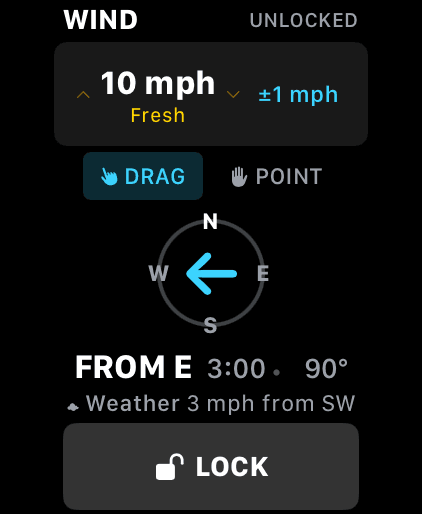
DRAG or POINT sets direction, the crown sets speed, and the chip states how sure you are.
Step 3
Call the wind
Speed is the Digital Crown on the watch, and a slider or the keyboard on iPhone. A word beside it names the band you are in: Calm, Light, Moderate, Fresh.
Direction has two modes:
DRAG: drag the arrow around the dial until it matches what you are reading in the mirage and the grass.POINT: turn and face into the wind. The arrow follows the compass live until you lock, so locking is the capture.
The blue chip is your wind-call confidence. Tap it to cycle ±0 through ±10 mph. It starts at ±1. It says how far off your speed call might be, and it is the single biggest lever on the hit percentage: a wide call on a small target is what turns 99% into 60%. It is not part of the lock, so you can adjust it any time.
The grey Weather line under the dial is the nearest station's report. It is there to sanity-check your own call and nothing more. It never feeds the solution, because the wind at the station is not the wind on your lane.
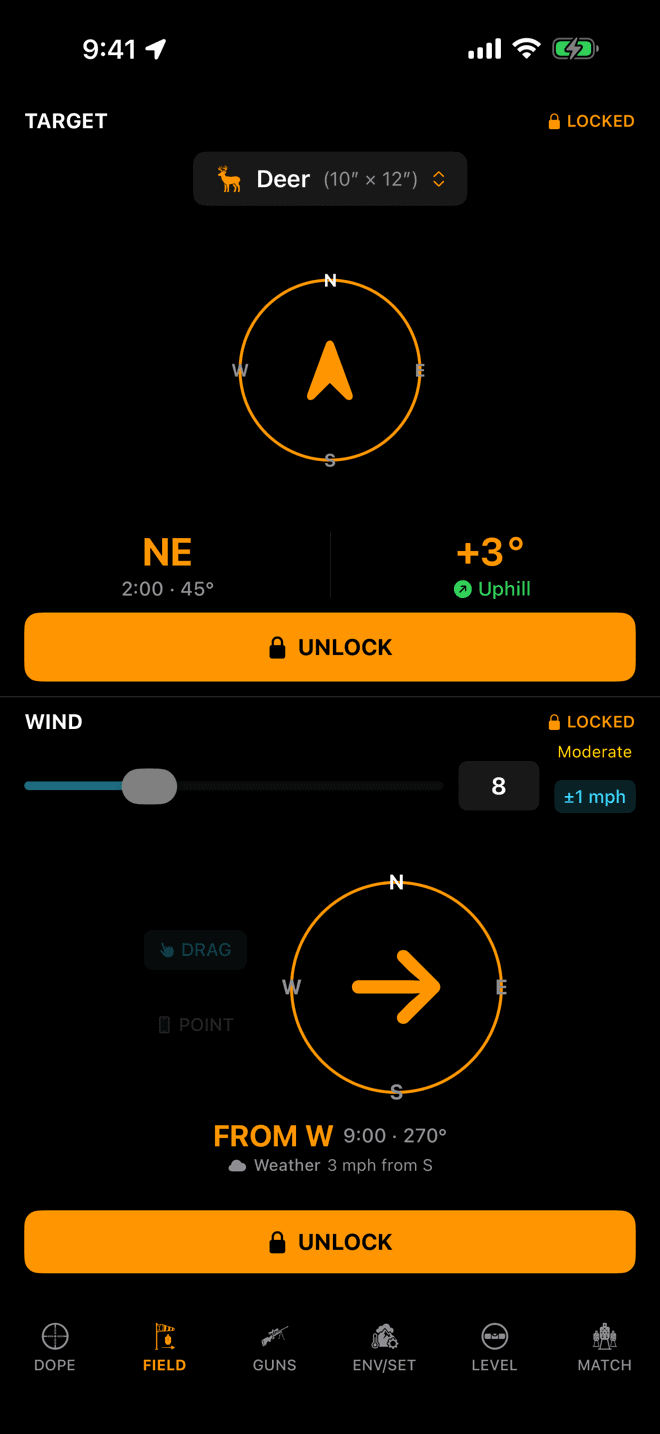
Both panes locked. Orange chrome and a padlock mean the solution is using these numbers.
Step 4
Lock the call. That is the commit.
This is the part that surprises people: editing a value does not change your holds. Locking it does. Drag the arrow, turn the crown, take as long as you like. The dope on Live Fire holds still until you tap LOCK WIND.
Unlocking is the mirror of that. It puts the pane back into edit mode and keeps the call you already committed solving in the background. You never lose a good wind call by opening it up to revise it.
Watch and iPhone share the call. Lock on one and the other has it a couple of seconds later, but a device you are actively editing is never yanked out from under you.
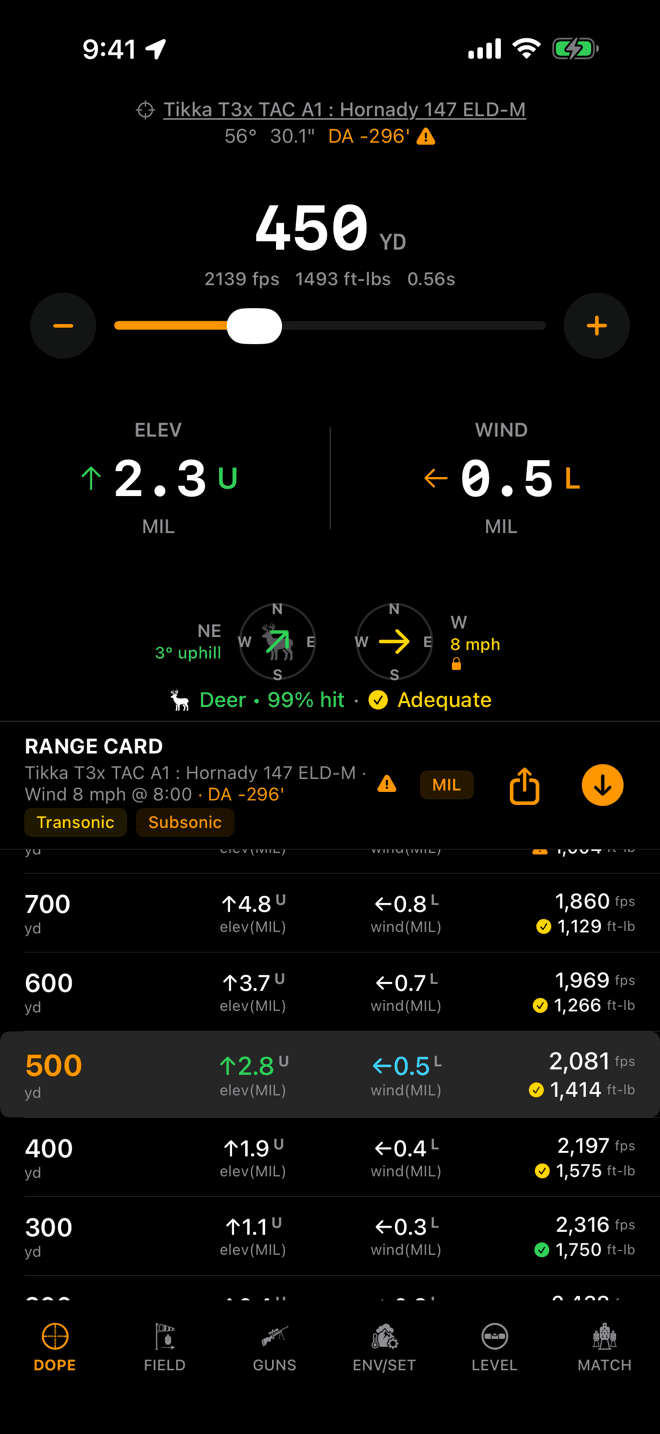
A wind from due west, on a north-east shot, is 8 o'clock on your clock, not 9.
Step 5
Read the shooter's clock
The Field pages report wind the way a weather app does: the compass bearing it blows from. Live Fire, the range card and the stage card report it the way a shooter needs it, on the clock face of your line of fire:
12: straight down the barrel at you. A headwind, and almost no drift.3: from your right. Full value, maximum drift.6: from behind you. A tailwind, and almost no drift.9: from your left. Full value the other way.
In the screenshot the wind is from due west and the target is to the north-east, so the card reads Wind 8 mph @ 8:00: behind your left shoulder, and only part of it pushing the bullet sideways. The solution uses that crosswind component, not the raw speed. Turn 90° to a new target and the same 8 mph becomes a different hold, because the clock moved.
That clock needs a locked target. With nothing locked there is no line of fire to measure from.
What you see before you call anything
A fresh session does not start with no wind, because a solution computed in dead calm is the one number a shooter is least likely to want. It starts on a 10 mph, 3 o'clock crosswind. That is a placeholder that is obviously a placeholder, and you are meant to replace it with your own call before the first shot.
The target starts unlocked, so until you lock one there is no bearing and no angle, and no hit percentage beside your holds.
Holds not moving when you change the wind?
- The call isn't locked. The header still says
UNLOCKEDand the button still saysLOCK WIND. Edits are local until you tap it. This is far and away the most common cause. - The wind is at 12 or 6 o'clock. A head or tail wind produces almost no sideways drift, so a big change in speed barely moves the windage. Check the clock reading in the Live Fire or range-card header, not the compass bearing on the Field page.
- You changed the compass bearing, not the clock. Wind is relative to your line of fire. With no target locked there is nothing for it to be relative to. Lock the target first.
- You're watching the Weather line. That line is the station report and is reference only. It never changes a hold.
Related: Environment and units covers the other half of the inputs: the air, and where its numbers come from. How to read wind is about making the call in the first place.
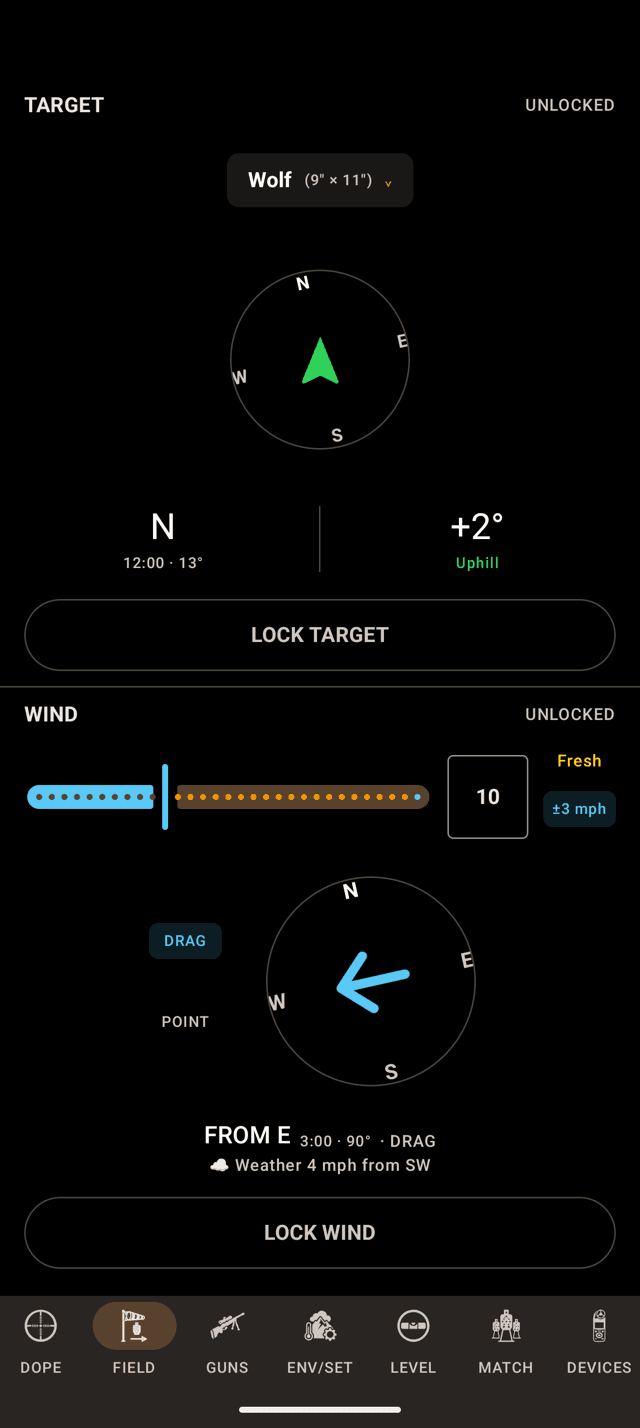
The FIELD page: TARGET on top, WIND below. Grey chrome and a green arrow mean nothing is locked yet.
Step 1
Choose the target size
On the phone, target and wind share the FIELD page. On the watch they are two pages, one either side of Live Fire. Both work the same way.
Tap the chip at the top of the TARGET pane and pick what you are shooting. The Target Size sheet groups the presets into varmints, game, steel, competition and tactical, and each row carries the vital-zone or plate size it is named for: Deer is 10″ × 12″. Pick the preset closest to what you are shooting. The size is only used to turn a hold into a hit percentage, so the nearest vital-zone or plate size is enough.
On the watch, tap the chip on the TARGET page for a wheel of every preset by its full name and tap Confirm. Turning the bezel or crown on that page steps through the presets without opening the wheel.
The size never changes your holds. It is what turns a hold into a hit percentage and, on game, into the ethical-shot rating beside it. Your choice is remembered between sessions.
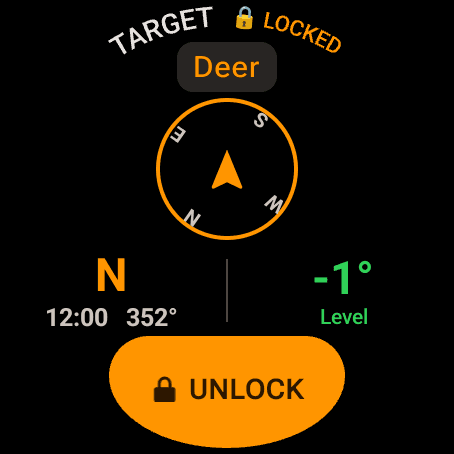
Locked: the header reads LOCKED, the chrome turns orange, and the button becomes UNLOCK.
Step 2
Point at the target and lock it
Aim the device down your line of fire. The compass reads the target's bearing on the left and its angle on the right: +2° Uphill, −12° Downhill, or Level inside a degree either way. Then tap LOCK TARGET on the phone or LOCK on the watch.
Locking does three things:
- It commits the angle, so the incline correction uses the slope you aimed at. Until you lock, the solution treats the shot as level.
- It commits the bearing, which is the firing direction the Coriolis correction needs. Coriolis stays off until a bearing is locked.
- It gives the wind a line of fire to be measured against. That is the shooter's clock in step 5.
On the watch, locking the target takes you straight to Live Fire, where the hold is.
Locks are deliberately forgotten when you quit. A bearing and an angle go stale the moment you move. The target size is a setting rather than a condition, so it stays.
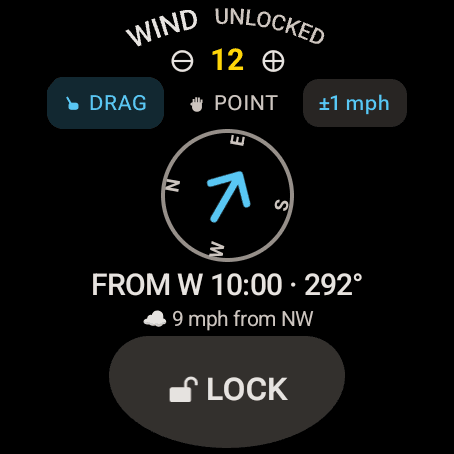
DRAG or POINT sets direction, the bezel or crown sets speed, and the chip states how sure you are.
Step 3
Call the wind
Speed is the bezel or crown on the watch, or the − and + buttons either side of the number. On the phone it is a slider, or tap the box beside it and type. The phone names the band beside the number: Calm, Light, Moderate, Fresh, Strong or Very Strong. The watch leaves the word off and colours the number instead.
Direction has two modes:
DRAG: drag the arrow around the dial until it matches what you are reading in the mirage and the grass.POINT: turn and face into the wind. The arrow follows the compass live until you lock, so locking is the capture.
The blue chip is your wind-call confidence. Tap it to cycle ±0 through ±10 mph. It starts at ±1. It says how far off your speed call might be, and it is the single biggest lever on the hit percentage: a wide call on a small target is what turns 99% into 60%. It is not part of the lock, so you can adjust it any time.
The grey line under the dial, with the cloud, is the nearest station's report. It appears once weather has arrived. It is there to sanity-check your own call and nothing more. It never feeds the solution, because the wind at the station is not the wind on your lane.
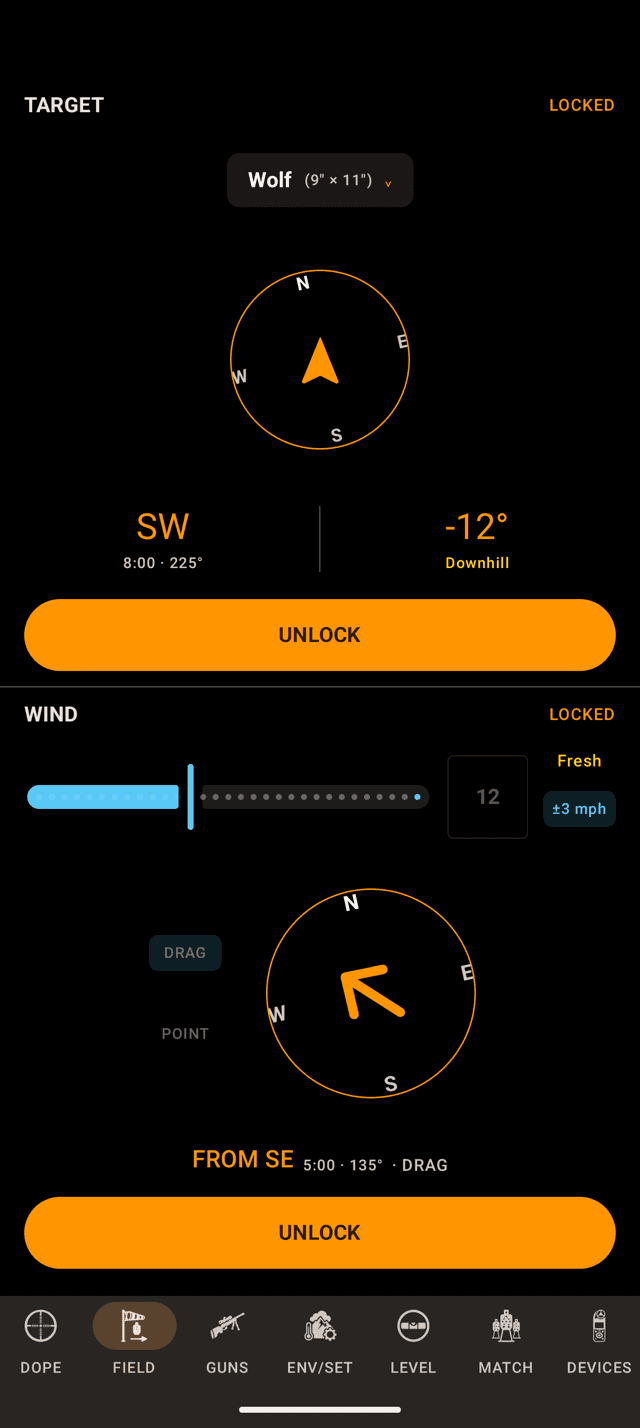
Both panes locked. Orange chrome and LOCKED in each header mean the solution is using these numbers.
Step 4
Lock the call. That is the commit.
This is the part that surprises people: editing a value does not change your holds. Locking it does. Drag the arrow, turn the bezel or crown, take as long as you like. The dope on Live Fire holds still until you tap LOCK WIND, or LOCK on the watch. Locking the wind on the watch also takes you to Live Fire.
Unlocking is the mirror of that. It puts the pane back into edit mode and keeps the call you already committed solving in the background. You never lose a good wind call by opening it up to revise it.
The watch and the phone share the call. Lock on one and the other has it a couple of seconds later.
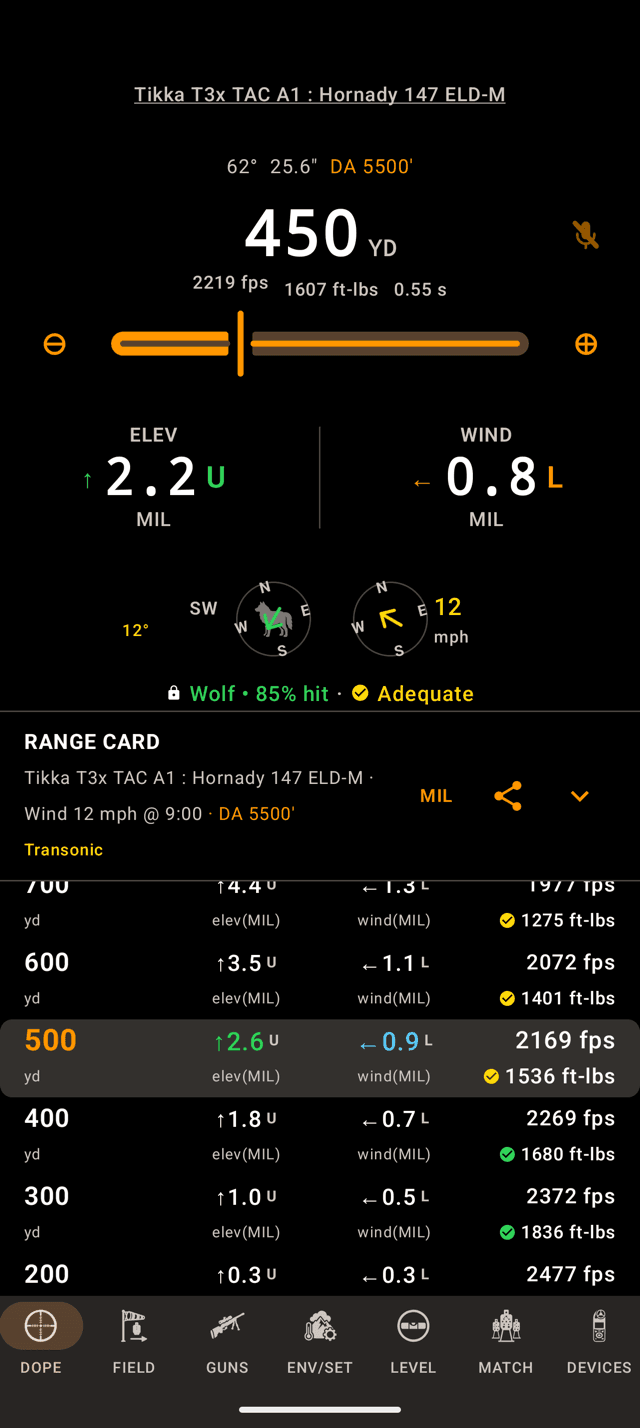
A wind from the south-east, on a south-west shot, is 9 o'clock on your clock: from your left, full value.
Step 5
Read the shooter's clock
The Field pages report wind the way a weather app does: the compass bearing it blows from. Live Fire, the range card and the stage card report it the way a shooter needs it, on the clock face of your line of fire:
12: straight down the barrel at you. A headwind, and almost no drift.3: from your right. Full value, maximum drift.6: from behind you. A tailwind, and almost no drift.9: from your left. Full value the other way.
In the screenshot the target is to the south-west and the wind is from the south-east, so the card reads Wind 12 mph @ 9:00. It is straight across from your left, and all of it pushes the bullet sideways. Turn to a target 90° away and the same 12 mph becomes a head or tail wind with almost no drift, because the clock moved. The solution uses the crosswind component, not the raw speed.
That clock needs a locked target. With nothing locked, the app measures the wind against due north.
What you see before you call anything
A fresh session does not start with no wind, because a solution computed in dead calm is the one number a shooter is least likely to want. It starts on a 10 mph, 3 o'clock crosswind. That is a placeholder that is obviously a placeholder, and you are meant to replace it with your own call before the first shot.
The target starts unlocked, so until you lock one there is no bearing and no angle, and no hit percentage beside your holds.
Holds not moving when you change the wind?
- The call isn't locked. The pane still says
UNLOCKEDand the button still saysLOCK WIND, orLOCKon the watch. Edits are local until you tap it. This is far and away the most common cause. - The wind is at 12 or 6 o'clock. A head or tail wind produces almost no sideways drift, so a big change in speed barely moves the windage. Check the clock reading in the Live Fire or range-card header, not the compass bearing on the Field page.
- You changed the compass bearing, not the clock. Wind is relative to your line of fire. With no target locked the app measures it against due north, which is only right if you are shooting north. Lock the target first.
- You're watching the Weather line. That line is the station report and is reference only. It never changes a hold.
- The watch did not get the call. The call reaches the other device a couple of seconds after you lock. If it never arrives, check that the watch is connected to the phone and that Wrist Dope is installed on the watch.
Related: Environment and units covers the other half of the inputs: the air, and where its numbers come from. How to read wind is about making the call in the first place.
Still stuck? support@wristdope.com