
Manual / Calypso Wind Meters
Calypso Wind Meters
A Calypso ultrasonic meter has no compass. It reads the wind as an angle off the arrow on its front. Point that arrow down your line of fire and Wrist Dope does the rest: the wind direction is the direction you are shooting plus the meter’s angle.
The meter only talks to apps that hold Calypso’s key. Wrist Dope gets that key with a purchased Pro upgrade and keeps a copy on your phone and on your watch.
Pro purchase
The meter key comes with a purchased Pro upgrade. The free trial doesn’t fetch it.
A Calypso
An ULTRASONIC Mini or an All In One, the two Calypso wind meters.
Wrist Dope 1.50
Wrist Dope 1.50 or later on the phone and the watch.
Wrist Dope 1.50 is the first version with Calypso support.
Step 1: get the key onto the phone
A Calypso answers only an app that holds Calypso’s key. Wrist Dope fetches that key for a verified Pro purchase on your Apple Account. The free 7-day trial does not fetch it, so a trial user can scan and connect a Calypso but it never sends a reading.
With the purchase in place, open Wrist Dope once with a connection. The phone fetches the key, checks it, and keeps it on this phone. From then on it works with no signal, which is the point of a range in the middle of nowhere. If a meter was left waiting, it starts reading on its own once the key arrives.
The key goes away if the purchase does, for example after a refund. You never type anything and there is no key screen.
While the phone has no key, the Calypso’s row and card on DEVICES carry one line under the name that says why. On the trial, or with no purchase at all, it reads Calypso connection requires Wrist Dope Pro. If the key has never been fetched on this phone it reads Need to be online to connect to a Calypso meter the first time. While the key is on its way it reads Enabling Calypso support. and before the app has heard back, No Calypso connection yet. A Calypso with the key shows no line at all.
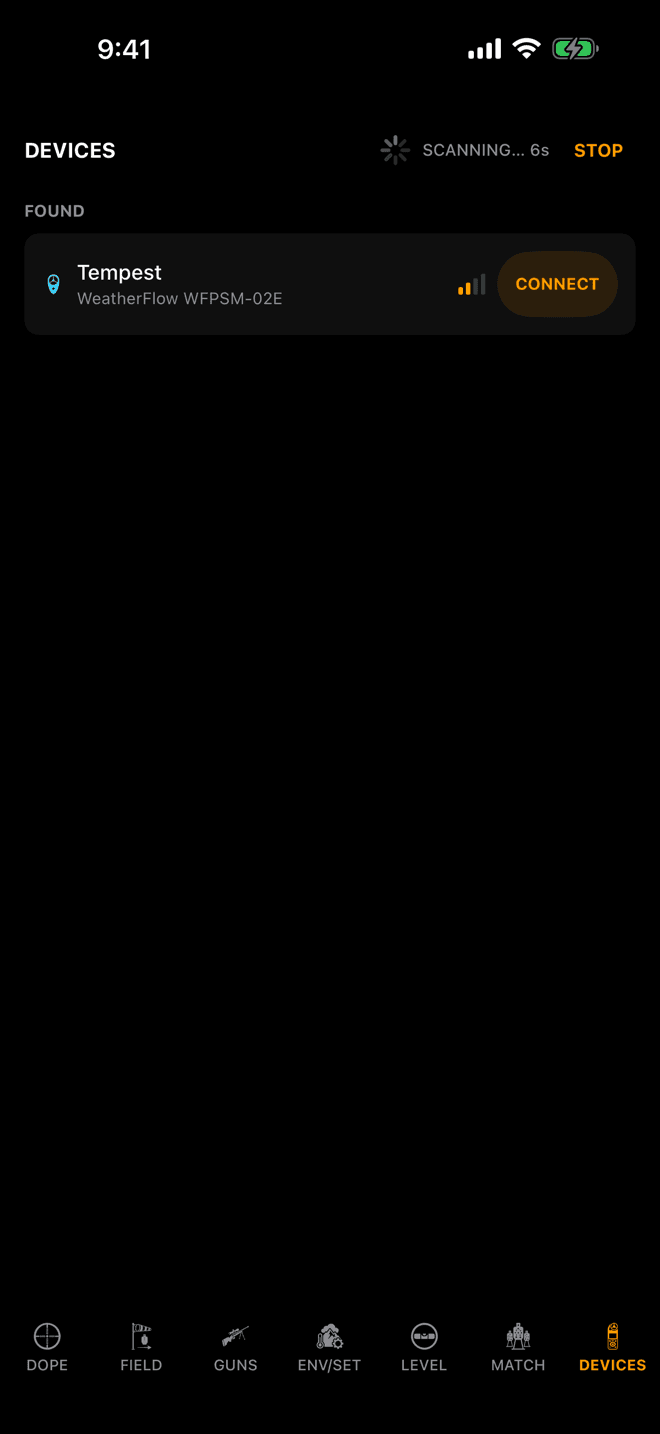
The same scan you use for any meter. A Tempest is the one found here.
Step 2
Connect it on the phone
Open DEVICES, wake the Calypso, hold it near the phone and tap SCAN. When it shows under FOUND, tap CONNECT.
Until it has connected the card just says Calypso. The Mini and the All In One look identical over the air, so the model name, ULTRASONIC Mini or All In One, appears once the meter has told the app which one it is.
Start on the phone. It fetches the key straight from your purchase, so a Calypso connected here reads at once. The watch can hold a Calypso too, once it has its own copy of the key, and the card On the watch below says how it gets one. Either way the wind and the air sync to the other device like any other meter.
Step 3
Point the arrow down your line of fire
You never point a Calypso into the wind. Its arrow is your line of fire, and there are two ways to set that up:
- On a tripod, with the arrow on the front of the meter pointing at the target.
- On the rifle, with the arrow pointing the same way as the barrel.
The app puts it in one line under the wind dial: Point the Calypso towards your target.
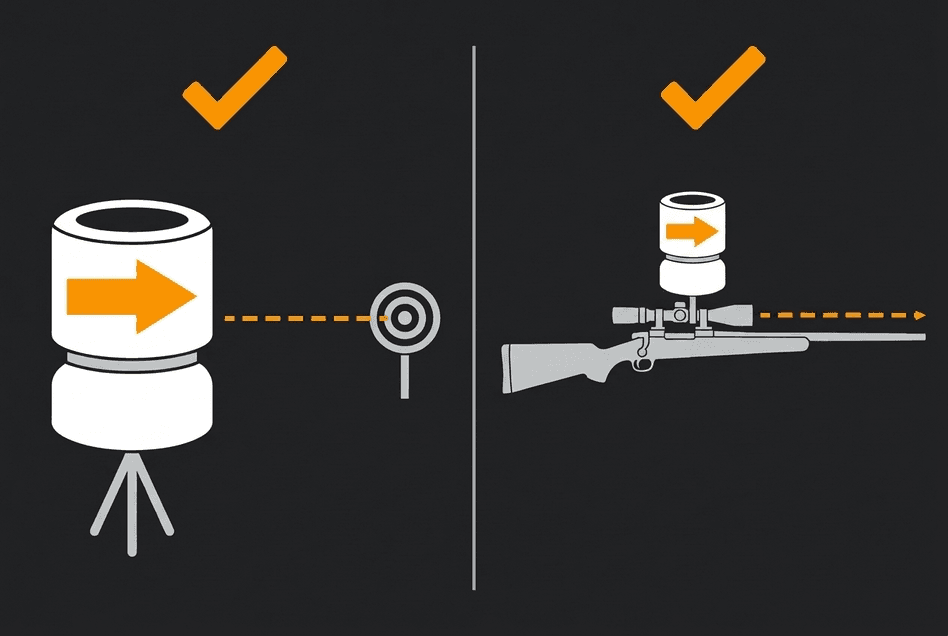
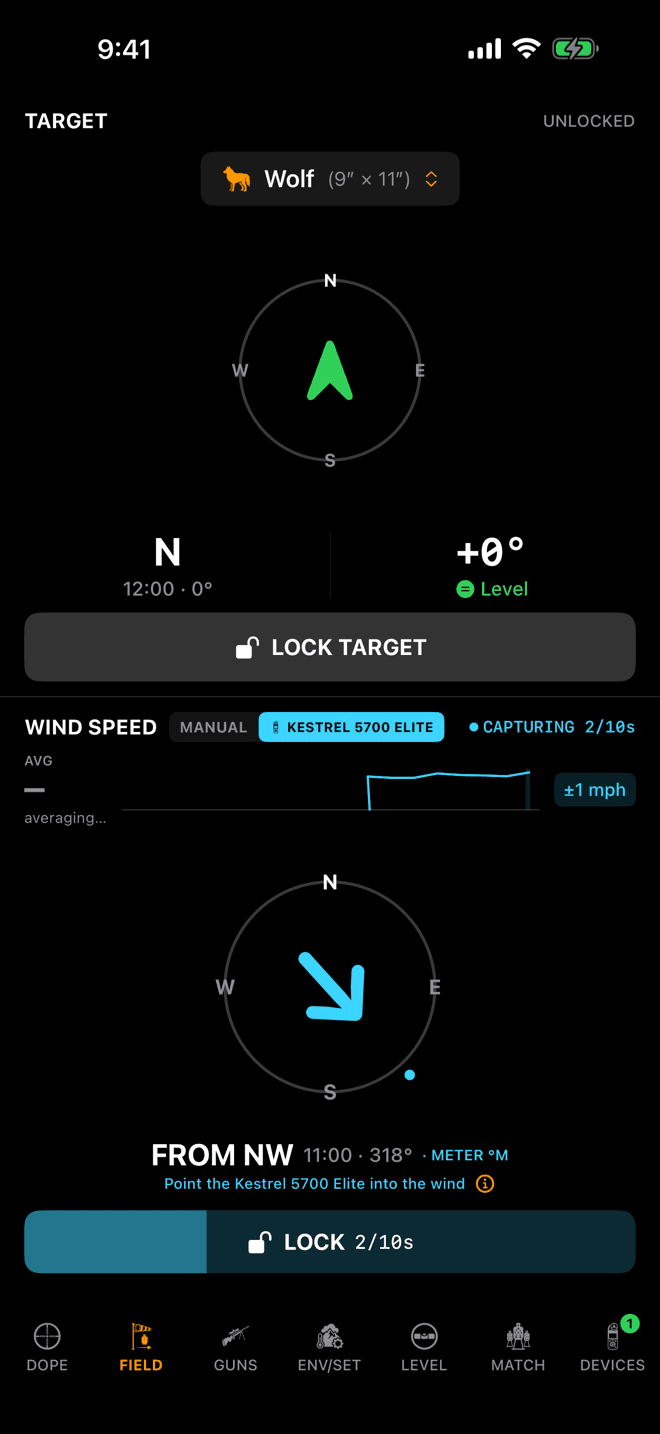
Shown with a Kestrel. With a Calypso the aiming line reads Point the Calypso towards your target.
Step 4
Capture and lock, like any meter
On FIELD the WIND pane takes the Calypso as its source. Tap CAPTURE, and the average starts at the tap. Tap LOCK, or the capture locks itself after ten seconds.
The line under the dial is the one thing that changes. For a Kestrel it tells you to point the meter into the wind. For a Calypso it says Point the Calypso towards your target, and its ⓘ opens the picture on this page.
Everything else, the lock, the gust spread, the Live Fire marks, is in Wind Meters.
Where the direction comes from
A Calypso has no compass. It measures the wind’s angle off its own arrow, and you have put that arrow on your line of fire. So Wrist Dope takes the direction you are shooting and adds the meter’s angle:
wind direction = the direction you are shooting + the meter’s angle
The direction you are shooting is the one the app already uses everywhere. On a rifle-mounted device with Use level for shot angle on and the level zeroed, that is the rifle’s live heading (the LIVE tag beside the target). Otherwise it is the target direction you set. With neither, the app assumes north, the same as the solver does.
The holds come out right in all three cases. The solver only cares about the angle between the wind and the shot, and that angle is exactly what the meter measured. What changes is the compass bearing printed next to it: with no target direction set, it is measured from north.
There is no compass capture, no mount bearing to enter and no mount setting to pick. A Calypso bearing never gets a °M. It shows wherever a Kestrel’s does: the Devices card, the WIND pane and Live Fire. In still air the meter reads zero and keeps its last angle, and so does the card.
On the watch
The watch shows a phone-held Calypso’s wind, direction and air like any phone-held meter: ON IPHONE on the Wind page, and CAPTURE and LOCK on the wrist run the capture on the phone.
The watch can hold the meter itself, and for that it needs its own copy of the key. If you bought Pro on the watch, it fetches one the same way the phone does. Otherwise it asks the iPhone once: keep the phone in reach with Wrist Dope open, and the watch gets the key and keeps it. From then on a Calypso connected on the wrist, from its own scan or with MOVE HERE, reads with the iPhone left in the truck. If the key is ever replaced, the watch asks again.
Until it has the key, the watch’s row for a Calypso says Open Wrist Dope on your iPhone to enable Calypso support. A remembered Calypso waits for a tap on Connect instead of reconnecting on its own, and a connected one sends nothing.
Calypso connected but silent?
- It connects, then goes STALE. The phone does not have the key. The card shows the meter connecting or connected, then
STALE, and the line under its name says why.Calypso connection requires Wrist Dope Pro.is the free trial or no purchase: buy or restore Pro.Need to be online to connect to a Calypso meter the first time.means this phone has not been online in Wrist Dope since the purchase: open the app with a connection.Enabling Calypso support.means the key is on its way, so give it a moment.Calypso connections disabled. Try again later.means Calypso support is switched off at our end for now. Once the key lands the meter starts reading on its own. If it doesn’t, disconnect and connect again. - It is connected to the watch and silent. The watch has no copy of the key yet, and its row says so:
Open Wrist Dope on your iPhone to enable Calypso support.Do that with the phone in reach and the watch fetches its own key. Or disconnect the meter there and connect it on the phone. - The direction is off by the same amount every time. The arrow is not on your line of fire. On a tripod, put the arrow on the target. On the rifle, square the mount with the barrel.
- It worked, then went quiet. It stopped sending, usually asleep or too far away. Wake it and keep it near the phone.
- It shows up but will not connect. Older Calypso firmware speaks a version Wrist Dope does not, so the app lists the meter as not supported and stops trying to connect it.
- No wind at all from a WeatherDot. Calypso’s WeatherDot measures air only: temperature, humidity and pressure. Use it for the Environment page.
Related: Wind Meters for capture, lock and the Devices page, Pro and Purchases for buying and restoring, and Scope Level for rifle-mounted mode.
Wrist Dope 1.50 is the first version with Calypso support on Android.
Step 1: get the key onto the phone
A Calypso answers only an app that holds Calypso’s key. Wrist Dope fetches that key for a Pro purchase made through Google Play, once Play confirms it is yours. The free 7-day trial does not fetch it, and neither does a purchase that is still pending. So a trial user can scan and connect a Calypso, but it never sends a reading.
With the purchase in place, open Wrist Dope once with a connection. The phone fetches the key, checks it, and keeps it encrypted on this phone. From then on it works with no signal, which is the point of a range in the middle of nowhere. If a meter was left waiting, it starts reading on its own once the key arrives.
The key goes away if the purchase does, for example after a refund. You never type anything and there is no key screen. On a new phone, sign in with the same Google Account, use Restore Purchases in the WRISTDOPE PRO section of ENV/SET if Pro does not show, and open the app online once.
While the phone has no key, the Calypso’s row and card on DEVICES carry one line under the name that says why. On the trial, with a purchase Play has not confirmed yet, or with no purchase at all, it reads Calypso connection requires Wrist Dope Pro. If the key has never been fetched on this phone it reads Need to be online to connect to a Calypso meter the first time. While the key is on its way it reads Enabling Calypso support. and before the app has heard back, No Calypso connection yet. A Calypso with the key shows no line at all.
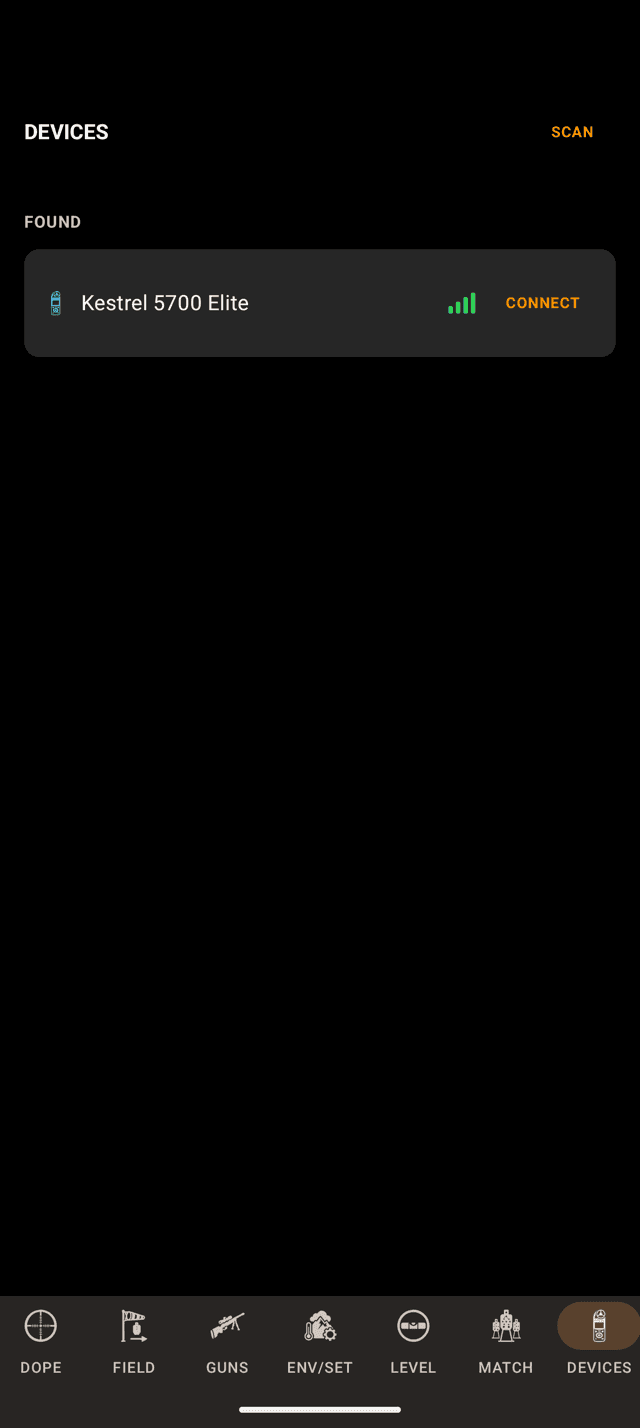
The same scan you use for any meter. A Kestrel is the one found here.
Step 2
Connect it on the phone
Open DEVICES, the last page on the phone, wake the Calypso, hold it near the phone and tap SCAN. When it shows under FOUND, tap CONNECT. Connecting a meter is part of Pro. The line on an empty Devices page names only Kestrel and WeatherFlow meters, and a Calypso still turns up in the scan.
Until it has connected the card just says Calypso. The Mini and the All In One look identical over the air, so the model name, ULTRASONIC Mini or All In One, appears once the meter has told the app which one it is. A WeatherDot is named as soon as the scan finds it.
Start on the phone. It fetches the key straight from your Play purchase, so a Calypso connected here reads at once. The watch can hold a Calypso too, once it has its own copy of the key, and the card On the watch below says how it gets one. Either way the wind and the air reach the other device like any other meter’s.
Step 3
Point the arrow down your line of fire
You never point a Calypso into the wind. Its arrow is your line of fire, and there are two ways to set that up:
- On a tripod, with the arrow on the front of the meter pointing at the target.
- On the rifle, with the arrow pointing the same way as the barrel.
The phone puts it in one line under the wind bearing: Point the Calypso towards your target. Tap the line or its ⓘ and a note with the same title says it in full: point the arrow in your target’s direction, or mount the meter on the rifle with the arrow along the barrel. GOT IT closes it.
The watch’s WIND page does not show this line.
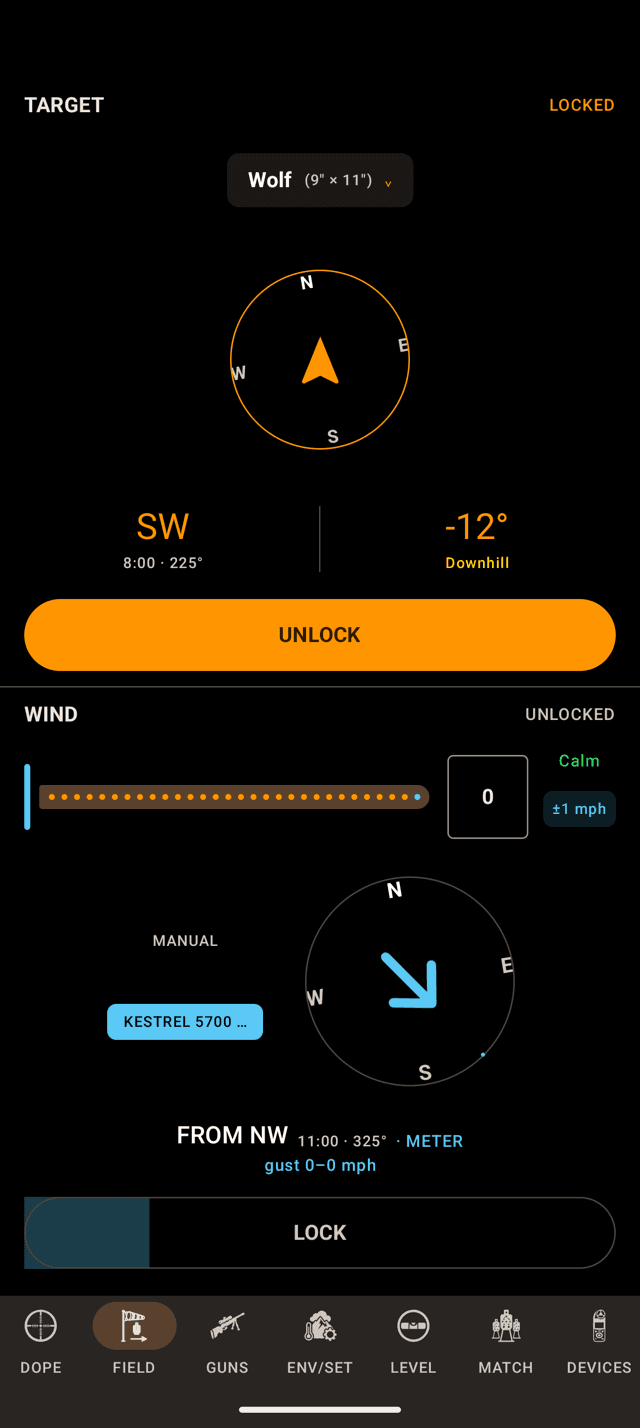
Shown with a Kestrel. With a Calypso, the line under the bearing reads Point the Calypso towards your target until you tap CAPTURE.
Step 4
Capture and lock, like any meter
On FIELD the WIND pane takes the Calypso as its source: its name is the segment beside MANUAL. Tap CAPTURE, and the average starts at the tap. Tap LOCK, or the capture locks itself after ten seconds.
The line under the bearing is the one thing that changes. While the meter is live and the wind unlocked, it reads Point the Calypso towards your target. Once a capture starts, the countdown and the gust spread take that line back.
Everything else, the lock, the gust spread, the Live Fire marks, is in Wind Meters.
Where the direction comes from
A Calypso has no compass. It measures the wind’s angle off its own arrow, and you have put that arrow on your line of fire. So Wrist Dope takes the direction you are shooting and adds the meter’s angle:
wind direction = the direction you are shooting + the meter’s angle
The direction you are shooting is the one the app already uses everywhere. On a rifle-mounted phone or watch with Use level for shot angle on and the level zeroed, that is the rifle’s live heading (the LIVE tag beside the target). Otherwise it is the target bearing you locked on FIELD. With neither, the app assumes north, the same as the solver does.
The holds come out right in all three cases. The solver only cares about the angle between the wind and the shot, and that angle is exactly what the meter measured. What changes is the compass bearing printed next to it: with no target locked, it is measured from north.
There is no compass capture, no mount bearing to enter and no mount setting to pick. A Calypso bearing never gets a °M. It shows wherever a Kestrel’s does: the Direction row on the Devices card, the WIND pane, Live Fire and the stage card. In still air the meter reads zero and keeps its last angle, and so does the card.
On the watch
The watch shows a phone-held Calypso’s wind, direction and air like any phone-held meter: its WIND page marks the meter ON PHONE.
The watch can hold the meter itself, and for that it needs its own copy of the key. If you bought Pro on the watch, it fetches one the same way the phone does. Otherwise it asks the phone once: keep the phone in reach with Wrist Dope open, and the watch gets the key and keeps it. From then on a Calypso connected on the wrist, from its own scan or with Use on this watch, reads with the phone left behind. If the key is ever replaced, the watch asks again.
Until it has the key, the watch’s row for a Calypso carries one line and nothing else: Open Wrist Dope on your phone to enable Calypso support. A remembered Calypso waits for a tap on Connect instead of reconnecting on its own, and a connected one sends nothing. To hand it back, disconnect it on the watch’s Devices page and connect it on the phone.
Calypso connected but silent?
- It connects, then goes STALE. The phone does not have the key. The card shows the meter connecting or connected, then
STALE, and the line under its name says why.Calypso connection requires Wrist Dope Pro.is the free trial, a Play purchase still pending, or no purchase: buy or restore Pro.Need to be online to connect to a Calypso meter the first time.means this phone has not been online in Wrist Dope since the purchase: open the app with a connection.Enabling Calypso support.means the key is on its way, so give it a moment.Calypso connections disabled. Try again later.means Calypso support is switched off at our end for now. Once the key lands the meter starts reading on its own. If it doesn’t, disconnect and connect again. - It is connected to the watch and silent. The watch has no copy of the key yet, and its row says so:
Open Wrist Dope on your phone to enable Calypso support.Do that with the phone in reach and the watch fetches its own key. Or disconnect the meter there and connect it on the phone. - The direction is off by the same amount every time. The arrow is not on your line of fire. On a tripod, put the arrow on the target. On the rifle, square the mount with the barrel.
- It worked, then went quiet. It stopped sending, usually asleep or too far away. The card says
No new readings. Wake the meter and keep it near your phone. - It shows up but will not connect. Older Calypso firmware speaks a version Wrist Dope does not, so the app lists the meter as not supported and stops trying to connect it. After a firmware update, close and reopen Wrist Dope and scan again.
- No wind at all from a WeatherDot. Calypso’s WeatherDot measures air only: temperature, humidity and pressure. Use it for the air on ENV/SET.
Related: Wind Meters for capture, lock and the Devices page, Pro and Purchases for buying and restoring, and Scope Level for rifle-mounted mode.
Still stuck? support@wristdope.com