
Manual / Match Mode
Match Mode
A stage brief is one strip of tape: targets, ranges, the order you shoot them. Match Mode is that strip of tape with the holds filled in and kept current. Build the match as stages and targets, arm it, and every target carries a live-solved elevation and wind hold on your wrist. Between strings you glance, you don't calculate.
1 · Turn on the page
Flip “Match Page” in the watch’s Match Mode settings.
2 · Build and arm
Stages and targets on the phone, then make one match active.
Pro required
Part of Wrist Dope Pro. A free 7-day trial starts on the watch.
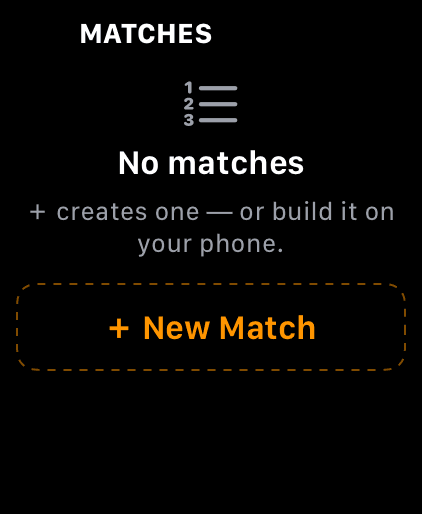
What the switch adds: a Match page in the swipe loop. Nothing armed yet, so it lists your matches.
Step 1
Turn on the Match page
On the watch, swipe to SETTINGS and turn the crown down to the Match Mode section. Switch on Match Page. A Match page joins the swipe loop right after Live Fire.
There is nothing to turn on for the phone. The iPhone already carries a MATCH page in its page bar.
Match Mode is part of Wrist Dope Pro. Without Pro the switch snaps back and the unlock card appears, and a free 7-day trial starts right there on the watch.
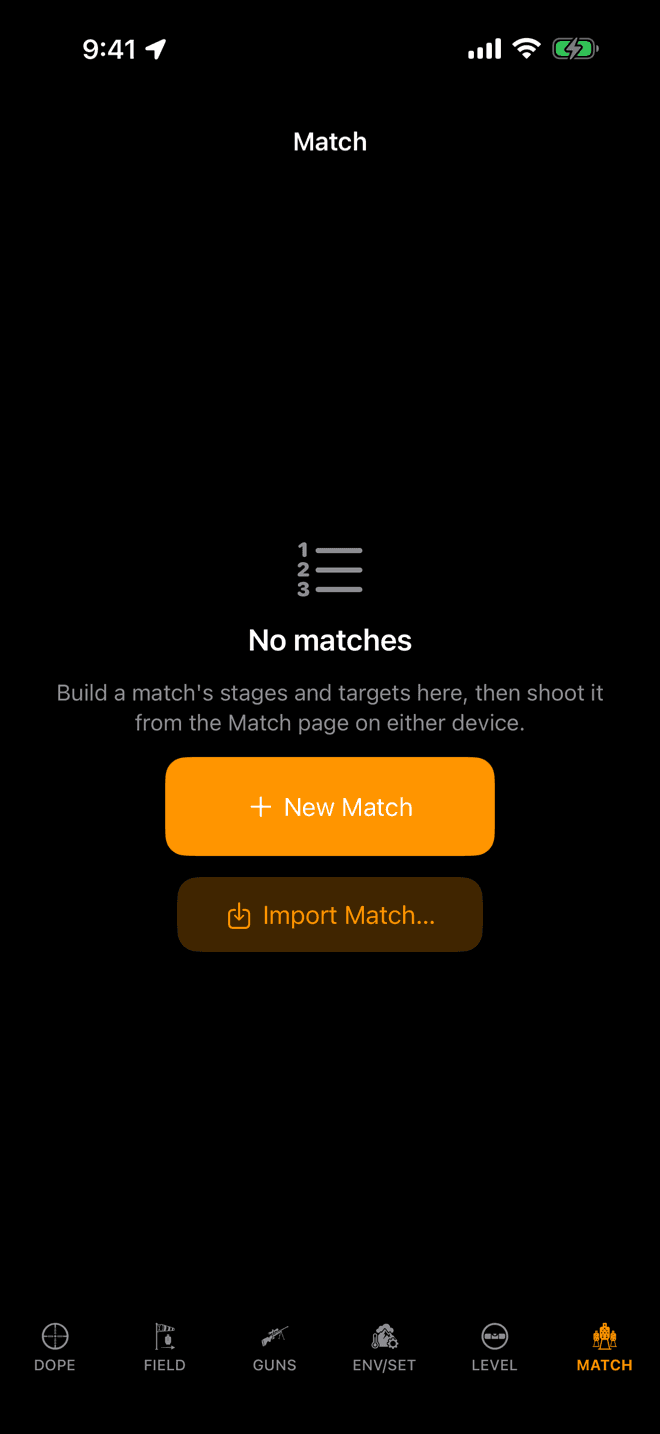
The MATCH page before your first match. New Match builds one; Import Match reads a file someone sent you.
Step 2
Build the match on your phone
Open MATCH on the phone and tap New Match. Name it and add a stage for each stage of the match. Drag to reorder them.
Tap a stage to fill it in. A stage holds the same two things the paper brief holds, and it keeps them separate:
- Targets: what is out there. A label and a range each.
Add Targetnames themT1,T2and on up, and you can rename any of them. - Sequence: how you shoot it. Steps in shoot order, so a target repeats as often as the brief says. Each step carries a round count and an optional position note like
gray car.
The stage also takes a Par (s) time, a Round limit and a brief note. Leave any of them blank and they simply don't appear on the card.
Every sequence step shows its hold beside it while you build, solved for your active load in the conditions you have now. That is the night-before sanity check.
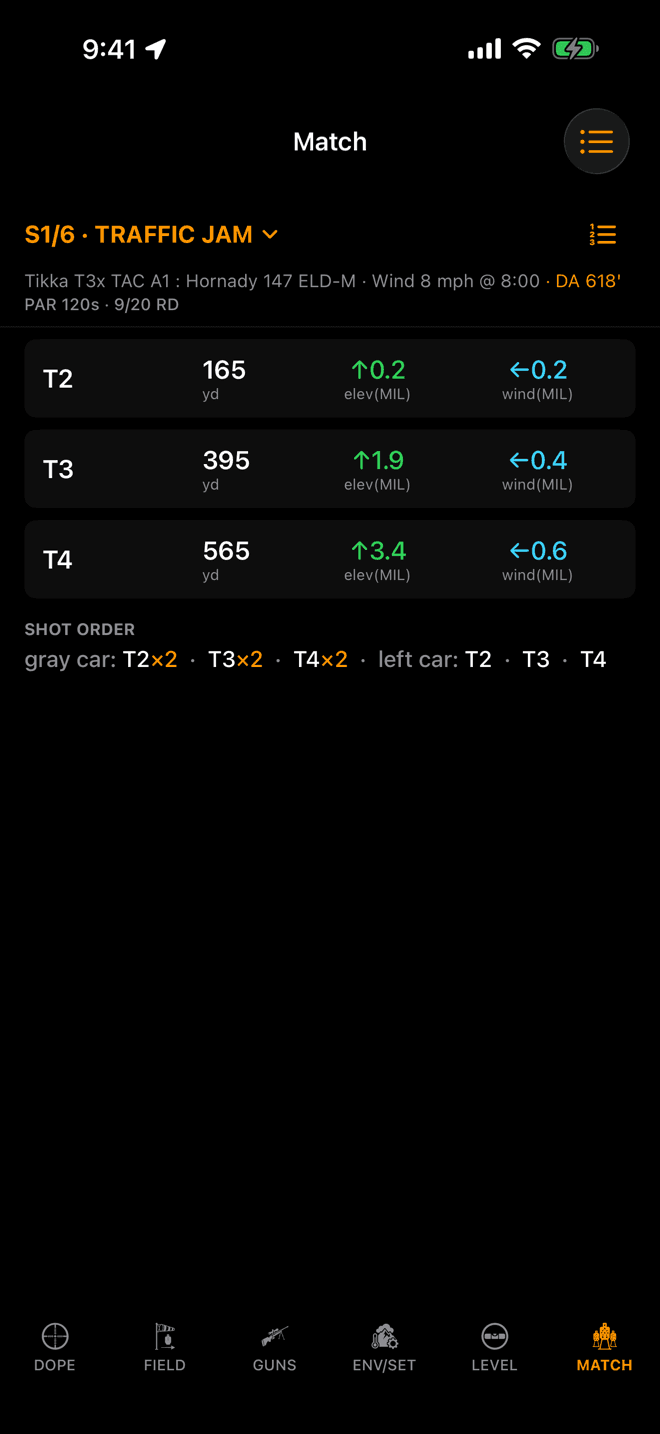
An armed match turns the phone’s MATCH page into the live Stage Card. Same solver, same numbers as the watch.
Step 3
Arm it, on both devices at once
One match at a time is active. Tap the circle beside a match in the list. It fills, and that match arms the Match page here and on the watch. Tap it again to stand down.
Shooting without a watch, phone on the rifle? This is your stage card, and the screen stays awake while the armed card is showing.
You can arm from the watch instead: with nothing active, the Match page lists your matches, and a tap arms one. Building on the watch works too, crown only, no keyboard. + New Match names it for today and opens quick entry, where the crown dials a range, the ×n chip sets the round count, ✓ commits the next target, and + Stage starts the next stage.
Matches and the active selection ride the watch connection both directions. Which stage you are on stays on the device you set it on.
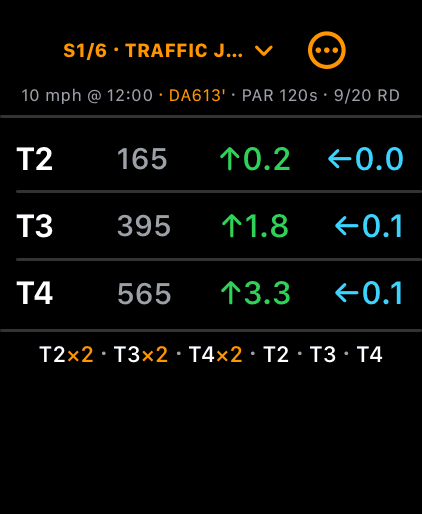
One row per target: label, range, elevation hold, wind hold. The shot order runs underneath.
Step 4
Read the card on the clock
The card is read-only on the clock. Turn the crown to scroll it. The header names the stage, S1/6 · TRAFFIC JAM, and the line under it carries the wind call, the density altitude the rows were solved with, and the stage's par and round count.
- Each target appears once, with its range, its elevation hold and its wind hold, in the unit your load is set to.
- The shot order sits under the list as one dense line, like
T2×2 · T3×2 · T4×2. - A row shaded yellow means the bullet is going transonic at that range. Orange means it has gone subsonic.
- A hold reads
—when the solver has no answer for that range.
Tap the stage title for the stage picker. Tap ••• for the match actions: add targets, switch match, end match, and Show shot sequence, which lists every engagement in shoot order with its round count instead. On the phone the stage name in the header is the picker, and the button beside it flips the layout. Each device remembers its own choice.
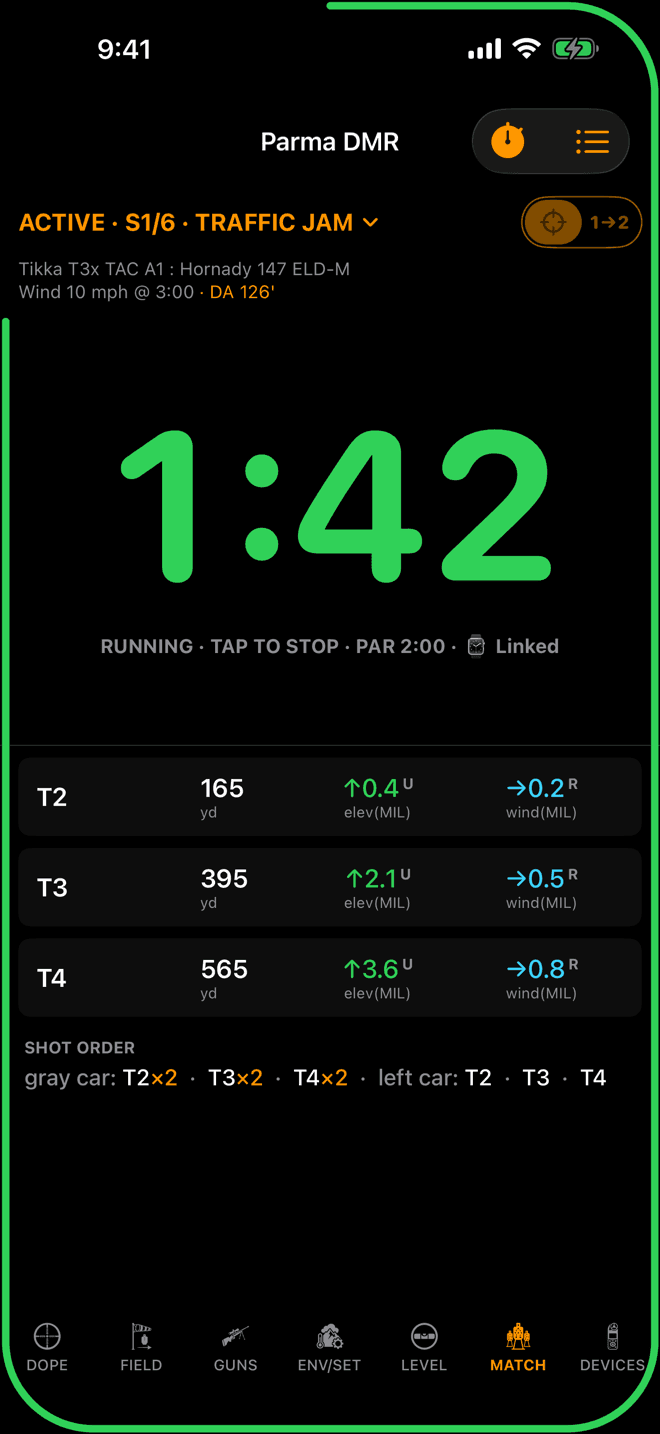
A running stage timer, linked to the watch. The holds stay underneath.
The timer
The stage runs the clock too
A stage with a par carries its own stage timer, on the same card as the holds. On the phone the stopwatch button arms it and a big START tile takes the tap. On the watch the ••• sheet arms it. When the two are linked, the phone and the watch run the same clock. Start on beep, the tones, the par and RO mode are all in Stage Timer.
NRL Hunter stages, where you find the targets on the clock, start from Hunter Stage on the phone's MATCH page or + Hunter Stage on the watch's Match page. Hunter Stages covers them.
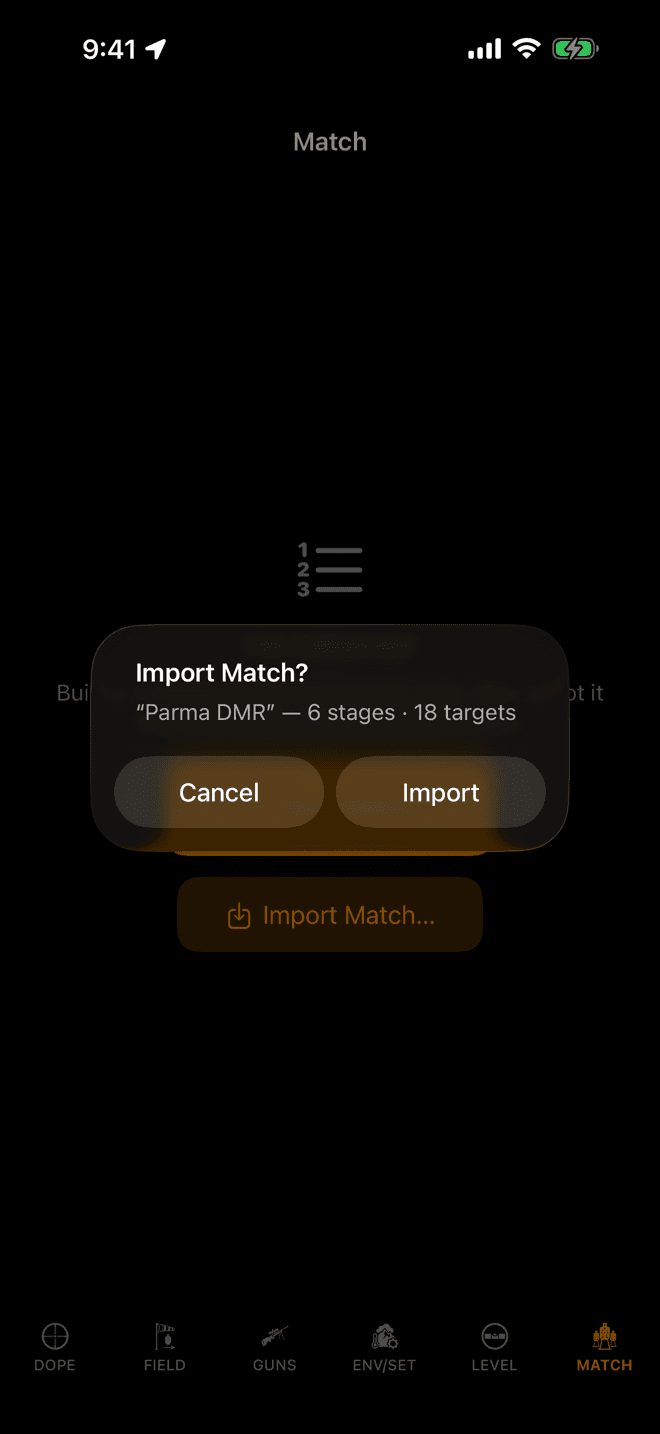
Tapping a .wdmatch file opens Wrist Dope and names what it found before it merges anything.
Step 5
One shooter keys it, the squad imports
Nobody needs to key the same stage sheet six times. Press and hold a match in the phone's list and choose Share Match…. There is a share button in the match editor too. It writes a .wdmatch file you send by AirDrop, Messages, or Files.
Everyone else taps the file. Wrist Dope opens, names what it found, and waits for a tap on Import. The merge is additive: it never deletes a match you already have, it brings back one you deleted, and where both copies exist the newer one wins. A file holding a single match arms it on import, then syncs on to your watch.
A file that arrived some other way and is sitting in Files? Use Import Match… on the MATCH page.
When the conditions move, the card moves
Holds are never stored in a match. The match keeps only what the paper brief keeps: names, ranges, order, round counts, notes. Every hold on the card is solved on the spot, and it re-solves itself when the inputs change:
- A new wind call, or a new target direction or angle.
- Temperature, pressure or humidity moving past the point where they change the answer.
- Switching to another gun or load, or editing the active one.
- Changing your distance unit, or an Advanced correction toggle.
So the same match file works next weekend at a different range in different air. The stage sheet is the same; the holds are not, and you don't have to notice.
No Match page on the watch?
- The switch is off. Watch Settings → Match Mode →
Match Page. The page is not in the swipe loop until this is on. This is the most common cause. - Pro isn't active. Match Mode is part of Wrist Dope Pro. If a trial has run out the page drops out of the loop even with the switch still on. Check your status in the watch's Settings.
- The page is there but shows a list. That is the no-match-armed state, not a fault. Tap a match to arm it, or arm one from the phone.
- The card says “No active load — ranges only”. No gun profile is active, so there is nothing to solve with. Set an active gun and load on the GUNS page and the holds fill in.
- A match you built on the phone isn't on the watch. Matches sync over the watch connection. Open Wrist Dope on both devices with the watch in range, then check again.
- An import said “Already up to date”. You already hold that match, and your copy is at least as new as the file's. Nothing was overwritten, which is the intended behavior.
Rifle-mounted tip: the anti-cant level glows behind the Stage Card too, on both devices, on the same switch that puts it behind Live Fire. See Scope Level.
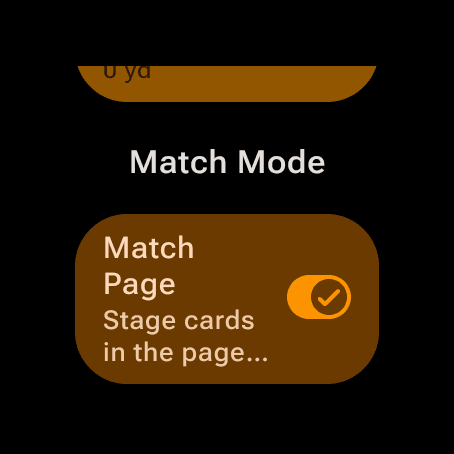
Watch Settings, Match Mode section. The switch adds a Match page to the swipe loop.
Step 1
Turn on the Match page
On the watch, swipe to SETTINGS and turn the bezel or crown down to the Match Mode section. Switch on Match Page. A Match page joins the swipe loop right after Live Fire.
There is nothing to turn on for the phone. It already carries a MATCH page in its page bar.
Match Mode is part of Wrist Dope Pro. Without Pro the unlock card appears instead, and a free 7-day trial starts right there on the watch.
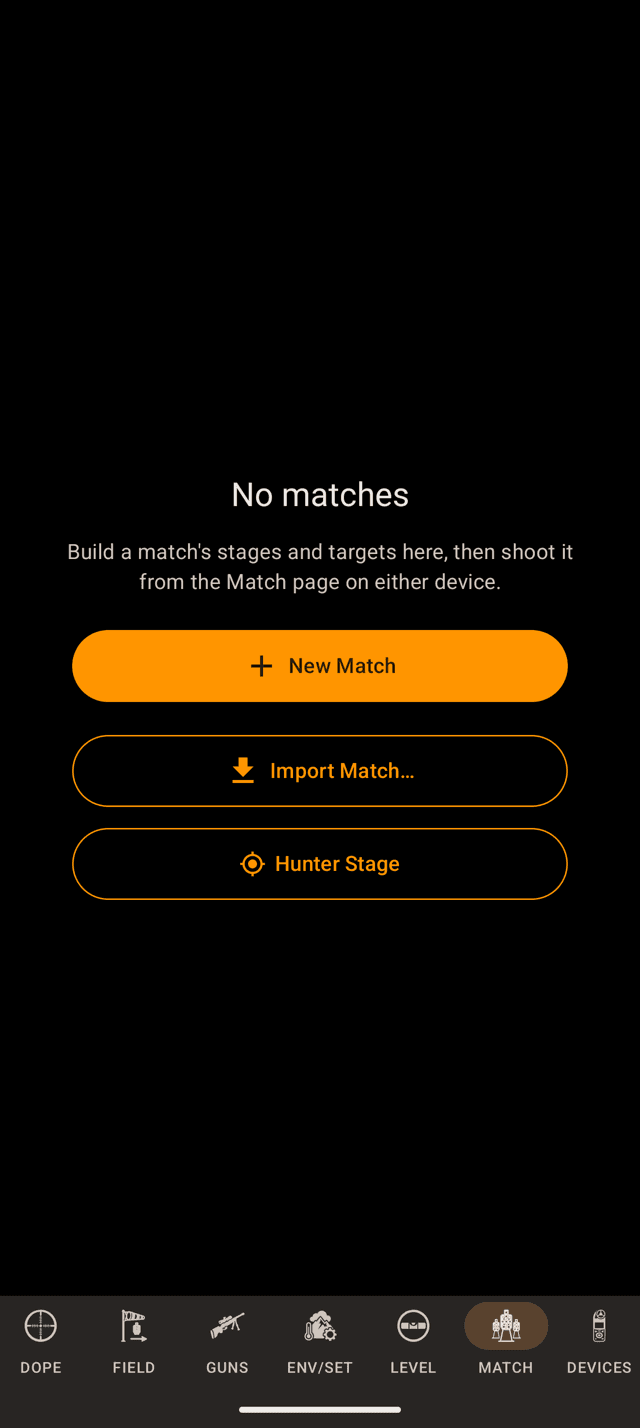
The MATCH page before your first match. New Match builds one; Import Match reads a file someone sent you.
Step 2
Build the match on your phone
Open MATCH on the phone and tap New Match. Name it and tap + Add Stage for each stage of the match. Stages run in the order you see. To move one, open its ⋯ menu and use Move Up or Move Down.
A finished match shows in the list with a ⋮ menu of its own. Delete Match in that menu removes it at once, without asking, so aim carefully.
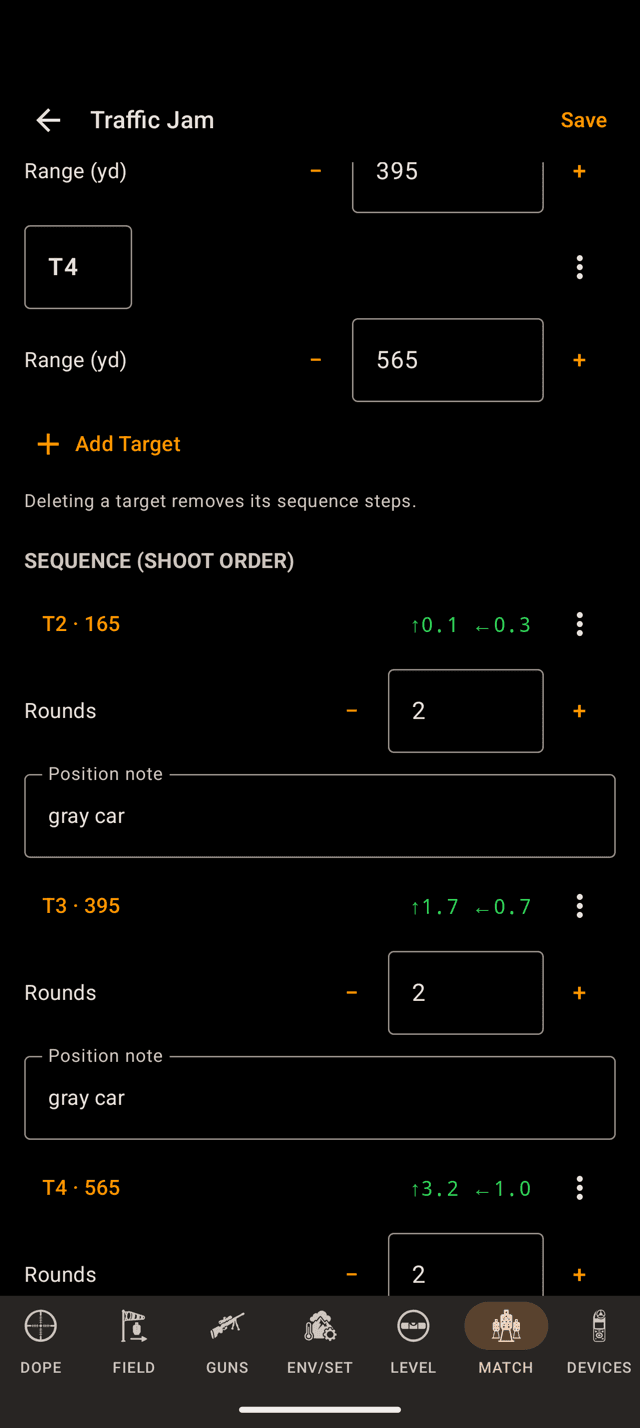
Each step in the shoot order shows its hold while you build. Deleting a target removes its steps.
Inside a stage
Targets, then the order you shoot them
Tap a stage to fill it in. A stage holds the same two things the paper brief holds, and it keeps them separate:
- Targets: what is out there. A label and a range each.
Add Targetnames themT1,T2and on up, and you can rename any of them. - Sequence: how you shoot it. Steps in shoot order, so a target repeats as often as the brief says. Each step carries a round count and an optional position note like
gray car.
The stage also takes a Par (s) time, a Round limit and a brief note. Leave any of them blank and they simply don't appear on the card.
Every sequence step shows its hold beside it while you build, solved for your active load in the conditions you have now. That is the night-before sanity check.
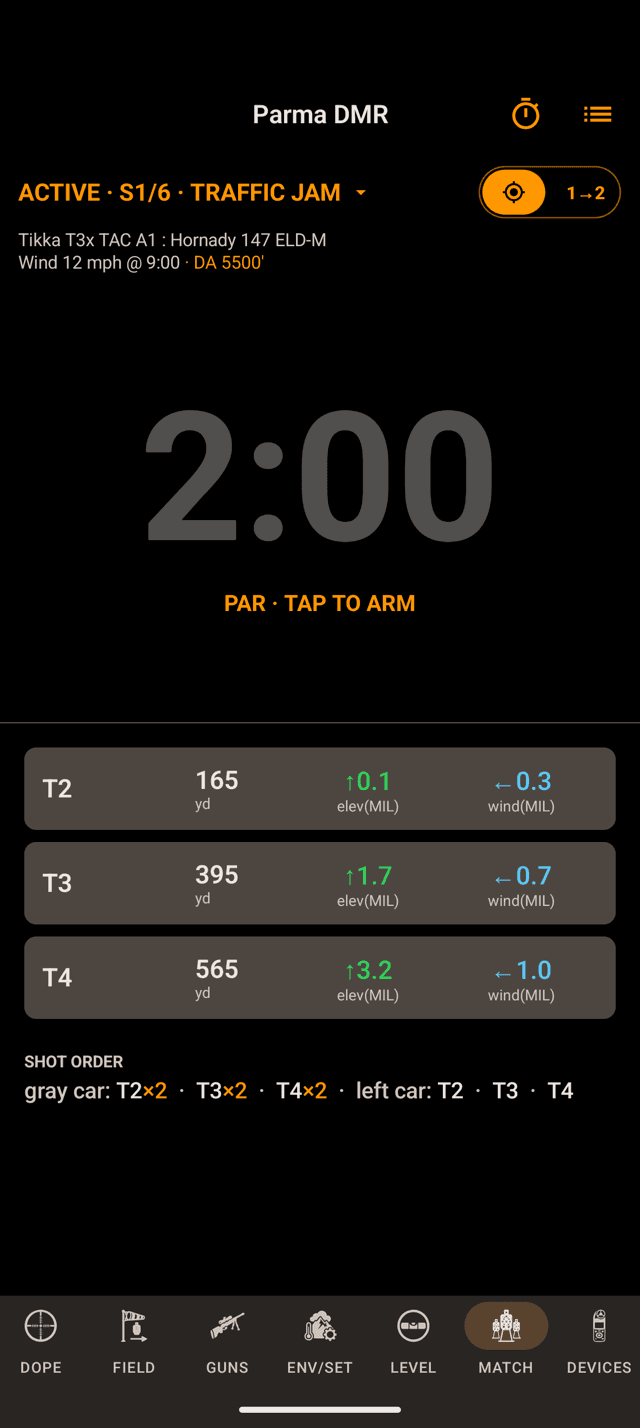
An armed match turns the phone’s MATCH page into the live Stage Card. Same solver, same numbers as the watch.
Step 3
Arm it, on both devices at once
One match at a time is active. Tap the circle beside a match in the list. It fills, and that match arms the Match page here and on the watch. Tap it again to stand down.
Shooting without a watch, phone on the rifle? This is your stage card, and the screen stays awake while a match is armed.
You can arm from the watch instead: with nothing active, the Match page lists your matches, and a tap arms one. Building on the watch works too, with no keyboard. New Match names it for today and opens quick entry, where the bezel or crown dials a range, the ×n chip sets the round count, ✓ adds the target, and + Stage starts the next stage.
Matches and the active selection ride the watch connection both directions. Which stage you are on stays on the device you set it on.
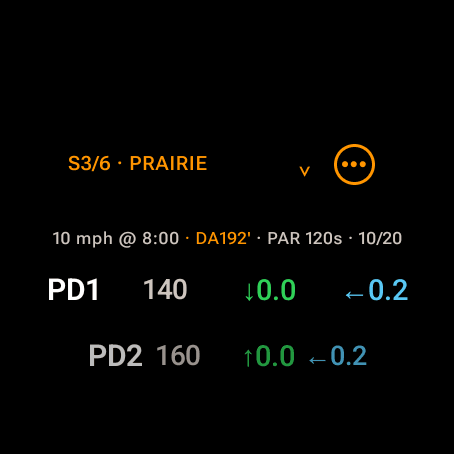
One row per target: label, range, elevation hold, wind hold.
Step 4
Read the card on the clock
The card is read-only on the clock. Turn the bezel or crown to scroll it. The header names the stage, S3/6 · PRAIRIE, and the line under it carries the wind call, the density altitude the rows were solved with, and the stage's par and round count.
- Each target appears once, with its range, its elevation hold and its wind hold, in the unit your load is set to.
- The shot order sits under the list as one dense line, like
T2×2 · T3×2 · T4×2. - A row shaded yellow means the bullet is going transonic at that range. Orange means it has gone subsonic.
- A hold reads
—when the solver has no answer for that range.
Tap the stage title for the stage picker. Tap ••• for the match actions: add targets, switch match, end match, and Show shot sequence, which lists every engagement in shoot order with its round count instead. On the phone the stage name in the header is the picker, and the toggle beside it flips between targets and shot order.
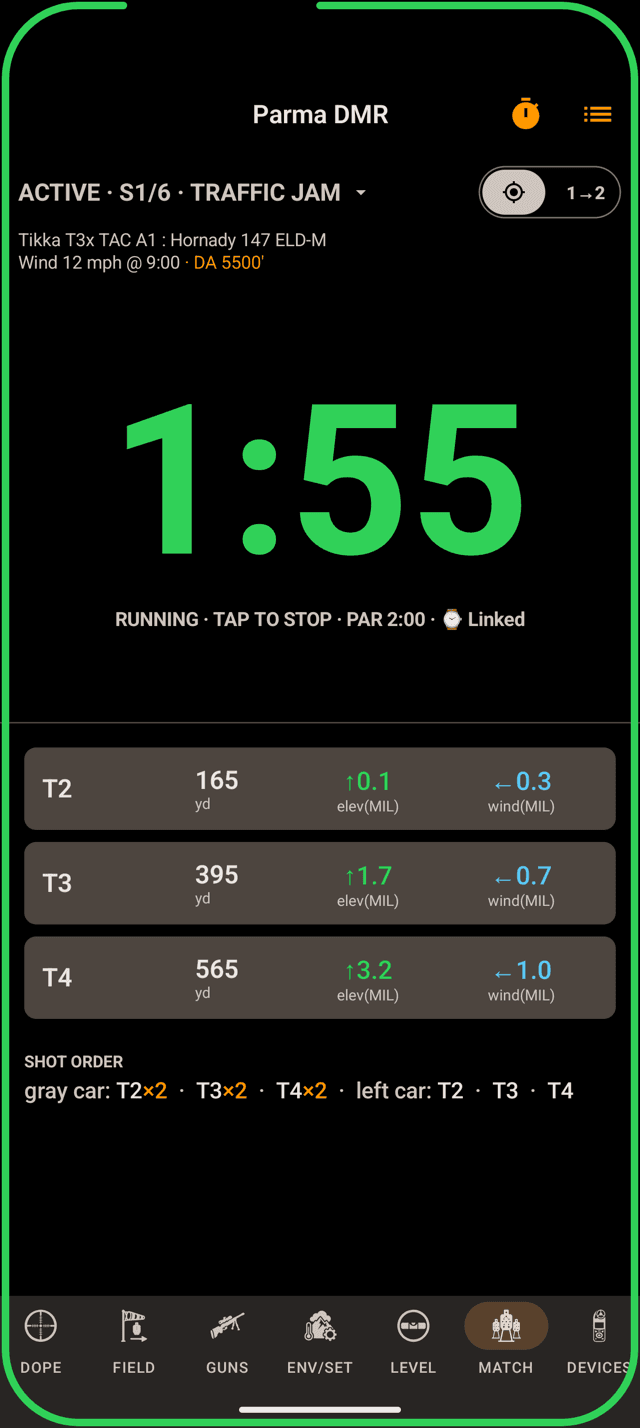
A running stage timer, linked to the watch. The holds stay underneath.
The timer
The stage runs the clock too
A stage with a par carries its own stage timer, on the same card as the holds. On the phone, tap the par clock on the card (it reads PAR · TAP TO ARM) or use the stopwatch menu. On the watch the ••• sheet arms it. When the two are linked, the phone and the watch run the same clock. Start on beep, the tones, the par and RO mode are all in Stage Timer.
NRL Hunter stages, where you find the targets on the clock, start from Hunter Stage on the phone's MATCH page or + Hunter Stage on the watch's Match page. Hunter Stages covers them, including logging targets by voice.
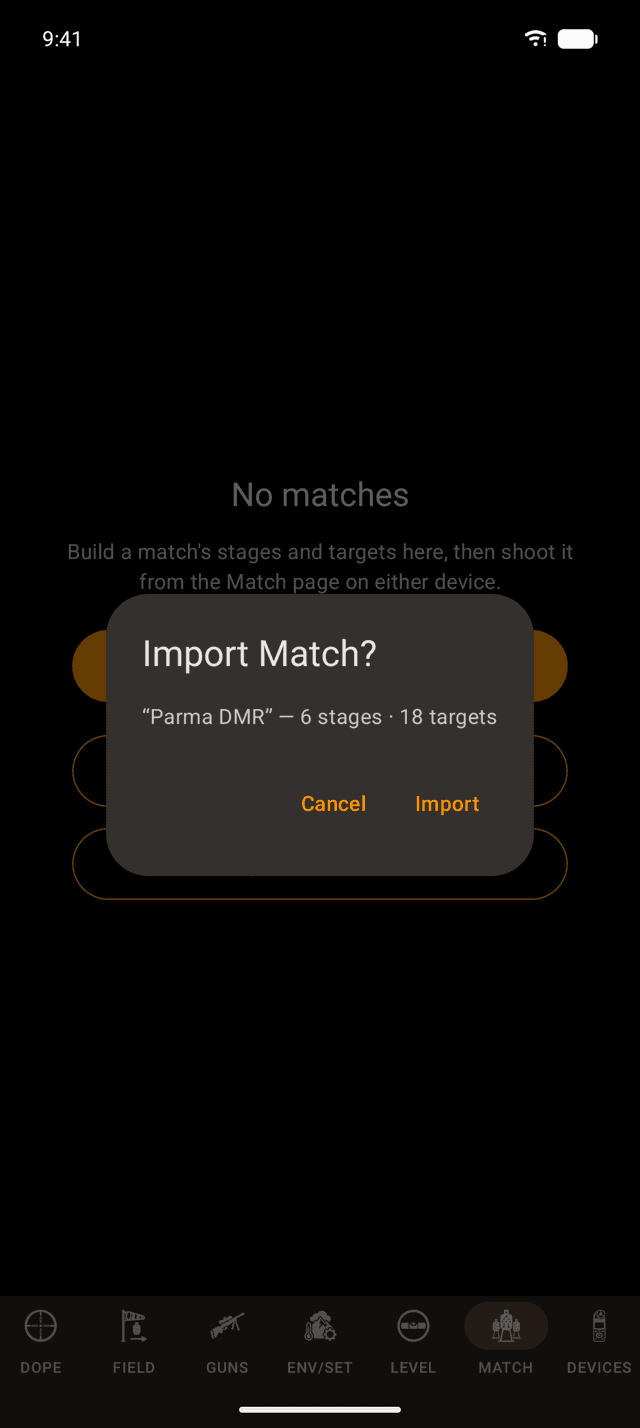
Tapping a .wdmatch file opens Wrist Dope and names what it found before it merges anything.
Step 5
One shooter keys it, the squad imports
Nobody needs to key the same stage sheet six times. Tap the ⋮ on a match in the phone's list and choose Share Match…. The match editor has a share button too. It writes a .wdmatch file and hands it to Android's share sheet, so it goes wherever your phone can send a file.
Everyone else taps the file. Wrist Dope opens, names what it found, and waits for a tap on Import. The merge is additive: it never deletes a match you already have, it brings back one you deleted, and where both copies exist the newer one wins. A file holding a single match arms it on import, then syncs on to your watch. The same file imports on an iPhone.
A file that arrived some other way and is sitting in your downloads? Use Import Match… on the MATCH page.
When the conditions move, the card moves
Holds are never stored in a match. The match keeps only what the paper brief keeps: names, ranges, order, round counts, notes. Every hold on the card is solved on the spot, and it re-solves itself when the inputs change:
- A new wind call, or a new target direction or angle.
- Temperature, pressure or humidity moving past the point where they change the answer.
- Switching to another gun or load, or editing the active one.
- Changing your distance unit, or an Advanced correction toggle.
So the same match file works next weekend at a different range in different air. The stage sheet is the same; the holds are not, and you don't have to notice.
No Match page on the watch?
- The switch is off. Watch Settings → Match Mode →
Match Page. The page is not in the swipe loop until this is on. This is the most common cause. - Pro isn't active. Match Mode is part of Wrist Dope Pro. If a trial has run out the page drops out of the loop even with the switch still on. Check your status in the watch's Settings.
- The page is there but shows a list. That is the no-match-armed state, not a fault. Tap a match to arm it, or arm one from the phone.
- The card says “No active load — ranges only”. No gun profile is active, so there is nothing to solve with. Set an active gun and load on the GUNS page and the holds fill in.
- A match you built on the phone isn't on the watch. Matches sync over the watch connection. Open Wrist Dope on both devices with the watch in range, then check again.
- An import said “Already up to date”. You already hold that match, and your copy is at least as new as the file's. Nothing was overwritten, which is the intended behavior. A file holding one match still arms it.
Rifle-mounted tip: the anti-cant level glows behind the Stage Card too, on both devices, on the same switch that puts it behind Live Fire. See Scope Level.
Still stuck? support@wristdope.com