
Manual / Hunter Stages
Hunter Stages
An NRL Hunter blind stage gives you a clock and a field and no distances. Wrist Dope turns the hunt into a stage card while the clock runs: range a target, dial that range, read the hold, log it. When you have found them all, the card is built and you shoot it.
Pro
Hunter stages run on the stage timer, part of the one-time Pro upgrade.
A rangefinder
You find the ranges on the clock. The app dials and logs them.
Watch, phone or both
Log on the wrist, name and note on the phone. They build one card.
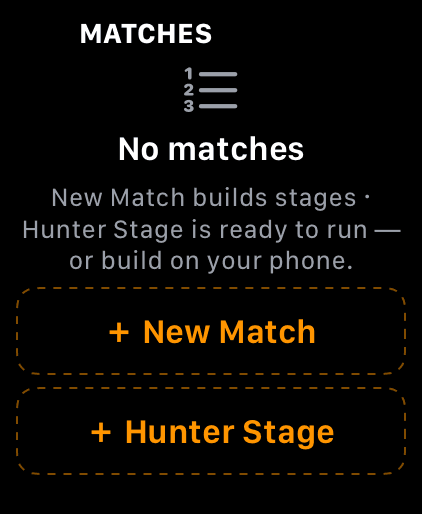
Hunter Stage sits under New Match on the watch’s match list.
Step 1
Start a hunter stage
On the watch Match page, tap + Hunter Stage. On the phone it is Hunter Stage on the MATCH page, under New Match and Import Match….
Hunter stages run on the stage timer, so they need what the timer needs: the one-time Pro upgrade, and on the watch the Match Page switch in Settings, under Match Mode.
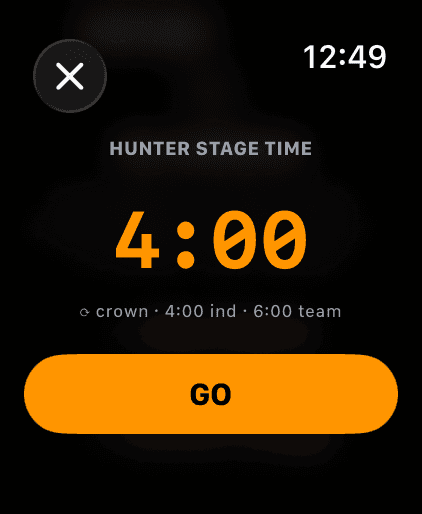
4:00 for an individual run, 6:00 for a team.
Step 2
Set the stage time
The time picker opens at 4:00. The hint under it says what the rules give you: 4:00 individual, 6:00 team. Turn the crown to change it and tap GO. On the phone it is the Hunter Stage Time sheet, minutes and seconds, then Go.
There is one hunter stage slot, called Hunter Stage, and every new hunter run reuses it. If the last run still has targets in it and you haven’t saved it, Wrist Dope asks first, on either device: Start new clears it, Save last run first keeps it as a match.
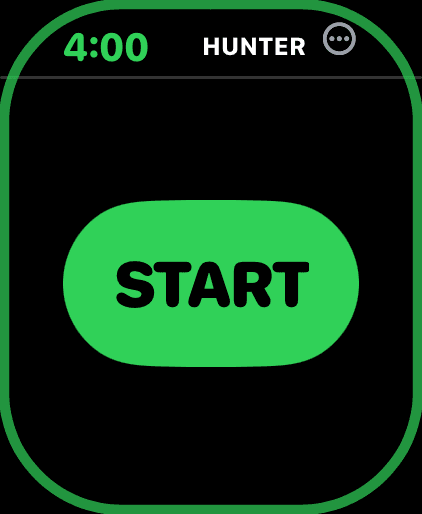
Before the clock starts there is nothing to range or log.
Step 3
Armed: one button, START
After GO the timer is armed with the stage time and the screen is one big START. There is nothing to dial yet, because you can’t range anything until the clock runs.
Tap it on the RO’s go, or turn on Start on beep and let the range timer start it. It is the same timer as any stage: Stage Timer.
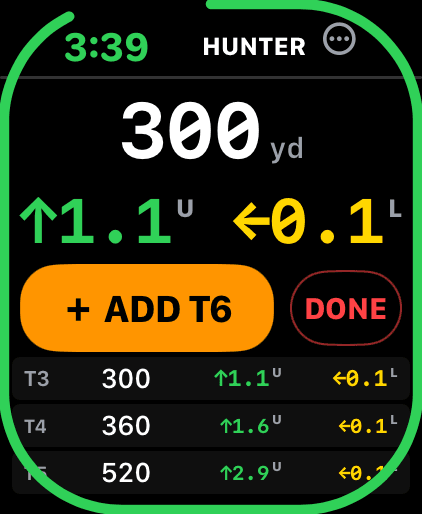
Dial the range your rangefinder gave you, read the hold, tap ADD.
Step 4
Range it, dial it, log it
The clock runs at the top. Under it, turn the crown to the range your rangefinder just gave you. It moves in 5 yard steps from 25 to 1500 (meters if that is your unit). The hold for that range sits right under it, big, in the stage card’s colors.
Tap + ADD T6 and that range becomes the next target, one round, labelled in order. Dial the next one. The last three you logged show underneath (two on the smaller watches).
The watch logs ranges. Names and notes are a phone job.
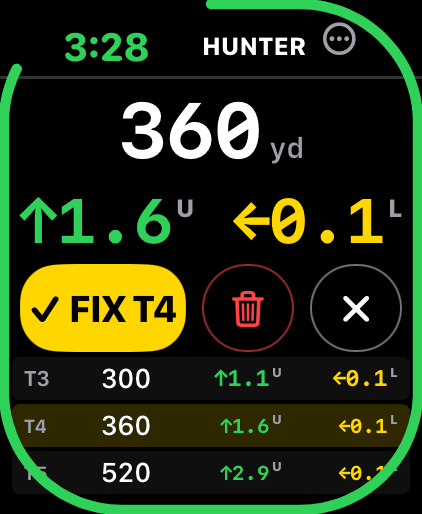
Tap a logged row to fix it. Yellow means you are editing.
Step 5
Fix a target you logged wrong
Tap a logged row. The dial jumps to its range and the button turns yellow: ✓ FIX T4. Re-dial and tap it to correct the range. The red trash deletes a target you logged too soon, and ✕ (or tapping the row again) backs out without changing anything.
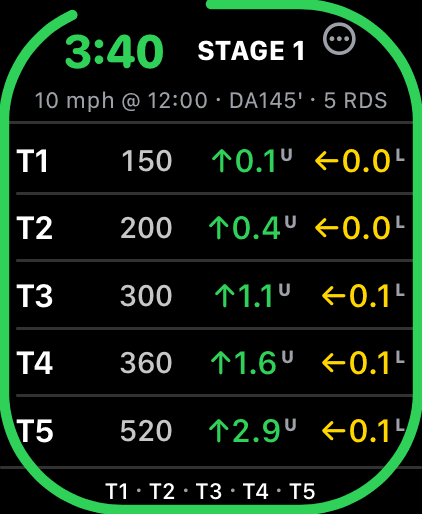
After DONE: the stage card you just built, with the clock still running.
Step 6
DONE means done logging
DONE does not stop the clock. It tells the watch you have found everything, and the screen flips to the stage card you just built, every target with its live hold, while the clock keeps running. Now shoot it.
Found one more? Press and hold the card to go back to logging. To stop the clock early, tap the clock at the top.
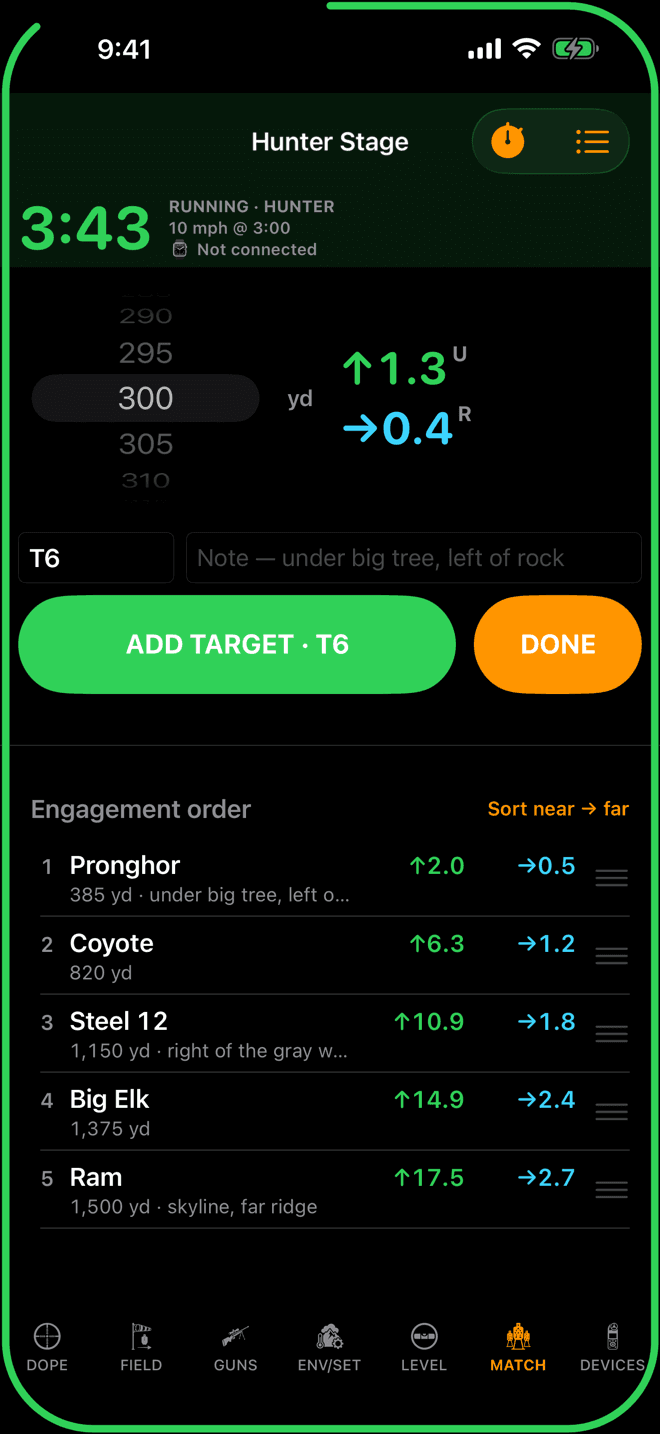
The phone adds a name and a note to each target, and the order you will shoot them in.
Step 7
On the phone: name it, note it, order it
The phone’s capture screen is the scope-table half of the job. Top half: the clock, a range wheel beside the live hold, a name field already filled with the next label, a note field, and ADD TARGET · T6 beside DONE.
Bottom half: Engagement order. Drag a target by its handle to put it where you will shoot it, or tap Sort near → far. Notes like “under big tree, left of the rock pile” show right under the range.
Phone and watch build the same card. A target logged on either shows up on the other at once, so a buddy can type names and notes on your phone while you range and log on the wrist.
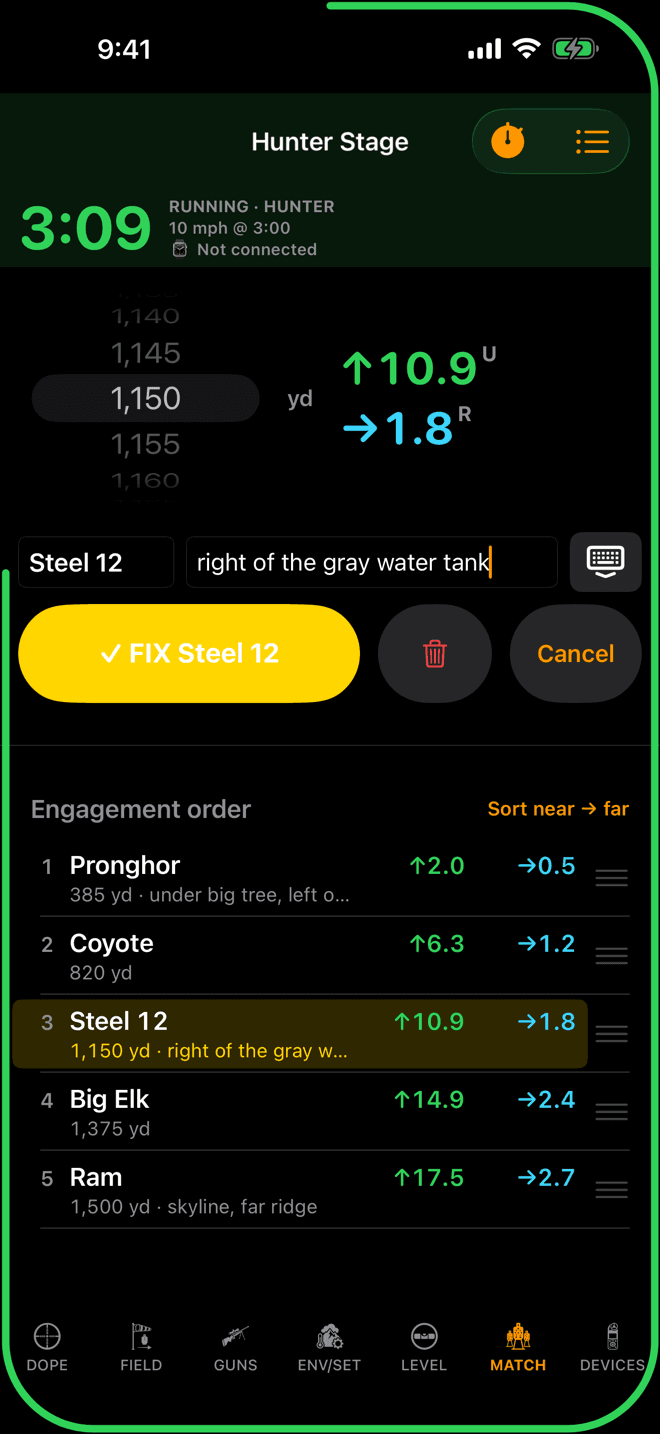
Tap a target to fix its range, name or note in the same entry.
Step 8
Fix a target on the phone
Tap a target in the list and it loads into the entry: range, name and note. Change what is wrong and tap ✓ FIX Steel 12. The trash deletes it and Cancel leaves it alone.
Press and hold a target for the shortcuts: Rename…, Note… and Delete.
Range only, hold live
An NRL Hunter blind stage gives you no distances. You find the targets on the clock, range them, and engage. Wrist Dope builds the stage card while you do that: every target you log is a range, one round, and a label.
The hold is never stored with the target. It is solved live from your load, the wind call and the air, the same as every stage card, so a target you logged two minutes ago still shows the right hold when the wind changes or the rifle swings.
Keep the run: save it as a match
A hunter run lives in the one Hunter Stage slot until the next run clears it. To keep it, use Save as match: in the ••• sheet on the watch, or the stopwatch menu on the phone. It shows up once the slot has targets and goes away after you have saved that run, so you can’t save the same run twice.
The slot itself is never deleted, only reused, so neither device offers Delete for it.
Hunter stage giving you trouble?
- There is no Hunter Stage button on the watch. Turn on
Match Pagein the watch’s Settings, under Match Mode. It also needs Pro. - You logged a target too early or at the wrong range. Tap its row, re-dial, and tap FIX. Or trash it.
- You tapped DONE too soon. The clock is still running. Press and hold the stage card to get back to logging.
- Your last run is gone. Starting a new hunter stage reuses the one slot. Save as match first, or pick
Save last run firstwhen the app asks. - There is no way to name a target on the watch. The watch logs ranges only. Add names and notes on the phone, during the run or after.
- You want to say the range out loud. Voice logging is not on iPhone or Apple Watch. It is an Android feature.
Related: Stage Timer for the clock, the ring and Start on beep, Match Mode for regular stages, and Scope Level, whose rifle-mounted mode keeps the hold following the rifle.
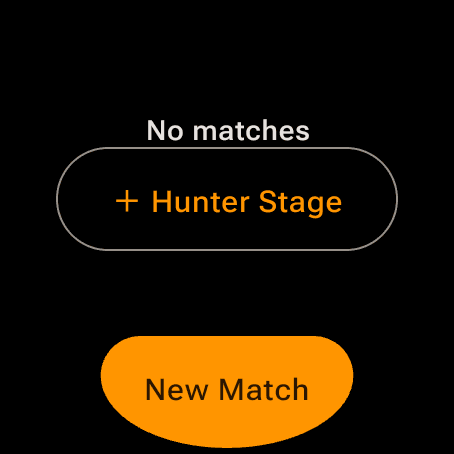
+ Hunter Stage on the watch’s Match page.
Step 1
Start a hunter stage
On the watch Match page, tap + Hunter Stage. It arms straight away at 4:00, the individual time. To change it, use •••, then Par.
On the phone, Hunter Stage on the MATCH page opens Hunter Stage Time, 4:00 to start, then Go.
There is one hunter slot, reused every run. If it still holds an unsaved run, either device asks first: Start new or Save last run first. Hunter stages need the one-time Pro upgrade, and the watch needs Match Page on in its Settings.
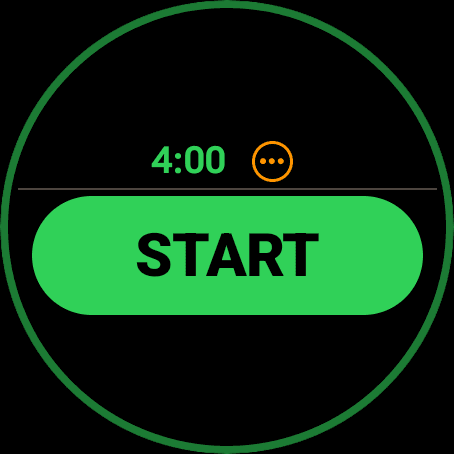
Nothing to range until the clock runs.
Step 2
Armed: one button, START
The armed screen is one green START. Tap it on the RO’s go, or let Start on beep do it.
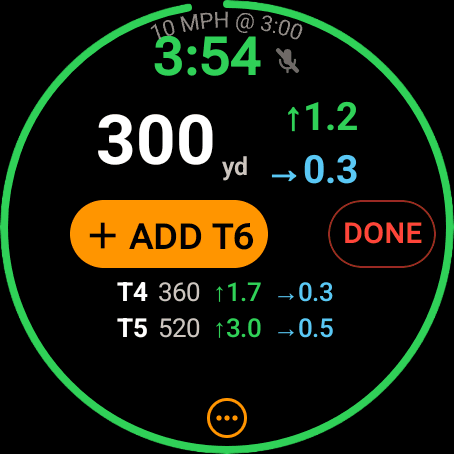
Turn the bezel or crown to the range, read the hold, tap ADD.
Step 3
Range it, dial it, log it
Turn the bezel or crown to the range your rangefinder gave you. The dial moves in 5 yard steps, or press and hold the range to type it exactly. The hold for that range sits next to it.
Tap + ADD T6 to log it as the next target and dial the next one. Your last logged targets show underneath.
On the phone the capture screen has a range wheel, a name and a note for each target, and the engagement order underneath, the same as on iPhone.
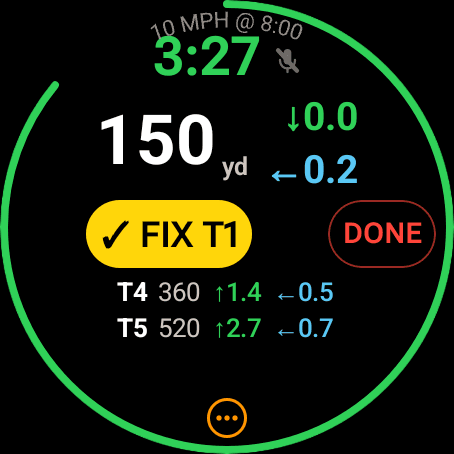
Picked from Targets…: the dial jumps to it and the button says FIX.
Step 4
Fix or delete a target
On the watch, fixes go through •••, then Targets…. Tap a target and the dial jumps to its range with a yellow ✓ FIX T1. The trash on a row asks right in the row, Delete T6?, and Sort near→far sits at the end of the list.
On the phone, tap a row for FIX, trash and Cancel, and drag the grips to reorder. Reordering is a phone job; the watch only sorts.
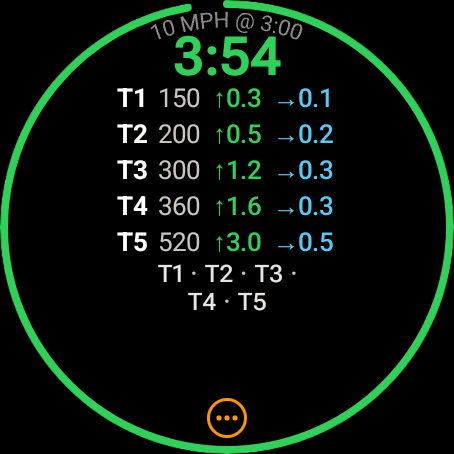
After DONE: the card you built, clock still running.
Step 5
DONE means done logging
DONE doesn’t stop the clock. The watch flips to the stage card you just built, each target with its live hold. Shoot it.
Found another one? On the phone tap Back to logging. On the watch it is in the ••• sheet.
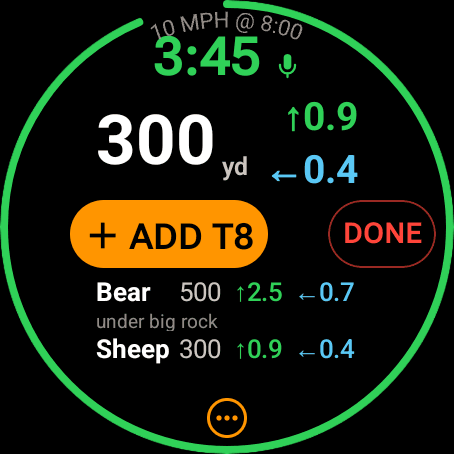
Voice logging on: Bear and Sheep, logged by talking.
Step 6
Or just say it
Android can log hunter targets by voice, so your hands stay on the rifle and the rangefinder. Say the range, then a name, a note, or “next.” Or say it all at once:
- “500 bear under big rock”
Turn it on for one run with the mic pill on the watch’s capture screen, the mic button on the phone, or Voice logging in the timer menu or the ••• sheet. To start every hunter stage listening, turn on Voice Logging in the watch’s Settings, under Voice, or Voice logging in the phone’s VOICE settings. It is off by default and set per device.
Voice logging is part of the one-time Pro upgrade and needs microphone access. It listens quietly, without the listening chime.
Range only, hold live
An NRL Hunter blind stage gives you no distances. You find the targets on the clock, range them, and engage. Wrist Dope builds the stage card while you do that: every target you log is a range, one round, and a label.
The hold is never stored with the target. It is solved live from your load, the wind call and the air, the same as every stage card, so a target you logged two minutes ago still shows the right hold when the wind changes or the rifle swings.
Keep the run: save it as a match
The run stays in the one hunter slot until the next run clears it. To keep it, use Save as match in the phone’s stopwatch menu or the watch’s ••• sheet, which offers it once the slot has targets.
Hunter stage giving you trouble?
- The mic button does nothing. Microphone access is off for Wrist Dope, or Pro is not active.
- Voice put the range in the wrong place. Say the range first, then the name or the note, and say “next” to move to the next target.
- A target got the wrong range. On the watch:
•••,Targets…, tap it, re-dial, FIX. On the phone, tap the row. - Your last run is gone. A new hunter stage reuses the slot. Save as match first, or pick
Save last run firstwhen the app asks. - There is no Hunter Stage button on the watch. Turn on
Match Pagein the watch’s Settings, under Match Mode. It needs Pro.
Related: Stage Timer for the clock and Start on beep, Voice Control for the rest of what Wrist Dope understands on Android, and Match Mode.
Still stuck? support@wristdope.com