
Manual / Supported watches
Supported watches
Wrist Dope runs on Apple Watch Series 4 and later, and on watches with Wear OS 3 or later. Every one of them gets the same solver. What changes from model to model is how much of the field the watch can measure for you, and how the screen behaves once the watch is on the rifle. This page says exactly which is which.
Watch
Apple Watch Series 4 or later on watchOS 10, or Wear OS 3 or later.
Phone
iPhone XS or later on iOS 18, or Android 11 or later.
Standalone
The watch app solves on its own. The phone is not required in the field.
The list
Which watches run it
The Wrist Dope watch app requires watchOS 10. Apple's own Apple Watch and iPhone compatibility table is what decides which hardware that covers: every Apple Watch from Series 4 onward can reach watchOS 10. Series 3 and earlier top out at watchOS 8 and cannot run it.
Series 4, Series 5, and the original SE reach watchOS 10 and stop there: 10.6.1 is the last update Apple ships them. They run Wrist Dope today. They will not get a newer watchOS.
Those are not a deployment-target guess. Wrist Dope has been run on a Series 4 and on a first-generation SE (the two oldest models the watchOS 10 floor allows), as well as on the current Ultra. The layout is checked at both ends of the lineup, so holds, wind arrows and range-card rows fit a 40 mm screen and not just a 49 mm one.
| Model | Case | Barometer | Compass | Always-on display |
|---|---|---|---|---|
| Series 4watchOS 10.6.1 is its last update | 40 / 44 mm | Yes | No | No |
| Series 5watchOS 10.6.1 is its last update | 40 / 44 mm | Yes | Yes | Yes |
| SE (1st generation)watchOS 10.6.1 is its last update | 40 / 44 mm | Yes | Yes | No |
| Series 6 | 40 / 44 mm | Yes | Yes | Yes |
| Series 7 | 41 / 45 mm | Yes | Yes | Yes |
| Series 8 | 41 / 45 mm | Yes | Yes | Yes |
| SE (2nd generation) | 40 / 44 mm | Yes | Yes | No |
| Ultra | 49 mm | Yes | Yes | Yes |
| Series 9 | 41 / 45 mm | Yes | Yes | Yes |
| Ultra 2 | 49 mm | Yes | Yes | Yes |
| Series 10 | 42 / 46 mm | Yes | Yes | Yes |
| Series 11 | 42 / 46 mm | Yes | Yes | Yes |
| SE 3 | 40 / 44 mm | Yes | Yes | Yes |
| Ultra 3 | 49 mm | Yes | Yes | Yes |
Sensor and display columns come from Apple's published tech specs for each model: Series 4, Series 5, SE (1st generation), Series 6, Series 7, Series 8, SE (2nd generation), Ultra, Series 9, Ultra 2, Series 10, Series 11, SE 3, and Ultra 3.
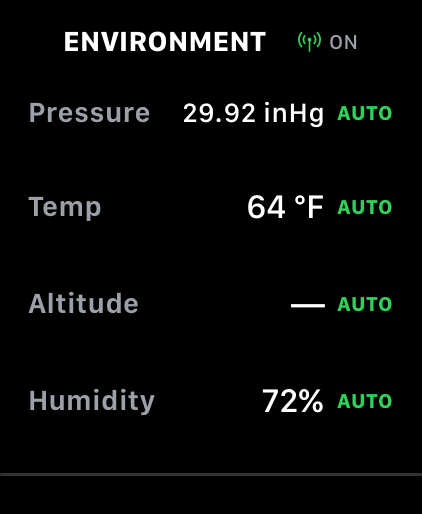
The Environment page. Altitude reads a dash until a GPS fix lands, rather than showing a number it does not have.
Barometer
Every supported watch has one
Apple has put a barometric altimeter in every Apple Watch since Series 3, so every watch that runs Wrist Dope has one. That is the sensor behind the pressure reading on the Environment page, and it is why the app can read station pressure on the spot instead of taking a sea-level number off a weather feed.
Pressure feeds density altitude, and density altitude is what moves your elevation hold when you drive from the valley up to the ridge. You can see it on Live Fire as the DA figure under the load name.
This is the one capability you do not have to shop for. If the watch runs the app, it can read the air.
Compass
Series 5 and later. Series 4 is the exception.
Apple added the compass with Series 5. Series 4 is the only watch in the table above without one, and it is the only place in Wrist Dope where a model choice takes a feature away rather than just changing how it looks.
With a compass
- Point the watch downrange and tap to lock the target bearing on the Target page.
- Point into the wind and tap to lock its direction, then dial speed with the Digital Crown.
- Coriolis runs in full. The solver enables it only when it has both your latitude and a shooting azimuth, and the azimuth comes from the compass.
On a Series 4
- Set wind direction by hand on the wind clock instead of pointing at it. Speed and the whole wind solution work exactly the same.
- Elevation, wind, drop, drift, spin drift, and the full range card are unaffected.
- Coriolis stays off, because nothing has given the solver an azimuth. At the ranges where Coriolis is worth arguing about, you are usually shooting off a known bearing anyway.
Heading also needs Location permission, on every model. Wrist Dope prefers true north and falls back to magnetic when true is unavailable.
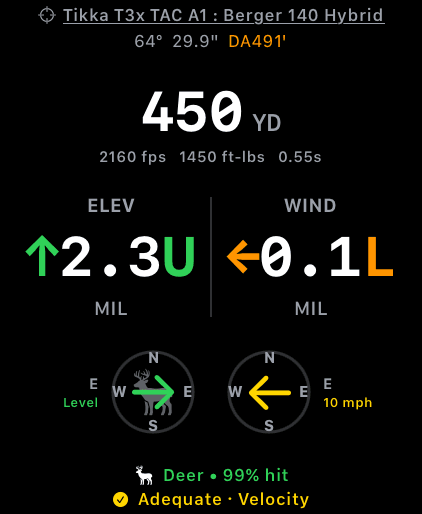
Live Fire on a 49 mm Ultra. This is the screen that has to survive the time between shots.
Always-on display
What you see between shots
A rifle-mounted watch does not get wrist raises. Whether your holds are still on the glass when you come off the recoil depends on the display.
With always-on (Series 5 and later, and the SE 3), the screen dims instead of going dark, and your solution stays readable. Wrist Dope handles that dimmed state on purpose: the cant glow drops to a lower opacity and stops pulsing, so it stays glanceable without burning the panel.
Without always-on (Series 4 and the SE 1st and 2nd generation), the screen goes black when the wake timer runs out, and you tap it to bring the holds back. The watch settings tips page covers the wake-duration change that makes this a much smaller problem.
On every model, Live Fire and the Level page run an extended runtime session while the level cue is active, which keeps the cant cue and the motion feed alive through wrist-down for up to an hour. It is not a substitute for an always-on panel, but it is why the audio cue does not simply stop.
Screen size
40 mm to 49 mm, nothing dropped
Wrist Dope lays out against the actual screen rather than shipping one fixed design. On the smaller cases the type tightens and the compass dials shrink; the range, both holds, the units, the compasses, and the hit and terminal lines are all still there. Below is the same Live Fire screen, same load, same solution, on a 49 mm Ultra and a 40 mm SE.
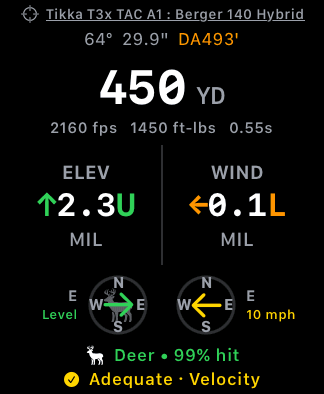
Both captured at native resolution, shown at the same scale relative to each other.
The 49 mm Ultra gives you the most room, and it is the easiest to read at arm's length on a rail. It is not a different app. Wrist Dope uses no Ultra-only hardware: not the Action button, not the depth gauge, not the siren. If you own an Ultra, buy it for the battery, the brightness, and the case. Not for a feature in this app that you would be missing otherwise.
Speed
What to expect from an older chip
We do not publish per-model benchmarks, and we would rather say that plainly than invent a table. What we can tell you is where the time actually goes, because that is what decides whether a watch feels quick.
- One hold is cheap. A single firing solution is a small piece of arithmetic by modern standards. Wrist Dope is built to recompute it inside one display frame, and dialing range with the Digital Crown on Live Fire should feel immediate on any supported watch.
- A full range card is the heavy screen. It is not one solution, it is every row from the muzzle out to your max range. That is where an older chip shows itself, as a visible beat before the card fills in. It is also why the card regenerates only while you are looking at it, so it never steals time from your holds.
- Complications do not compute. The watch-face complications read a saved snapshot rather than solving on the face, so they cost the same on every model.
- Battery, not speed. On the oldest supported watches the thing you will notice first is battery, not lag. A day of live sensors on a Series 4 is a bigger ask than on a Series 10. Start charged.
If a screen feels slow on your watch, tell us which model and which screen. That is a bug report we can act on, and it beats a benchmark table we made up.
The iPhone side
iOS 18 or later
The Wrist Dope iPhone app requires iOS 18, which Apple ships to iPhone XS and later. That iPhone pairs with any watch in the table above. Apple's compatibility table has always allowed a newer iPhone with an older watch, so a Series 4 on a current iPhone is a supported pairing.
You do not need the phone at the range. The watch app carries the solver, your saved guns and loads, manual conditions, and the range card on its own. The iPhone is where scanning ammo and building profiles is faster, and the two sync when they are together.
The watch app will not install
- The watch is below watchOS 10. On the watch, open
Settings→General→Software Update. Series 3 and earlier cannot get to watchOS 10 at all, so no update will help there. - Install from the iPhone. The watch app ships with the iPhone app rather than being sold separately. Install Wrist Dope on the iPhone first, then open the Apple Watch app, tap
My Watch, and scroll down toAvailable Apps. - Automatic App Install is off. In the Apple Watch app,
My Watch→General→Automatic App Installdecides whether watch apps follow their iPhone app across. With it off, tapInstallnext to Wrist Dope underAvailable Appsinstead.
Menu paths checked against Apple's current Apple Watch User Guide for watchOS 26. Apple moves settings between releases, so if a menu is not where we said it was, tell us and we will fix the page.
Next: once the app is on the watch, the watch settings tips page covers the handful of watchOS settings that make a rifle-mounted watch behave.
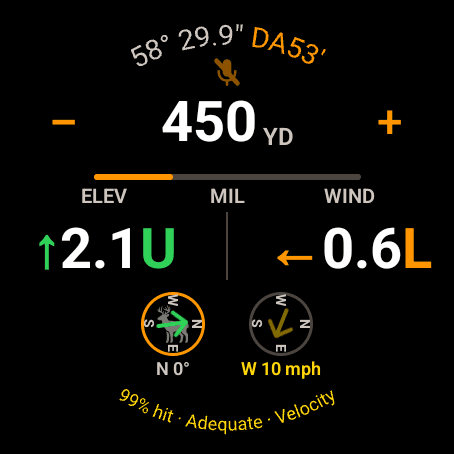
Live Fire on a large round Wear OS watch. Same solver, same holds as the phone.
The requirements
Wear OS 3 or later
The Wrist Dope watch app needs Wear OS 3 or later. The phone app needs Android 11 or later. Google Play only offers the app to devices that meet those floors.
A barometer and a compass are not required to install it. A watch without one still runs Wrist Dope on the same solver. It measures less of the field for you, and the two sections below say exactly what you lose.
Wrist Dope has been run on a Samsung Galaxy A17 phone and on three watches: a Galaxy Watch 8, a Google Pixel Watch 4 and a Galaxy Watch Ultra.
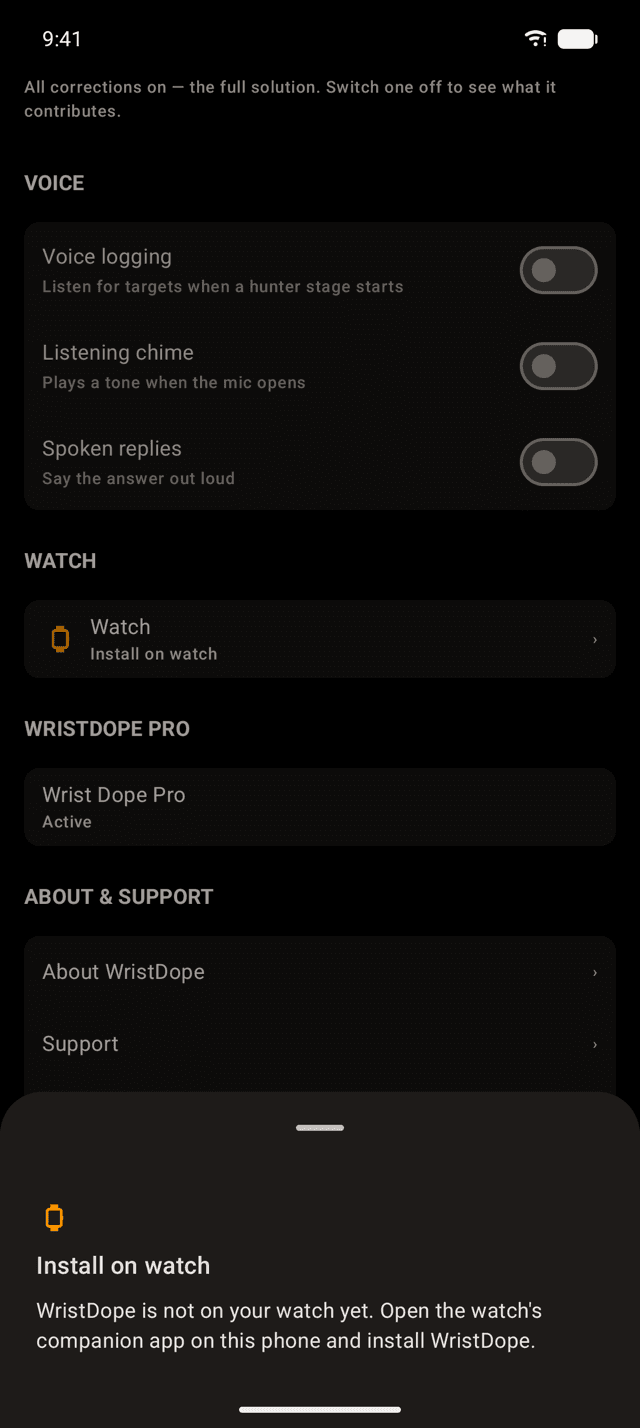
ENV/SET, WATCH: the phone found a watch without Wrist Dope on it.
Getting it on the watch
Phone first, then the watch
Install Wrist Dope on the phone from Google Play. Then put it on the watch, either from the Play Store on the watch itself or from the watch's companion app on the phone.
On the phone, ENV/SET then WATCH shows where things stand: No watch, Install on watch, Watch connected, or Live while Wrist Dope is open on the watch and syncing.
You do not need the phone at the range. The watch app carries the solver, your guns and loads, and its own conditions, and you can build a rifle and a load right on the watch.
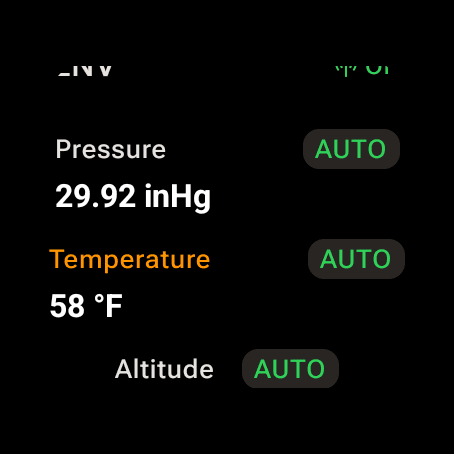
The watch ENV page. Pressure on AUTO comes from the barometer when there is one.
Barometer
Station pressure, when the watch has one
With a barometer, AUTO pressure is station pressure measured on the watch: the real weight of the air where you are standing. Pressure feeds density altitude, and density altitude is what moves your elevation hold between the valley and the ridge.
Without one, Wrist Dope takes the weather's sea-level pressure and corrects it to your altitude. With no altitude to correct it to, it falls back to the 29.92 inHg standard and labels it as a stand-in, not a reading. The Environment guide covers where each number comes from.
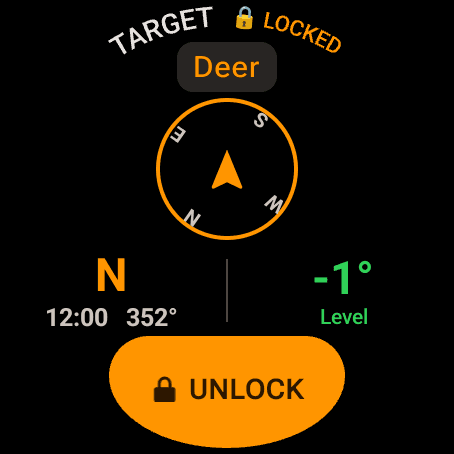
The Target page. The bearing it locks is the watch heading.
Compass
Point-and-lock needs a heading
Wrist Dope reads the watch's heading from its fused motion sensor and corrects it to true north. That heading is what locks a target bearing and a wind direction, and it gives Coriolis its shooting azimuth.
A watch that cannot give a heading cannot lock a bearing. The holds and the range card do not need one.
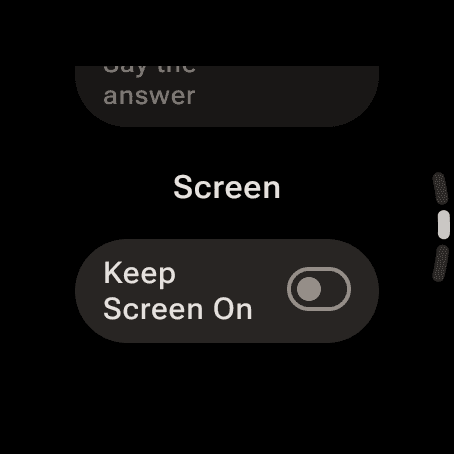
Settings, Screen: Keep Screen On. It starts off.
Between shots
Keep Screen On, and the ambient face
A rifle-mounted watch does not get wrist raises, so what the screen does between shots matters. Wear OS lets an app hold its own screen on, and Wrist Dope has a switch for it: Keep Screen On, under Screen in the watch's Settings. It starts off. Turn it on and Live Fire, the Range Card and an armed match stay lit.
A few things hold the screen whatever the switch says: the Level page, Live Fire while a voice session is listening, and the stage timer while it is armed or running. Apple Watch has no way for an app to do this, which is why the Apple side of these guides talks about Wake Duration instead.
When the watch does dim and its always-on display is turned on, Live Fire stays up as a dark ambient face. The range and both holds keep full contrast. The cant glow switches off, and the conditions line shows a dash, because a reading that can be a minute old is not one to shoot on.
The watch app will not install
- Wrist Dope does not show up in the watch's Play Store. The watch is below Wear OS 3, and no update on the Wrist Dope side will change that.
- The phone says Install on watch. The phone app is in and the watch app is not. Open the Play Store on the watch, or the watch's companion app on the phone, and install Wrist Dope there.
- The phone says No watch. No watch is paired with this phone. Pair it in the watch's companion app first. You can still manage guns and loads on the phone.
- It says Watch connected, not Live. That is normal.
Livemeans Wrist Dope is open on the watch right now. Open it and the row changes.
Next: once the app is on the watch, the watch settings guide covers the Wear OS settings that make a rifle-mounted watch behave.
Still stuck? support@wristdope.com