
Manual / Live Aim on the Rifle
Live Aim on the Rifle
Mount the watch or phone on the rifle and it points where the barrel points. Wrist Dope uses that: the compass heading becomes your line of fire, the bore angle your shot angle, and any cant a correction to your holds. Swing to the next target and the hold follows, until you lock one.
Pro
Rifle-mounted mode is part of the one-time Pro upgrade.
On the gun
The device mounted on the rifle, with the level zeroed there.
A compass
For the live bearing. Without one, the angle and the cant still follow.
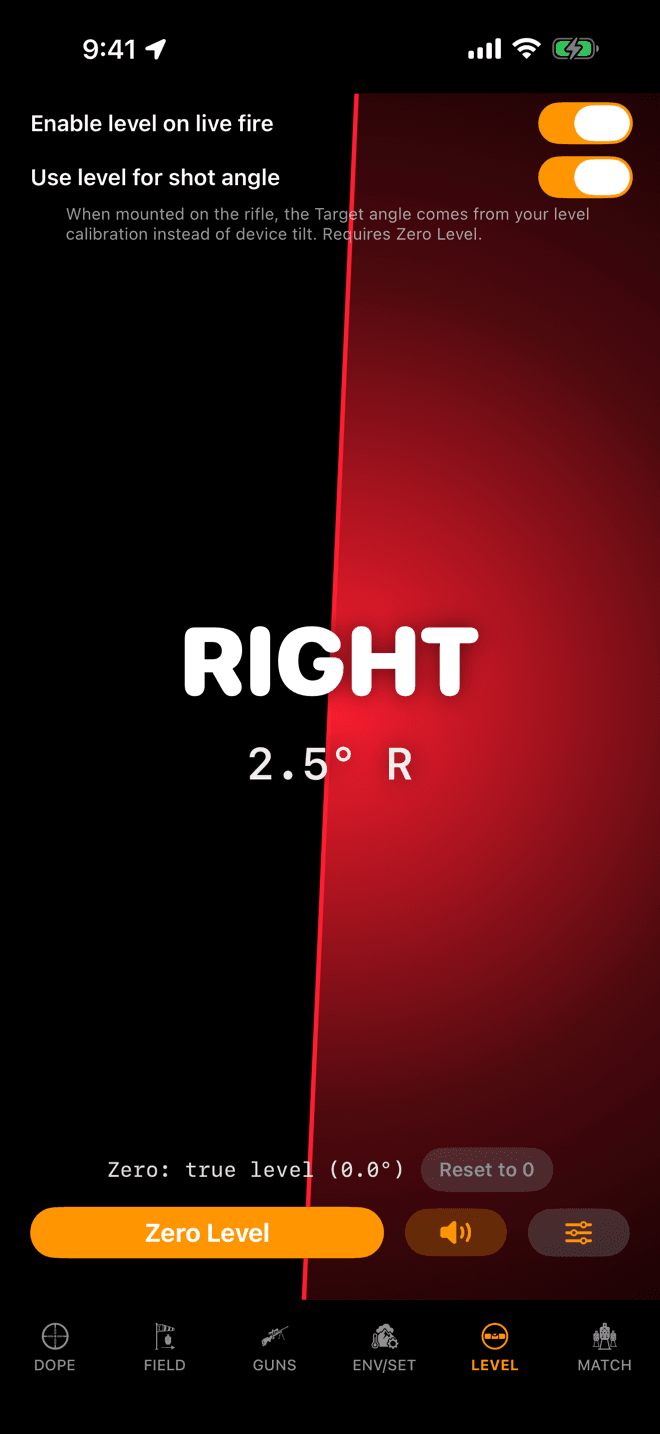
The two switches at the top of the iPhone LEVEL page. Zero Level is at the bottom.
Step 1
Turn on rifle-mounted mode
Live aim is the Use level for shot angle switch. On the iPhone it sits at the top of the LEVEL page. Turning on Enable level on live fire above it turns this one on too.
Then mount the phone on the rifle, hold the rifle level, and tap Zero Level. Nothing follows until the level is zeroed, because the zero is how the app knows where the bore points relative to the phone. Remount it and zero again.
Both switches are part of the one-time Pro upgrade. The Level page itself is free. The full level setup is in Scope Level.
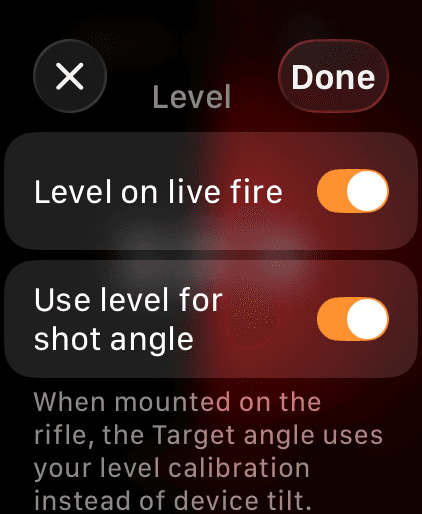
The watch Level tab, gear button.
Step 2
On the watch
On the watch the same two switches are behind the gear on the Level tab: Level on live fire and Use level for shot angle. Zero the level with the watch on the rifle.
Each device keeps its own zero, so set it on whichever one is on the gun.
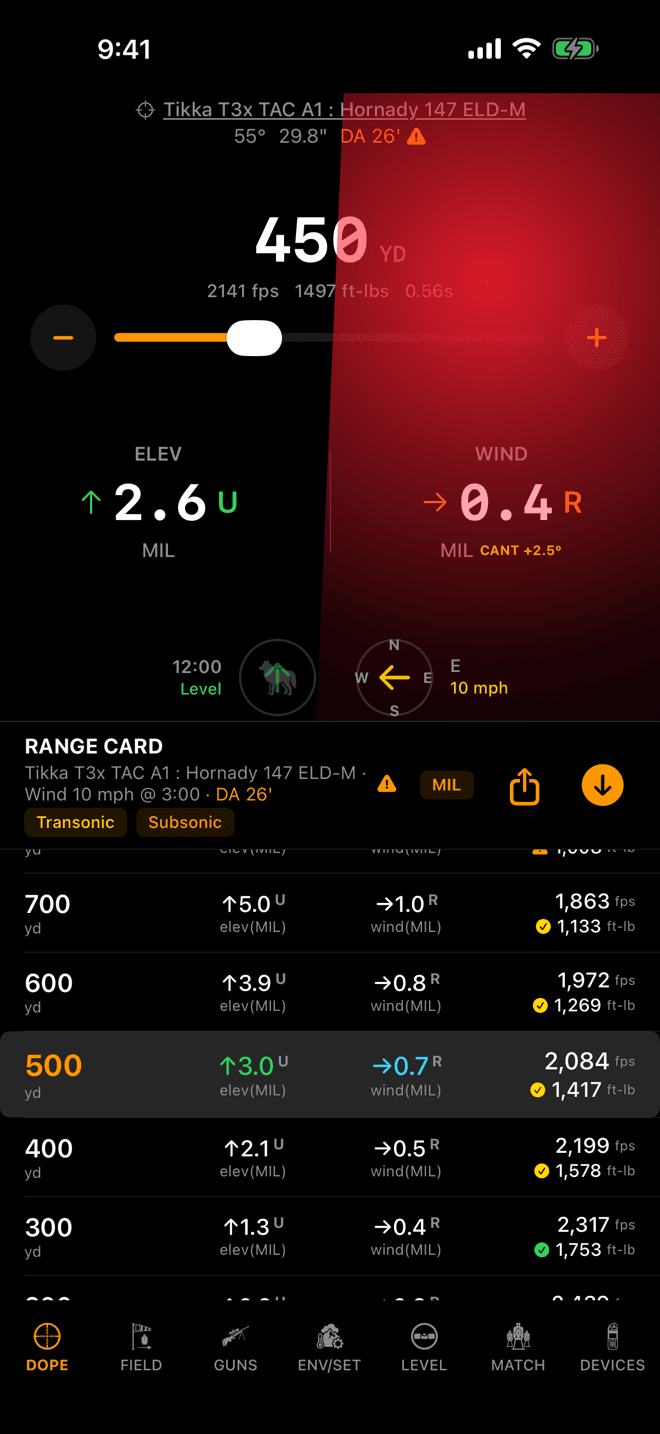
Rolled 2.5° right: CANT +2.5° beside the wind hold, and the holds already corrected for it.
Step 3
Leave the target unlocked and aim
With no target locked, Live Fire follows the rifle. The bearing under the target compass is the barrel’s own heading right now, marked with a green LIVE beside it on the phone and the watch. The shot angle comes off the bore too, from your level zero.
Roll the rifle and a yellow CANT +2.5° appears beside the wind hold. The holds you see are already corrected for that cant. Get level and the tag goes away.
Apple Watch Series 4 has no compass, so on a Series 4 the angle and cant follow but the bearing never does, and you never see LIVE.
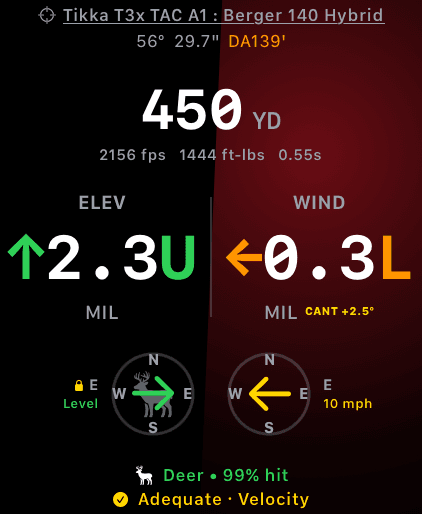
Target locked (the lock beside E): the bearing stands still, the cant correction carries on.
Step 4
Lock a target to stop the follow
Locking a target is you committing to where you are shooting, so the follow gets out of the way: the bearing and angle stay at what you locked. On the watch the lock glyph sits where LIVE was.
Cant keeps working through a lock. A rifle you rolled after locking is still a rolled rifle, so the CANT tag and its correction stay.
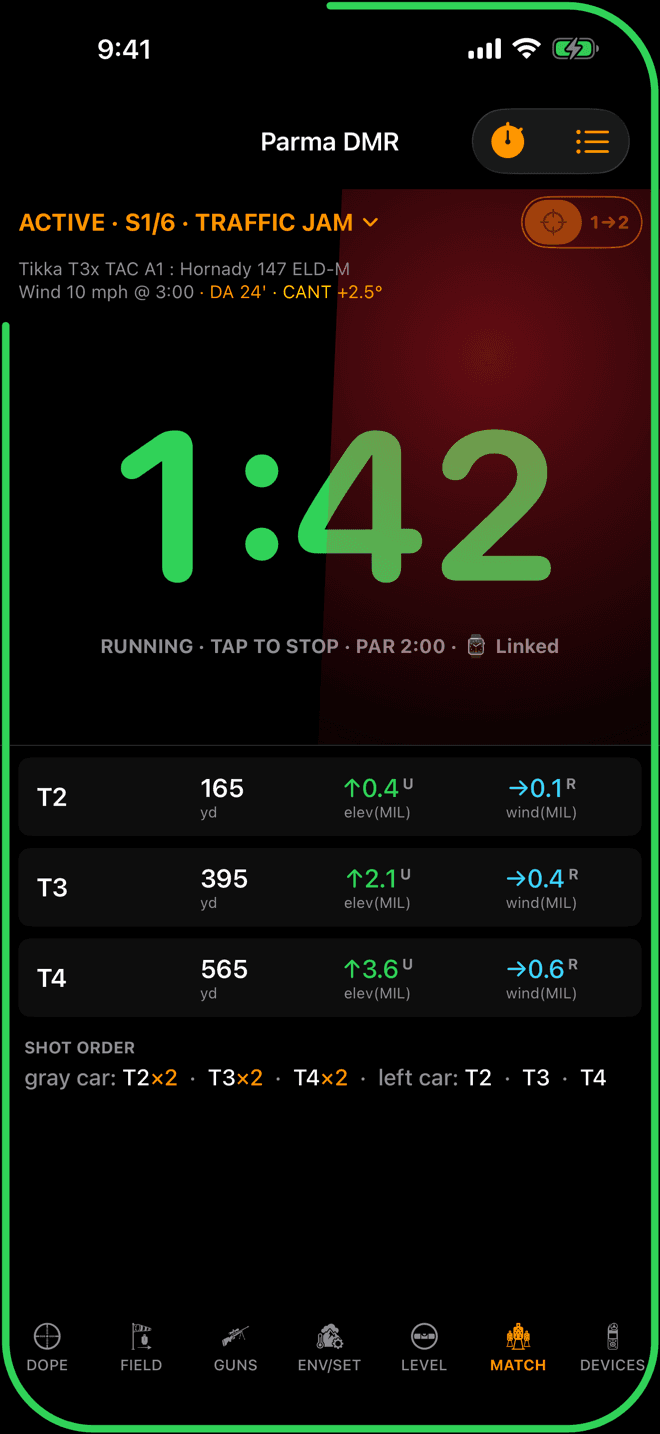
The line under the stage name carries the cant once for every row.
Step 5
The stage card says it once
Every row on a stage card shares the one bearing and the one cant, so the tags go on the line under the stage name, once: · LIVE AIM in green while the bearing follows the rifle, and · CANT +2.5° in yellow while the rifle is rolled. The watch stage card does the same.
It says LIVE AIM there, not LIVE, because the wind on the same line can itself be a live meter reading.
Why it matters
The holds depend on the angle between the wind and your shot. With a wind locked from 3 o’clock and no target locked, the app had nothing telling it the rifle moved, so you could turn 180° and the wind hold never flipped. On the gun, the device’s compass heading is your line of fire, so Wrist Dope uses it. Swing to the next target and the wind hold follows the swing.
The same goes for the shot angle (the bore’s incline, read from the level you zeroed) and the cant (how far the rifle is rolled, which pushes the hit sideways). Both feed the holds while you aim.
What follows, and when
Rifle-mounted mode is on when Use level for shot angle is on, you have Pro, and the level has been zeroed. Inside that, three things follow, each needing a little more:
- Cant follows whenever rifle-mounted mode is on, locked target or not. A canted scope is canted whatever you are pointing at.
- Shot angle follows the bore while no target is locked.
- Bearing follows the compass while no target is locked, on a device that has a compass.
A locked target always wins. Lock it and the bearing and angle stand still at what you locked. After 20 minutes with no lock, no target change and no interaction, the follow stands down to save battery. Bring up Live Fire or the stage card and it picks back up.
The live values go to Live Fire and the stage card (and the hunter capture screen) only. They are never written into your saved target, so the Range Card keeps showing your stored call and doesn’t rebuild every time the barrel moves. The bearing only updates when the change would move a wind hold, so compass jitter doesn’t make the numbers dance.
Two different LIVE tags
Green LIVE beside the target bearing is live aim: the bearing is the rifle’s, right now. Cyan LIVE beside the WIND header is something else: the wind is following a connected wind meter. See Wind Meters.
Not following the rifle?
- Nothing follows, and nothing says why. The level isn’t zeroed. Live aim needs Zero Level set with the device on the rifle; until then the angle stays raw device tilt and no tag appears.
- No LIVE tag on the bearing. A target is locked (unlock it), the device has no compass (Apple Watch Series 4), or
Use level for shot angleis off. - It stopped following after a while. After 20 minutes with no lock, no target change and no interaction, the follow stands down. Bring up Live Fire or the stage card and it starts again.
- It stopped when the trial ended. Live aim is Pro. With Pro gone it stops steering the holds, even if the switch is still on.
- The Range Card doesn’t match Live Fire. By design. The Range Card shows your stored call; Live Fire shows the rifle right now. Lock the target to make them agree.
- The numbers are off after you remounted. Zero the level again with the device in its new spot.
Related: Scope Level for the zero and the glow, Target and Wind for locking a target, and Calypso Wind Meters, whose wind direction rides on this same line of fire.
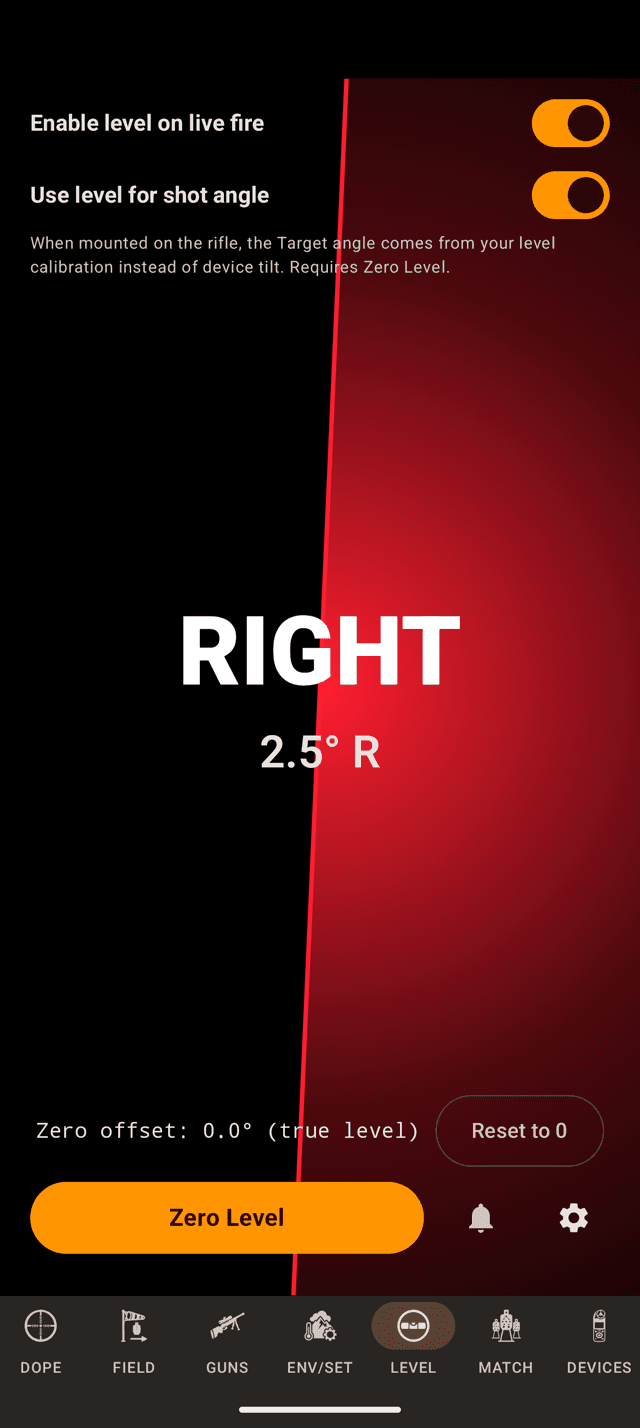
Both switches at the top of the phone’s LEVEL page.
Step 1
Turn on rifle-mounted mode
On the phone, Use level for shot angle is at the top of the LEVEL page, under Enable level on live fire, which turns it on with it. Mount the phone, hold the rifle level, and tap Zero Level.
Both switches are part of the one-time Pro upgrade. See Scope Level for the level itself.
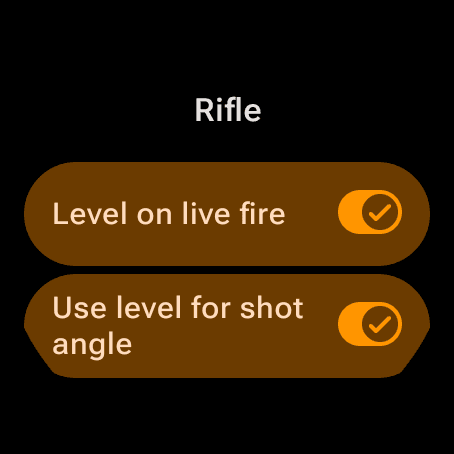
The watch’s Level gear sheet, Rifle section.
Step 2
On the watch
On the watch, the gear on the LEVEL page opens the settings. The Rifle section has the same two switches. Zero the level with the watch on the gun.
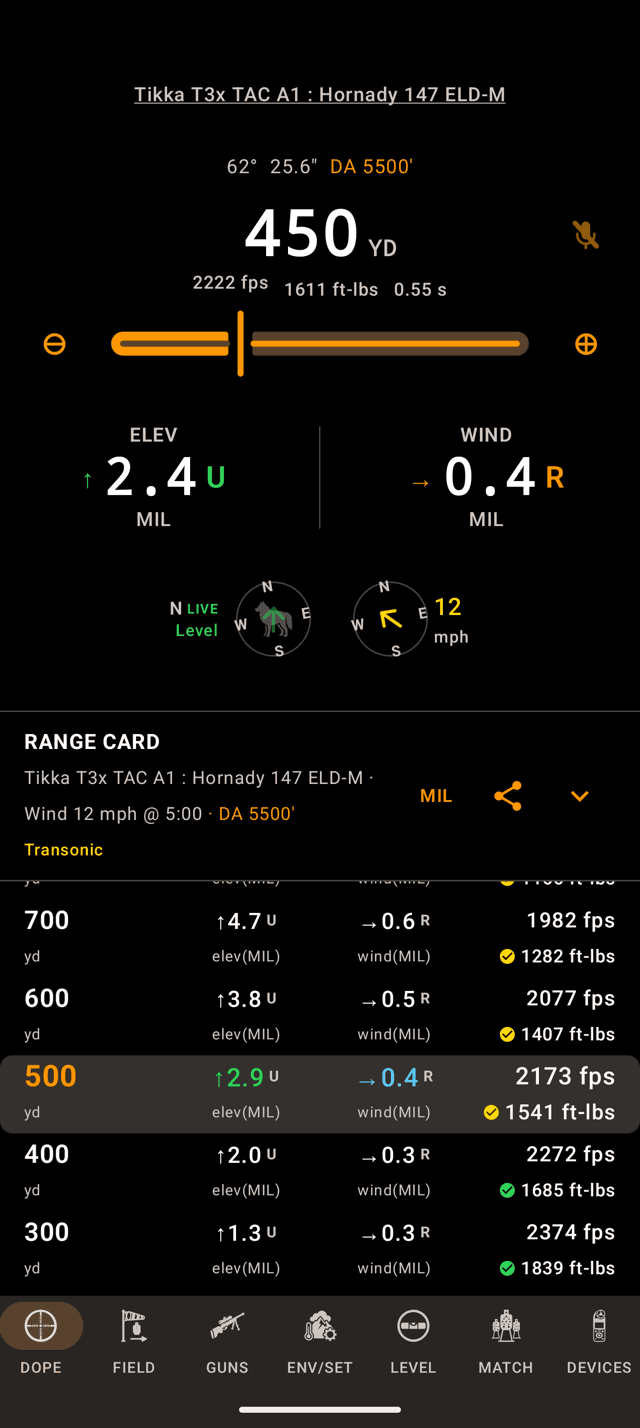
N LIVE: the bearing is the rifle’s. The Range Card below keeps the stored call.
Step 3
Leave the target unlocked and aim
With no target locked, Live Fire follows the rifle: the bearing under the target compass reads with a green LIVE, and the angle comes off the bore. The Range Card under it keeps your stored call, which is why its header doesn’t move.
A phone or watch without a compass follows the angle and the cant but never the bearing, and shows no LIVE.
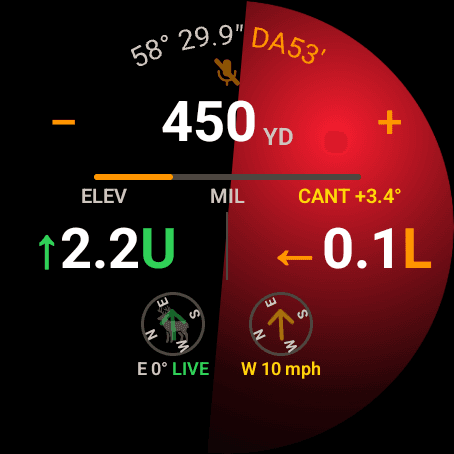
On the watch: E 0° LIVE, and CANT +3.4° with the holds corrected for it.
Step 4
Roll it and the holds correct
Roll the rifle and a yellow CANT +3.4° appears on Live Fire. The holds are already corrected for it. On the watch it sits on the line above the holds.
Lock a target and the bearing and angle stand still. The cant keeps correcting.
The stage card carries it once on the line under the stage name: · LIVE AIM and · CANT +3.4°, on the phone and the watch.
Why it matters
The holds depend on the angle between the wind and your shot. With a wind locked from 3 o’clock and no target locked, the app had nothing telling it the rifle moved, so you could turn 180° and the wind hold never flipped. On the gun, the device’s compass heading is your line of fire, so Wrist Dope uses it. Swing to the next target and the wind hold follows the swing.
The same goes for the shot angle (the bore’s incline, read from the level you zeroed) and the cant (how far the rifle is rolled, which pushes the hit sideways). Both feed the holds while you aim.
What follows, and when
Rifle-mounted mode is on when Use level for shot angle is on, you have Pro, and the level has been zeroed. Inside that, three things follow, each needing a little more:
- Cant follows whenever rifle-mounted mode is on, locked target or not. A canted scope is canted whatever you are pointing at.
- Shot angle follows the bore while no target is locked.
- Bearing follows the compass while no target is locked, on a device that has a compass.
A locked target always wins. Lock it and the bearing and angle stand still at what you locked. After 20 minutes with no lock, no target change and no interaction, the follow stands down to save battery. Bring up Live Fire or the stage card and it picks back up.
The live values go to Live Fire and the stage card (and the hunter capture screen) only. They are never written into your saved target, so the Range Card keeps showing your stored call and doesn’t rebuild every time the barrel moves. The bearing only updates when the change would move a wind hold, so compass jitter doesn’t make the numbers dance.
Not following the rifle?
- Nothing follows, and nothing says why. The level isn’t zeroed. Set Zero Level with the device on the rifle.
- No LIVE tag on the bearing. A target is locked, the device has no compass, or
Use level for shot angleis off. - It stopped following after a while. The 20-minute idle rule. Bring up Live Fire or the stage card and it starts again.
- It stopped when the trial ended. Live aim is Pro. Without it the switch stops steering the holds.
- The Range Card doesn’t match Live Fire. By design: the Range Card keeps your stored call. Lock the target to make them agree.
Related: Scope Level and Target and Wind.
Still stuck? support@wristdope.com