
Manual / Hit Percentage and Terminal Rating
Hit Percentage and Terminal Rating
Your holds tell you where to aim. These two numbers tell you how likely the bullet is to land in the box you picked and, on an animal, whether it still has enough left to do the job when it gets there. Neither is a promise. Both are honest about what they know.
Pick the target
Steel, competition, tactical, varmint and game vital zones. The size is what makes a hit a hit.
Three inputs move it
Group size, velocity SD, and how sure you are of the wind. At distance the wind call usually wins.
The rating is not a kill
Energy and impact velocity against published floors. Placement and bullet are still yours.
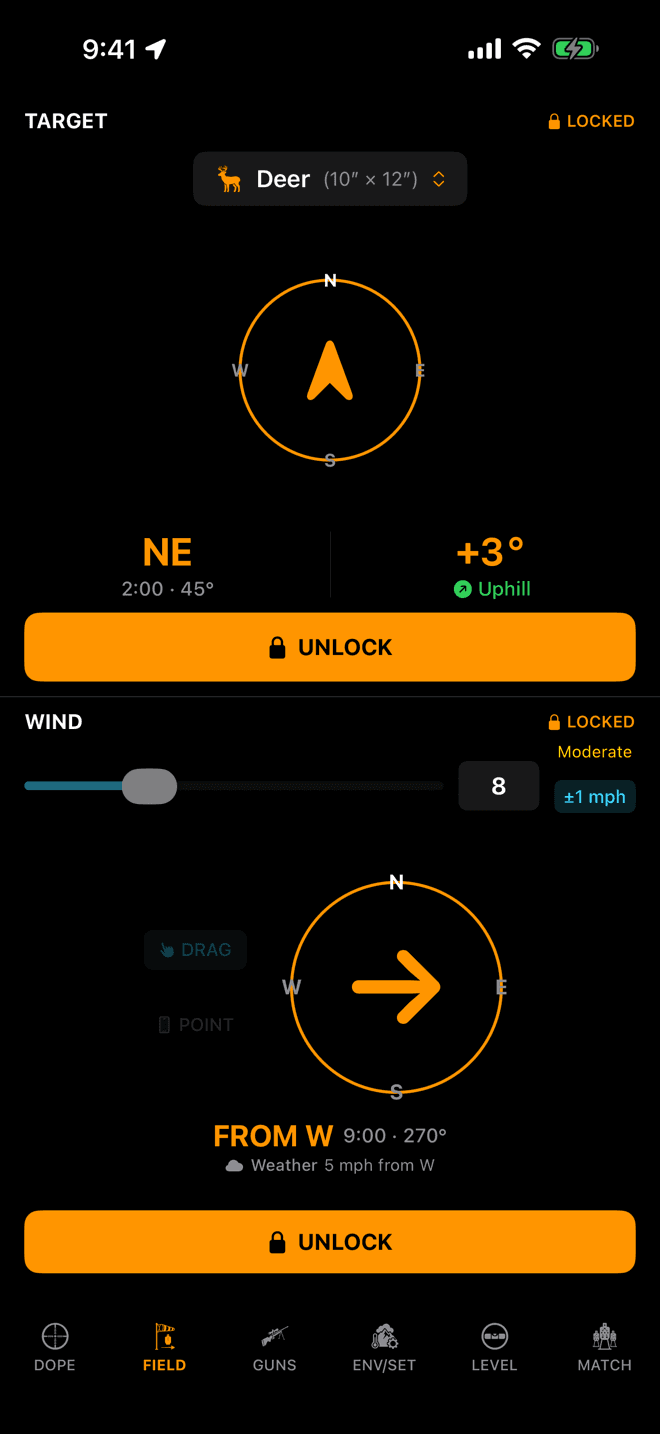
The chip at the top of the TARGET pane carries the preset and its size. The blue ±1 mph chip is your wind call’s confidence.
Step 1
Tell it what you are shooting at
Everything on this page hangs off one choice. Tap the chip at the top of the TARGET pane on iPhone, or the same chip on the watch's TARGET page, and pick what is downrange. The sheet is titled Target Size and groups the presets five ways: Varmint, Game, Steel, Competition, Tactical.
Every row shows its size in inches beside the name, and so does the chip once you have chosen. Metric shooters get centimetres everywhere. The sizes are stored in inches and converted for display.
The size changes nothing about your elevation or your windage. A 10 inch plate and a moose take the same hold. What it changes is what counts as a hit, which is the whole basis of the percentage. On a living target it also sets which energy floor the terminal rating is measured against.
Your choice is remembered between sessions. The lock is not: a bearing and an angle go stale the moment you move, so Target and Wind covers the point-and-lock half of this.
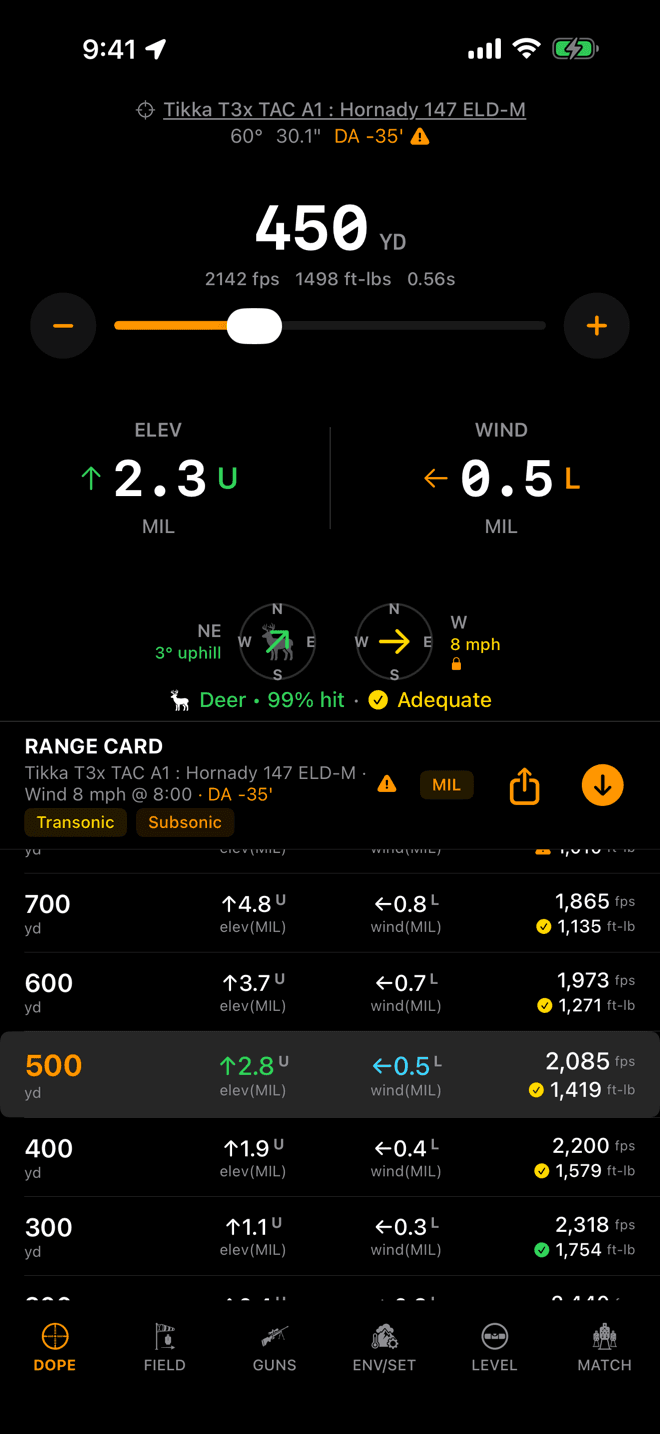
One line under the compasses: preset, hit percentage, terminal band. The range card carries the band on every row.
Step 2
Where the two numbers appear
On iPhone the line sits under the two compasses on the DOPE page. On the watch it sits at the bottom of Live Fire. Same content either way: the preset's silhouette, its name, the hit percentage and, on game and varmints only, the terminal band.
The whole line is hidden until the target is locked. That is deliberate. Without a locked target there is no line of fire, so there is no crosswind component to be uncertain about, and a percentage computed without one would be a guess wearing a decimal point.
The percentage is coloured on a fixed ladder, so you can read it without reading it:
- Green: 80% and up.
- Yellow: 60 to 79%.
- Orange: 40 to 59%.
- Red: under 40%.
If there is no solution at all, you get — instead of a number. The app does not invent one.
The range card below carries the terminal band too: a small glyph beside the retained energy on every row, so you can see where the rating steps down without dialling to each distance in turn.
The list
Every target, and what its number means
Twenty-seven presets. Sizes are width × height in inches, and they are the numbers the solver uses: a rectangle, centred on your aim point. The energy column is the retained-energy floor the terminal rating is measured against. None means the preset never shows a rating.
Varmint
Vital zones, and they are small. Every one carries an energy floor but no expansion gate. These animals do not need a bullet to open up, so the rating asks only whether enough energy arrives.
| Preset | Size (in) | Energy floor |
|---|---|---|
| G. Squirrel | 2 × 4 | 4 ft-lbs |
| P. Dog | 3 × 8 | 5 ft-lbs |
| Rabbit | 4 × 6 | 6 ft-lbs |
| Groundhog | 4 × 8 | 100 ft-lbs |
| Fox | 5 × 6 | 250 ft-lbs |
| Coyote | 8 × 10 | 300 ft-lbs |
Game
The size is the vital zone, not the animal: roughly the heart-and-lung window behind the shoulder, seen broadside. A bull elk is a very large animal with a 14 × 18 inch box on it. These are the only presets that carry both gates: energy to reach the vitals, and impact velocity for the bullet to expand.
| Preset | Size (in) | Energy floor |
|---|---|---|
| Antelope | 9 × 10 | 800 ft-lbs |
| Wolf | 9 × 11 | 700 ft-lbs |
| Cougar | 9 × 11 | 800 ft-lbs |
| Hog | 8 × 10 | 1,300 ft-lbs |
| Deer | 10 × 12 | 1,000 ft-lbs |
| Goat/Sheep | 10 × 13 | 1,300 ft-lbs |
| Mule Deer | 11 × 14 | 1,000 ft-lbs |
| Bearblack bear | 12 × 14 | 1,500 ft-lbs |
| Caribou | 12 × 16 | 1,300 ft-lbs |
| Grizzlybrown bear | 13 × 16 | 2,000 ft-lbs |
| Elk | 14 × 18 | 1,500 ft-lbs |
| Moose | 18 × 24 | 2,000 ft-lbs |
Steel
The plate, square, as it hangs. Four sizes, and they are the sizes on the rack at most matches. Nothing inanimate gets a terminal rating.
| Preset | Size (in) | Energy floor |
|---|---|---|
| 6" | 6 × 6 | None |
| 8" | 8 × 8 | None |
| 10" | 10 × 10 | None |
| 12" | 12 × 12 | None |
Competition
The scoring area of the two common cardboard targets.
| Preset | Size (in) | Energy floor |
|---|---|---|
| IPSC | 18 × 30 | None |
| Silhsilhouette | 18 × 36 | None |
Tactical
Human-scale reference sizes for training and qualification courses. Like steel, they never show a terminal rating.
| Preset | Size (in) | Energy floor |
|---|---|---|
| Head | 8 × 10 | None |
| Torso | 12 × 18 | None |
| Zombiestanding figure | 18 × 72 | None |
The floors are published hunting rules of thumb, not law. Your state may set a minimum caliber or energy that is stricter than anything here, and that minimum is the one that matters. Check it before you hunt.
The inputs
What actually moves the hit percentage
Four things, plus the range. Each one is a spread the app models separately, then combines: rifle dispersion in both directions, velocity spread up and down, wind-call error left and right. The percentage is the chance the shot lands inside your target rectangle given all three at once.
Group Size
Where it lives: Load editor → Consistency. On the watch, the load editor too.
Velocity SD
Where it lives: Load editor → Consistency. Your chronograph’s standard deviation over a string.
Wind-call confidence
Where it lives: The chip beside the wind speed on the FIELD page (iPhone) or the WIND page (watch).
±0, ±0.5, ±1, ±1.5, ±2, ±3, ±5, ±7.5, ±10. It starts at ±1. It is not part of the wind lock, so you can adjust it any time. This is the one to be honest about: past a few hundred yards it is usually the biggest term in the whole calculation, because wind error is multiplied by the bullet's lag, and lag grows faster than range. Setting it to ±0 does not make you a better wind reader; it just removes the term.Target size
Where it lives: The chip on the TARGET pane.
Range
Where it lives: The dial on Live Fire, or the range card row.
Leave group size and velocity SD alone and you still get a number: new loads start at 1.0 inch and 20 fps, which is a reasonable factory rifle and a reasonable factory load. It is a placeholder, not a measurement, and it will flatter a rifle that does not shoot that well. The maths behind all of this, with charts, is in What are the odds of hitting a target at long range?
What the percentage is not
- It is not a scoring of you. It knows your rifle's dispersion and your stated wind uncertainty. It does not know your position, your trigger, your breathing, or whether you cant the rifle.
- It assumes your aim point is right. Every error source in it is centred on your point of aim. A wrong muzzle velocity or a wrong BC moves the whole group off the target, and the percentage will not notice.
- It assumes the wind you called is the wind on the whole flight path. A switch halfway to the target is not in the model at any confidence setting.
- 99% is not a guarantee, and 60% is not a licence. On an animal, the percentage is the floor of the decision, not the whole of it.
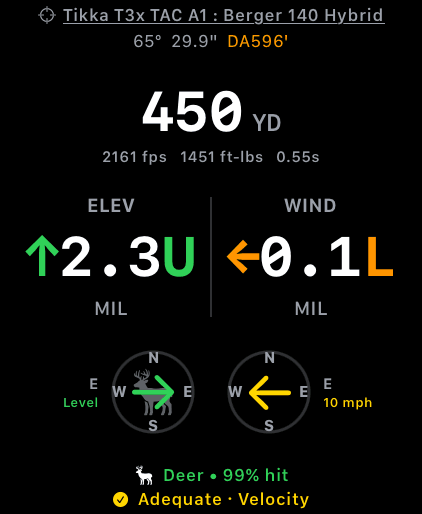
On the watch the band gets its own line and names the gate it is being judged on. Here, velocity.
Step 3
The terminal rating, and its two gates
On a game or varmint preset a second reading appears beside the percentage: Ideal, Adequate, Marginal or Insufficient. It answers a different question. The percentage asks whether the bullet lands in the box. The band asks whether the bullet still has any business being there.
Two published gates, checked at your range:
- Retained energy against a floor that depends on the species: 1,000 ft-lbs for whitetail, 1,500 for elk, 2,000 for moose and grizzly. Penetration to the vitals.
- Impact velocity against 1,800 fps, the speed below which a standard cup-and-core bullet stops expanding reliably. It is applied to every load in this version, and it is deliberately the conservative figure, never the optimistic one. Varmints skip this gate entirely.
Each gate gives a ratio: what you have, over what the rule of thumb asks for. The worse of the two sets the band, and that gate is named the governing gate. On the watch it is spelled out: Adequate · Velocity means the load is fine on energy, and the expansion speed is what will run out first. On iPhone the space is tighter, so the governing readout is tinted instead: the velocity number or the energy number goes the band's colour, and only in the two warning bands.
Colour and shape both carry the recommendation, so it survives colour-blindness and a hard glance in bad light. A check for the two passing bands, a warning triangle for Marginal, a stop sign for Insufficient.
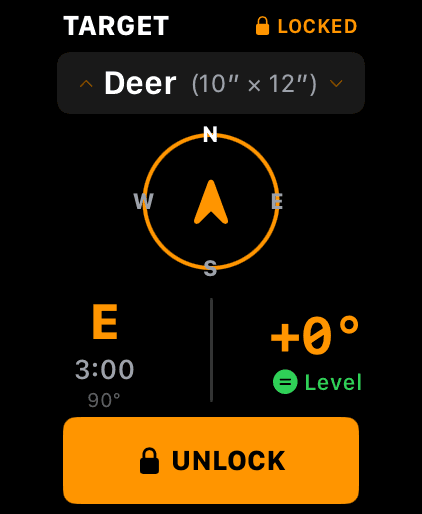
The watch TARGET page. The chip opens the same grouped list; the crown scrolls it.
On the wrist
Picking the target without your phone
The watch app is a full solver, not a remote. The TARGET page sits one swipe from Live Fire, carries the same chip with the same preset and size, and opens the same grouped list. Dial through it with the crown.
Whatever you pick syncs to the phone, and the phone's choice syncs back. Your wind-call confidence rides along with it.
Nothing about the hit percentage or the terminal rating is held back on either device. Free covers three rifle-and-load combinations, and the watch app is free on every tier.
The four bands
Reading a rating before you take the shot
The band comes from one ratio: what the bullet has when it arrives, divided by what the published rule of thumb asks for, on whichever of the two gates is thinner.
| Band | Ratio | What it means |
|---|---|---|
| ✓Ideal | 1.25 or better | Comfortable headroom on whichever gate is thinner. The load is well inside the published minimum at this distance. |
| ✓Adequate | 1.00 to 1.25 | Meets the published minimum, without much left over. Real conditions and a real chronograph both move this line. |
| ⚠Marginal | 0.85 to 1.00 | Under the line. Not a small shortfall dressed up as fine: the load no longer meets the published figure at this range. |
| ✕Insufficient | below 0.85 | Well under. Get closer, change the load, or pass the shot. |
The same load, two animals
Nothing shows the point better than one cartridge against two species. Below is a 6.5 Creedmoor firing Hornady's 143 grain ELD-X at its published 2,700 fps, zeroed at 100 yards, in standard atmosphere, run through the app's own engine and banded by the app's own rules.
| Band | On deer | On elk |
|---|---|---|
| Ideal | to 322 yd | to 189 yd |
| Adequate | 322 to 681 yd | 189 to 380 yd |
| Marginal | 681 to 823 yd | 380 to 513 yd |
| Insufficient | beyond 823 yd | beyond 513 yd |
Same rifle, same round, same day. Switching the preset from deer to elk moves the point where the app stops endorsing the shot in by more than three hundred yards, because the elk floor is 1,500 ft-lbs and the deer floor is 1,000. Notice too that the top of the deer ladder is set by velocity, not energy: the bullet drops under 2,250 fps at 322 yards while it still has plenty of energy. The bottom is set by energy. Which gate is biting changes as the shot gets longer, and the app tells you which one.
Those distances are built on a published box velocity and the conservative standard-bullet expansion floor. Chronograph your rifle and the numbers move. Shoot at 7,000 feet on a warm day and they move again. Field Trueing is how you replace the published number with yours.
What the rating is not
It is deliberately not a kill probability, and there is no percentage attached to it for a reason. Whether an animal dies quickly is decided by shot placement, the angle it is standing at, and how your particular bullet behaves in tissue. A phone on your belt can observe none of those things, so it does not pretend to.
Ideal means the load clears two published physical thresholds at that distance. It is not the app telling you the shot is ethical, and it cannot be. That call is yours, and it takes in things the rating never sees: whether you can make the shot cold, off that position, in that wind, with that animal standing the way it is standing.
Insufficient is worth reading the other way round. It is not a scolding, and it is not a failed test. It is the arithmetic telling you the bullet arrives without what the published minimum asks for. Close the distance, change the load, or let it walk. The read-through on the whole argument, with the sources for the floors, is in How far is too far to shoot a deer?
The marks
Every warning you can see around these numbers
A percentage is only worth what the solution under it is worth. Wrist Dope marks the ways that solution can be thinner than it looks, and every mark is tappable or self-explaining.
Orange warning triangle beside the DA
In the Live Fire header and the range-card header, beside the density altitude. It means at least one of altitude, temperature, pressure or humidity behind this solve is a stand-in, not a reading. Tap it for Solving on standard atmosphere, which lists exactly which fields are stand-ins and why (no GPS fix or no weather yet) and offers the Env page, or the Location permission, to fix it. Both the hit percentage and the terminal rating are computed from that air, so the mark applies to them as much as to the holds.
Transonic and Subsonic shading
Yellow wash on a range-card row once the bullet drops through Mach 1.2, orange once it is fully subsonic, with a legend chip in the header printed on the same wash so the colour explains itself. On Live Fire the remaining-velocity readout takes the same colours.Through that region a bullet's behaviour stops being reliably predictable. The hit percentage does not model the extra dispersion, so treat the number there as optimistic.
A tinted velocity or energy readout
When the band is Marginal or Insufficient, the number for the governing gate takes the band's colour and the other stays grey. That is the app pointing at which of the two floors is the problem, so you know whether closing the distance or changing the bullet is the fix.
Dashes instead of numbers
A range-card row that could not be solved keeps its range and renders every hold and readout as —. The hit-percentage chip does the same. A dash is always the app declining to make something up.
No line at all
With the target unlocked, the whole chip is absent rather than showing a stale figure. If you unlock to revise something, expect it to disappear until you lock again.
A wide confidence chip
±5 or ±10 mph is not a warning the app raises. It is one you raise, and then get shown the cost of. Honest settings on a gusty day are worth more than a flattering percentage.
Row-level warnings on the environment itself (which readings are live, which are stale, and what the mark next to a single field means) are covered in Environment and Units.
No number, or a number you don't believe?
- The target isn't locked. The chip does not exist until it is. The header still reads
UNLOCKEDand the button still saysLOCK TARGET. This is far and away the most common cause. - There is no terminal rating at all. You are on steel, a competition target, or a human-scale one. Only game and varmint presets carry a rating. The others have no vital zone to reason about.
- The percentage looks too good. Check the load's Consistency section. A group size and SD still sitting at 1.0 inch and 20 fps are defaults, not your rifle. Then check the confidence chip: ±1 mph is a very good wind call.
- It barely moves when you change the wind speed. The percentage is driven by your wind uncertainty, not the wind itself, and it scales with the crosswind component. At 12 or 6 o'clock there is almost nothing for the uncertainty to act on.
- The rating dropped a band without you touching anything. Look at the DA in the header. Thinner air holds velocity and thicker air bleeds it, so a cold morning can push the impact velocity under the expansion gate. The rating is solved for the air the app currently has.
- The band changed when you swapped presets to one the same size. Expected. Coyote, hog and head all measure 8 × 10 inches and none of them shares a rating: coyote is energy-gated at 300 ft-lbs, hog at 1,300 with an expansion gate on top, and head carries no rating at all. The size is not the whole preset.
- Nothing solves. Free keeps three rifle-and-load combinations usable, and the range card needs an active load. Everything else is stored and shown locked.
One honest caveat: both numbers are calculations, and a calculation is not a result. Verify your dope on paper at distance, know your own limits on an animal before you are looking at one, and shoot safely, responsibly and within the law.
Related: Target and Wind covers point-and-lock and the shooter's clock. Guns and Loads is where group size and velocity SD live. Range Card and Dope Card covers the table these bands ride on.
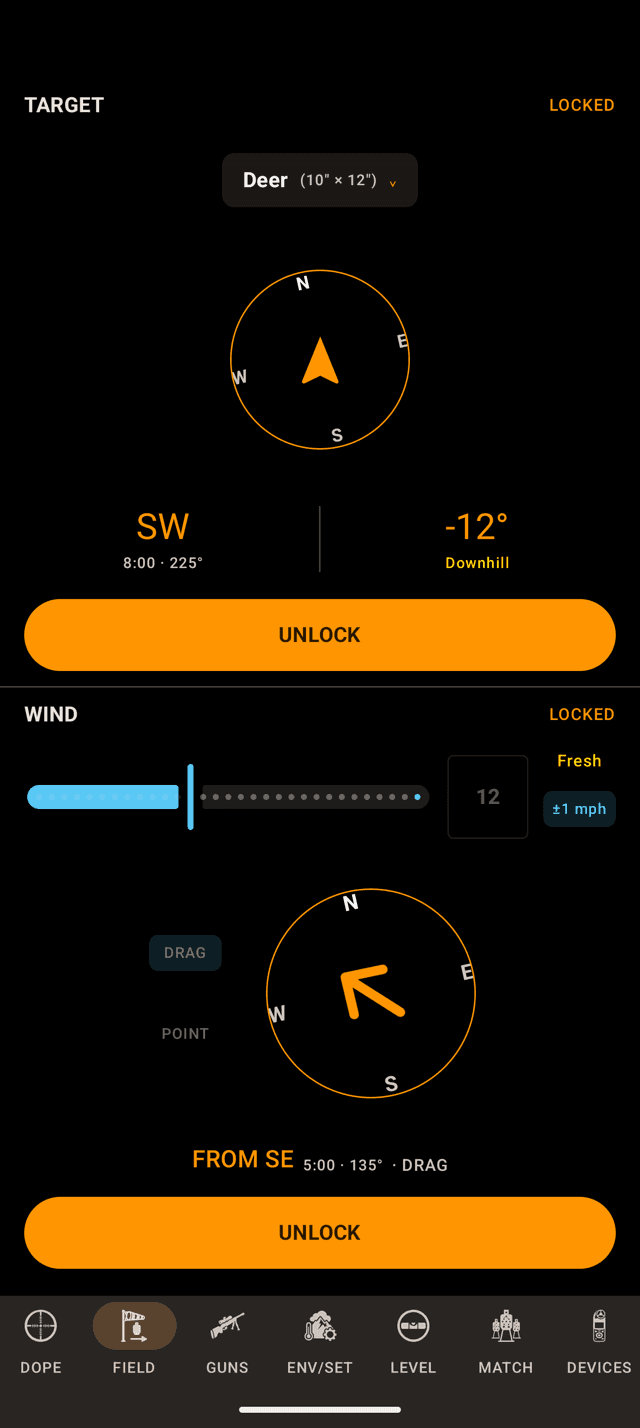
The chip at the top of the TARGET pane carries the preset and its size. The blue ±1 mph chip is your wind call’s confidence.
Step 1
Tell it what you are shooting at
Everything on this page hangs off one choice. Tap the chip at the top of the TARGET pane on the phone's FIELD page and pick what is downrange. The sheet is titled Target Size and groups the presets five ways: Varmint, Game, Steel, Competition, Tactical.
Every row shows its size in inches beside the name, and so does the chip once you have chosen. Metric shooters get centimetres. The sizes are stored in inches and converted for display.
The size changes nothing about your elevation or your windage. A 10 inch plate and a moose take the same hold. What it changes is what counts as a hit, which is the whole basis of the percentage. On a living target it also sets which energy floor the terminal rating is measured against.
Your choice is remembered between sessions. The lock is not: a bearing and an angle go stale the moment you move, so Target and Wind covers the point-and-lock half of this.
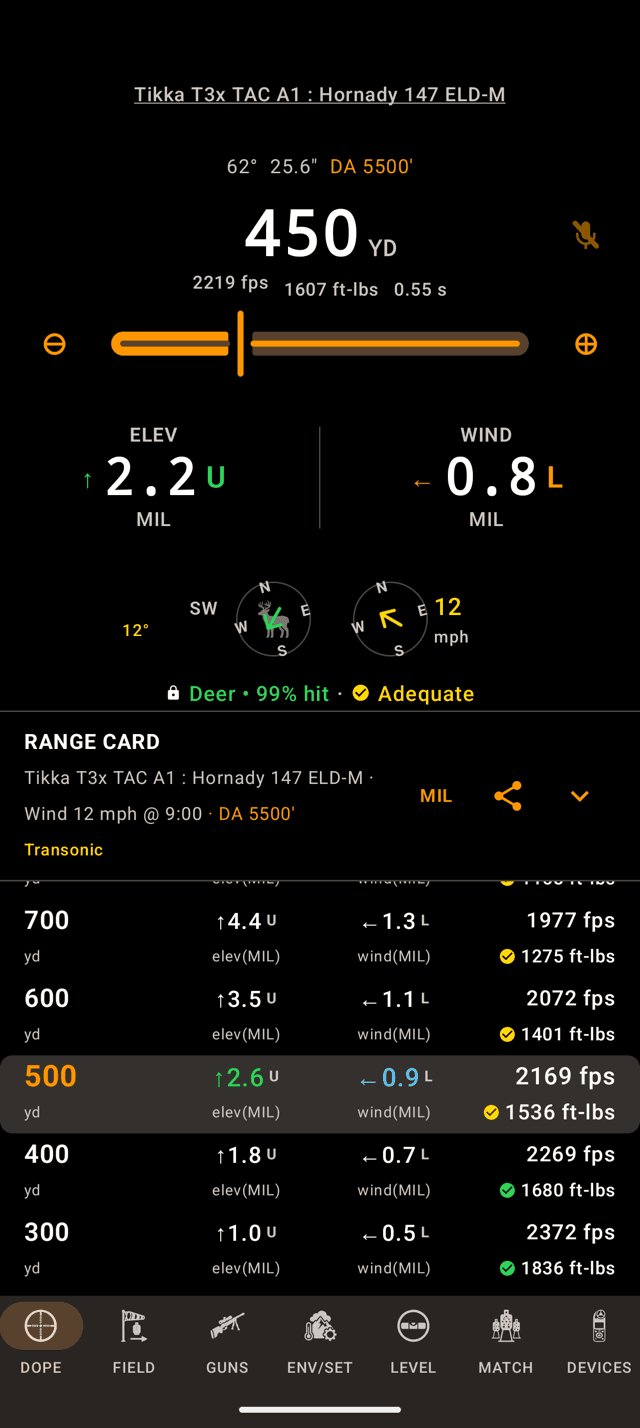
One line under the compasses: preset, hit percentage, terminal band. The range card carries the band on every row.
Step 2
Where the two numbers appear
On the phone the line sits under the two compasses on the DOPE page, behind a small padlock. It carries the preset's name, the hit percentage and, on game and varmints only, the terminal band. The watch puts the same numbers on an arc along the bottom of Live Fire, shown in the next step.
The whole line is hidden until the target is locked. That is deliberate. Without a locked target there is no line of fire, so there is no crosswind component to be uncertain about, and a percentage computed without one would be a guess wearing a decimal point.
The percentage is coloured on a fixed ladder, so you can read it without reading it:
- Green: 80% and up.
- Yellow: 60 to 79%.
- Orange: 40 to 59%.
- Red: under 40%.
If there is no solution at all, you get — instead of a number. The app does not invent one.
The range card below carries the terminal band too: a small glyph beside the retained energy on every row, so you can see where the rating steps down without dialling to each distance in turn.
The list
Every target, and what its number means
Twenty-seven presets. Sizes are width × height in inches, and they are the numbers the solver uses: a rectangle, centred on your aim point. The energy column is the retained-energy floor the terminal rating is measured against. None means the preset never shows a rating.
Varmint
Vital zones, and they are small. Every one carries an energy floor but no expansion gate. These animals do not need a bullet to open up, so the rating asks only whether enough energy arrives.
| Preset | Size (in) | Energy floor |
|---|---|---|
| G. Squirrel | 2 × 4 | 4 ft-lbs |
| P. Dog | 3 × 8 | 5 ft-lbs |
| Rabbit | 4 × 6 | 6 ft-lbs |
| Groundhog | 4 × 8 | 100 ft-lbs |
| Fox | 5 × 6 | 250 ft-lbs |
| Coyote | 8 × 10 | 300 ft-lbs |
Game
The size is the vital zone, not the animal: roughly the heart-and-lung window behind the shoulder, seen broadside. A bull elk is a very large animal with a 14 × 18 inch box on it. These are the only presets that carry both gates: energy to reach the vitals, and impact velocity for the bullet to expand.
| Preset | Size (in) | Energy floor |
|---|---|---|
| Antelope | 9 × 10 | 800 ft-lbs |
| Wolf | 9 × 11 | 700 ft-lbs |
| Cougar | 9 × 11 | 800 ft-lbs |
| Hog | 8 × 10 | 1,300 ft-lbs |
| Deer | 10 × 12 | 1,000 ft-lbs |
| Goat/Sheep | 10 × 13 | 1,300 ft-lbs |
| Mule Deer | 11 × 14 | 1,000 ft-lbs |
| Bearblack bear | 12 × 14 | 1,500 ft-lbs |
| Caribou | 12 × 16 | 1,300 ft-lbs |
| Grizzlybrown bear | 13 × 16 | 2,000 ft-lbs |
| Elk | 14 × 18 | 1,500 ft-lbs |
| Moose | 18 × 24 | 2,000 ft-lbs |
Steel
The plate, square, as it hangs. Four sizes, and they are the sizes on the rack at most matches. Nothing inanimate gets a terminal rating.
| Preset | Size (in) | Energy floor |
|---|---|---|
| 6" | 6 × 6 | None |
| 8" | 8 × 8 | None |
| 10" | 10 × 10 | None |
| 12" | 12 × 12 | None |
Competition
The scoring area of the two common cardboard targets.
| Preset | Size (in) | Energy floor |
|---|---|---|
| IPSC | 18 × 30 | None |
| Silhsilhouette | 18 × 36 | None |
Tactical
Human-scale reference sizes for training and qualification courses. Like steel, they never show a terminal rating.
| Preset | Size (in) | Energy floor |
|---|---|---|
| Head | 8 × 10 | None |
| Torso | 12 × 18 | None |
| Zombiestanding figure | 18 × 72 | None |
The floors are published hunting rules of thumb, not law. Your state may set a minimum caliber or energy that is stricter than anything here, and that minimum is the one that matters. Check it before you hunt.
The inputs
What actually moves the hit percentage
Four things, plus the range. Each one is a spread the app models separately, then combines: rifle dispersion in both directions, velocity spread up and down, wind-call error left and right. The percentage is the chance the shot lands inside your target rectangle given all three at once.
Group Size
Where it lives: Load editor → Consistency on the phone. On the watch, the load editor too.
Velocity SD
Where it lives: Load editor → Consistency. Your chronograph’s standard deviation over a string.
Wind-call confidence
Where it lives: The chip on the WIND pane of the FIELD page (phone) or on the WIND page (watch).
±0, ±0.5, ±1, ±1.5, ±2, ±3, ±5, ±7.5, ±10. It starts at ±1. It is not part of the wind lock, so you can adjust it any time. This is the one to be honest about: past a few hundred yards it is usually the biggest term in the whole calculation, because wind error is multiplied by the bullet's lag, and lag grows faster than range. Setting it to ±0 does not make you a better wind reader; it just removes the term.Target size
Where it lives: The chip on the TARGET pane.
Range
Where it lives: The dial on Live Fire, or the range card row.
Leave group size and velocity SD alone and you still get a number: new loads start at 1.0 inch and 20 fps, which is a reasonable factory rifle and a reasonable factory load. It is a placeholder, not a measurement, and it will flatter a rifle that does not shoot that well. The maths behind all of this, with charts, is in What are the odds of hitting a target at long range?
What the percentage is not
- It is not a scoring of you. It knows your rifle's dispersion and your stated wind uncertainty. It does not know your position, your trigger, your breathing, or whether you cant the rifle.
- It assumes your aim point is right. Every error source in it is centred on your point of aim. A wrong muzzle velocity or a wrong BC moves the whole group off the target, and the percentage will not notice.
- It assumes the wind you called is the wind on the whole flight path. A switch halfway to the target is not in the model at any confidence setting.
- 99% is not a guarantee, and 60% is not a licence. On an animal, the percentage is the floor of the decision, not the whole of it.
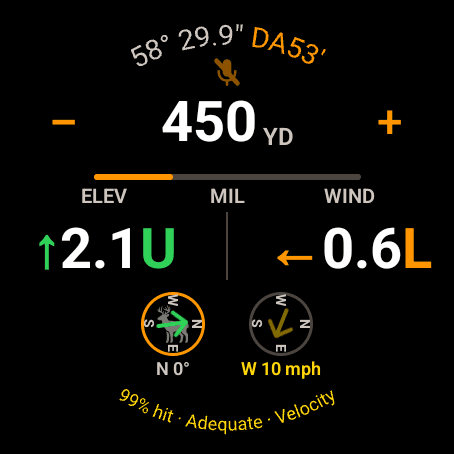
On the watch one arc carries the percentage, the band and the gate it is being judged on. Here, velocity.
Step 3
The terminal rating, and its two gates
On a game or varmint preset a second reading appears beside the percentage: Ideal, Adequate, Marginal or Insufficient. It answers a different question. The percentage asks whether the bullet lands in the box. The band asks whether the bullet still has any business being there.
Two published gates, checked at your range:
- Retained energy against a floor that depends on the species: 1,000 ft-lbs for whitetail, 1,500 for elk, 2,000 for moose and grizzly. Penetration to the vitals.
- Impact velocity against 1,800 fps, the speed below which a standard cup-and-core bullet stops expanding reliably. It is applied to every load in this version, and it is deliberately the conservative figure, never the optimistic one. Varmints skip this gate entirely.
Each gate gives a ratio: what you have, over what the rule of thumb asks for. The worse of the two sets the band, and that gate is named the governing gate. On the watch it is spelled out: 99% hit · Adequate · Velocity means the load is fine on energy, and the expansion speed is what will run out first. A varmint shows the band with no gate word, because varmints are judged on energy alone. The watch leaves the preset name off this line so the whole thing fits on the arc.
On the phone the governing readout is tinted instead: the velocity number or the energy number goes the band's colour, and only in the two warning bands.
On the phone, colour and shape both carry the recommendation, so it survives colour-blindness and a hard glance in bad light. A check for the two passing bands, a warning triangle for Marginal, a cross for Insufficient. The watch arc carries the band's name in its colour, with no glyph.
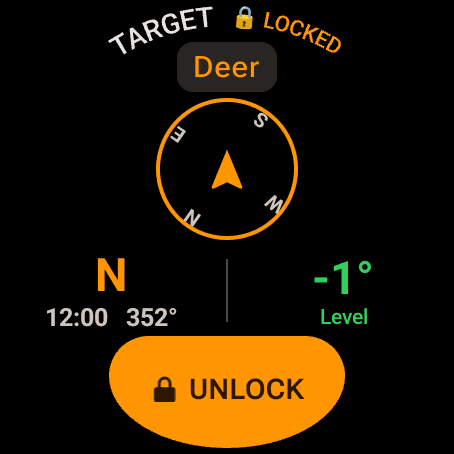
The watch TARGET page. The chip opens a wheel of every preset by its full name.
On the wrist
Picking the target without your phone
The watch app is a full solver, not a remote. The TARGET page sits one swipe from Live Fire and carries the same chip with the same preset. Tap it for a wheel of every preset by its full name, such as Deer (Vitals) or Ground Squirrel, and tap Confirm. Swipe back to leave the wheel without changing anything. Turning the bezel or crown on the TARGET page steps through the presets without opening the wheel.
The watch shows names only. The sizes are in the phone's sheet and in the list above. Lock the target on the watch and it takes you straight to Live Fire, where the arc appears.
Whatever you pick syncs to the phone, and the phone's choice syncs back. Your wind-call confidence rides along with it.
Nothing about the hit percentage or the terminal rating is held back on either device. Free covers three rifle-and-load combinations, and the watch app is free on every tier.
The four bands
Reading a rating before you take the shot
The band comes from one ratio: what the bullet has when it arrives, divided by what the published rule of thumb asks for, on whichever of the two gates is thinner.
| Band | Ratio | What it means |
|---|---|---|
| ✓Ideal | 1.25 or better | Comfortable headroom on whichever gate is thinner. The load is well inside the published minimum at this distance. |
| ✓Adequate | 1.00 to 1.25 | Meets the published minimum, without much left over. Real conditions and a real chronograph both move this line. |
| ⚠Marginal | 0.85 to 1.00 | Under the line. Not a small shortfall dressed up as fine: the load no longer meets the published figure at this range. |
| ✕Insufficient | below 0.85 | Well under. Get closer, change the load, or pass the shot. |
The same load, two animals
Nothing shows the point better than one cartridge against two species. Below is a 6.5 Creedmoor firing Hornady's 143 grain ELD-X at its published 2,700 fps, zeroed at 100 yards, in standard atmosphere, run through the app's own engine and banded by the app's own rules.
| Band | On deer | On elk |
|---|---|---|
| Ideal | to 322 yd | to 189 yd |
| Adequate | 322 to 681 yd | 189 to 380 yd |
| Marginal | 681 to 823 yd | 380 to 513 yd |
| Insufficient | beyond 823 yd | beyond 513 yd |
Same rifle, same round, same day. Switching the preset from deer to elk moves the point where the app stops endorsing the shot in by more than three hundred yards, because the elk floor is 1,500 ft-lbs and the deer floor is 1,000. Notice too that the top of the deer ladder is set by velocity, not energy: the bullet drops under 2,250 fps at 322 yards while it still has plenty of energy. The bottom is set by energy. Which gate is biting changes as the shot gets longer, and the app tells you which one.
Those distances are built on a published box velocity and the conservative standard-bullet expansion floor. Chronograph your rifle and the numbers move. Shoot at 7,000 feet on a warm day and they move again. Field Trueing is how you replace the published number with yours.
What the rating is not
It is deliberately not a kill probability, and there is no percentage attached to it for a reason. Whether an animal dies quickly is decided by shot placement, the angle it is standing at, and how your particular bullet behaves in tissue. A phone on your belt can observe none of those things, so it does not pretend to.
Ideal means the load clears two published physical thresholds at that distance. It is not the app telling you the shot is ethical, and it cannot be. That call is yours, and it takes in things the rating never sees: whether you can make the shot cold, off that position, in that wind, with that animal standing the way it is standing.
Insufficient is worth reading the other way round. It is not a scolding, and it is not a failed test. It is the arithmetic telling you the bullet arrives without what the published minimum asks for. Close the distance, change the load, or let it walk. The read-through on the whole argument, with the sources for the floors, is in How far is too far to shoot a deer?
The marks
Every warning you can see around these numbers
A percentage is only worth what the solution under it is worth. Wrist Dope marks the ways that solution can be thinner than it looks, and every mark is tappable or self-explaining.
Orange warning triangle beside the DA
In the Live Fire header and the range-card header, beside the density altitude. It means at least one of altitude, temperature, pressure or humidity behind this solve is a stand-in, not a reading. Tap it for Solving on standard atmosphere, which lists exactly which fields are stand-ins and why (no GPS fix or no weather yet) and offers the Env page, or the Location permission, to fix it. Both the hit percentage and the terminal rating are computed from that air, so the mark applies to them as much as to the holds. The mark is on the phone only. The watch does not carry it, so check the phone when the air matters.
Transonic and Subsonic shading
Yellow wash on a range-card row once the bullet drops through Mach 1.2, orange once it is fully subsonic, with a legend chip in the header printed on the same wash so the colour explains itself. On the phone's Live Fire the remaining-velocity readout takes the same colours and a TRANSONIC or SUBSONIC tag. On the watch the range readout takes the colour.Through that region a bullet's behaviour stops being reliably predictable. The hit percentage does not model the extra dispersion, so treat the number there as optimistic.
A tinted velocity or energy readout
When the band is Marginal or Insufficient, the number for the governing gate takes the band's colour and the other stays grey. That is the app pointing at which of the two floors is the problem, so you know whether closing the distance or changing the bullet is the fix.
Dashes instead of numbers
A range-card row that could not be solved keeps its range and renders every hold and readout as —. The hit-percentage chip does the same. A dash is always the app declining to make something up.
No line at all
With the target unlocked, the whole chip is absent rather than showing a stale figure. If you unlock to revise something, expect it to disappear until you lock again.
A wide confidence chip
±5 or ±10 mph is not a warning the app raises. It is one you raise, and then get shown the cost of. Honest settings on a gusty day are worth more than a flattering percentage.
Row-level warnings on the environment itself (which readings are live, which are stale, and what the mark next to a single field means) are covered in Environment and Units.
No number, or a number you don't believe?
- The target isn't locked. The line does not exist until it is. The TARGET pane still reads
UNLOCKEDand the button still saysLOCK TARGET, orLOCKon the watch. This is far and away the most common cause. - There is no terminal rating at all. You are on steel, a competition target, or a human-scale one. Only game and varmint presets carry a rating. The others have no vital zone to reason about.
- A dash where the percentage should be. The active load is missing its group size or its velocity SD. Fill both in the load's Consistency section.
- The percentage looks too good. Check the load's Consistency section. A group size and SD still sitting at 1.0 inch and 20 fps are defaults, not your rifle. Then check the confidence chip: ±1 mph is a very good wind call.
- It barely moves when you change the wind speed. The percentage is driven by your wind uncertainty, not the wind itself, and it scales with the crosswind component. At 12 or 6 o'clock there is almost nothing for the uncertainty to act on.
- The rating dropped a band without you touching anything. Look at the DA in the header. Thinner air holds velocity and thicker air bleeds it, so a cold morning can push the impact velocity under the expansion gate. The rating is solved for the air the app currently has.
- The band changed when you swapped presets to one the same size. Expected. Coyote, hog and head all measure 8 × 10 inches and none of them shares a rating: coyote is energy-gated at 300 ft-lbs, hog at 1,300 with an expansion gate on top, and head carries no rating at all. The size is not the whole preset.
- The watch shows a different target from the phone. The choice syncs both ways and lands a couple of seconds later. If it never arrives, check that the watch is connected to the phone.
- Nothing solves. Free keeps three rifle-and-load combinations usable, and the range card needs an active load. Everything else is stored and shown locked.
One honest caveat: both numbers are calculations, and a calculation is not a result. Verify your dope on paper at distance, know your own limits on an animal before you are looking at one, and shoot safely, responsibly and within the law.
Related: Target and Wind covers point-and-lock and the shooter's clock. Guns and Loads is where group size and velocity SD live. Range Card and Dope Card covers the table these bands ride on.
Still stuck? support@wristdope.com