
Manual / Settings
Settings
Every switch and picker in Wrist Dope, what it changes, and what it starts at. Most of them live on one screen per device. A few live where you use them instead (the level tuning is on the LEVEL page, the card sort is on the card), and those are listed here too, so this page is the whole set.
Phone
ENV/SET, the fourth page along the bottom bar, on iPhone and Android.
Watch
The Settings page in the swipe loop, on Apple Watch and Wear OS.
What follows you
Units, range steps, the advanced corrections and the timer tone sync. The rest is per device, on purpose.
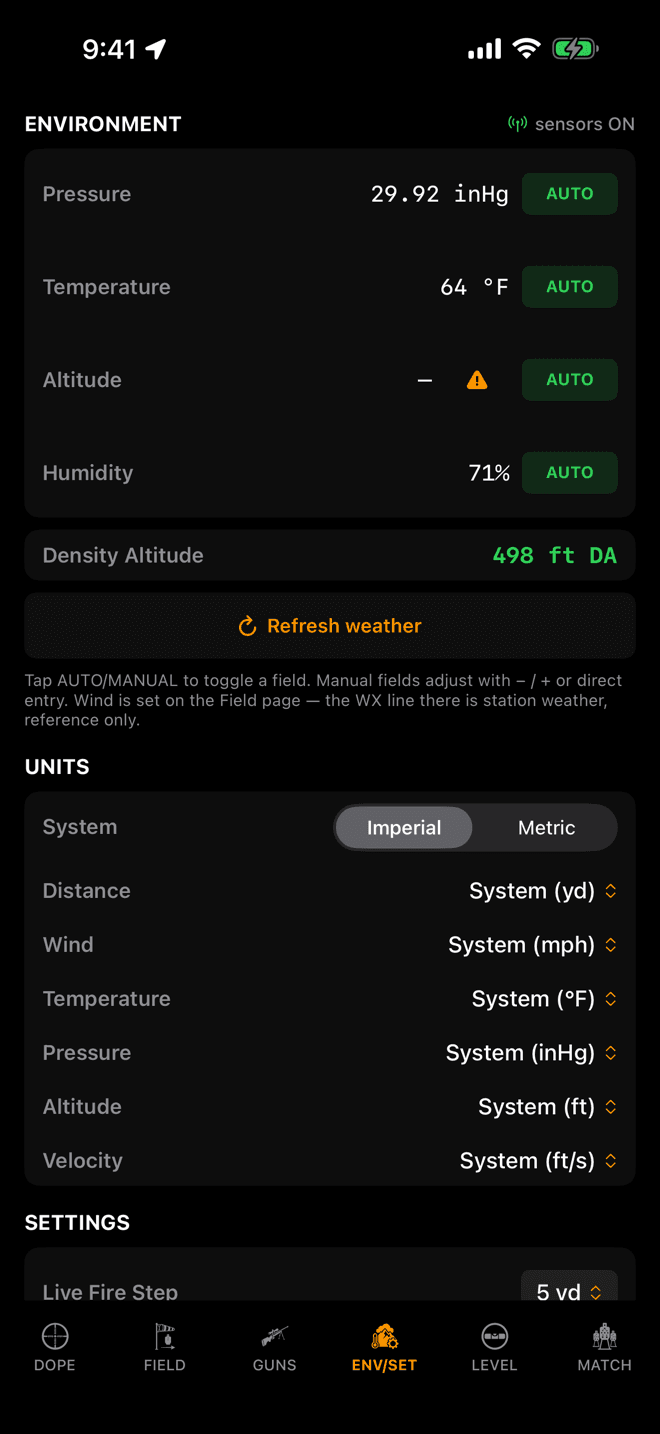
iPhone, ENV/SET. Conditions at the top, then units, then everything else.
Where they live
One screen on each device
On iPhone, swipe to ENV/SET, the fourth page in the bar along the bottom. On Apple Watch, swipe to the Settings page. The two screens are not copies of each other: each carries the settings that belong to the device you are holding.
The top of the iPhone page is the air you are shooting in: pressure, temperature, altitude, humidity, and the density altitude they add up to. Those four rows have their own guide in Environment and Units, including the orange triangle that means nothing measured a field.
Everything below that line is what this page covers.
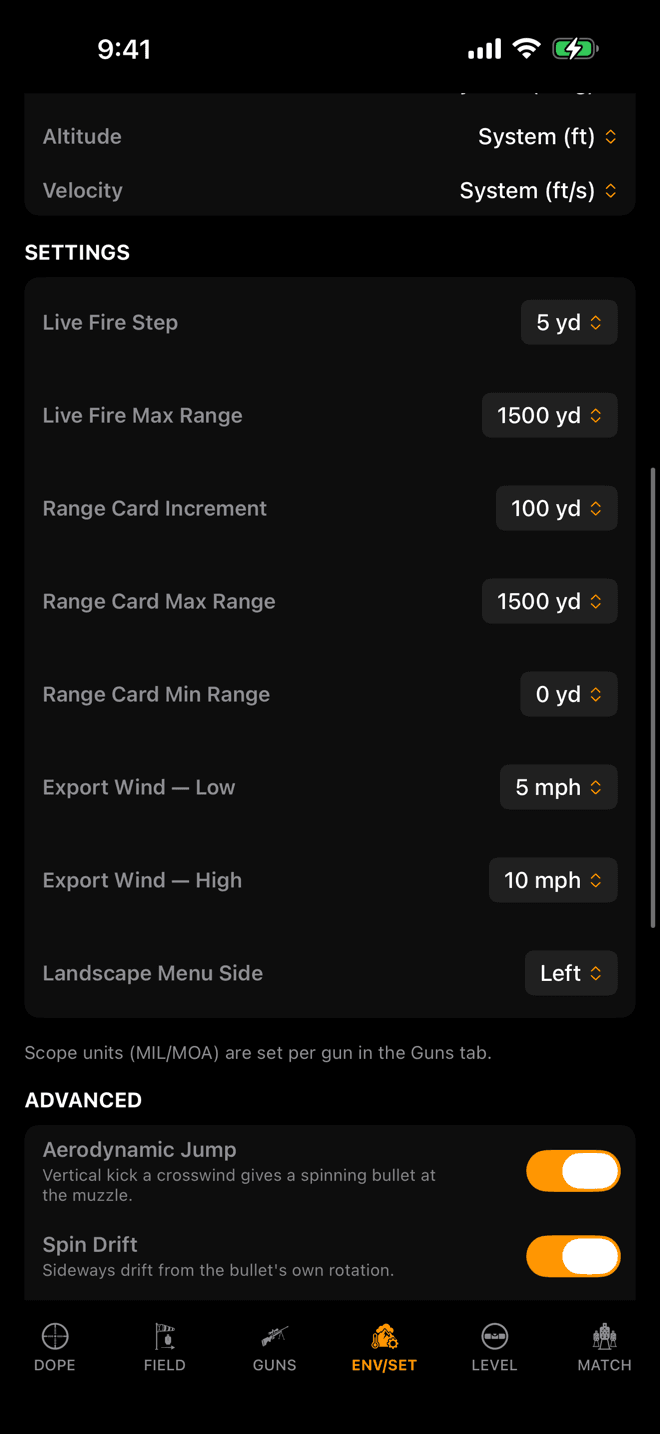
The SETTINGS group sits under UNITS. Every row is a picker with a fixed list.
Units
One system, six escape hatches
System is the master switch: Imperial or Metric. On a fresh install it follows the device: a phone set to US measurements opens in Imperial, everything else opens in Metric. Changing it converts every distance, speed, temperature and pressure on screen at once.
Under it sit six overrides, one per measurement, each reading System (…) until you change it. That is how you get a mixed set: metres for distance with a temperature in Fahrenheit, or yards with pressure in hPa. Setting one back to System returns it to whatever the master switch says.
Scope units are not here. MIL and MOA describe a physical turret, so they belong to the rifle, not to the app: set them per gun in the Guns tab. Switching Imperial to Metric deliberately leaves them alone.
The Apple Watch carries the master switch only. Per-measurement overrides are set on the iPhone and arrive on the watch with the rest of the unit settings.
| Measurement | Imperial default | Metric default |
|---|---|---|
| Distance | yards | metres |
| Wind | mph | m/s |
| Temperature | °F | °C |
| Pressure | inHg | hPa |
| Altitude | feet | metres |
| Velocity | ft/s | m/s |
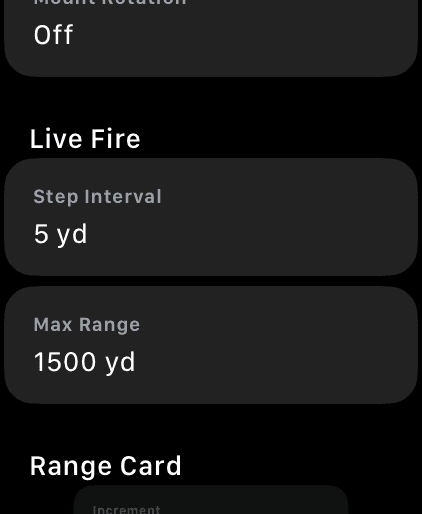
The same range settings on the watch, one section per screen.
Ranges
How far the dials go, and how fast
These five decide what the Digital Crown and the range card actually give you. A step of 5 yards is precision at the cost of a lot of spinning; a step of 25 gets you across 1,000 yards in a few flicks. Airgun and rimfire shooters want the small numbers at both ends.
All five follow you between iPhone and watch. The card's sort order is not in this list because it is a tap on the card itself: the arrow in the range-card header flips it between far-to-near and near-to-far, and that choice syncs too. See the range card guide for the rest of that screen.
| Setting | What it does | Default |
|---|---|---|
| Live Fire Step | How far one step of the dial moves the Live Fire range. 5, 10, 25, 50 or 100 yards. | 5 yd |
| Live Fire Max Range | The far end of the Live Fire dial. 100 to 2,500 yards. | 1,500 yd |
| Range Card Increment | Spacing between range-card rows. 5, 10, 25, 50 or 100 yards. | 100 yd |
| Range Card Max Range | Last row on the card. | 1,500 yd |
| Range Card Min Range | First row on the card. 0, 10, 25, 50 or 100 yards. An airgun card starts at 10, not 0. | 0 yd |
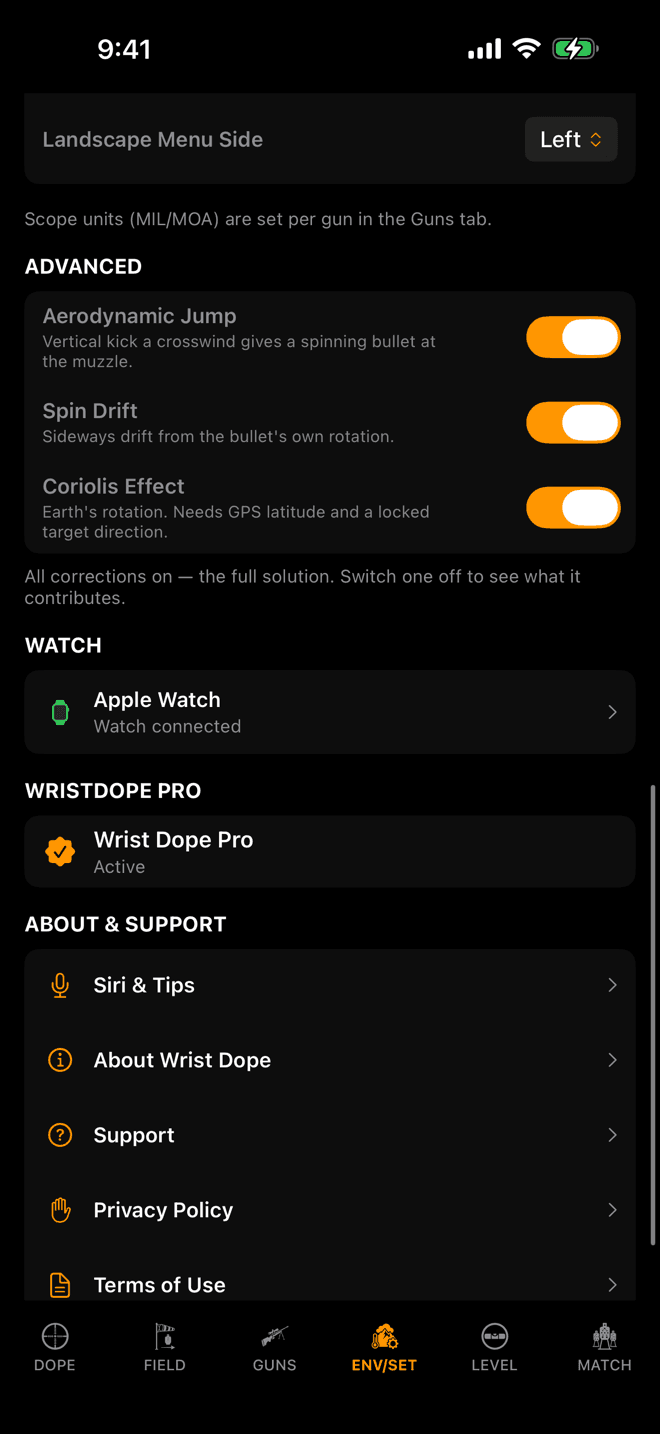
All three on is the full solution. The line underneath names anything you have switched off.
Advanced
Three switches you should leave alone
Aerodynamic Jump, Spin Drift and Coriolis Effect are the three secondary corrections the solver applies on top of drag, gravity and wind. All three ship on, and on is the correct answer for shooting.
They are switches so you can answer a question, not so you can pick a physics package. Turning one off tells you exactly how much of a hold that effect is responsible for, which is what you need when you are reconciling Wrist Dope against a dope book built without it, or against another solver that leaves it out. The grey line under the rows turns orange and names whatever is currently suppressed, so you can never leave one off and forget.
Coriolis needs two things the others don't: your latitude, which comes from location, and a target direction, which comes from locking a bearing on the Field page. Without both, the term is simply not applied.
The three switches are part of Wrist Dope Pro, and they sync between iPhone and watch. A correction you switch off on the phone is off on the wrist you shoot with, which is why the watch shows the same three rows and the same warning line. Without Pro the rows read on and the solve applies all three.
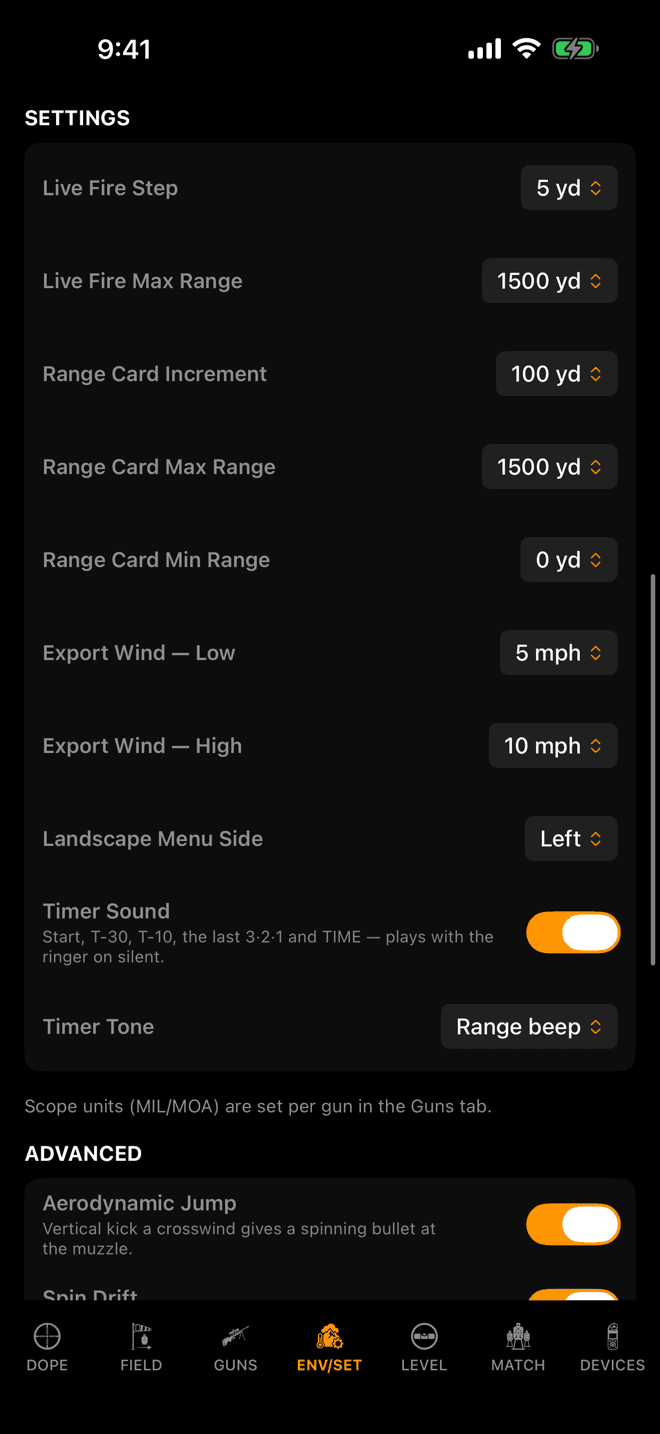
iPhone, ENV/SET. The timer rows close out the SETTINGS group.
Stage timer
How the timer sounds
The stage timer's sound sits at the bottom of SETTINGS on the iPhone's ENV/SET page. On the watch the same rows are under Match Mode in Settings.
The stopwatch menu on the iPhone's MATCH page, and the ••• sheet on the watch's Match page, repeat them so you can change the sound mid-match without leaving the stage.
| Setting | What it does | Default |
|---|---|---|
| Timer Sound | Plays the timer's marks: start, T-30, T-10 and TIME, plus the last 3·2·1 on iPhone, where it plays with the ringer on silent. Per device. | On |
| Timer Tone | Chime, Range beep or Voice. The watch calls Range beep Beep. Follows you between iPhone and watch. | Range beep |
| Timer Voice | Shown when the tone is Voice: Female voice or Male voice (Female or Male on the watch). Per device. | Female |
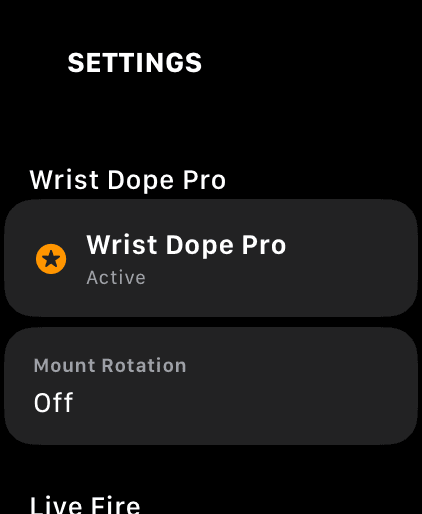
Watch Settings. Membership, mount rotation, then the range sections.
Watch only
Mount rotation, the Match page, widgets
Three groups exist only on the watch, because only the watch has the problem they solve. Mount Rotation turns the entire interface for a rifle-mounted watch. The Match Page switch adds stage cards to the swipe loop. The Widgets group is the only place the range-card complication is configured, and it is deliberately separate from the in-app card: a wrist face wants 100-yard rows even when the app is stepping by 10.
Every one of these is per device. A watch on a rifle mount and a watch on your wrist should not share a rotation, and the complication settings belong to the face they are drawn on.
| Setting | What it does | Default |
|---|---|---|
| Mount Rotation | Turns the whole watch interface 90°, 180° or 270° for a rifle-mounted watch. Set once and forget. Part of Pro. | Off |
| Match Page | Adds the Match page to the swipe loop when a match is active. Part of Pro. | Off |
| Range Card Rows | How the range-card complication picks its distances: Last Dialed, Spread, or Custom. | Last Dialed |
| Interval | Row spacing for the complication, independent of the in-app card. 10 to 200 yards. | 100 yd |
| Wind Column 1 | Wind speed for the complication's first hold column. | 5 mph |
| Wind Column 2 | Wind speed for its second hold column. | 10 mph |
| Wind From | Clock position the complication's wind blows from. 3 and 9 are full-value crosswinds. | 3 o'clock |
| Hold Distance | Distance for the single-hold complication. Left at 0 it follows whatever you last dialled in Live Fire. | Follow Live Fire |
| Range 1 to 8 | The eight pinned distances, used only when Range Card Rows is set to Custom. | 100 to 1,000 yd |
The three iPhone-only rows
| Setting | What it does | Default |
|---|---|---|
| Export Wind — Low | Wind speed for the first hold column of an exported dope card. A full-value 3 o'clock crosswind. 3 to 20 mph. | 5 mph |
| Export Wind — High | Wind speed for the second column of the export. | 10 mph |
| Landscape Menu Side | Which edge the page rail sits on when you turn the phone sideways. Left suits a right-handed shooter, whose phone puts its right edge toward the rifle. | Left |
The two export winds only ever touch a card you share or print, never a live solution. They are per device, like everything else about how a screen is laid out.
Settings that live where you use them
A setting you change mid-string does not belong three swipes away. These are set from the screen they affect, and they are just as much settings as the ones in the list above.
| Setting | Where | Default |
|---|---|---|
| Precision | LEVEL page: the sliders button on iPhone, the gear on the watch. Half-width of the band that counts as level: Fine ½°, Standard 1° or Relaxed 2°. | Standard 1° |
| Max angle | LEVEL page: the sliders button on iPhone, the gear on the watch. The cant at which the blink and beep reach full urgency. 5° to 45°. | 10° |
| Tone | LEVEL page: the sliders button on iPhone, the gear on the watch. Timbre of the cant beep. Each option auditions as you tap it. | Marimba |
| Sound | The speaker pill on the LEVEL page. Session only: it always starts off, so a watch can never surprise a firing line. | Off at every launch |
| Level on live fire | On the iPhone LEVEL page as Enable level on live fire; in the gear sheet on the watch. Puts the cant glow behind your firing solution. Part of Pro, and covered in its own guide. | Off |
| Use level for shot angle | Next to the switch above on both devices. Takes the shot angle from the level calibration instead of raw device tilt. Follows the switch above in both directions, then stays adjustable. | Off |
| Level indicator | LEVEL page: the sliders button on iPhone, the gear on the watch. Glow, Ring, H Bars, V Bars, Footer (iPhone only) or Off. Per device. | Glow |
| Card sort order | The arrow in the range-card header. Far-to-near or near-to-far. | Far to near |
| Card hold units | The chip in the iPhone range-card header. Shows holds in the scope's own unit, or in inches and centimetres at the target. Per device; the watch card stays in the scope's unit. | Scope unit |
| Stage card layout | A toggle on the stage card itself. Target list with holds, or the engagement sequence in shoot order. See Match Mode. | Target list |
| Start on beep | iPhone: the stopwatch menu on the MATCH page. Watch: the Match page's ••• sheet. Listens only while the timer is armed, for a PACT or Shooters Global beep; both are recognised, so there is nothing to pick. Per device. | Off |
| Rifle field units | The unit chip beside sight height, barrel length and twist in the rifle editor. Reset when you switch the master unit system. | Follows the system |
| Group size, measured miss, zero offset | The unit chip beside each of those fields. Linear (inches or centimetres) or angular (the scope's MIL or MOA). Used in field trueing. | Linear |
| Scope unit, zero range, sight height, twist | Per gun, in the Guns tab. They describe a rifle, so they travel with the rifle. | Per gun |
Wind meters have no rows here. Everything about a meter lives on the DEVICES page.
One more set lives outside Wrist Dope entirely. Wake duration, wrist raise and always-on are watchOS settings, and they decide whether your dope is still on the glass when you come off the scope. Watch Settings for the Rifle covers those, with what each one costs you in battery.
What syncs, and what deliberately doesn't
Change one of these on either device and it lands on the other, last change winning:
- The unit system and all six per-measurement overrides.
- Aerodynamic Jump, Spin Drift and Coriolis.
- Live Fire step and maximum range.
- Range card increment, maximum, minimum and sort order.
- The stage timer's tone: Chime, Range beep or Voice.
Everything else stays where you set it. Mount rotation, the Match page, the widget columns, the level tuning and indicator, the export winds, the landscape rail side, the timer's sound and voice, Start on beep and the card's hold units all describe one device in one role. A watch clamped to a rifle and a phone in your pocket are not the same instrument, and a setting that made both of them agree would be wrong on one of them.
A setting isn't doing what you expect?
- A switch flips back, or a card appears. Mount Rotation, the Match page and the three advanced corrections are part of Wrist Dope Pro. Tapping one without Pro shows the unlock card instead of writing the change, and a free trial starts right on the watch.
- You changed it on the phone and the watch disagrees. Only the groups listed above travel. If it is not one of those, the watch is supposed to differ. If it is, the two devices reconcile the next time they are in range of each other.
- The scope still reads MOA after switching to Metric. That is deliberate. Turrets are physical, so scope units are per gun and never follow the system switch. Change it in the gun.
- Your rifle's sight height went back to inches. Per-field entry units in the rifle editor mean “inches even though I am on metric”, so they only make sense under the system they were set in. Switching the master system clears them.
- The range card stops short of your target. Range Card Max Range caps it, and Live Fire Max Range caps the dial separately. They are two settings, and a card that ends at 1,000 usually means only one of them was raised.
- A hold changed and you don't know why. Check the line under the ADVANCED switches. If it is orange, it names the correction that is currently switched off.
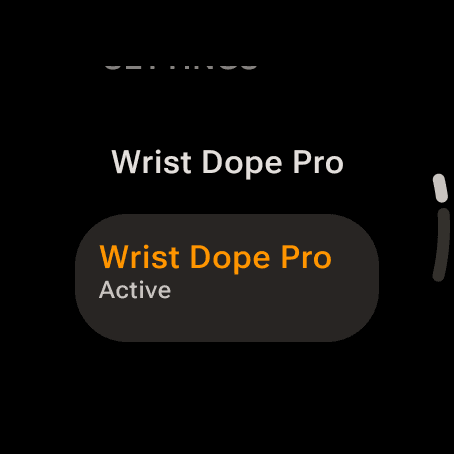
The top of the watch's Settings page. Wrist Dope Pro comes first.
Where they live
One screen on each device
On the phone, swipe to ENV/SET, the fourth page along the bottom bar. On the watch, swipe to the Settings page. The two screens are not copies of each other: each carries the settings that belong to the device you are holding.
The top of the phone page is the air you are shooting in. Those rows have their own guide in Environment and Units. Below them, in order: UNITS, SETTINGS, ADVANCED, VOICE, WATCH, WRISTDOPE PRO and ABOUT & SUPPORT.
The watch's Settings page runs Wrist Dope Pro, Live Fire, Range Card, Match Mode, Voice, Screen, Widgets, Units, Advanced and About. Tap a picker row, turn the bezel or crown to the value, then tap Confirm.
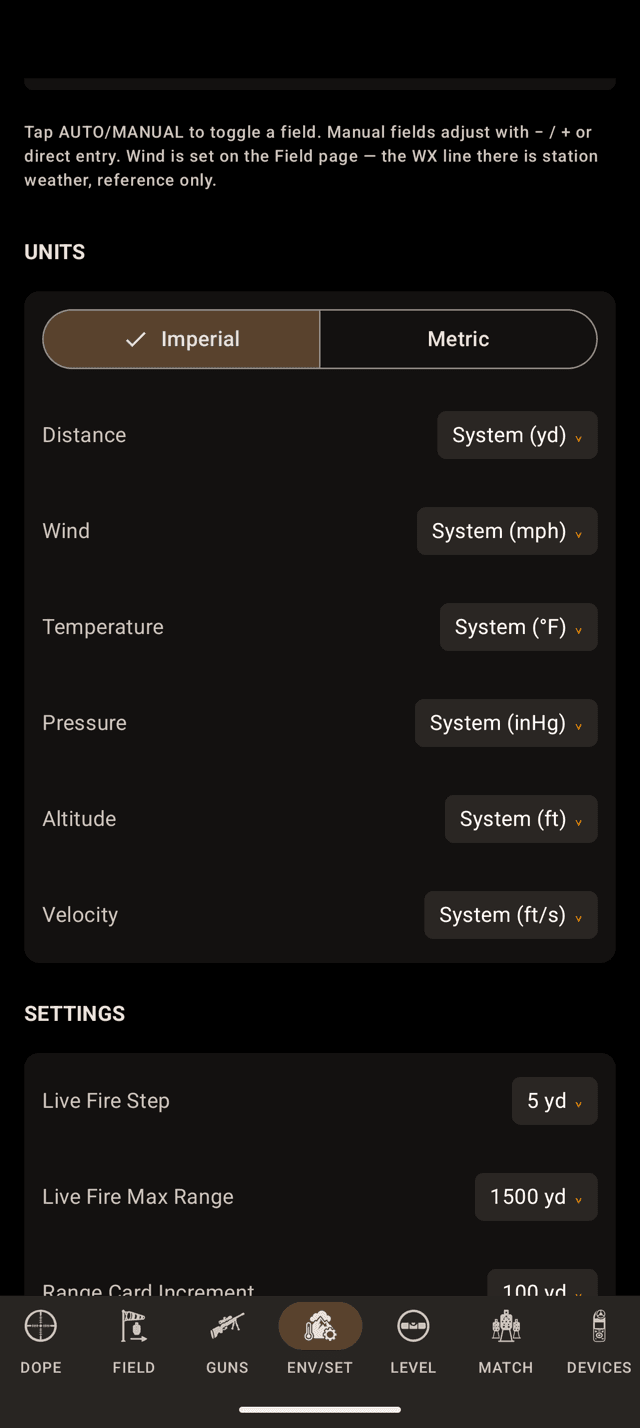
UNITS on the phone. Each override reads System until you pick a unit.
Units
One system, six escape hatches
Imperial or Metric is the master switch. On a fresh install it follows the phone: set to US measurements, it opens in Imperial; anything else opens in Metric. Under it sit six overrides, one per measurement, each reading System (…) until you change it.
The watch carries the master switch only, as System under Units. Overrides are set on the phone and arrive on the watch with the rest of the unit settings. Scope units are per gun, in GUNS.
| Measurement | Imperial default | Metric default |
|---|---|---|
| Distance | yards | metres |
| Wind | mph | m/s |
| Temperature | °F | °C |
| Pressure | inHg | hPa |
| Altitude | feet | metres |
| Velocity | ft/s | m/s |
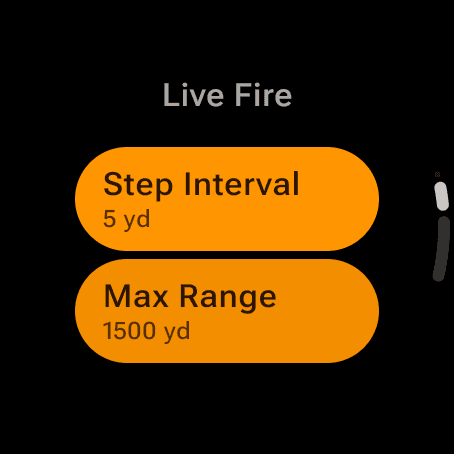
Live Fire on the watch: Step Interval and Max Range, the same values as on the phone.
Ranges
How far the dials go, and how fast
Five rows set how far the dials go and how fast, with the same lists and defaults as on iPhone. On the phone they open the SETTINGS group. On the watch they are Step Interval and Max Range under Live Fire, and Increment, Max Range and Min Range under Range Card. All five follow you between phone and watch, and so does the card's sort order.
| Setting | What it does | Default |
|---|---|---|
| Live Fire Step | How far one step of the dial moves the Live Fire range. 5, 10, 25, 50 or 100 yards. | 5 yd |
| Live Fire Max Range | The far end of the Live Fire dial. 100 to 2,500 yards. | 1,500 yd |
| Range Card Increment | Spacing between range-card rows. 5, 10, 25, 50 or 100 yards. | 100 yd |
| Range Card Max Range | Last row on the card. | 1,500 yd |
| Range Card Min Range | First row on the card. 0, 10, 25, 50 or 100 yards. An airgun card starts at 10, not 0. | 0 yd |
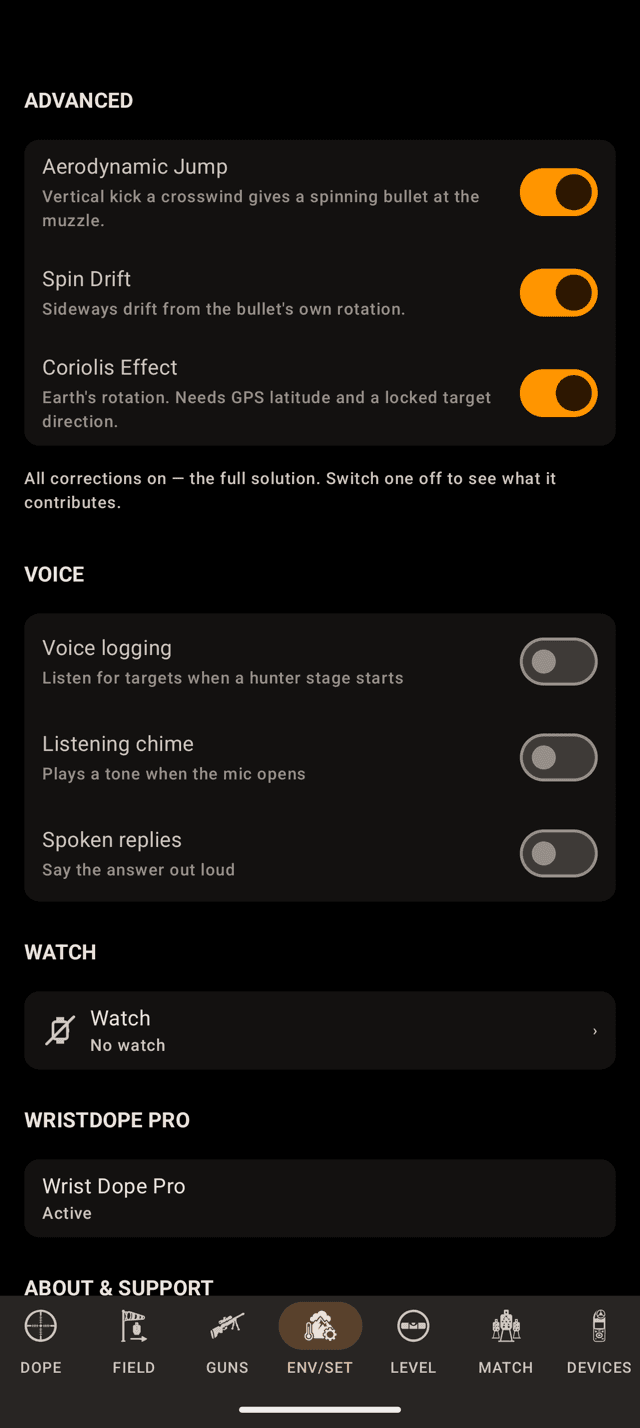
ADVANCED on the phone, all three on. The line under the switches says so.
Advanced
Three switches you should leave alone
Aerodynamic Jump, Spin Drift and Coriolis Effect (just Coriolis on the watch) all ship on, and on is the correct answer for shooting. Turning one off tells you how much of a hold that effect is responsible for. The line under the rows confirms all three are on, and names what is missing the moment you switch one off.
Switching them off is part of the one-time Pro upgrade; without it the solve applies all three. They sync between phone and watch.
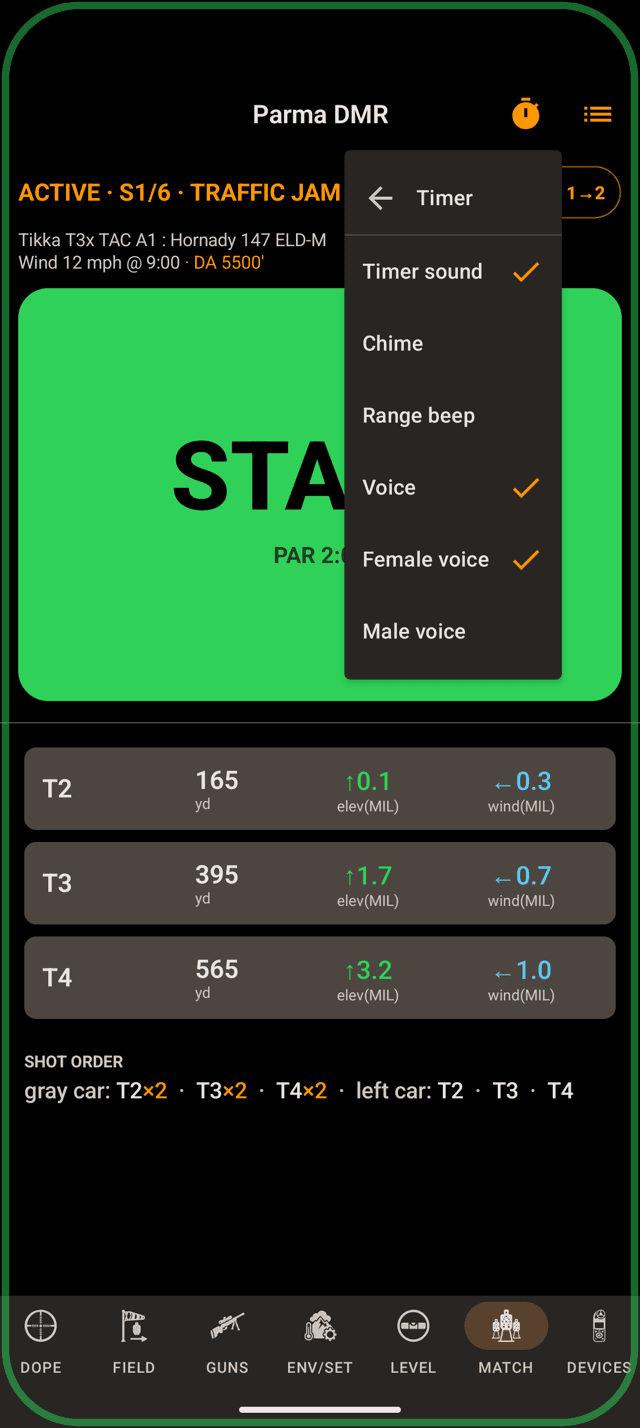
The timer's own menu on the phone, with Voice as the tone and its two voices below it.
Stage timer
How the timer sounds
On Android the timer's sound lives with the timer, not on the Settings page. On the phone, open the MATCH page's timer menu and then Tone. On the watch, open the Match page's menu and scroll to Timer Audio.
| Setting | What it does | Default |
|---|---|---|
| Timer sound | Plays the timer's marks. On the watch, Timer Sound. Per device. | On |
| Tone | Chime, Range beep or Voice. The watch says Beep for Range beep. Follows you between phone and watch. | Range beep |
| Voice | Shown when the tone is Voice: Female voice or Male voice (Female or Male on the watch). Per device. | Female |
| Start on beep | Listens, only while the timer is armed, for the range timer's beep and starts on it. A PACT and a Shooters Global timer are both recognised; there is nothing to pick. Per device. | Off |
Start on beep needs the microphone. On the phone the row reads Start on beep (mic off in Settings) if it has been turned off. The Stage Timer guide covers the rest of the menu.
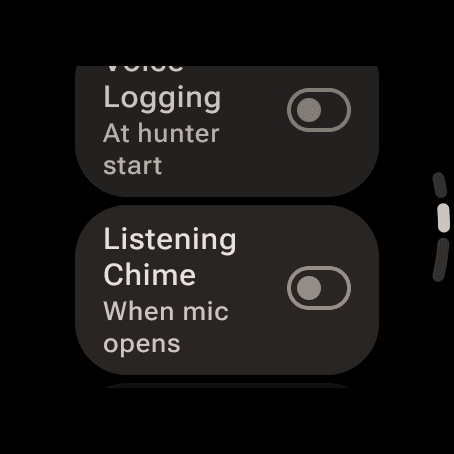
Voice on the watch. Both switches shown are off, the default.
Voice
Quiet by default
Three switches, all off until you turn them on. On the phone they sit under VOICE on ENV/SET, and on the watch under Voice in Settings. All three are per device. Voice Control has the full story.
| Setting | What it does | Default |
|---|---|---|
| Voice logging | Whether a hunter stage starts with voice logging on. | Off |
| Listening chime | Plays a tone when the Live Fire voice mic opens. | Off |
| Spoken replies | Says the voice answer out loud instead of only showing it. | Off |
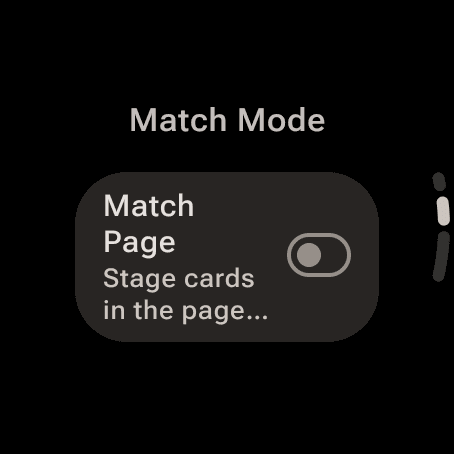
Match Page under Match Mode puts stage cards in the watch's page loop.
Watch only
The Match page, the screen, widgets
Three groups exist only on the watch: Match Mode, Screen and Widgets. Widgets decides what the Range Card tile and the complications show. There is no Mount Rotation on Wear OS; that one is an Apple Watch setting.
| Setting | What it does | Default |
|---|---|---|
| Match Page | Stage cards in the page loop when a match is active. Part of Pro. | Off |
| Keep Screen On | Holds Live Fire, the Range Card and an armed match lit. Under Screen. | Off |
| Range Card Rows | How the tile and complications pick their distances: Last Dialed, Spread or Custom. | Last Dialed |
| Interval | Row spacing for the tile, 10 to 200 yards. | 100 yd |
| Wind Column 1 | The tile's first reference wind. | 5 mph |
| Wind Column 2 | Its second reference wind. | 10 mph |
| Wind From | The clock those reference winds blow from. | 3 o'clock |
| Hold Distance | The distance the three hold complications solve. Reads 0 and follows your last dialed range until you pick one; the picker has no way back to 0. | 0 (follow the dial) |
| Range 1 to 8 | The eight pinned distances, shown when Range Card Rows is Custom. | 100 to 1,000 yd |
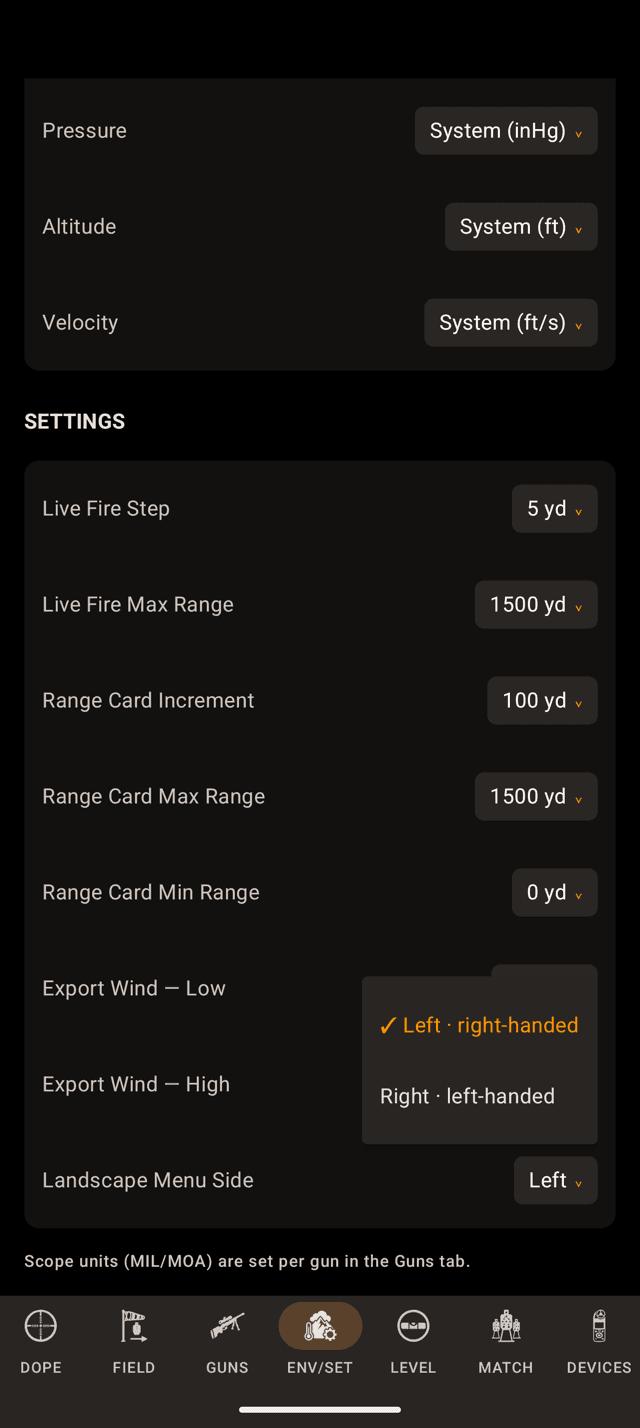
The phone-only rows close the SETTINGS group. Landscape Menu Side is open here.
Phone only
The rows the watch does not have
Three rows exist only on the phone, at the end of the SETTINGS group: the two export winds and the side the landscape rail sits on.
| Setting | What it does | Default |
|---|---|---|
| Export Wind — Low | Wind speed for the first hold column of an exported dope card. A full-value 3 o'clock crosswind. 3 to 20 mph. | 5 mph |
| Export Wind — High | Wind speed for the second column of the export. | 10 mph |
| Landscape Menu Side | Which edge the page rail sits on when you turn the phone sideways. Left suits a right-handed shooter, whose phone puts its right edge toward the rifle. | Left |
The two export winds only ever touch a card you share or print, never a live solution. They are per device, like everything else about how a screen is laid out.
Also on ENV/SET: WATCH shows whether the phone can see the watch app (No watch, Install on watch, Watch connected or Live), and WRISTDOPE PRO shows where you stand, with the trial, upgrade and restore buttons. The Pro and Purchases guide covers that one.
Settings that live where you use them
| Setting | Where | Default |
|---|---|---|
| Sound, Precision, Max angle, Level indicator | Phone: the gear on LEVEL opens Sound & Precision. Watch: the gear on the Level page. Covered in Scope Level. | Marimba, Standard 1°, 10°, Glow |
| Level sound on or off | The bell on the phone's LEVEL page, the pill on the watch's. Session only: it always starts off. | Off at every launch |
| Level on live fire | Phone: Enable level on live fire, at the top of LEVEL. Watch: Rifle, in the level's gear sheet. Part of Pro. | Off |
| Use level for shot angle | Next to the switch above on both. Follows it in both directions, then stays adjustable. | Off |
| Card hold units | The MIL or MOA chip in the phone's range-card header: the scope's unit, or inches and centimetres at the target. Per device. | Scope unit |
| Rifle field units | The unit chip beside sight height, barrel length and twist in the rifle editor. Reset when you switch the master unit system. | Follows the system |
| Scope unit, zero range, sight height, twist | Per gun, in GUNS. | Per gun |
Wind meters have no rows here either. Everything about a meter lives on the DEVICES page, and while one feeds the air, the ENV rows show the meter's name instead of AUTO.
What syncs, and what deliberately doesn't
Change one of these on either device and it lands on the other, last change winning:
- The unit system and all six per-measurement overrides.
- Aerodynamic Jump, Spin Drift and Coriolis.
- Live Fire step and maximum range.
- Range card increment, maximum, minimum and sort order.
- The stage timer's tone: Chime, Range beep or Voice.
Everything else stays where you set it: the export winds, the landscape rail side, the voice switches, Keep Screen On, the widget rows, the level tuning and indicator, the timer's sound and voice, Start on beep and the card's hold units. A watch clamped to a rifle and a phone in your pocket are not the same instrument.
A setting isn't doing what you expect?
- A switch flips back, or an offer appears. The Match Page, the advanced corrections and the two level switches are part of the one-time Pro upgrade. Tapping one without Pro shows the offer instead of writing the change.
- You changed it on the phone and the watch disagrees. Only the groups listed above travel. If it is not one of those, the watch is supposed to differ.
- There is no timer sound row on ENV/SET. On Android it lives in the timer's own menu, on the MATCH page.
- The scope still reads MOA after switching to Metric. That is deliberate. Scope units are per gun and never follow the system switch. Change it in the gun.
- The range card stops short of your target. Range Card Max Range caps the card, and Live Fire Max Range caps the dial. A card that ends at 1,000 usually means only one of them was raised.
- A hold changed and you don't know why. Check the line under the ADVANCED switches. If it names a correction, that one is switched off.
Still stuck? support@wristdope.com